Skip to content
Truehost Logo
Websites
Truehost.com Truehost Cloud Truehost Kenya Truehost Nigeria Truehost South Africa Truehost India Truehost UK Truehost Canada
Contact us
Policies
Data Privacy Policy Domain Name and Services Dispute Resolution Policy Abuse Policy File Migration Policy
Coupons

client area

8
  • How to create add funds invoice from truehost client area.
  • How To Move A Website From One Truehost Account To Another Truehost Account
  • How to Power OFF, Powe ON and Reboot a VPS from client area.
  • How to Acess your Virtualizor Account from Truehost Client area
  • How to change VPS Password from Truehost Client Area
  • How to Access VPS via VNC from Truehost Client Area
  • How to set a VPS to rescure mode from Truehost Client area
  • How to Re-install a Tcloud VPS Operating System (OS) from Truehost Client Area

Truehost Reseller Panel

4
  • Connect to WHMCS: Move Your Customers to the Truehost Reseller Panel
  • What You Need To Set Up Your Truehost Reseller Panel
  • How to White Label the Truehost Reseller Panel Client Area and Admin
  • How to Create Hosting Packages on The Truehost Reseller Panel

Managed Applications

3
  • Managing Truehost Vaultwarden
  • OpenClaw Hosting Walkthrough
  • Working with Managed VPN

Cloud

4
  • How to Enable Ports, Whitelist, and Blacklist IPs in CSF Firewall (ConfigServer Security & Firewall)
  • How to set up Hostname SSL on CWP
  • How to import/export a MariaDB/MySQL database on Cyberpanel
  • How to resize a VPS Disk space

Cloud servers in Kenya

224
  • How to Install and Configure ModSecurity in WHM
  • How to Configure Hostname and Default Nameservers in WHM
  • How to Migrate cPanel Accounts Between cPanel Servers Using WHM
  • How to install a PHP extension in WHM
  • How to remove a DNS zone from WHM
  • How to Suspend / Unsuspend cPanel Accounts Within WHM
  • How to Assign A dedicated IP to a Cpanel Account on WHM
  • How to Add an IP Adress to a Cpanel Server From WHM
  • How to Set Up A DNS Clusters in WHM
  • How to Set Document Root outside public_html for Addon Domain OR Sub Domain
  • How to Create a Backup Job in WHM With Jetbackup
  • How to Add A backup Destination in Jetbackup on A cPnel Server
  • How to Migrate Email Accounts Between cPanel Servers
  • How to enable Shell Access for a Cpanerl Accout
  • How to Automate Updates for cPanel and System Software via WHM
  • How to Schedule cPanel Backups in WHM
  • How to Enable Two-Factor Authentication for WHM Access
  • How to Set Up Custom Branding for Reseller Accounts in WHM
  • How to change cPanel Account Ownership from WHM
  • How to Use MultiPHP in WHM to Change your Server’s PHP Version
  • How to Convert an existing account to Reseller Accounts in WHM
  • How to create and Managing Reseller Accounts in WHM
  • How to Create a cPanel account within WHM
  • How to Add a Remote MySQL Access Host in Webuzo
  • How to Configure Apache as a Reverse Proxy with mod_proxy
  • How to Set Up a Reverse Proxy with Nginx on AlmaLinux 9
  • How to Install and Configure NGINX on CWP
  • How to Monitor Server Health with Nagios
  • How to Forward Ports With Iptables On A Linux Server
  • How to Configure and Manage MySQL Databases in Webuzo
  • How to Whitelist an IP with CSF
  • How To Open Ports On Ubuntu
  • How to Transfer files from a Linux Server to Windows Server using WinSCP
  • How to Configure Firewalld for Enhanced Server Security
  • How to Create a Container in Proxmox
  • How to Backup and Restore Virtual Machines (VMs) in Proxmox
  • How to Create Virtual Machines in Proxmox
  • How to Install and Use Proxmox for Virtualization
  • How to Create & Manage FTP in Webuzo With Enduser Access
  • How to Change File Permissions in Webuzo File Manager
  • How to Install and Configure HAProxy for Load Balancing on Almalinux
  • How to Update a CyberPanel Server
  • How to Create Additional admin User Accounts in CyberPanel
  • How to Disable Two-Factor Authentication in CyberPanel
  • How to Enable Two-Factor Authentication in CyberPanel
  • Implementing Firewall and Security Measures in CyberPanel
  • How to Install WordPress on Webuzo
  • How to Change the PHP Version in the Webuzo Panel
  • How to Install an SSL Certificate in Webuzo
  • How to Create a Self-signed SSL Certificate in Webuzo
  • How to Generate a Certificate Signing Request (CSR) on Webuzo
  • How to Add Subdomain in Webuzo With Enduser Access
  • How to Add a Domain in Webuzo With Enduser Access
  • How to Enable/Disable ModSecurity in Webuzo
  • How to Add Domain and Nameservers in Webuzo For Root Users
  • How to Add Domain Alias in Webuzo With Enduser Access
  • How to Add or Edit DNS Records in Webuzo Panel
  • How To Change The Root Password Of Webuzo Control Panel
  • How to Delete Email Accounts in Webuzo Panel
  • How to Add an Email Account in the Webuzo Panel
  • How to Access Admin Panel in Webuzo
  • How to add a User on Webuzo Admin Panel
  • How to Access User Panel in Webuzo
  • How to Access VNC using Remmina
  • How to Schedule Backups: Local or SFTP on Cyberpanel
  • How to Delete Backup Destinations on Cyberpanel
  • How to Check for installed PHP extensions via ssh on a VPS server
  • How to Add Destination for Scheduled Local/SFTP Remote Backups on Cyberpanel
  • How to Create and Restore CyberPanel Backups
  • How to Set Up Nameservers in Control Web Panel
  • How to check resources usage in DirectAdmin
  • How to generate CSR for SSL in DirectAdmin
  • How to install an SSL Certificate on DirectAdmin
  • How to Increase File Upload Limit in DirectAdmin
  • How to manage user packages in DirectAdmin
  • How to disable/enable php_functions on DirectAdmin
  • How to change the PHP version in DirectAdmin
  • How to create autoresponder in DirectAdmin
  • How to create an FTP account in DirectAdmin
  • How to create a MySQL Database in DirectAdmin
  • How to Suspend/Unsuspend domains in DirectAdmin
  • How to create a subdomain in DirectAdmin
  • How to check the website statistics in DirectAdmin
  • How to add a custom suspension message in DirectAdmin
  • How to change Email Account Password in DirectAdmin
  • How to Create an Email Account in DirectAdmin
  • How to set up Cron Jobs in DirectAdmin
  • How to create a backup in DirectAdmin
  • How to Add and Manage DNS Records in DirectAdmin
  • How to change MX Records in DirectAdmin
  • How to Set Up Website Redirection Rules in DirectAdmin
  • How to Create/Restore an Admin Backup with DirectAdmin
  • How to Create Additional Administrator User In DirectAdmin
  • How to set Up Reseller Accounts in DirectAdmin
  • Installing DirectAdmin on a Cloud Server: Step-by-Step Guide
  • Setting Up and Managing Reseller Accounts in CWP
  • How to copy files from a Windows Server to Linux Server using rSync
  • How to Transfer files from a Windows Server to Linux Server using Command Line (CMD)
  • How to Transfer files from a Windows Server to Linux Server using WinSCP
  • How to Remotely Access Windows Server (RDP) from Linux using Command Line/terminal
  • How to Remotely Access Windows Server (RDP) from Linux using Remmina
  • Understanding how to use the wall command in Linux
  • How to Schedule Server Downtime Notifications with Wall Command
  • Introduction to Linux File System Structure: What Every User Should Know
  • Setting Up and Using Swap Space on Linux Servers
  • How to Use SCP for Secure File Transfers Between Linux Servers
  • How to Compress and Decompress Files Using tar and gzip
  • How to Set Up Syslog for Centralized Logging
  • Installing and Configuring Kubernetes on a Linux Server
  • How to Install and Configure Nginx as a Web Server
  • Installing and Using Docker on a Linux Server
  • Setting Up a LAMP Stack (Linux, Apache, MySQL, PHP) on Almalinux
  • How to Set Up Samba for File Sharing on Linux Servers
  • How to Set Up Network File System (NFS) on a Linux Server
  • How to Configure a Load Balancer on Nginx
  • How to Install and Configure Apache Tomcat on Linux – Almalinux
  • Setting Up a LAMP Stack (Linux, Apache, MySQL, PHP) on Ubuntu
  • Setting Up a LEMP Stack (Linux, Nginx, MySQL, PHP) on Almalinux
  • Automating Server Backups Using rsync and cron
  • How to Optimize Linux Server Swap Usage
  • Using Memcached for Database Performance Optimization
  • How to Use SSH Tunneling for Secure Remote Access
  • How to Install and Configure Redis on Linux Servers
  • How to Secure MySQL/MariaDB with SSL Encryption
  • Optimizing MySQL Performance with Tuning Tools
  • How to Set Up and Use an SSH Jumphost.
  • How to Use Prometheus and Grafana for Server Monitoring
  • Installing and Configuring ELK Stack (Elasticsearch, Logstash, Kibana)
  • How to Set Up a Git Server on Linux
  • How to Install and Configure OpenVPN on a Linux Server
  • How to Install and Configure Apache Tomcat on Linux – Ubuntu
  • Setting Up a LEMP Stack (Linux, Nginx, MySQL, PHP) on Ubuntu 22.04
  • How to Use Fail2Ban to Protect Apache and Nginx from Brute-Force Attacks
  • How to Find Large Files and Directories on a Linux Server
  • How to Configure Apache Redirects with .htaccess Files
  • How to Restrict SSH Access to Specific IPs Using hosts.allow and hosts.deny
  • How to Install ClamAV for Malware Scanning on Ubuntu
  • How to Install ClamAV for Malware Scanning on Amlalinux
  • How to Identify and Kill a Running Process in Linux
  • How to Monitor CPU and Memory Usage in Linux
  • How to Check Disk Usage with df and du Commands
  • Getting Started with Linux Aliases: Simplify Your Commands
  • Understanding and Managing System Logs in Linux
  • Managing Users and Groups on a Linux Server: Best Practices
  • Introduction to Linux Package Managers: Apt vs. Yum
  • How to Set Up a Basic Firewall with Uncomplicated Firewall (UFW)
  • Top 10 Essential Linux Commands for Server Management
  • Understanding Linux File Permissions: What Every Administrator Should Know
  • Setting Up Your First Linux Server: A Step-by-Step Guide
  • Configuring DKIM and SPF for Email Security
  • How to Configure SMTP Relays on a Linux Server
  • How to Configure a Mail Server with Dovecot and Postfix on Almalinux
  • How To Install MariaDB on Ubuntu 22.04
  • How to adjust max_vars_input on CWP
  • How to adjust max_vars_input on Plesk Windows
  • How to manually install moodle on plesk windows
  • How to change System PHP in Plesk Windows
  • How to Install and enable PHP handles on Plesk – Windows
  • How to change PHP version / handler for a single domain Plesk – Windows/Linux
  • How to Back Up MySQL Databases Automatically with Cron
  • How to Set Up Postfix as a Mail Server on Ubuntu
  • Why You May Not Want To Run Your Own Mail Server
  • First Server Setup with Ubuntu
  • What is an Intrusion Detection System (IDS)?
  • Practices for Server Security Hardening
  • How to install Softaculous On Control Web Panel (CWP)
  • How to Install Moodle Manually on Your Server (CWP, Cyberpanel)
  • How to Secure a Linux Server with Fail2Ban
  • Fail2Ban Configuration Documentation: jail.local and fail2ban.local
  • How to Power OFF, Powe ON and Reboot a VPS from client area.
  • How to Acess your Virtualizor Account from Truehost Client area
  • How to set a VPS to rescure mode from Truehost Client area
  • How to Access VPS via VNC from Truehost Client Area
  • How to change VPS Password from Truehost Client Area
  • How to Re-install a Tcloud VPS Operating System (OS) from Truehost Client Area
  • How to disable Two-Factor Authentication (2FA) on Cyberpanel login.
  • How to Disable InnoDB in MariaDB
  • How to Disable InnoDB in MySQL
  • How To Configure the Apache Web Server on an Almalinux
  • How to Install MariaDB on Almalinux 9
  • How to prevent frequent SSH and SCP disconnect
  • How to Install MariaDB on Almalinux 8
  • How to Install phpMyAdmin client on Almalinux 9
  • How to Install phpMyAdmin client on Almalinux 8
  • How to Change the Time Zone on Ubuntu Server
  • How To Configure the Apache Web Server on an Ubuntu/Debian
  • Wget Command Examples to Download Files in Linux
  • How to Check Bandwidth Usage from WHM Panel
  • How to Configure SSH Key for a User
  • How to disable root ssh with password but enable via ssh keys
  • How to change SSH port to a custom port
  • How to Run Sudo Commands Without Password
  • How to create a sudo user on your server
  • How to manually deploy WordPress on Control Web Panel (CWP) User Panel
  • How to manually deploy WordPress on Control Web Panel(CWP) Admin Panel
  • How to disable root ssh completely
  • How to import/export a database on Control Web Panel (CWP)
  • How to create a database in Control Web Panel (CWP)
  • How to Create a Hosting Package on CentOS Web Panel(CWP)
  • How to adjust PHP INI settings on CentOS Web Panel (CWP)
  • How to change the PHP version in Control Web Panel (CWP)
  • How to Install and Enable CSF Firewall on CentOS Web Panel (CWP)
  • How to Manage Existing Emails on CentOS Web Panel (CWP)
  • How to Create Email Accounts on CentOS Web Panel (CWP)
  • How to Create an Addon Domain/Subdomain on a CWP cPanel
  • How to Configure CWP server for Email use
  • How to change a CWP user account password
  • How to Create a User Account (Domain Account) on CWP (CentOS Web Panel)
  • How to Access CWP (Main WHM Panel)
  • How to Access CWP (User’s cPanel)
  • How to set up Hostname SSL on CWP
  • How to change SSH passwords for root and non-root user
  • How to set up a hostname SSL On Cyberpanel
  • How to import/export a MariaDB/MySQL database on Cyberpanel
  • How to Create and Manage Databases on Cyberpanel
  • How to Install CyberPanel – Ubuntu and Almalinux
  • How to adjust PHP INI settings on Cyberpanel (e.g., Upload Limit, post_max_size, display_errors)
  • How to properly Install Control Web Panel(CWP) on Almalinux/CentOS
  • How to Manage Existing Email Accounts on Cyberpanel
  • How to Create and Access Email Accounts on CyberPanel
  • How to Configure Cyberpanel server for Email use
  • How to create a domain and subdomain on Cyberpanel
  • How to Access A Server via SSH/Terminal

Cloudflare

7
  • How to Point Custom Domain to Blogger using Cloudflare DNS?
  • How to Change A record for your domain at Cloudflare
  • How to Update MX records at Cloudflare
  • How to Remove Cloudflare Proxy
  • How to Add a Domain to Cloudflare
  • Activating CloudFlare
  • Configuring CloudFlare

Cpanel

36
  • How to deploy website on cPanel using git version control
  • How to Connect Your Webmail to thunderbird
  • Deploy Websites with Git on cPanel: A Step-by-Step Guide
  • How to Create a Staging Site for WordPress on cPanel
  • How to clone WordPress on cPanel
  • How to enable wordpress security features using softaculous
  • How to deploy Nextjs on cPanel
  • Understanding Resource Usage on Shared Hosting
  • How to Deploy a React App on cPanel: A Step-by-Step Guide
  • ERROR LOADING DATAChild failed to make LIVEAPI connection to cPanel
  • How to Convert an existing account to Reseller Accounts in WHM
  • How to resolve the domain already exists error when adding addon domain
  • How to install free SSL on cPanel using AUTO SSL
  • How to change SSH passwords for root and non-root user
  • How To create a subdomain on Jupiter theme Cpanel
  • [OUTDATED] How To Create a Subdomain in cPanel
  • How to manually Transfer and Restore a Cpanel account using Jetbackup
  • How to restore emails from Jetbackup5
  • How to view cPanel Error logs
  • How to kill Python or Nodejs processes on cpanel
  • How to resolve error 403 on cPanel
  • How to enable 2FA on cPanel
  • How to resolve “Missing temporary folder” for websites on cPanel server.
  • How to Restore Specific Files in cPanel Using Jetbackup5
  • How to Restore Specific Files in cPanel Using Jetbackup5
  • How to force https redirect on your domain
  • Enabling GZIP Compression on Cpanel Websites
  • [Resolved]. How to fix or address Request Timeout Error on cpanel
  • How To Install A Premium SSL Certificate in Cpanel
  • How to fix AWStats not Updating
  • How to Upload A Website To The Cpanel
  • How to back up website from cpanel
  • How to easily build your website on Truehost cpanel
  • How To Install Your Ssl Certificate On Truehost Cpanel
  • How to increase the upload size for wordpress

Jetbackup 5

2
  • How to manually Transfer and Restore a Cpanel account using Jetbackup
  • How to Restore Specific Files in cPanel Using Jetbackup5

dedicated servers

219
  • CentOS Web Panel (CWP) Security Vulnerability – Remediation Guide
  • How to Install and Configure ModSecurity in WHM
  • How to Configure Hostname and Default Nameservers in WHM
  • How to Migrate cPanel Accounts Between cPanel Servers Using WHM
  • How to install a PHP extension in WHM
  • How to remove a DNS zone from WHM
  • How to Suspend / Unsuspend cPanel Accounts Within WHM
  • How to Assign A dedicated IP to a Cpanel Account on WHM
  • How to Add an IP Adress to a Cpanel Server From WHM
  • How to Set Up A DNS Clusters in WHM
  • How to Set Document Root outside public_html for Addon Domain OR Sub Domain
  • How to Create a Backup Job in WHM With Jetbackup
  • How to Add A backup Destination in Jetbackup on A cPnel Server
  • How to Migrate Email Accounts Between cPanel Servers
  • How to enable Shell Access for a Cpanerl Accout
  • How to Automate Updates for cPanel and System Software via WHM
  • How to Schedule cPanel Backups in WHM
  • How to Enable Two-Factor Authentication for WHM Access
  • How to Set Up Custom Branding for Reseller Accounts in WHM
  • How to change cPanel Account Ownership from WHM
  • How to Use MultiPHP in WHM to Change your Server’s PHP Version
  • How to Convert an existing account to Reseller Accounts in WHM
  • How to create and Managing Reseller Accounts in WHM
  • How to Create a cPanel account within WHM
  • How to Add a Remote MySQL Access Host in Webuzo
  • How to Configure Apache as a Reverse Proxy with mod_proxy
  • How to Set Up a Reverse Proxy with Nginx on AlmaLinux 9
  • How to Install and Configure NGINX on CWP
  • How to Monitor Server Health with Nagios
  • How to Forward Ports With Iptables On A Linux Server
  • How to Configure and Manage MySQL Databases in Webuzo
  • How to Whitelist an IP with CSF
  • How To Open Ports On Ubuntu
  • How to Transfer files from a Linux Server to Windows Server using WinSCP
  • How to Configure Firewalld for Enhanced Server Security
  • How to Create a Container in Proxmox
  • How to Backup and Restore Virtual Machines (VMs) in Proxmox
  • How to Create Virtual Machines in Proxmox
  • How to Install and Use Proxmox for Virtualization
  • How to Create & Manage FTP in Webuzo With Enduser Access
  • How to Change File Permissions in Webuzo File Manager
  • How to Install and Configure HAProxy for Load Balancing on Almalinux
  • How to Update a CyberPanel Server
  • How to Create Additional admin User Accounts in CyberPanel
  • How to Disable Two-Factor Authentication in CyberPanel
  • How to Enable Two-Factor Authentication in CyberPanel
  • Implementing Firewall and Security Measures in CyberPanel
  • How to Install WordPress on Webuzo
  • How to Change the PHP Version in the Webuzo Panel
  • How to Install an SSL Certificate in Webuzo
  • How to Create a Self-signed SSL Certificate in Webuzo
  • How to Generate a Certificate Signing Request (CSR) on Webuzo
  • How to Add Subdomain in Webuzo With Enduser Access
  • How to Add a Domain in Webuzo With Enduser Access
  • How to Enable/Disable ModSecurity in Webuzo
  • How to Add Domain and Nameservers in Webuzo For Root Users
  • How to Add Domain Alias in Webuzo With Enduser Access
  • How to Add or Edit DNS Records in Webuzo Panel
  • How To Change The Root Password Of Webuzo Control Panel
  • How to Delete Email Accounts in Webuzo Panel
  • How to Add an Email Account in the Webuzo Panel
  • How to Access Admin Panel in Webuzo
  • How to add a User on Webuzo Admin Panel
  • How to Access User Panel in Webuzo
  • How to Access VNC using Remmina
  • How to Schedule Backups: Local or SFTP on Cyberpanel
  • How to Delete Backup Destinations on Cyberpanel
  • How to Check for installed PHP extensions via ssh on a VPS server
  • How to Add Destination for Scheduled Local/SFTP Remote Backups on Cyberpanel
  • How to Create and Restore CyberPanel Backups
  • How to Set Up Nameservers in Control Web Panel
  • How to check resources usage in DirectAdmin
  • How to generate CSR for SSL in DirectAdmin
  • How to install an SSL Certificate on DirectAdmin
  • How to Increase File Upload Limit in DirectAdmin
  • How to manage user packages in DirectAdmin
  • How to disable/enable php_functions on DirectAdmin
  • How to change the PHP version in DirectAdmin
  • How to create autoresponder in DirectAdmin
  • How to create an FTP account in DirectAdmin
  • How to create a MySQL Database in DirectAdmin
  • How to Suspend/Unsuspend domains in DirectAdmin
  • How to create a subdomain in DirectAdmin
  • How to check the website statistics in DirectAdmin
  • How to add a custom suspension message in DirectAdmin
  • How to change Email Account Password in DirectAdmin
  • How to Create an Email Account in DirectAdmin
  • How to set up Cron Jobs in DirectAdmin
  • How to create a backup in DirectAdmin
  • How to Add and Manage DNS Records in DirectAdmin
  • How to change MX Records in DirectAdmin
  • How to Set Up Website Redirection Rules in DirectAdmin
  • How to Create/Restore an Admin Backup with DirectAdmin
  • How to Create Additional Administrator User In DirectAdmin
  • How to set Up Reseller Accounts in DirectAdmin
  • Installing DirectAdmin on a Cloud Server: Step-by-Step Guide
  • Setting Up and Managing Reseller Accounts in CWP
  • How to copy files from a Windows Server to Linux Server using rSync
  • How to Transfer files from a Windows Server to Linux Server using Command Line (CMD)
  • How to Transfer files from a Windows Server to Linux Server using WinSCP
  • How to Remotely Access Windows Server (RDP) from Linux using Command Line/terminal
  • How to Remotely Access Windows Server (RDP) from Linux using Remmina
  • Understanding how to use the wall command in Linux
  • How to Schedule Server Downtime Notifications with Wall Command
  • Introduction to Linux File System Structure: What Every User Should Know
  • Setting Up and Using Swap Space on Linux Servers
  • How to Use SCP for Secure File Transfers Between Linux Servers
  • How to Compress and Decompress Files Using tar and gzip
  • How to Set Up Syslog for Centralized Logging
  • Installing and Configuring Kubernetes on a Linux Server
  • How to Install and Configure Nginx as a Web Server
  • Installing and Using Docker on a Linux Server
  • Setting Up a LAMP Stack (Linux, Apache, MySQL, PHP) on Almalinux
  • How to Set Up Samba for File Sharing on Linux Servers
  • How to Set Up Network File System (NFS) on a Linux Server
  • How to Configure a Load Balancer on Nginx
  • How to Install and Configure Apache Tomcat on Linux – Almalinux
  • Setting Up a LAMP Stack (Linux, Apache, MySQL, PHP) on Ubuntu
  • Setting Up a LEMP Stack (Linux, Nginx, MySQL, PHP) on Almalinux
  • Automating Server Backups Using rsync and cron
  • How to Optimize Linux Server Swap Usage
  • Using Memcached for Database Performance Optimization
  • How to Use SSH Tunneling for Secure Remote Access
  • How to Install and Configure Redis on Linux Servers
  • How to Secure MySQL/MariaDB with SSL Encryption
  • Optimizing MySQL Performance with Tuning Tools
  • How to Set Up and Use an SSH Jumphost.
  • How to Use Prometheus and Grafana for Server Monitoring
  • Installing and Configuring ELK Stack (Elasticsearch, Logstash, Kibana)
  • How to Set Up a Git Server on Linux
  • How to Install and Configure OpenVPN on a Linux Server
  • How to Install and Configure Apache Tomcat on Linux – Ubuntu
  • Setting Up a LEMP Stack (Linux, Nginx, MySQL, PHP) on Ubuntu 22.04
  • How to Use Fail2Ban to Protect Apache and Nginx from Brute-Force Attacks
  • How to Find Large Files and Directories on a Linux Server
  • How to Configure Apache Redirects with .htaccess Files
  • How to Restrict SSH Access to Specific IPs Using hosts.allow and hosts.deny
  • How to Install ClamAV for Malware Scanning on Ubuntu
  • How to Install ClamAV for Malware Scanning on Amlalinux
  • How to Identify and Kill a Running Process in Linux
  • How to Monitor CPU and Memory Usage in Linux
  • How to Check Disk Usage with df and du Commands
  • Getting Started with Linux Aliases: Simplify Your Commands
  • Understanding and Managing System Logs in Linux
  • Managing Users and Groups on a Linux Server: Best Practices
  • Introduction to Linux Package Managers: Apt vs. Yum
  • How to Set Up a Basic Firewall with Uncomplicated Firewall (UFW)
  • Top 10 Essential Linux Commands for Server Management
  • Understanding Linux File Permissions: What Every Administrator Should Know
  • Setting Up Your First Linux Server: A Step-by-Step Guide
  • Configuring DKIM and SPF for Email Security
  • How to Configure SMTP Relays on a Linux Server
  • How to Configure a Mail Server with Dovecot and Postfix on Almalinux
  • How To Install MariaDB on Ubuntu 22.04
  • How to adjust max_vars_input on CWP
  • How to adjust max_vars_input on Plesk Windows
  • How to manually install moodle on plesk windows
  • How to change System PHP in Plesk Windows
  • How to Install and enable PHP handles on Plesk – Windows
  • How to change PHP version / handler for a single domain Plesk – Windows/Linux
  • How to Back Up MySQL Databases Automatically with Cron
  • How to Set Up Postfix as a Mail Server on Ubuntu
  • Why You May Not Want To Run Your Own Mail Server
  • First Server Setup with Ubuntu
  • What is an Intrusion Detection System (IDS)?
  • Practices for Server Security Hardening
  • How to install Softaculous On Control Web Panel (CWP)
  • How to Install Moodle Manually on Your Server (CWP, Cyberpanel)
  • How to Secure a Linux Server with Fail2Ban
  • Fail2Ban Configuration Documentation: jail.local and fail2ban.local
  • How to change VPS Password from Truehost Client Area
  • How to disable Two-Factor Authentication (2FA) on Cyberpanel login.
  • How to Disable InnoDB in MariaDB
  • How to Disable InnoDB in MySQL
  • How To Configure the Apache Web Server on an Almalinux
  • How to Install MariaDB on Almalinux 9
  • How to prevent frequent SSH and SCP disconnect
  • How to Install MariaDB on Almalinux 8
  • How to Install phpMyAdmin client on Almalinux 9
  • How to Install phpMyAdmin client on Almalinux 8
  • How to Change the Time Zone on Ubuntu Server
  • How To Configure the Apache Web Server on an Ubuntu/Debian
  • Wget Command Examples to Download Files in Linux
  • How to Check Bandwidth Usage from WHM Panel
  • How to Configure SSH Key for a User
  • How to disable root ssh with password but enable via ssh keys
  • How to change SSH port to a custom port
  • How to Run Sudo Commands Without Password
  • How to create a sudo user on your server
  • How to manually deploy WordPress on Control Web Panel (CWP) User Panel
  • How to manually deploy WordPress on Control Web Panel(CWP) Admin Panel
  • How to disable root ssh completely
  • How to import/export a database on Control Web Panel (CWP)
  • How to create a database in Control Web Panel (CWP)
  • How to Create a Hosting Package on CentOS Web Panel(CWP)
  • How to adjust PHP INI settings on CentOS Web Panel (CWP)
  • How to change the PHP version in Control Web Panel (CWP)
  • How to Install and Enable CSF Firewall on CentOS Web Panel (CWP)
  • How to Manage Existing Emails on CentOS Web Panel (CWP)
  • How to Create Email Accounts on CentOS Web Panel (CWP)
  • How to Create an Addon Domain/Subdomain on a CWP cPanel
  • How to Configure CWP server for Email use
  • How to change a CWP user account password
  • How to Create a User Account (Domain Account) on CWP (CentOS Web Panel)
  • How to Access CWP (Main WHM Panel)
  • How to Access CWP (User’s cPanel)
  • How to set up Hostname SSL on CWP
  • How to change SSH passwords for root and non-root user
  • How to manually deploy WordPress on Cyberpanel
  • How to set up a hostname SSL On Cyberpanel
  • How to import/export a MariaDB/MySQL database on Cyberpanel
  • How to Install CyberPanel – Ubuntu and Almalinux
  • How to adjust PHP INI settings on Cyberpanel (e.g., Upload Limit, post_max_size, display_errors)
  • How to properly Install Control Web Panel(CWP) on Almalinux/CentOS
  • How to Manage Existing Email Accounts on Cyberpanel
  • How to Create and Access Email Accounts on CyberPanel
  • How to Configure Cyberpanel server for Email use
  • How to create a domain and subdomain on Cyberpanel
  • How to Access A Server via SSH/Terminal

Domains

454
  • How to add google text verification code on cPanel and Olitt
  • How to resolve “An issue was encountered while updating the domain nameservers”
  • CO.UK and .UK domain transfers
  • How to Assign domains to Reseller
  • How to activate Truehost Domain reseller API module
  • The Truehost Domain Reseller API Documentation
  • How to Create a User Account (Domain Account) on CWP (CentOS Web Panel)
  • How to register a domain name at in Kenya.
  • How to connect your domain to shopify from olitt.
  • How To Connect Your Olitt Site To A Domain.
  • How to Lock or Unlock a domain name
  • How To Renew Your Domain In Truehost

Emails

77
  • How to Install Roundcube On CyberPanel
  • How to Connect Your Webmail to thunderbird
  • Configuring DKIM and SPF for Email Security
  • How to Configure SMTP Relays on a Linux Server
  • How To Send Mass Mail At Truehost Cloud
  • How to Set Up Postfix as a Mail Server on Ubuntu
  • Why You May Not Want To Run Your Own Mail Server
  • How to Manage Existing Emails on CentOS Web Panel (CWP)
  • How to Create Email Accounts on CentOS Web Panel (CWP)
  • How to Configure CWP server for Email use
  • How to Manage Existing Email Accounts on Cyberpanel
  • How to Create and Access Email Accounts on CyberPanel
  • How to Configure Cyberpanel server for Email use
  • How to Repair a misconfigured Outlook Account.
  • How to set a recovery email address in Cloudoon Mail
  • How to create no-reply emails on the Cpanel
  • A Fix for Joomla 3 Not Sending Emails
  • How To Check Email Headers For cPanel Emails
  • How To Check Email Headers For Truehost Business Email
  • Truehost Business Email Limitations
  • How To Create A Forwarder In Truehost Business Email
  • How To Set Up Email Aliases In Truehost Business Email
  • What Are The Official Truehost Email Addresses
  • How To Migrate Emails From Gmail To Truehost Business Email
  • How To Check Which Email Is Spamming From My Account
  • Emails and Messages After .com Domain Registration
  • How to Migrate Emails from cPanel to Cloudoon Mail
  • How to Automatically Configure Your Email on Outlook.
  • How to Configure Cloudoon Mail to Gmail
  • Private Email Server
  • How To Configure Emails On Phone Or Tablet
  • How to review emails sent to you in the client area.
  • How To Configure Emails On Your Iphone
  • How to set up an email account on Cpanel
  • Accessing your email
  • Configuring Webmail with Gmail

Guides

2
  • Managing Truehost Vaultwarden
  • How to Access a Server in Rescue Mode and Retrieve Backups

Hosting

3
  • How to Identify a Website Framework by Looking at Its File Structure

MySQL

9
  • How to fix Access denied for user ‘root’@’localhost’ error
  • Subprocess exited with error when installing mysqlclient.
  • How To Install MariaDB on Ubuntu 22.04
  • How to Back Up MySQL Databases Automatically with Cron
  • How to Install phpMyAdmin client on Almalinux 9
  • How to import/export a database on Control Web Panel (CWP)
  • How to create a database in Control Web Panel (CWP)
  • How to import/export a MariaDB/MySQL database on Cyberpanel
  • How to Create and Manage Databases on Cyberpanel

Plesk

23
  • How to deploy website using Plesk git version control
  • How to deploy laravel on Plesk
  • How to change a database user password in Plesk
  • What Versions of .NET does Truehost Support?
  • How to enable dotNET Core Error logging Plesk
  • How to create domain redirects on Plesk
  • How to Create and Restore backups on Plesk
  • How to adjust max_vars_input on Plesk Windows
  • How to manually install moodle on plesk windows
  • How to change System PHP in Plesk Windows
  • How to Install and enable PHP handles on Plesk – Windows
  • How to change PHP version / handler for a single domain Plesk – Windows/Linux
  • How to deploy Node.js app on Plesk Windows
  • How to connect remotely to MSSQL database using DBeaver.
  • How to connect to MSSQL database using Microsoft SQL Server Management Studio (SSMS)
  • How to install FREE SSL on Plesk
  • How to upload a dotnet website on Plesk – Windows server
  • Overview of the Plesk control panel
  • How to add a DMARC record in Plesk
  • How to install wordpress on a subdomain on Plesk.
  • How to create a sub-domain on Plesk
  • HOW TO CHANGE THE IDLE TIMEOUT OF A IIS APPLICATION POOL ON PLESK.
  • How to install Lets Encrypt in Plesk

Security

16
  • Managing Truehost Vaultwarden
  • CentOS Web Panel (CWP) Security Vulnerability – Remediation Guide
  • How to Access a Server in Rescue Mode and Retrieve Backups
  • How to Install and Configure ModSecurity in WHM
  • How To Open Ports On Ubuntu
  • How to Disable Two-Factor Authentication in CyberPanel
  • How to Enable Two-Factor Authentication in CyberPanel
  • How to Install an SSL Certificate in Webuzo
  • How to Create a Self-signed SSL Certificate in Webuzo
  • How to Generate a Certificate Signing Request (CSR) on Webuzo
  • How to Enable/Disable ModSecurity in Webuzo
  • How to Delete Email Accounts in Webuzo Panel
  • How to Configure a Mail Server with Dovecot and Postfix on Almalinux
  • What is an Intrusion Detection System (IDS)?
  • Practices for Server Security Hardening
  • How to Install and Enable CSF Firewall on CentOS Web Panel (CWP)

SEO

1

SSL

37
  • How to Install an SSL Certificate in Webuzo
  • How to Create a Self-signed SSL Certificate in Webuzo
  • How to Generate a Certificate Signing Request (CSR) on Webuzo
  • How to set up Hostname SSL on CWP
  • How to set up a hostname SSL On Cyberpanel
  • What to do if your website still shows insecure after SSL Installation
  • SSL Certificate installation procedure
  • How to install Let’s Encrypt in your Truehost cPanel
  • How to install Let’s Encrypt SSL on PLESK or Windows Hosting
  • How to install a wildcard SSL Oon CPANEL
  • How To Install A Premium SSL Certificate in Cpanel
  • How to install Lets Encrypt in Plesk
  • Can I buy SSL Certificate from you?
  • How To Install Your Ssl Certificate On Truehost Cpanel

WordPress

150
  • How to Create a Staging Site for WordPress on cPanel
  • How to clone WordPress on cPanel
  • How to enable wordpress security features using softaculous
  • How-to-fix-woocommerce-checkout-error
  • How to install wordpress on Fastpanel
  • How to enable Ajax on WooCommerce
  • How to check WooCommerce Error logs
  • How to manually reset admin password for wordpress dashboard in cyberpanel
  • How to manually deploy WordPress on Cyberpanel
  • How to fix Missing Add new Plugin button – WordPress
  • How To Point A Domain To Google Sites
  • How To Clear Litespeed Cache
  • My Website Shows OLITT Landing Page; What Do I Do Next?
  • How To Resolve ‘Your Website Redirected Too Many Times’ SSL Error
  • How To Secure Webmail Link In Windows Plesk Hosting
  • How To Set Up LEMP Stack On Ubuntu 20.04
  • How To Know If My VPS Has Been Hacked
  • How to resolve upload error in CyberPanel
  • How to Start MySQL While in Rescue Mode
  • How To Enable ‘allow_url_fopen()’ For PHP In cPanel
  • How To Force HTTP to HTTPS redirect In CodeIgniter
  • How To Enable allow_url_fopen() For PHP In Cyberpanel
  • Enhancing Security: A Guide To Add SSH Keys to GitHub/GitLab
  • How To Force HTTP To HTTPS Redirect In Prestashop
  • Unlocking Ecommerce Success: A Comprehensive Guide to Getting Started with Our Ecommerce Package
  • How to Create a Website on CloudPanel
  • Choose the Appropriate Backup Restoration Method
  • How to remove “site not secure” when using Elementor
  • Cpanel versus Plesk
  • What to do if your website still shows insecure after SSL Installation
  • Add-ons in the Truehost cPanel
  • Website hacking
  • WORDPRESS NOT DIRECTING PROPERLY
  • How to configure WordPress to use SMTP to send emails
  • How To Install WordPress Using Softaculous
  • Changing the WordPress auto-save interval
  • how to manually install WordPress Themes in Truehost account
  • Updating WordPress
  • How To resest The Administrator Password in WordPress
  • How to fix broken image links in wordpress
  • WordPress plugins
  • Dissapearing WordPress PLugins
  • How To Install and configure Google XML sitemaps in WordPress
  • Debugging In WordPress
  • Configuring Cron jobs For wordpress
  • Configuring date and time settings in WordPress
  • Why add CAPTCHA Protection to Your WordPress
  • Administering WordPress through a Command line Interface
  • How To install and Configure Postie email In WordPress
  • Password protected Pages in WordPress
  • Configuring The wordpress Permalink Structure
  • Migrating an Existing WordPress Site To Truehost
  • Changing The WordPress language
  • Enabling and Customizing Maintenance mode in WordPress
  • ‘Schedule Maintenance’ Message in WordPress
  • Optimizing WordPress Trash Settings
  • Adding External RSS Feeds To Your WordPress Site
  • How To Enable Pingbacks and Trackbacks in WordPress
  • Installing and Configuring The Disqus Comment System Plugin in WordPress
  • Changing a wordPress Account Username
  • Troubleshooting Blank Pages in WordPress
  • Optimizing WordPress with W3 Total Cache and Gtmetrix
  • Ways To Enhance WordPress Security
  • Disabling plugins in WordPress
  • Updating WordPress Database Configuration Settings
  • How To Determine The WordPress Version
  • How To install WordPress Using Softaculous
  • Managing WordPress Comments
  • How to Install WordPress on add on Domain
  • How To Create a Contact Form In WordPress
  • How To login To WordPress Dashboard in Truehost
  • How to move your wordpress blog to a hosting plan
  • How to Correct the HTTP Upload Error in WordPress
  • How to use Content Delivery Networks in WordPress.
  • How to move a site from Joomla to WordPress
  • How to configure dates and time zones in wordpress.
  • How to add captcha protection in WordPress
  • How to Enable and Disable ping-back and trackback in WordPress.
  • How to change WordPress users account Username
  • How to Disable Automatic WordPress cron Job
  • Configuring a custom Cron job in WordPress Using the Cpanel
  • Configuring a custom Cron job in WordPress Using Command line.
  • How to schedule publishing in WordPress posts.
  • How to change WordPress language
  • How to change WordPress language using a Plugin
  • How to Configure WordPress to Use Temporary URL
  • How to restore original WordPress URL
  • How to install WordPress in Plesk
  • Remove https redirection from your WordPress website
  • Vulnerability types with WordPress plugins
  • How to speed up your wordpress site
  • How to create sitemap in WordPress
  • Adjusting the PHP Memory Limit for WordPress
  • How to move WordPress from one URL to another URL
  • Sitemap in WordPress
  • How to Fix “Are You Sure You Want to Do This” Error in WordPress
  • How to reset your WordPress admin password
  • How To Secure A WordPress Site
  • How to Fix “Missing a Temporary Folder” Error in WordPress
  • How to Move Your Blog from WordPress.com to Truehost
  • How To Fix Broken Permalinks In WordPress (404 Error – Page Not Found)
  • How To Move Your Blog From Blogger To WordPress
  • How to move WordPress installation from a folder to public_html
  • How to remove a WordPress installation.
  • How to create multiple admin users in WordPress
  • How to secure WordPress with .htaccess file
  • How to Install WordPress using SSH in Cpanel.
  • How to deactivate WordPress plugins from the cPanel
  • How to Upload a WordPress website to Plesk
  • How to Login to WordPress Dashboard using Softaculous
  • HOW TO CHANGE YOUR WORDPRESS WP-ADMIN PASSWORD USING SOFTACULOUS
  • How to activate a theme in WordPress
  • How to Install WordPress on LAMPP
  • How to Install WordPress on CWP
  • How to Install WordPress on Plesk (Windows)
  • How to Configure WordPress SMTP using WP Mail SMTP
  • How to migrate a WordPress website from Cpanel to cyber panel
  • How To Access the WordPress Dashboard
  • How to Disable a Plugin in WordPress from File Manager
  • How to Upload a WordPress Theme/Plugin using File Manager
  • How to Backup a WordPress Site in cPanel
  • How To Update Your WordPress Installation
  • How to connect Google Analytics with your WordPress website
  • How to set yo Easy WP SMTP plugin in WordPress
  • How To Know If My WordPress Website Is Compromised
  • How To Install WordPress Manually
  • How to upload a WordPress themes/plugins using FileZilla (ftp)
  • How To Remove The Address Footer In WordPress
  • How To Fix Error 403 Forbidden Error On WordPress
  • How To Identify Overload Causes On WordPress Websites
  • How To Force HTTP To HTTPS Redirect On WordPress
  • 7 Best Practices To Secure The WordPress Admin Dashboard
  • How to change WordPress URL using a plugin
  • How To Update Your WordPress Password Using WP-CLI
  • How To Change WordPress Theme Via PhpMyAdmin
  • How To Create A WordPress Staging Environment Using Softaculous
  • Create a WordPress site on CloudPanel.
  • Manage WordPress Database on CloudPanel
  • How to Migrate WordPress site from cPanel to E-commerce Lite Hosting
  • How to Install WordPress on CyberPanel
  • How to increase the upload size for wordpress
  • Troubleshooting wordpress error in CPANEL:
  • How to remove the branding on wordpress footer
  • Locked out of WordPress – Here’s the Fix
  • How to Correct the HTTP Upload Error in WordPress
  • How to Clean Up a WordPress Website
  • How to login to word press via softaculous
  • How to Import WordPress installation to softaculous
  • How To Install WordPress Locally And On Cpanel Online

Getting Started

1
  • Managing Truehost Vaultwarden

Cpanel

38
  • How to deploy website on cPanel using git version control
  • How to Connect Your Webmail to thunderbird
  • Deploy Websites with Git on cPanel: A Step-by-Step Guide
  • How to Create a Staging Site for WordPress on cPanel
  • How to clone WordPress on cPanel
  • How to enable wordpress security features using softaculous
  • How to deploy Nextjs on cPanel
  • Understanding Resource Usage on Shared Hosting
  • How to Deploy a React App on cPanel: A Step-by-Step Guide
  • How to push changes to your code on cpanel using github actions and FTP.
  • How to Increase Python App Max Children Limit on cPanel
  • How to configure SMTP on Sitepad.
  • ERROR LOADING DATAChild failed to make LIVEAPI connection to cPanel
  • How to Install and Configure ModSecurity in WHM
  • How to Configure Hostname and Default Nameservers in WHM
  • How to Migrate cPanel Accounts Between cPanel Servers Using WHM
  • How to install a PHP extension in WHM
  • How to remove a DNS zone from WHM
  • How to Suspend / Unsuspend cPanel Accounts Within WHM
  • How to Assign A dedicated IP to a Cpanel Account on WHM
  • How to Add an IP Adress to a Cpanel Server From WHM
  • How to Set Up A DNS Clusters in WHM
  • How to Set Document Root outside public_html for Addon Domain OR Sub Domain
  • How to Create a Backup Job in WHM With Jetbackup
  • How to Add A backup Destination in Jetbackup on A cPnel Server
  • How to enable Shell Access for a Cpanerl Accout
  • How to Automate Updates for cPanel and System Software via WHM
  • How to Schedule cPanel Backups in WHM
  • How to Convert an existing account to Reseller Accounts in WHM
  • How to Check for installed PHP extensions via ssh on a VPS server
  • Composer detected issues in your platform
  • Failed building wheel for mysqlclient on cPanel
  • How to resolve the domain already exists error when adding addon domain
  • How to install free SSL on cPanel using AUTO SSL
  • How to Access CWP (User’s cPanel)
  • How to change SSH passwords for root and non-root user
  • How to fix TOO_MANY_REDIRECTS error
  • cPanel overview at truehost

Servers

238
  • How to Access a Server in Rescue Mode and Retrieve Backups
  • How to deploy website using git on a VPS server.
  • How to Set Up a Website on a VPS with Nginx
  • How to resolve Remote Desktop License Servers Error.
  • How to set up Two Step Authentication in DirectAdmin
  • How to Install and Configure ModSecurity in WHM
  • How to Configure Hostname and Default Nameservers in WHM
  • How to Migrate cPanel Accounts Between cPanel Servers Using WHM
  • How to install a PHP extension in WHM
  • How to remove a DNS zone from WHM
  • How to Suspend / Unsuspend cPanel Accounts Within WHM
  • How to Assign A dedicated IP to a Cpanel Account on WHM
  • How to Add an IP Adress to a Cpanel Server From WHM
  • How to Set Up A DNS Clusters in WHM
  • How to Set Document Root outside public_html for Addon Domain OR Sub Domain
  • How to Create a Backup Job in WHM With Jetbackup
  • How to Add A backup Destination in Jetbackup on A cPnel Server
  • How to Migrate Email Accounts Between cPanel Servers
  • How to enable Shell Access for a Cpanerl Accout
  • How to Automate Updates for cPanel and System Software via WHM
  • How to Schedule cPanel Backups in WHM
  • How to Enable Two-Factor Authentication for WHM Access
  • How to Set Up Custom Branding for Reseller Accounts in WHM
  • How to change cPanel Account Ownership from WHM
  • How to Use MultiPHP in WHM to Change your Server’s PHP Version
  • How to Convert an existing account to Reseller Accounts in WHM
  • How to create and Managing Reseller Accounts in WHM
  • How to Create a cPanel account within WHM
  • How to Add a Remote MySQL Access Host in Webuzo
  • How to Configure Apache as a Reverse Proxy with mod_proxy
  • How to Set Up a Reverse Proxy with Nginx on AlmaLinux 9
  • How to fix Access denied for user ‘root’@’localhost’ error
  • How to Install and Configure NGINX on CWP
  • How to Monitor Server Health with Nagios
  • How to Forward Ports With Iptables On A Linux Server
  • How to Configure and Manage MySQL Databases in Webuzo
  • How to Whitelist an IP with CSF
  • How To Open Ports On Ubuntu
  • How to Transfer files from a Linux Server to Windows Server using WinSCP
  • How to Configure Firewalld for Enhanced Server Security
  • How to Create a Container in Proxmox
  • How to Backup and Restore Virtual Machines (VMs) in Proxmox
  • How to Create Virtual Machines in Proxmox
  • How to Install and Use Proxmox for Virtualization
  • How to Create & Manage FTP in Webuzo With Enduser Access
  • How to Change File Permissions in Webuzo File Manager
  • How to Install and Configure HAProxy for Load Balancing on Almalinux
  • How to Update a CyberPanel Server
  • How to Create Additional admin User Accounts in CyberPanel
  • How to Disable Two-Factor Authentication in CyberPanel
  • How to Enable Two-Factor Authentication in CyberPanel
  • Implementing Firewall and Security Measures in CyberPanel
  • How to Install WordPress on Webuzo
  • How to Change the PHP Version in the Webuzo Panel
  • How to Install an SSL Certificate in Webuzo
  • How to Create a Self-signed SSL Certificate in Webuzo
  • How to Generate a Certificate Signing Request (CSR) on Webuzo
  • Subprocess exited with error when installing mysqlclient.
  • How to Add Subdomain in Webuzo With Enduser Access
  • How to Add a Domain in Webuzo With Enduser Access
  • How to Enable/Disable ModSecurity in Webuzo
  • How to Add Domain and Nameservers in Webuzo For Root Users
  • How to Add Domain Alias in Webuzo With Enduser Access
  • How to Add or Edit DNS Records in Webuzo Panel
  • How To Change The Root Password Of Webuzo Control Panel
  • How to Delete Email Accounts in Webuzo Panel
  • How to Add an Email Account in the Webuzo Panel
  • How to Access Admin Panel in Webuzo
  • How to add a User on Webuzo Admin Panel
  • How to Access User Panel in Webuzo
  • How to Access VNC using Remmina
  • How to Schedule Backups: Local or SFTP on Cyberpanel
  • How to Delete Backup Destinations on Cyberpanel
  • How to Check for installed PHP extensions via ssh on a VPS server
  • How to Add Destination for Scheduled Local/SFTP Remote Backups on Cyberpanel
  • How to Create and Restore CyberPanel Backups
  • How to Set Up Nameservers in Control Web Panel
  • How to check resources usage in DirectAdmin
  • How to generate CSR for SSL in DirectAdmin
  • How to install an SSL Certificate on DirectAdmin
  • How to Increase File Upload Limit in DirectAdmin
  • How to manage user packages in DirectAdmin
  • How to disable/enable php_functions on DirectAdmin
  • How to change the PHP version in DirectAdmin
  • How to create autoresponder in DirectAdmin
  • How to create an FTP account in DirectAdmin
  • How to create a MySQL Database in DirectAdmin
  • How to Suspend/Unsuspend domains in DirectAdmin
  • How to create a subdomain in DirectAdmin
  • How to check the website statistics in DirectAdmin
  • How to add a custom suspension message in DirectAdmin
  • How to change Email Account Password in DirectAdmin
  • How to Create an Email Account in DirectAdmin
  • How to set up Cron Jobs in DirectAdmin
  • How to create a backup in DirectAdmin
  • How to Add and Manage DNS Records in DirectAdmin
  • How to change MX Records in DirectAdmin
  • How to Set Up Website Redirection Rules in DirectAdmin
  • How to Create/Restore an Admin Backup with DirectAdmin
  • How to Create Additional Administrator User In DirectAdmin
  • How to set Up Reseller Accounts in DirectAdmin
  • Installing DirectAdmin on a Cloud Server: Step-by-Step Guide
  • Setting Up and Managing Reseller Accounts in CWP
  • How to copy files from a Windows Server to Linux Server using rSync
  • How to Transfer files from a Windows Server to Linux Server using Command Line (CMD)
  • How to Transfer files from a Windows Server to Linux Server using WinSCP
  • How to Remotely Access Windows Server (RDP) from Linux using Command Line/terminal
  • How to Remotely Access Windows Server (RDP) from Linux using Remmina
  • Understanding how to use the wall command in Linux
  • How to Schedule Server Downtime Notifications with Wall Command
  • Introduction to Linux File System Structure: What Every User Should Know
  • Setting Up and Using Swap Space on Linux Servers
  • How to Use SCP for Secure File Transfers Between Linux Servers
  • How to Compress and Decompress Files Using tar and gzip
  • How to Set Up Syslog for Centralized Logging
  • Installing and Configuring Kubernetes on a Linux Server
  • How to Install and Configure Nginx as a Web Server
  • Installing and Using Docker on a Linux Server
  • Setting Up a LAMP Stack (Linux, Apache, MySQL, PHP) on Almalinux
  • How to Set Up Samba for File Sharing on Linux Servers
  • How to Set Up Network File System (NFS) on a Linux Server
  • How to Configure a Load Balancer on Nginx
  • How to Install and Configure Apache Tomcat on Linux – Almalinux
  • Setting Up a LAMP Stack (Linux, Apache, MySQL, PHP) on Ubuntu
  • Setting Up a LEMP Stack (Linux, Nginx, MySQL, PHP) on Almalinux
  • Automating Server Backups Using rsync and cron
  • How to Optimize Linux Server Swap Usage
  • Using Memcached for Database Performance Optimization
  • How to Use SSH Tunneling for Secure Remote Access
  • How to Install and Configure Redis on Linux Servers
  • How to Secure MySQL/MariaDB with SSL Encryption
  • Optimizing MySQL Performance with Tuning Tools
  • How to Set Up and Use an SSH Jumphost.
  • How to Use Prometheus and Grafana for Server Monitoring
  • Installing and Configuring ELK Stack (Elasticsearch, Logstash, Kibana)
  • How to Set Up a Git Server on Linux
  • How to Install and Configure OpenVPN on a Linux Server
  • How to Install and Configure Apache Tomcat on Linux – Ubuntu
  • Setting Up a LEMP Stack (Linux, Nginx, MySQL, PHP) on Ubuntu 22.04
  • How to Use Fail2Ban to Protect Apache and Nginx from Brute-Force Attacks
  • How to Find Large Files and Directories on a Linux Server
  • How to Configure Apache Redirects with .htaccess Files
  • How to Restrict SSH Access to Specific IPs Using hosts.allow and hosts.deny
  • How to Install ClamAV for Malware Scanning on Ubuntu
  • How to Install ClamAV for Malware Scanning on Amlalinux
  • How to Identify and Kill a Running Process in Linux
  • How to Monitor CPU and Memory Usage in Linux
  • How to Check Disk Usage with df and du Commands
  • Getting Started with Linux Aliases: Simplify Your Commands
  • Understanding and Managing System Logs in Linux
  • Managing Users and Groups on a Linux Server: Best Practices
  • Introduction to Linux Package Managers: Apt vs. Yum
  • How to Set Up a Basic Firewall with Uncomplicated Firewall (UFW)
  • Top 10 Essential Linux Commands for Server Management
  • Understanding Linux File Permissions: What Every Administrator Should Know
  • Setting Up Your First Linux Server: A Step-by-Step Guide
  • Configuring DKIM and SPF for Email Security
  • How to Configure SMTP Relays on a Linux Server
  • How to Configure a Mail Server with Dovecot and Postfix on Almalinux
  • How To Install MariaDB on Ubuntu 22.04
  • How to adjust max_vars_input on CWP
  • How to adjust max_vars_input on Plesk Windows
  • How to manually install moodle on plesk windows
  • How to change System PHP in Plesk Windows
  • How to change PHP version / handler for a single domain Plesk – Windows/Linux
  • How to Back Up MySQL Databases Automatically with Cron
  • How to Set Up Postfix as a Mail Server on Ubuntu
  • Why You May Not Want To Run Your Own Mail Server
  • First Server Setup with Ubuntu
  • How to Install CWP on CentOS Linux 8/Alma Linux 8
  • Truehost VPS Test IP Addresses
  • What is an Intrusion Detection System (IDS)?
  • Practices for Server Security Hardening
  • How to install Softaculous On Control Web Panel (CWP)
  • How to Install Moodle Manually on Your Server (CWP, Cyberpanel)
  • How to Secure a Linux Server with Fail2Ban
  • Fail2Ban Configuration Documentation: jail.local and fail2ban.local
  • How to Power OFF, Powe ON and Reboot a VPS from client area.
  • How to Acess your Virtualizor Account from Truehost Client area
  • How to set a VPS to rescure mode from Truehost Client area
  • How to Access VPS via VNC from Truehost Client Area
  • How to change VPS Password from Truehost Client Area
  • How to Re-install a Tcloud VPS Operating System (OS) from Truehost Client Area
  • How to disable Two-Factor Authentication (2FA) on Cyberpanel login.
  • How to Disable InnoDB in MariaDB
  • How to Disable InnoDB in MySQL
  • How To Configure the Apache Web Server on an Almalinux
  • How to Install MariaDB on Almalinux 9
  • How to prevent frequent SSH and SCP disconnect
  • How To Host A nodejs Application On Ubuntu 20.04
  • How to enable OpenSSH Client on Windows
  • How to resolve Warning Remote host Identification has changed on Windows powershell
  • How to use Termius for SSH access on Windows/Linux
  • How to Install MariaDB on Almalinux 8
  • How to Install phpMyAdmin client on Almalinux 9
  • How to Install phpMyAdmin client on Almalinux 8
  • How to Change the Time Zone on Ubuntu Server
  • How To Configure the Apache Web Server on an Ubuntu/Debian
  • Wget Command Examples to Download Files in Linux
  • How to Check Bandwidth Usage from WHM Panel
  • How to Configure SSH Key for a User
  • How to disable root ssh with password but enable via ssh keys
  • How to change SSH port to a custom port
  • How to Run Sudo Commands Without Password
  • How to create a sudo user on your server
  • How to manually deploy WordPress on Control Web Panel (CWP) User Panel
  • How to manually deploy WordPress on Control Web Panel(CWP) Admin Panel
  • How to disable root ssh completely
  • How to import/export a database on Control Web Panel (CWP)
  • How to create a database in Control Web Panel (CWP)
  • How to Create a Hosting Package on CentOS Web Panel(CWP)
  • How to adjust PHP INI settings on CentOS Web Panel (CWP)
  • How to change the PHP version in Control Web Panel (CWP)
  • How to Install and Enable CSF Firewall on CentOS Web Panel (CWP)
  • How to Manage Existing Emails on CentOS Web Panel (CWP)
  • How to Create Email Accounts on CentOS Web Panel (CWP)
  • How to Create an Addon Domain/Subdomain on a CWP cPanel
  • How to Configure CWP server for Email use
  • How to change a CWP user account password
  • How to Create a User Account (Domain Account) on CWP (CentOS Web Panel)
  • How to Access CWP (Main WHM Panel)
  • How to change SSH passwords for root and non-root user
  • How to manually deploy WordPress on Cyberpanel
  • How to set up a hostname SSL On Cyberpanel
  • How to Create and Manage Databases on Cyberpanel
  • How to properly Install Control Web Panel(CWP) on Almalinux/CentOS
  • How to Manage Existing Email Accounts on Cyberpanel
  • How to Create and Access Email Accounts on CyberPanel
  • How to Configure Cyberpanel server for Email use
  • How to create a domain and subdomain on Cyberpanel
  • How to Access Cyberpanel
  • How to Access A Server via SSH/Terminal
  • How to reset Cyberpanel password via Terminal/SSH
  • Overview of Truehost Virtualizor for VPS.
  • How to resolve – Can’t connect to local server through socket ‘/run/mysqld/mysqld.sock’ (2)
  • How to install cpanel/WHM on a VPS
  • Control panels supported for VPS and Dedicated Servers.
  • How to Activate and use rescue mode on a VPS

remote access

8
  • How to Transfer files from a Linux Server to Windows Server using WinSCP
  • How to Access VNC using Remmina
  • How to copy files from a Windows Server to Linux Server using rSync
  • How to Transfer files from a Windows Server to Linux Server using Command Line (CMD)
  • How to Transfer files from a Windows Server to Linux Server using WinSCP
  • How to Remotely Access Windows Server (RDP) from Linux using Command Line/terminal
  • How to Remotely Access Windows Server (RDP) from Linux using Remmina
  • How to Access A Server via SSH/Terminal

VPS-Servers

217
  • Managing Truehost Vaultwarden
  • How to Access a Server in Rescue Mode and Retrieve Backups
  • How to deploy website using git on a VPS server.
  • How to Set Up a Website on a VPS with Nginx
  • How to Install and Configure ModSecurity in WHM
  • How to Configure Hostname and Default Nameservers in WHM
  • How to Migrate cPanel Accounts Between cPanel Servers Using WHM
  • How to install a PHP extension in WHM
  • How to remove a DNS zone from WHM
  • How to Suspend / Unsuspend cPanel Accounts Within WHM
  • How to Assign A dedicated IP to a Cpanel Account on WHM
  • How to Add an IP Adress to a Cpanel Server From WHM
  • How to Set Up A DNS Clusters in WHM
  • How to Set Document Root outside public_html for Addon Domain OR Sub Domain
  • How to Create a Backup Job in WHM With Jetbackup
  • How to Add A backup Destination in Jetbackup on A cPnel Server
  • How to Migrate Email Accounts Between cPanel Servers
  • How to enable Shell Access for a Cpanerl Accout
  • How to Automate Updates for cPanel and System Software via WHM
  • How to Schedule cPanel Backups in WHM
  • How to Enable Two-Factor Authentication for WHM Access
  • How to Set Up Custom Branding for Reseller Accounts in WHM
  • How to change cPanel Account Ownership from WHM
  • How to Use MultiPHP in WHM to Change your Server’s PHP Version
  • How to Convert an existing account to Reseller Accounts in WHM
  • How to create and Managing Reseller Accounts in WHM
  • How to Create a cPanel account within WHM
  • How to Add a Remote MySQL Access Host in Webuzo
  • How to Configure Apache as a Reverse Proxy with mod_proxy
  • How to Set Up a Reverse Proxy with Nginx on AlmaLinux 9
  • How to Install and Configure NGINX on CWP
  • How to Monitor Server Health with Nagios
  • How to Forward Ports With Iptables On A Linux Server
  • How to Configure and Manage MySQL Databases in Webuzo
  • How to Whitelist an IP with CSF
  • How To Open Ports On Ubuntu
  • How to Transfer files from a Linux Server to Windows Server using WinSCP
  • How to Configure Firewalld for Enhanced Server Security
  • How to Create a Container in Proxmox
  • How to Backup and Restore Virtual Machines (VMs) in Proxmox
  • How to Create Virtual Machines in Proxmox
  • How to Install and Use Proxmox for Virtualization
  • How to Create & Manage FTP in Webuzo With Enduser Access
  • How to Change File Permissions in Webuzo File Manager
  • How to Install and Configure HAProxy for Load Balancing on Almalinux
  • How to Update a CyberPanel Server
  • How to Create Additional admin User Accounts in CyberPanel
  • How to Disable Two-Factor Authentication in CyberPanel
  • How to Enable Two-Factor Authentication in CyberPanel
  • Implementing Firewall and Security Measures in CyberPanel
  • How to Install WordPress on Webuzo
  • How to Change the PHP Version in the Webuzo Panel
  • How to Install an SSL Certificate in Webuzo
  • How to Create a Self-signed SSL Certificate in Webuzo
  • How to Generate a Certificate Signing Request (CSR) on Webuzo
  • Subprocess exited with error when installing mysqlclient.
  • How to Add Subdomain in Webuzo With Enduser Access
  • How to Add a Domain in Webuzo With Enduser Access
  • How to Enable/Disable ModSecurity in Webuzo
  • How to Add Domain and Nameservers in Webuzo For Root Users
  • How to Add Domain Alias in Webuzo With Enduser Access
  • How to Add or Edit DNS Records in Webuzo Panel
  • How To Change The Root Password Of Webuzo Control Panel
  • How to Delete Email Accounts in Webuzo Panel
  • How to Add an Email Account in the Webuzo Panel
  • How to Access Admin Panel in Webuzo
  • How to add a User on Webuzo Admin Panel
  • How to Access User Panel in Webuzo
  • How to Access VNC using Remmina
  • How to Schedule Backups: Local or SFTP on Cyberpanel
  • How to Delete Backup Destinations on Cyberpanel
  • How to Check for installed PHP extensions via ssh on a VPS server
  • How to Add Destination for Scheduled Local/SFTP Remote Backups on Cyberpanel
  • How to Create and Restore CyberPanel Backups
  • How to Set Up Nameservers in Control Web Panel
  • How to check resources usage in DirectAdmin
  • How to generate CSR for SSL in DirectAdmin
  • How to install an SSL Certificate on DirectAdmin
  • How to Increase File Upload Limit in DirectAdmin
  • How to manage user packages in DirectAdmin
  • How to disable/enable php_functions on DirectAdmin
  • How to change the PHP version in DirectAdmin
  • How to create autoresponder in DirectAdmin
  • How to create an FTP account in DirectAdmin
  • How to create a MySQL Database in DirectAdmin
  • How to Suspend/Unsuspend domains in DirectAdmin
  • How to create a subdomain in DirectAdmin
  • How to check the website statistics in DirectAdmin
  • How to add a custom suspension message in DirectAdmin
  • How to change Email Account Password in DirectAdmin
  • How to Create an Email Account in DirectAdmin
  • How to set up Cron Jobs in DirectAdmin
  • How to create a backup in DirectAdmin
  • How to Add and Manage DNS Records in DirectAdmin
  • How to change MX Records in DirectAdmin
  • How to Set Up Website Redirection Rules in DirectAdmin
  • How to Create/Restore an Admin Backup with DirectAdmin
  • How to Create Additional Administrator User In DirectAdmin
  • How to set Up Reseller Accounts in DirectAdmin
  • Installing DirectAdmin on a Cloud Server: Step-by-Step Guide
  • Setting Up and Managing Reseller Accounts in CWP
  • How to copy files from a Windows Server to Linux Server using rSync
  • How to Transfer files from a Windows Server to Linux Server using Command Line (CMD)
  • How to Transfer files from a Windows Server to Linux Server using WinSCP
  • How to Remotely Access Windows Server (RDP) from Linux using Command Line/terminal
  • How to Remotely Access Windows Server (RDP) from Linux using Remmina
  • Understanding how to use the wall command in Linux
  • Introduction to Linux File System Structure: What Every User Should Know
  • Setting Up and Using Swap Space on Linux Servers
  • How to Use SCP for Secure File Transfers Between Linux Servers
  • How to Compress and Decompress Files Using tar and gzip
  • How to Set Up Syslog for Centralized Logging
  • Installing and Configuring Kubernetes on a Linux Server
  • How to Install and Configure Nginx as a Web Server
  • Installing and Using Docker on a Linux Server
  • Setting Up a LAMP Stack (Linux, Apache, MySQL, PHP) on Almalinux
  • How to Set Up Samba for File Sharing on Linux Servers
  • How to Set Up Network File System (NFS) on a Linux Server
  • How to Configure a Load Balancer on Nginx
  • How to Install and Configure Apache Tomcat on Linux – Almalinux
  • Setting Up a LAMP Stack (Linux, Apache, MySQL, PHP) on Ubuntu
  • Setting Up a LEMP Stack (Linux, Nginx, MySQL, PHP) on Almalinux
  • Automating Server Backups Using rsync and cron
  • How to Optimize Linux Server Swap Usage
  • Using Memcached for Database Performance Optimization
  • How to Use SSH Tunneling for Secure Remote Access
  • How to Install and Configure Redis on Linux Servers
  • How to Secure MySQL/MariaDB with SSL Encryption
  • Optimizing MySQL Performance with Tuning Tools
  • How to Set Up and Use an SSH Jumphost.
  • How to Use Prometheus and Grafana for Server Monitoring
  • Installing and Configuring ELK Stack (Elasticsearch, Logstash, Kibana)
  • How to Set Up a Git Server on Linux
  • How to Install and Configure OpenVPN on a Linux Server
  • How to Install and Configure Apache Tomcat on Linux – Ubuntu
  • Setting Up a LEMP Stack (Linux, Nginx, MySQL, PHP) on Ubuntu 22.04
  • How to Use Fail2Ban to Protect Apache and Nginx from Brute-Force Attacks
  • How to Find Large Files and Directories on a Linux Server
  • How to Configure Apache Redirects with .htaccess Files
  • How to Restrict SSH Access to Specific IPs Using hosts.allow and hosts.deny
  • How to Install ClamAV for Malware Scanning on Ubuntu
  • How to Install ClamAV for Malware Scanning on Amlalinux
  • How to Identify and Kill a Running Process in Linux
  • How to Monitor CPU and Memory Usage in Linux
  • How to Check Disk Usage with df and du Commands
  • Getting Started with Linux Aliases: Simplify Your Commands
  • Understanding and Managing System Logs in Linux
  • Managing Users and Groups on a Linux Server: Best Practices
  • Introduction to Linux Package Managers: Apt vs. Yum
  • How to Set Up a Basic Firewall with Uncomplicated Firewall (UFW)
  • Top 10 Essential Linux Commands for Server Management
  • Understanding Linux File Permissions: What Every Administrator Should Know
  • Setting Up Your First Linux Server: A Step-by-Step Guide
  • Configuring DKIM and SPF for Email Security
  • How to Configure SMTP Relays on a Linux Server
  • How to Configure a Mail Server with Dovecot and Postfix on Almalinux
  • How To Install MariaDB on Ubuntu 22.04
  • How to adjust max_vars_input on CWP
  • How to adjust max_vars_input on Plesk Windows
  • How to manually install moodle on plesk windows
  • How to change System PHP in Plesk Windows
  • How to change PHP version / handler for a single domain Plesk – Windows/Linux
  • How to Back Up MySQL Databases Automatically with Cron
  • How to Set Up Postfix as a Mail Server on Ubuntu
  • First Server Setup with Ubuntu
  • What is an Intrusion Detection System (IDS)?
  • How to install Softaculous On Control Web Panel (CWP)
  • How to Install Moodle Manually on Your Server (CWP, Cyberpanel)
  • How to Secure a Linux Server with Fail2Ban
  • Fail2Ban Configuration Documentation: jail.local and fail2ban.local
  • How to Power OFF, Powe ON and Reboot a VPS from client area.
  • How to Acess your Virtualizor Account from Truehost Client area
  • How to set a VPS to rescure mode from Truehost Client area
  • How to Access VPS via VNC from Truehost Client Area
  • How to change VPS Password from Truehost Client Area
  • How to Re-install a Tcloud VPS Operating System (OS) from Truehost Client Area
  • How to disable Two-Factor Authentication (2FA) on Cyberpanel login.
  • How to Disable InnoDB in MariaDB
  • How To Configure the Apache Web Server on an Almalinux
  • How to Install MariaDB on Almalinux 9
  • How to prevent frequent SSH and SCP disconnect
  • How to Install MariaDB on Almalinux 8
  • How to Install phpMyAdmin client on Almalinux 8
  • How to Change the Time Zone on Ubuntu Server
  • How To Configure the Apache Web Server on an Ubuntu/Debian
  • Wget Command Examples to Download Files in Linux
  • How to Check Bandwidth Usage from WHM Panel
  • How to Configure SSH Key for a User
  • How to disable root ssh with password but enable via ssh keys
  • How to change SSH port to a custom port
  • How to Run Sudo Commands Without Password
  • How to create a sudo user on your server
  • How to manually deploy WordPress on Control Web Panel (CWP) User Panel
  • How to manually deploy WordPress on Control Web Panel(CWP) Admin Panel
  • How to disable root ssh completely
  • How to import/export a database on Control Web Panel (CWP)
  • How to create a database in Control Web Panel (CWP)
  • How to Create a Hosting Package on CentOS Web Panel(CWP)
  • How to adjust PHP INI settings on CentOS Web Panel (CWP)
  • How to change the PHP version in Control Web Panel (CWP)
  • How to Install and Enable CSF Firewall on CentOS Web Panel (CWP)
  • How to Manage Existing Emails on CentOS Web Panel (CWP)
  • How to Create Email Accounts on CentOS Web Panel (CWP)
  • How to Create an Addon Domain/Subdomain on a CWP cPanel
  • How to Configure CWP server for Email use
  • How to change a CWP user account password
  • How to Create a User Account (Domain Account) on CWP (CentOS Web Panel)
  • How to Access CWP (Main WHM Panel)
  • How to change SSH passwords for root and non-root user
  • How to manually deploy WordPress on Cyberpanel
  • How to Create and Manage Databases on Cyberpanel
  • How to properly Install Control Web Panel(CWP) on Almalinux/CentOS
  • How to Manage Existing Email Accounts on Cyberpanel
  • How to Create and Access Email Accounts on CyberPanel
  • How to Configure Cyberpanel server for Email use
  • How to create a domain and subdomain on Cyberpanel
  • How to Access A Server via SSH/Terminal

Business Email

13
  • Configuring DKIM and SPF for Email Security
  • How to Configure SMTP Relays on a Linux Server
  • How to Set Up Postfix as a Mail Server on Ubuntu
  • Why You May Not Want To Run Your Own Mail Server
  • How to Manage Existing Emails on CentOS Web Panel (CWP)
  • How to Create Email Accounts on CentOS Web Panel (CWP)
  • How to Configure CWP server for Email use
  • How to set a recovery email address in Cloudoon Mail
  • Truehost Business Email Limitations
  • How To Create A Forwarder In Truehost Business Email
  • How To Set Up Email Aliases In Truehost Business Email
  • How To Migrate Emails From Gmail To Truehost Business Email
  • How to Migrate Emails from cPanel to Cloudoon Mail

CWP Panel

37
  • CentOS Web Panel (CWP) Security Vulnerability – Remediation Guide
  • How to Install and Configure NGINX on CWP
  • How to Check for installed PHP extensions via ssh on a VPS server
  • Setting Up and Managing Reseller Accounts in CWP
  • How to adjust max_vars_input on CWP
  • How to Install CWP on CentOS Linux 8/Alma Linux 8
  • How to install Softaculous On Control Web Panel (CWP)
  • How to Install Moodle Manually on Your Server (CWP, Cyberpanel)
  • How to manually deploy WordPress on Control Web Panel (CWP) User Panel
  • How to manually deploy WordPress on Control Web Panel(CWP) Admin Panel
  • How to import/export a database on Control Web Panel (CWP)
  • How to create a database in Control Web Panel (CWP)
  • How to Create a Hosting Package on CentOS Web Panel(CWP)
  • How to adjust PHP INI settings on CentOS Web Panel (CWP)
  • How to change the PHP version in Control Web Panel (CWP)
  • How to Install and Enable CSF Firewall on CentOS Web Panel (CWP)
  • How to Manage Existing Emails on CentOS Web Panel (CWP)
  • How to upgrade mariadb on CWP to version 10.11 lts
  • How to Create Email Accounts on CentOS Web Panel (CWP)
  • How to Create an Addon Domain/Subdomain on a CWP cPanel
  • How to Configure CWP server for Email use
  • How to change a CWP user account password
  • How to Create a User Account (Domain Account) on CWP (CentOS Web Panel)
  • How to Access CWP (Main WHM Panel)
  • How to Access CWP (User’s cPanel)
  • How to set up Hostname SSL on CWP
  • How to change SSH passwords for root and non-root user
  • How to properly Install Control Web Panel(CWP) on Almalinux/CentOS
  • How to Resolve “PHP Build Failed” on CWP
  • How to Disable ClamAV CWP
  • How to fix CWP RoundCube Internal Server Error
  • How to Update CWP
  • A list of CWP WebServer Errors and their fixes
  • How to Fix Invalid Session issue in CWP
  • How To Install CentOS Web Panel on VPS
  • How to resolve error 404 phpmyadmin cwp panel.
  • How to resolve Roundcube Connection to the storage server failed on Control Web Panel – CWP panel.

Cyberpanel

52
  • How to Install Roundcube On CyberPanel
  • How to Deploy a React App on Cyberpanel: A Step-by-Step Guide
  • Can’t connect to host “ssl://localhost:993” on Cyberpanel
  • How to deploy Nextjs on Cyberpanel.
  • How to Deploy Laravel on Cyberpanel VPS
  • How to deploy a nodejs app on Cyberpanel
  • How to Update a CyberPanel Server
  • How to Create Additional admin User Accounts in CyberPanel
  • How to Disable Two-Factor Authentication in CyberPanel
  • How to Enable Two-Factor Authentication in CyberPanel
  • How to Setup or Deploy Django on Cyberpanel
  • How to Delete Backup Destinations on Cyberpanel
  • How to resolve Server Error 500 on Cyberpanel login page
  • How to Check for installed PHP extensions via ssh on a VPS server
  • How to Add Destination for Scheduled Local/SFTP Remote Backups on Cyberpanel
  • How to enable remote database connection on Cyberpanel.
  • How to manually reset admin password for wordpress dashboard in cyberpanel
  • How to enable remote database access on Cyberpanel server
  • How to Update CyberPanel
  • How to resolve “Site can’t be reached for Cyberpanel admin dashboard”
  • How to Install Moodle Manually on Your Server (CWP, Cyberpanel)
  • How to disable Two-Factor Authentication (2FA) on Cyberpanel login.
  • How to change SSH passwords for root and non-root user
  • How to manually deploy WordPress on Cyberpanel
  • How to set up a hostname SSL On Cyberpanel
  • How to import/export a MariaDB/MySQL database on Cyberpanel
  • How to Create and Manage Databases on Cyberpanel
  • How to Install CyberPanel – Ubuntu and Almalinux
  • How to adjust PHP INI settings on Cyberpanel (e.g., Upload Limit, post_max_size, display_errors)
  • How to increase file upload limit on Tpanel
  • How to Manage Existing Email Accounts on Cyberpanel
  • How to Create and Access Email Accounts on CyberPanel
  • How to Configure Cyberpanel server for Email use
  • How to create a domain and subdomain on Cyberpanel
  • How to Access Cyberpanel
  • How to reset Cyberpanel password via Terminal/SSH
  • How to Schedule Incremental Backup
  • How to Fix “Can’t Send Message” Error on CyberPanel
  • How to upload a website files to CyberPanel using FTP FileZilla.
  • How to install Prestashop on cyberpanel server
  • How to install Moodle on Cyberpanel VPS server.
  • How to Fix Blacklisted Domain Error in CyberPanel
  • How to disable 2FA cyberpanel
  • How to install Nodejs on Cyberpanel Ubuntu Server
  • How to auto-import a cPanel Backup to CyberPanel – Transfer from cpanel to CyberPanel
  • How to install PHP 8.2 in CyberPanel
  • How to resolve Error message: local variable ‘post_max_size’ referenced before assignment on Cyberpanel.
  • How to Restore Backup in Cyberpanel
  • How to Create Incremental Backup in CyberPanel
  • Installing Cyberpanel on Ubuntu20.04.
  • How to upgrade mariadb on cyberpanel from 10.3 to 10.6 on ubuntu 20.04
  • How to deploy Django on Cyberpanel on Ubuntu.

Joomla

1
  • How to write and post an article in Joomla

Cloudpanel

10
  • CentOS Web Panel (CWP) Security Vulnerability – Remediation Guide
  • Deploy Laravel E-Commerce Site on CloudPanel
  • Login to CloudPanel.
  • How to Upload files in CloudPanel VPS server
  • How to install Cloudpanel on a VPS Server
  • Deploy Django Python App on CloudPanel
  • Installing Free SSL on CloudPanel site.
  • How to Fix 404 and 502 Errors on CloudPanel
  • How to change SSH passwords for root and non-root user
  • How to Import/Export database on CloudPanel

Windows Server

11
  • How to resolve Remote Desktop License Servers Error.
  • How to copy files from a Windows Server to Linux Server using rSync
  • How to Transfer files from a Windows Server to Linux Server using Command Line (CMD)
  • How to Transfer files from a Windows Server to Linux Server using WinSCP
  • How to Remotely Access Windows Server (RDP) from Linux using Command Line/terminal
  • How to Remotely Access Windows Server (RDP) from Linux using Remmina
  • How to adjust max_vars_input on Plesk Windows
  • How to change System PHP in Plesk Windows
  • How to Install and enable PHP handles on Plesk – Windows
  • How to change PHP version / handler for a single domain Plesk – Windows/Linux
  • How to create an application pool in IIS 8 – Windows Server 2012 R2

Billing

2
  • How to create add funds invoice from truehost client area.
  • How to Pay Using MPESA Global Pay

Support

1
  • How to Securely Share Login Credentials at Truehost Cloud

IspConfig

1
  • How to install ispconfig on Debian 12

Workplace

6
  • How to Change workplace Email Password
  • How to share files securely using workplace email.
  • How to access drive storage for workplace email
  • How to add Email signature on Truehost Workplace email.
  • MX, Dmarc and SPF Records for Truehost Workplace e-Mail
  • Getting Started with Truehost Workplace email

Fastpanel

10
  • How to Install Postgresql on FastPanel
  • How to setup a Hostname on FastPanel (Panel Address)
  • How to install php on FastPanel
  • How To transfer cPanel Emails to FastPanel using Semaphore
  • How to instal Premium SSL on FastPanel
  • How to install Free SSL on FastPanel.
  • What are the supported OS for FastPanel
  • How to Reset Your FastPanel User Password via SSH
  • How to install wordpress on Fastpanel
  • How to Install, Update and Uninstall FastPanel

DNS

40
  • How to Set Up Nameservers in Control Web Panel
  • How to Add Domain and Nameservers in Webuzo For Root Users
  • How to Add a Domain in Webuzo With Enduser Access
  • How to Add Subdomain in Webuzo With Enduser Access
  • How to Install and Use Proxmox for Virtualization
  • How to Create a Container in Proxmox
  • How to Configure Apache as a Reverse Proxy with mod_proxy
  • How to add google text verification code on cPanel and Olitt
  • How to Schedule cPanel Backups in WHM
  • How to Migrate Email Accounts Between cPanel Servers
  • How to Configure Hostname and Default Nameservers in WHM
  • How to install ispconfig on Debian 12
  • MX, Dmarc and SPF Records for Truehost Workplace e-Mail
  • How to install Free SSL on FastPanel.
  • How to setup a Hostname on FastPanel (Panel Address)
  • Can’t connect to host “ssl://localhost:993” on Cyberpanel
  • How to Set Up a Website on a VPS with Nginx
  • How To Set Up a WildCard Subdomain and DNS in Cpanel
  • DNS tab in Plesk Control panel
  • How to create a DNS A record in Windows Server
  • How to configure reverse Dns( rdns)
  • How to check your Reverse DNS
  • How to manage Dns Zone in Plesk
  • Set up Forward DNS zone on your VPS
  • Manually configure reverse DNS in Linux VPS
  • Deleting Dns Records in Plesk
  • How to manage DNS records in cPanel
  • How to set up Truehost Free DNS
  • How to Register on Olitt and manage Domain DNS
  • Olitt DNS Setup
  • How to Point Emails Only to Truehost hosting from external DNS
  • How to Manage DNS in Plesk (Windows)
  • How to Clear Your DNS/Network Cache
  • How To Set Up Zoho Mails On OLITT DNS
  • How To Set Custom DNS Resolvers In Your VPS
  • How to Point Custom Domain to Blogger using Cloudflare DNS?
  • How to Add and Manage DNS Records in DirectAdmin
  • How to Add or Edit DNS Records in Webuzo Panel
  • How to Set Up A DNS Clusters in WHM
  • How to remove a DNS zone from WHM
View Categories
  • Home
  • Truehost Support
  • How to Set Up Domain Pricing in the Truehost Reseller Panel

How to Set Up Domain Pricing in the Truehost Reseller Panel

Faith Chelangat
Updated on October 27, 2026
0:00 / 15:12
  • View as Markdown Open this page as plain Markdown (opens in a new tab)
  • Open in ChatGPT Ask questions about this page (opens in a new tab)
  • Open in Claude Ask questions about this page (opens in a new tab)
  • Open in Google AI Studio Ask questions about this page (Google account required) (opens in a new tab)

You can sell domain names from your own branded storefront at prices you choose, while Truehost registers them behind the scenes. In the Truehost Reseller Panel you connect your Truehost reseller account once, and the panel can pull your Truehost price list everytime and add your own markup. 

The setup has three parts:

  1. A connection between the panel and your Truehost Domain Reseller API account.
  2. Prices for each extension, either synced from Truehost with your markup or entered by hand.
  3. Funds in your Truehost reseller balance to pay for registrations, transfers and renewals.

Setting a price does not by itself get a domain registered. The connection, the extension settings, your balance, and the customer’s order details must all be right. This guide shows you how to check each one.

 Truehost module  #

Truehost module reads your Truehost price list and sells each extension at your cost plus your markup; it registers, transfers, and renews paid domains; and it keeps each domain’s expiry date, status, and nameservers in step with Truehost.

These steps apply to a panel where the Truehost module is installed. Open Setup → Modules and look for Truehost listed as a registrar. 
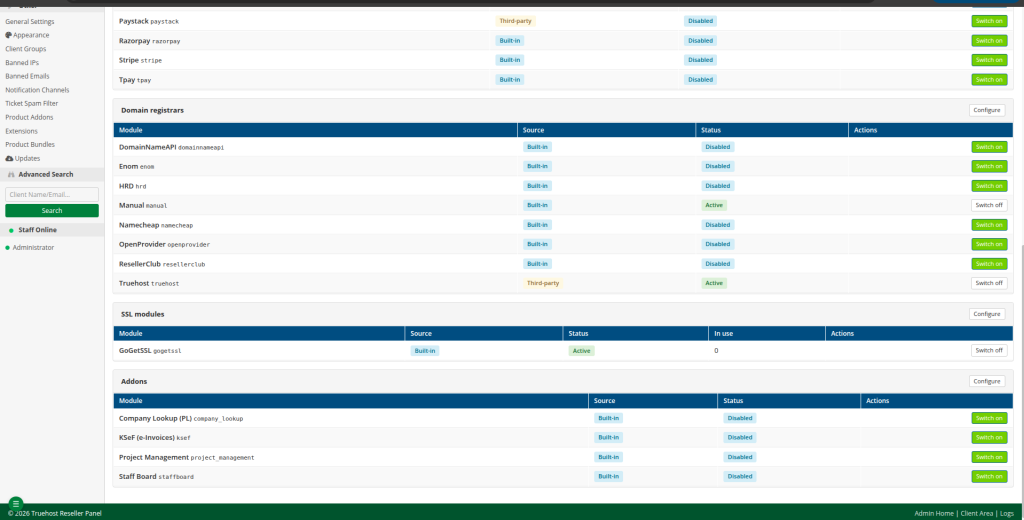
What you need: #

  • Access to the Truehost Reseller Panel administrator account – You need a staff login that can change settings and domain prices.
  • An active Truehost Domains Reseller account on the correct regional site – Truehost runs separate sites. Your reseller account works only on the site where it was set up.
  • Your Truehost login email and API key – The email is the one you use to sign in to that Truehost site. The API key is a secret code that lets the panel act on your account. Copy both from your own account; never use example values.
  • A topped-up reseller balance – Truehost’s guide indicate low balance as a cause of failed registrations.
  • Your shop’s default currency – Check it under Setup → Currencies before you price anything.
  • A way to test – You will open your public site in a private browser window.

Truehost’s Domain Reseller API is free to use, but normal registration, transfer, and renewal fees still apply to every domain.

Step 1: Connect your Truehost account #

  1. Sign in to the administrator area.
  1. Go to Setup → Modules and switch on Truehost .
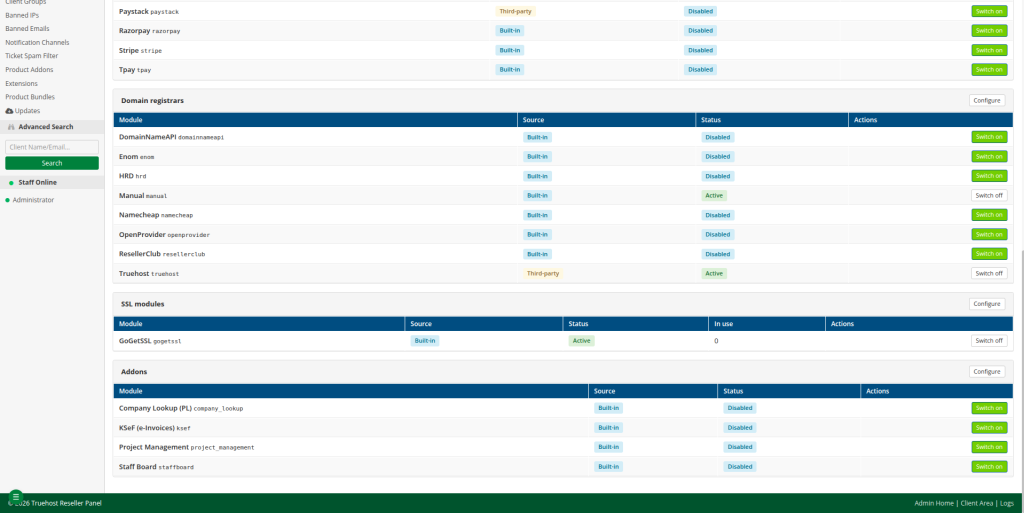
  1. Go to Setup → Domain Registrars → Truehost, tick Enable registrar, and fill in the fields below.
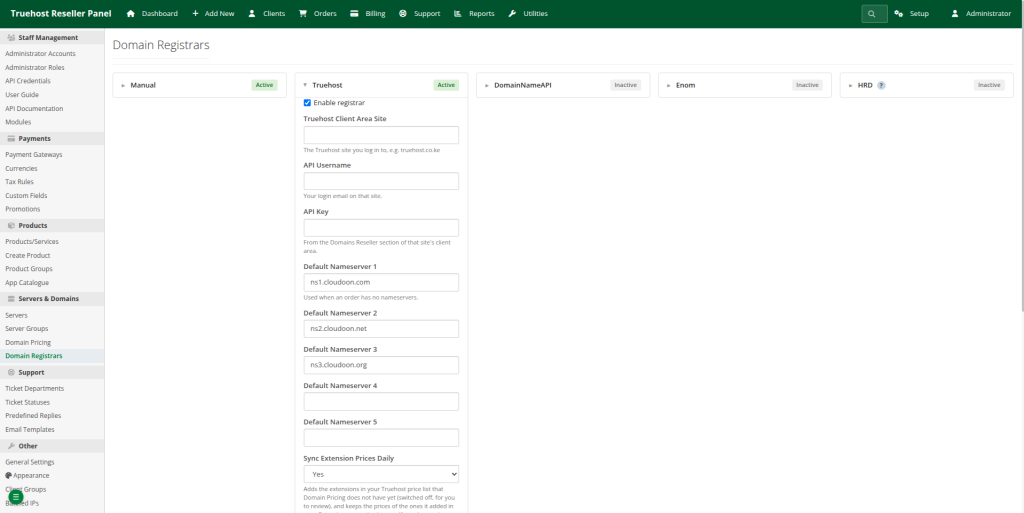
FieldWhat to enterWhere to find it
Truehost Client Area SiteThe Truehost site your reseller account is on, such as truehost.co.ke. The address alone is enoughThe site where you sign in to manage your account
API UsernameThe email you log in to that site withYour Truehost login
API KeyYour reseller API keyThat site’s client area → Domains Reseller → API settings
Default Nameservers 1–5Nameservers new domains get when the customer gives noneKeep the pre-filled Truehost ones, or enter your own

Nameservers are the servers that tell the internet where a domain’s website and email live.

  1. Press Save Settings – Saving tests the connection by reading your balance and tells you what is wrong if it fails. The Test button repeats the check at any time. A good result is the success message the panel shows; treat anything else as not connected.

Common errors when saving: #

Message saysMeaningWhat to do
“has no reseller account”Your account is on a different Truehost sitePick the site you log in to
“knows … but not this API key”The key belongs to another Truehost site, or was regeneratedCopy the key again from the right site
A server error from the siteThat site may not have domain reselling switched on yetAsk Truehost support

The panel server’s clock must be correct. The connection uses a token that changes every hour, so a wrong clock can make connections fail.

Step 2: Sync your extensions and prices from Truehost #

On the same Truehost settings card, set how your prices are worked out:
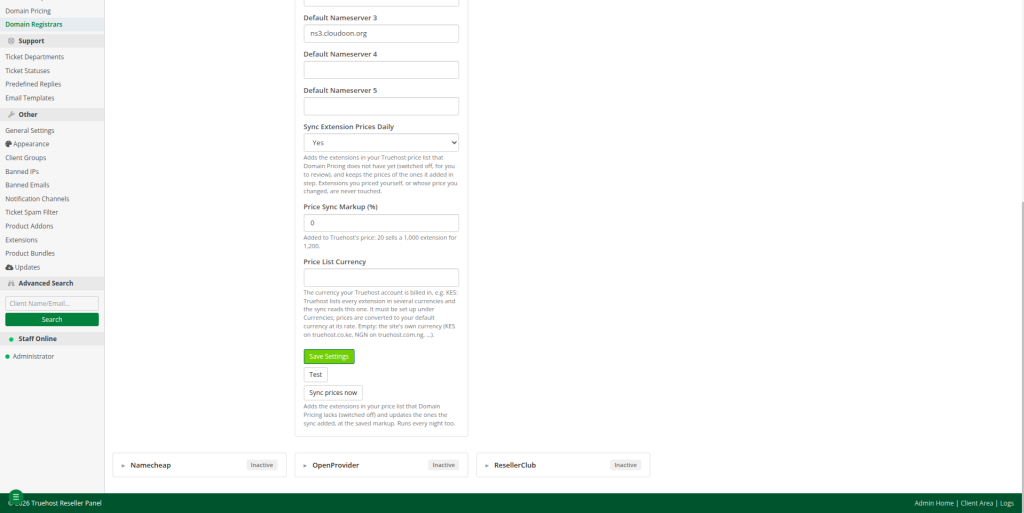
FieldWhat to enter
Sync Extension Prices DailyYes keeps your prices in step with Truehost every night. No syncs only when you press Sync prices now
Price Sync Markup (%)Your margin on top of Truehost’s price
Price List CurrencyThe currency your Truehost account is billed in (KES on truehost.co.ke). Leave empty to use the site’s own currency

Then:

  1. Press Save Settings, then Sync prices now.
  2. Read the message. It reports how many extensions were added, updated, left unchanged, and left alone because you priced them yourself.
  3. Open Setup → Domain Pricing. Every extension you can sell is listed, switched off, with a Synced badge and Truehost as its registrar. Nothing is on sale until you switch it on in Step 3.

How a synced price is worked out #

Your Truehost cost for the extension, plus your markup. Register, transfer and renew are priced separately from their own costs, so a renewal that costs you more is sold for more.

Example if :

ItemIllustrative amount
Truehost cost (register)KES 1,000
Markup20%
Customer priceKES 1,200
Your gross differenceKES 200

Customer price = Truehost cost × (1 + markup)

Gross difference = Customer price − Truehost cost

The module guide’s own example is a .co.ke costing KES 999 with a 20% markup, sold at KES 1,198.80. Note the difference between markup (20% of your cost) and margin (your profit as a share of the selling price): here KES 200 ÷ KES 1,200 is about 17% margin. The difference is before payment-processing fees, taxes and your other costs. Always check your real current costs in your Truehost reseller price list.

What the sync does and does not touch #

ExtensionWhat happens
In your Truehost price list, not yet in Domain PricingAdded switched off, with Truehost as its registrar
Added by the sync (Synced badge), on or offRegister, transfer and renew prices follow Truehost cost plus markup on every sync
A synced extension whose price you change by handHanded to you: the Synced badge goes and the sync stops updating it
Added by youNever touched
No longer in your Truehost price listLeft as it is. Switch it off yourself if Truehost stops selling it

The sync sets only register, transfer and renew prices. It never switches an extension on or off, and it leaves the Restore fee and WHOIS privacy price for you to set. Each sync is recorded in Utilities → System Logs → Module (module Truehost, action price sync) with the currency and markup it used.

Step 3: Review and switch on what you sell #

  1. On Setup → Domain Pricing, check the prices of the extensions you want to sell. A good first list is .com, .co.ke and .net; confirm each is in your Truehost price list.
  2. Tick them (the header box ticks all), choose Enable in the bar that appears, and press Apply. They stay synced.
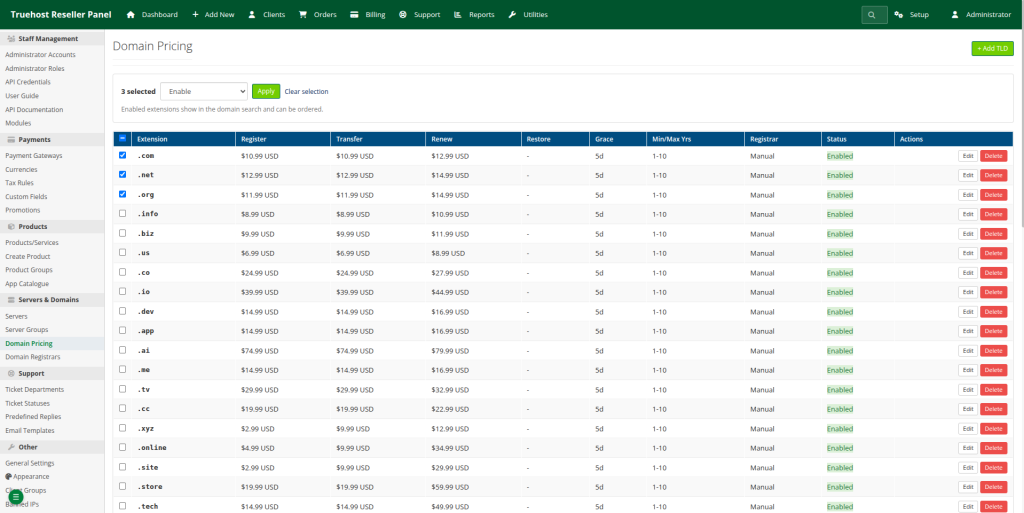
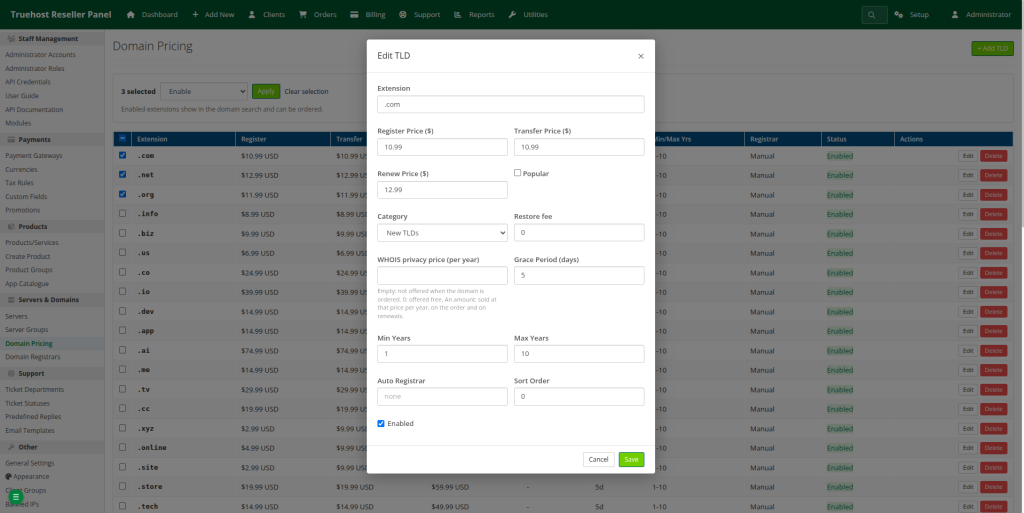
The bar has more actions for long lists:

ActionWhat it does
Enable / DisablePuts extensions on sale or takes them off. Synced extensions stay synced
Set registrarTruehost, or Manual to register paid domains yourself
Set categoryThe tab they show under on the public pricing page: Generic, Local, Country or New
Change prices by %Raises register, transfer and renew prices by a percentage, or lowers them with a minus (-10). These become your own prices, so the sync stops updating them
DeleteRemoves the extensions. Customers can no longer order them

Price changes and deletes ask you to confirm first. To set your own price on one extension, press Edit and change its register, transfer or renew price; from then on the sync leaves it alone.

Your currency and Truehost’s #

Truehost prices vary in every extension in several currencies (on truehost.co.ke: KES, USD and NGN). The sync uses the one in Price List Currency, because that is what your account actually pays.

  • Your shop sells in KES (your default currency under Setup → Currencies): nothing to set up. Truehost’s KES prices are used as they are.
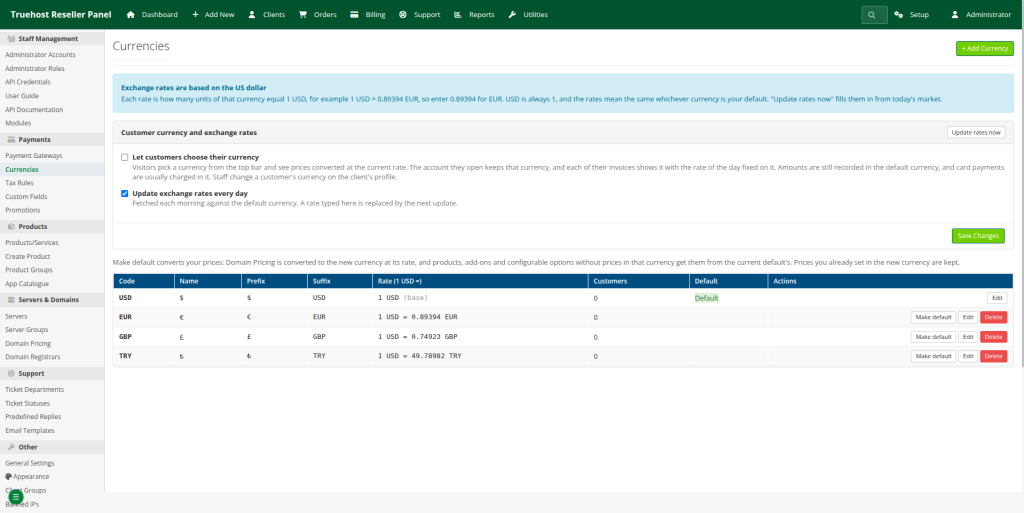
  • Your shop sells in another currency, for example USD: add KES under Setup → Currencies with its rate, and the sync converts your costs with it. Without KES set up, the sync stops, tells you, and changes nothing.

Rates are based on the US dollar: each rate is how many units of that currency make 1 USD, for example 1 USD = 130 KES, so you enter 130 for KES. USD is always 1. Update rates now fills in today’s rates, and the panel updates them every morning.

Do not type a rate upside down. KES is 130, not 0.0077. An inverted rate makes every converted price wrong.

Pick your shop’s currency before you start selling.  Make default on another currency converts every domain price to it at that day’s rate, so switching back and forth can shift prices by a cent through rounding.

Step 4: Add an extension by hand #

Use this for an extension the sync does not bring in, or one you want to set up yourself. A TLD (top-level domain) is the ending of a domain name, such as .com or .co.ke.

  1. Go to Setup → Domain Pricing → Add TLD.
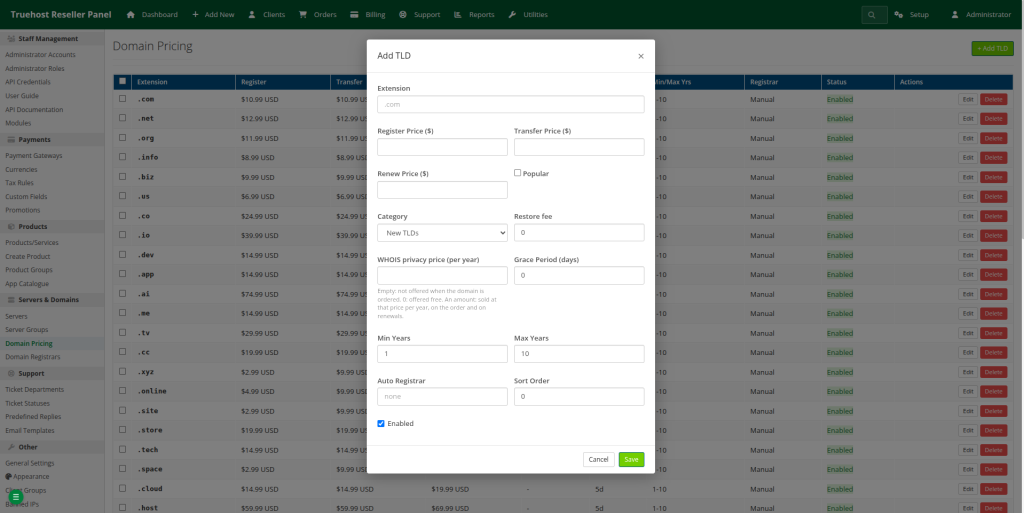
  1. Fill in the fields, using .co.ke as the example.
  2. Save. Prices are in your shop’s default currency.
FieldWhat to enter
ExtensionWith the dot: .com, .co.ke, .africa
Register PriceWhat customers pay for the first year
Transfer PriceWhat customers pay to move a domain to you
Renew PriceWhat customers pay each year after
PopularLists it under the Popular filter on the search and pricing pages
CategoryGeneric (.com, .net), Local extensions or Country (.co.ke), for the pricing page tabs
Restore FeeCharged to recover a domain after it expired
WHOIS Privacy Price (per year)Empty: not offered. 0: free. An amount: sold at that price per year
Grace Period (days)Days after expiry when it can still be renewed normally
Min Years / Max YearsHow many years customers can register for at once (usually 1 to 10)
Auto Registrartruehost. This is what makes paid orders register automatically
Sort OrderLower numbers show first
EnabledTicked to sell it

Price above your cost. For an extension you price by hand, check its register, transfer and renew cost in your Truehost reseller price list. Renewals often cost more than the first year, so do not reuse one price for all three.

Leave Auto Registrar empty only on purpose. An extension with no registrar is billed normally, but you have to register each paid domain yourself.

A price in your list does not prove Truehost can register that extension. Truehost’s API documentation names .com, .net, .org and .co.ke among supported extensions; confirm the others against your Truehost price list.

Step 5: Top up your balance #

Registrations, transfers and renewals are paid from your reseller balance on the Truehost site. With too little balance, a paid domain stays Pending and you get a “registration failed” notification showing your balance.

  1. Sign in to the Truehost client area for the same site your reseller account uses.
  2. Create an add-funds invoice and pay it. Truehost’s support site has a guide titled How to create add funds invoice from truehost client area; follow it, as the navigation can change.
  3. Confirm the new balance. Pressing Test on the Truehost registrar page reads your balance too.

To get a warning before it runs out, go to Setup → General Settings → Registrar balance watch. Keep enough balance for the registrations, transfers and renewals you expect, including renewals falling due.

Step 6: Try it as a customer #

  1. Open https://your-panel-domain/client/domain-search in a private window and search for a name.
  2. Check the price, and that the extensions you switched on appear.
  3. Open https://your-panel-domain/client/domain-pricing, where customers see all prices.
  4. Confirm the currency is the one you expect and that disabled extensions are not offered.

Replace your-panel-domain with your real hostname, and confirm the paths exist in your version. Do not place a real paid order just to test; only register a real domain when you are ready to pay its cost from your balance.

Step 7: What happens after an order, and what customers manage #

  • Paid order – The domain is registered at Truehost, then marked Active once Truehost lists it in your reseller account.
  • Registration failed – It stays Pending. Fix the cause (balance, contact details), then open it under Clients → Domains and use Register (or Retry registration). Every call to Truehost and its answer are in Utilities → System Logs → Module (module Truehost). Do not retry repeatedly: check the log, the payment, and whether the domain already exists at Truehost first.
  • Renewals – The panel sends the renewal invoice before expiry and renews at Truehost when it is paid.
  • Every night the panel reads each domain’s expiry date, status and nameservers from Truehost, and syncs your prices if Sync Extension Prices Daily is on.

Customers manage their own domains in the client area: nameservers, auto-renew, transfer lock, EPP code and contact details. Which controls work can still depend on the extension, so test with .co.ke before advertising them.

Common mistakes and troubleshooting #

IssueSymptomLikely causeNext action
Wrong Truehost site“has no reseller account”Account is on a different sitePick the site you log in to
Wrong or old credentials“knows … but not this API key”Key regenerated or from another siteCopy it again
Module not enabledTruehost missing, or orders stay pendingModule off in Setup → Modules or Domain Registrars, or not installedEnable it, or ask for it to be installed
Reselling not switched onServer error on saveThe Truehost site has not enabled domain reselling for youAsk Truehost support
Clock problemsConnection fails at timesServer clock is wrong (the token changes hourly)Correct the server time
Extension not on saleCustomers cannot order itSynced extensions start switched offEnable it in Step 3
Wrong pricesUnexpected amountsMarkup, price-list currency or exchange rateRecheck markup, Price List Currency and rates
Sync stoppedMessage says KES is missingShop currency is not KES and KES is not set upAdd KES under Setup → Currencies with its USD rate
Price stopped updatingSynced badge goneYou edited or bulk-changed its priceExpected; the price is now yours
Auto Registrar emptyPaid domains need manual registrationNo registrar setSet it to truehost
Low balanceDomain stays Pending, failure notice shows balanceReseller balance too lowTop up, then retry once
Unsupported extension or action“not supported” style errorsTruehost or module cannot do itCheck your Truehost price list; use Manual or do not sell it

Frequently asked questions #

  1. What is domain pricing in the Truehost Reseller Panel? 

It is the list under Setup → Domain Pricing holding each extension you sell, its register, transfer and renew prices, and which registrar handles it.

  1. Do I need a Truehost reseller account?

 Yes. The panel registers domains through your Truehost Domains Reseller account and pays from its balance.

  1. Where do I find my API credentials?

 The username is the email you log in to your Truehost site with. The API key is in that site’s client area under Domains Reseller → API settings.

  1. How do I add a .co.ke domain?

 Run Sync prices now and enable .co.ke in Step 3, or add it by hand with Setup → Domain Pricing → Add TLD.

  1. What is the difference between registration, transfer and renewal prices?

 Registration is a new domain, transfer is a domain moved in from another registrar, and renewal extends an existing one. Each has its own cost and price.

  1. How do I calculate my profit?

 Customer price minus your Truehost cost, before fees and taxes, for each of the three prices. Markup is a percentage of your cost; margin is a percentage of the selling price.

  1. Why is my order still pending?

 Usually registration failed, for example because of low balance or contact details. Check Utilities → System Logs → Module, fix it, then use Register once.

  1. What if my balance is too low? 

The paid domain stays Pending and you get a failure notice showing your balance. Top up, then retry.

  1. Can I set my own prices? 

Yes. Use a markup on synced prices, edit any extension by hand, or add your own with Add TLD.

  1. How do I check customers can see my prices? 

Open the domain search and pricing pages in a private window (Step 6).

  1. Can I sell an extension Truehost does not support? 

Only manually: set the registrar to Manual and register the domain yourself elsewhere.

  1. Can customers manage nameservers and renewals? 

Yes: nameservers, auto-renew, transfer lock, EPP code and contact details, depending on the extension.

Conclusion #

Connect your Truehost account, sync your prices with a markup you have checked, switch on the extensions you want to sell, keep your reseller balance funded, and test the public storefront. Until you have done all of that and tested it, do not promise customers automatic registration or fixed profits.

Your next step is to open your own domain search in a private window, look up a name, and confirm the price is what you intended.

Powered by BetterDocs

Leave a Reply Cancel reply0

Your email address will not be published. Required fields are marked *


Table of Contents
  •  Truehost module 
  • What you need:
  • Step 1: Connect your Truehost account
    • Common errors when saving:
  • Step 2: Sync your extensions and prices from Truehost
  • How a synced price is worked out
    • What the sync does and does not touch
  • Step 3: Review and switch on what you sell
  • Your currency and Truehost's
  • Step 4: Add an extension by hand
  • Step 5: Top up your balance
  • Step 6: Try it as a customer
  • Step 7: What happens after an order, and what customers manage
  • Common mistakes and troubleshooting
  • Frequently asked questions
  • Conclusion

Share This Article :

  • Facebook
  • X
  • LinkedIn
  • Pinterest

Was it helpful ?

  • Happy
  • Normal
  • Sad
© 2026