
This tutorial is meant to help you able to manage and raise support tickets on Truehost client area.
1.Login to the client area using your registered email and password.
2.Click Support tab and click Tickets

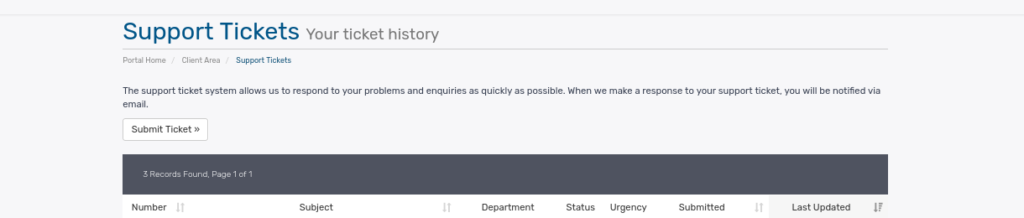
3.Click Submit Ticket
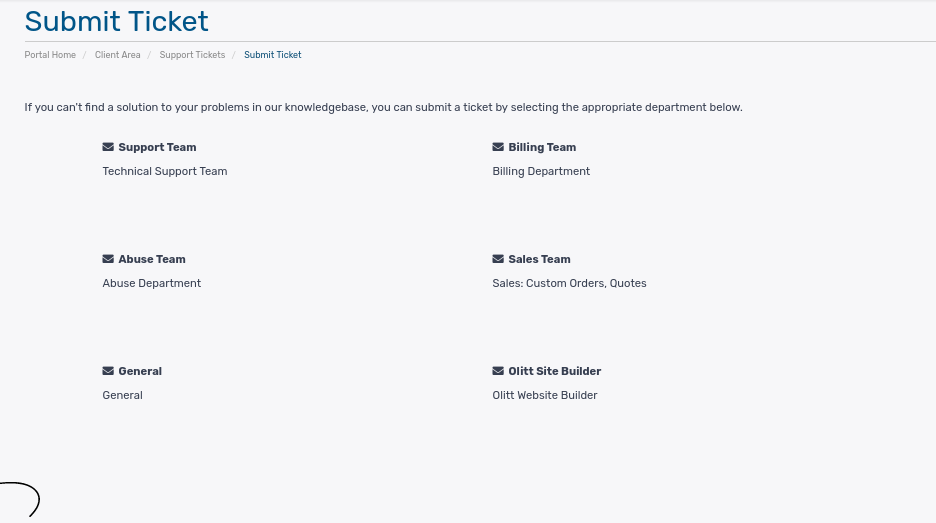
4.Choose a department, either billing or technical tickets depending with your need.
Billing Support: includes all payment related issues
Technical Support: includes all issues related to technicalities around domain registrations, dns, hosting, emails etc.
5.In the next window, fill in the required fields i.e.
Name: your name [This is auto filled]
Email address: your email address, [This is auto filled]
Subject: the title of your message, must be brief
Priority: choose low. Medium or high to determine the level of urgency
Message: the message itself. Type in as much details as possible. Copy paste error messages, upload screenshots etc so that the ticket is resolved as fast as possible.
Attachments: any screenshot or attachment to support your message.
6.Hit submit button and you’ll be done.
Wait for the reply for not more than 25mins.
i want to clarify this, we downgraded this domain to a silver hosting of annual renewal. why is it suspended and we opted out for monthly renewal of platinum
why suspend this domain bushdweller-safaris.co.ke and we opted out of platinum monthly hosting to silver annual renewal
We opted out of platinum hosting so that we can only be paying only annually, not monthly. even we talked with your colleague Dominic and told me he has changed
Domain name: bushdweller-safaris.co.ke
I’m having issues with my domain name here’s the issue below please help me
Composer detected issues in your platform: Your Composer dependencies require a PHP version “>= 7.3.0”.
Kindly login on hosting and select PHP version greater than 7.3.0 such as php version 7.4, 8.0,8.2 etcHow To Change PHP Version in the Cpanel.
heIIo l my site was broken by one of your team when trying to clean up my site. Can you restore my website the way it was on the 7th of July 2024
I want to see samples of my former website hosting demo.& how it look like, before I can proceed.
Thank you
Thank you so much
my site is still broken Could you please can you help repare it
I have already renewed my domain but I wonder why it has not reflected
Truehost Cloud
AI WEBSITE DOMAINS PROMOS SUPPORT
Dear Peter Murunga (Murunga Holdings Limited),
This is a payment receipt for Invoice 528436 sent on Saturday, September 27th, 2025
truehost_Bronze Hosting – chepcom.com (26/11/2025 – 25/11/2026) Ksh 900.00
——————————————————
Sub Total: Ksh 900.00
16.00% Kenyan VAT: Ksh 144.00
Credit: Ksh 0.00
Total: Ksh 1044.00
Amount: Ksh 1044.00
Transaction #: TLG3D19OXG
Total Paid: Ksh 1044.00
Remaining Balance: Ksh 0.00
Status: Paid
You may review your invoice history at any time by logging in to your client area.
or
You can autologin to pay the invoice at https://truehost.co.ke/cloud/[email protected]&invoice=528436&zmkey=9c1fd17e246938aef2d14f0698cf62c7
Note: This email will serve as an official receipt for this payment.
OLITT
Turn your ideas into revenue. Create Websites, Shops, and Landing Pages in minutes with AI — no coding. Sell anywhere and automate your marketing with OlittGrow.
Or let our experts create your custom Website from $130.
Watch Olitt Intro Video
Click above to watch a quick 2-minute introduction to OLITT.
Get Started on OLITT.com
Free Google Audit
Get a quick analysis of how Google sees your site.
Learn more on TruehostSEO
CLOUDPAP
Simple Cloud for Developers all over the World.
Learn more on Cloudpap.com
Visit Us
facebook twitter linkedin youtube tiktok
Visit our website Log in to your account Get support
© Truehost Cloud. All rights reserved.