Domain RegistrationFind and register the perfect domain for your website.
 .COM DomainChoose a widely recognized domain to build global credibility.
 Domain TransferSeamless domain transfers with zero downtime and complete control.
 All TLDsFind and register your perfect domain. Choose from local and global extensions.
 SSL CertificatesKeep your website safe with reliable SSL Certificates that protect customer data and build trust.
 whoisCheck domain ownership details, expiration dates, and registrar information.
 US DomainRegister a .US domain and build trust in the USA.
 Web HostingEverything your website needs to run smoothly
 WordPress HostingWordPress hosting that just works
 Windows HostingReliable hosting for Windows environments
 Reseller HostingTurn hosting into your business
 Email HostingEmail that looks professional and works anywhere
 cPanel HostingFull control of your hosting with cPanel
 Affiliate ProgramJoin as a partner and earn commissions on every referral you send our way.
 Vps HostingScalable virtual servers that expand as you need.
 Dedicated ServersGet complete access and full control over your dedicated physical server.
 Managed vpsNot tech-savvy? We will take care of everything with our fully managed VPS hosting for you.
 AI Website BuilderCreate stunning websites in seconds with AI.
 Online ShopSet up a professional online store. No coding required.
 Web design serviceGet a tailored website designed to match your brand and support your goals.
 BlogFind helpful guides on web hosting, online selling, digital marketing, and more.
 Contact USYou can reach us anytime, day or night, through chat or email.
 SupportBrowse helpful guides and answers for all of our services.
Most VPS plans share hardware with dozens of other accounts on the same machine. A VDS locks a fixed slice of that hardware just for you.
A dedicated server hands you the whole machine outright. That single fact explains most of the confusion around these three hosting types. It also sets up everything else in this comparison.
If you have outgrown shared hosting, you already know the next choice carries weight. Pick the wrong tier and you either overpay for resources you don’t need. Or you underpay and watch your site slow down under real traffic.
This guide breaks down what separates a VPS, a VDS, and a dedicated server. Use it to match your workload to the right one.
VPS, VDS, and Dedicated Server at a Glance
Here’s the short version before the details.
| Feature | VPS | VDS | Dedicated Server |
|---|---|---|---|
| Virtualization type | Container or basic hypervisor | Full hypervisor (KVM, Xen, Hyper-V) | None, direct hardware access |
| Kernel | Often shared with the host | Independent per instance | Independent, no virtualization layer |
| Resource allocation | Shared pool, may burst | Reserved per tenant | The entire physical machine |
| Storage and IOPS | Shared SSD pool, capped | NVMe tiers, higher IOPS ceiling | Raw hardware storage, no cap |
| Security and isolation | Logical isolation | Resource-level isolation | Physical isolation |
| Live migration | Yes | Yes | No |
| Nested virtualization | Rarely supported | Often supported on higher tiers | Not applicable |
| Provisioning speed | Minutes | Minutes, fast OS reinstalls | Slower, may need physical setup |
| OS flexibility | Limited to container-based plans | Any OS | Any OS |
| Cost per core/RAM | Lowest | Higher | Highest overall |
| Management overhead | Low | Low to moderate | Higher |
| Best fit | Small sites, staging, dev/test | Production apps need steady performance | High compliance, high traffic, custom hardware |
A VPS gives you a private space on a shared machine. A VDS reserves a fixed slice of that machine just for you, still through virtualization.
A dedicated server removes virtualization entirely and gives you the full physical box.
VDS sits between the other two. It is not another name for VPS, and it is not a discount dedicated server either.
What Is a VPS (Virtual Private Server)?
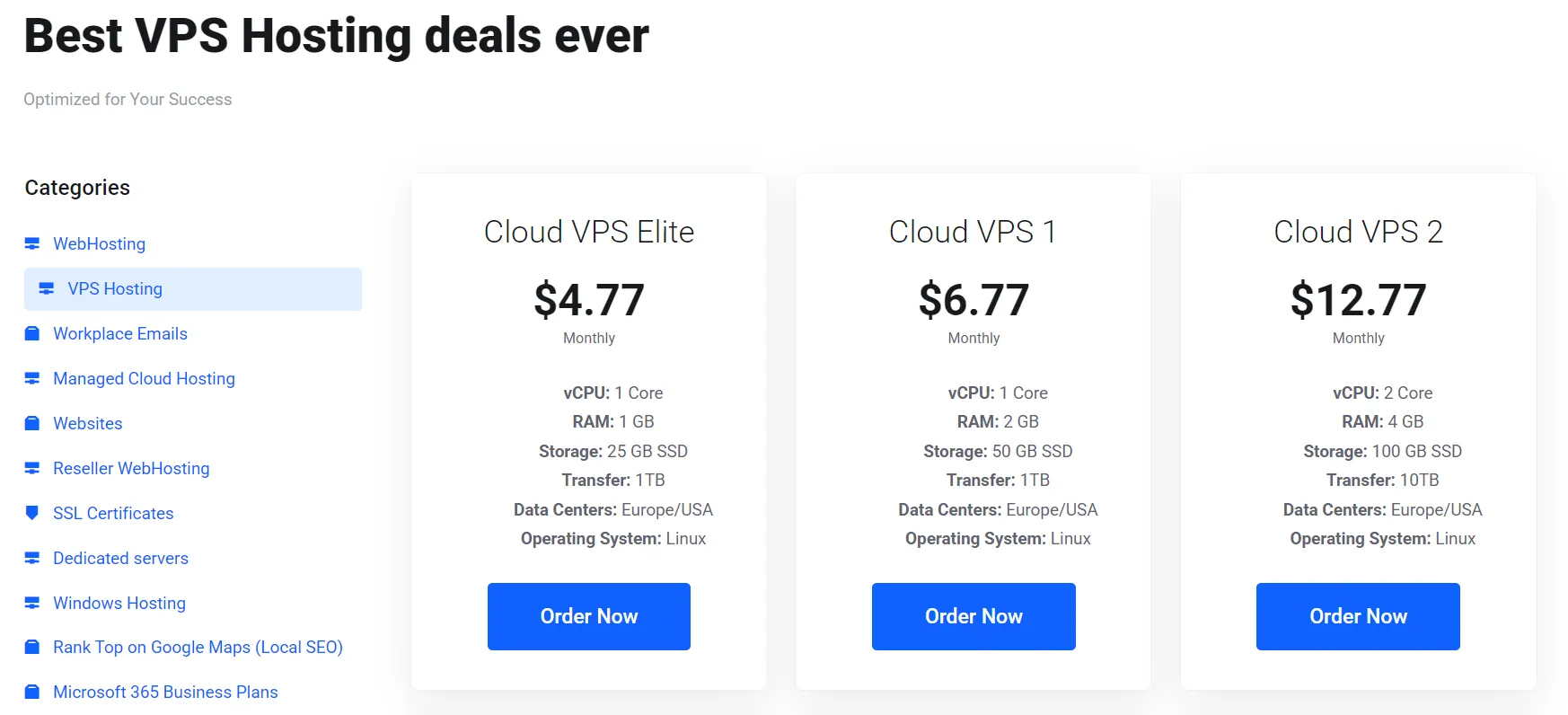
A VPS splits one physical server into several virtual environments through virtualization software.
Each one gets its own operating system and a set slice of resources. The underlying hardware still belongs to the host.
Budget VPS plans often run on container-based virtualization, such as OpenVZ or LXC.
All containers on that machine share one kernel. This setup is light and cheap to run. Still, it caps how much isolation you actually get.
Your resource guarantee on a VPS covers a baseline. Extra capacity past that baseline often comes from a shared pool.
A busy neighbor on the same box can still affect your performance during peak load.
A VPS suits a small business site, a growing blog, or a test environment. In each case, cost carries more weight than raw consistency.
You get root access and can install your own software. Customization still stays more limited than on a VDS or dedicated server.
What Is a VDS (Virtual Dedicated Server)?
A VDS runs on a full hypervisor, such as KVM, Xen, or Hyper-V. This differs from a shared container layer.
Each instance gets its own independent kernel, separate from every other tenant on the host.
That independent kernel is why a VDS can run almost any operating system you want. A container-based VPS cannot make that promise, since it depends on the host kernel underneath it.
The bigger draw is resource reservation. A VDS locks a fixed amount of CPU, RAM, and storage for one customer alone.
No other tenant can borrow it. A busy neighbor on the same physical machine cannot slow you down.
A production app that needs steady, predictable performance fits a VDS well. So does a growing SaaS platform or an e-commerce store. Neither can afford random slowdowns during a sale.
A VDS still has real limits. A hypervisor sits between you and the hardware. You cannot pick physical components the way you can on a custom dedicated server.
Price per core and per gigabyte of RAM also runs higher than VPS. Reserved capacity only sells once, so it costs more.
What Is a Dedicated Server?
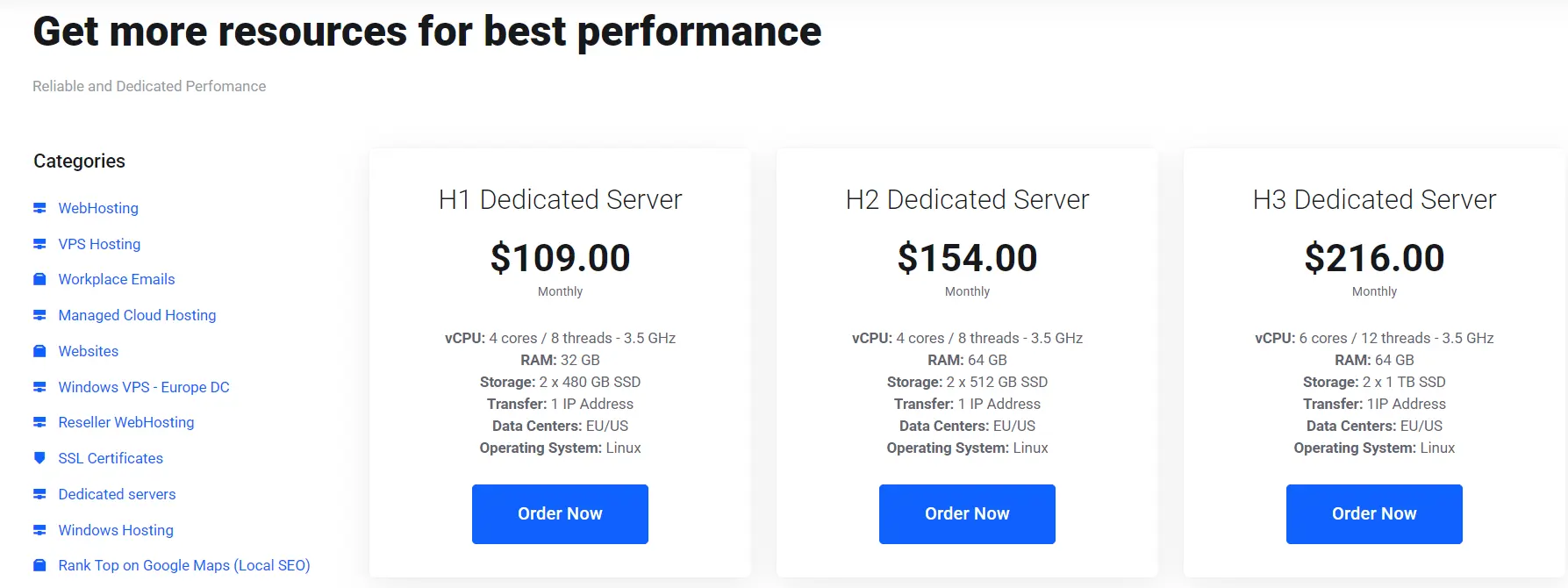
A dedicated server gives you the entire physical machine. There is no virtualization layer at all. Every CPU core, every gigabyte of RAM, and every drive belongs to you alone.
That direct hardware access opens up customization that a VDS cannot match. You can configure RAID arrays for storage redundancy.
You can adjust BIOS settings for energy use and speed. This means you can also install kernel-level security modules that a hypervisor would normally block.
Physical isolation also carries weight for compliance. Some industries, including finance and healthcare, require a real hardware gap.
That gap sits between client data and the rest of the internet. A dedicated server delivers that gap in a way no virtualized option can.
High-traffic e-commerce platforms, large databases, and enterprise applications tend to land here. So does any workload that needs hardware-level control. A shared or virtualized environment cannot offer that level of control.
VPS vs VDS vs Dedicated Server: Head-to-Head Comparison
1) Virtualization Technology
Budget VPS plans lean on OS-level or container virtualization. Every account on the host shares one kernel in this setup. This keeps overhead low but weakens isolation between tenants.
A VDS runs on a full hypervisor instead, giving each instance its own kernel. A dedicated server skips virtualization entirely.
There is no hypervisor layer standing between your software and the hardware.
This one distinction explains a lot of downstream differences. Kernel sharing limits which operating systems a container-based VPS can run.
An independent kernel on a VDS or dedicated server removes that limit completely.
2) Performance and Resource Allocation
Picture a traffic spike hitting your site during a flash sale. On a shared VPS, a neighbor pulling a heavy CPU load can slow your response times. This can happen even if your own traffic hasn’t grown at all.
A VDS avoids that problem. Your CPU and RAM allocation stays reserved no matter what other tenants are doing.
A dedicated server removes the concern entirely, since there are no other tenants to share with.
3) Storage and IOPS
A standard VPS usually draws from a shared SSD pool with a set IOPS cap per plan. That cap can become a real bottleneck for a database-heavy application.
A VDS often ships with NVMe storage tiers and a far higher IOPS ceiling. That storage capacity gets reserved rather than pooled across accounts.
A dedicated server gives you the raw drives, with no shared capacity at all.
4) Security, Isolation, and Compliance
A VPS relies on logical isolation. Software keeps one tenant’s data separate from another’s, but the underlying hardware stays shared.
A VDS strengthens that boundary through resource-level isolation. This also makes it easier to document infrastructure separation for frameworks like GDPR.
A dedicated server goes further with full physical isolation. Many strict compliance rules actually require that standard.
5) Uptime, Live Migration, and High Availability
Both VPS and VDS instances run on a hypervisor. They can migrate between physical hosts with no downtime. This holds even if hardware needs maintenance or fails.
A dedicated server cannot do this. Moving to new hardware means real downtime and manual setup. There is no virtualization layer to abstract the move.
6) Cost and Total Ownership
VPS pricing starts lowest and stays that way for small workloads. A VDS costs more per CPU core and per gigabyte of RAM.
That capacity gets reserved for one customer instead of being pooled across many.
A dedicated server carries the highest price tag upfront. Still, the true cost comparison should factor in admin time too.
Running several large VPS instances to match one dedicated server’s output can cost close to the same amount anyway.
7) Scalability, Provisioning Speed, and Upgrade Path
A VPS or VDS can scale up in minutes through a control panel. Little to no downtime is involved in this process.
Some VDS providers even complete a full OS reinstall in under a minute, using hypervisor snapshots.
A dedicated server scales differently. Adding capacity often means installing new physical components or migrating to bigger hardware. This slower process usually needs scheduled downtime.
8) Technical Control and Customization
Root access on a VPS lets you install software and adjust configuration. Real limits still apply, set by the shared environment underneath.
A VDS goes further. Some tiers even support nested virtualization, letting you run a hypervisor inside your own VM. This helps with test labs or CI pipelines.
A dedicated server allows the deepest control of all. This includes RAID configuration and BIOS-level tuning that a hypervisor would otherwise block.
How to Choose the Right Server Type for Your Business
Three factors decide this call: your budget, your in-house technical skills, and how predictable your workload actually is.
A VPS covers most small to mid-size sites well. If your traffic stays fairly steady and your budget is tight, an early upgrade past VPS just adds cost. It brings no real payoff at that stage.
A VDS makes sense once your workload needs steady, guaranteed performance. It should not yet justify a full dedicated machine. A growing SaaS product or a store handling regular traffic spikes fits this tier naturally.
A dedicated server becomes the right call once you hit specific signals. Watch for these:
- Your traffic has grown large and consistent enough that several VPS instances now cost close to one dedicated machine
- Your industry requires physical hardware isolation for compliance reasons
- You need custom hardware configurations, like specific RAID setups or GPU access
- Your team has the operational skill or budget for managed support to run a full server
FAQs
Is VDS the same as VPS?
No. Both use virtualization, but they allocate resources differently. A VPS shares resources from a pool. A VDS reserves a fixed slice of CPU, RAM, and storage for one customer alone.
Is VDS better than VPS?
VDS offers steadier performance and stronger isolation, so it fits production workloads better. A standard VPS still wins on price for smaller or less demanding sites.
Can I upgrade from VPS to a dedicated server later?
Yes. Many businesses start on a VPS and grow from there. They move to a VDS as traffic grows. Then they shift to a dedicated server once workload size and compliance needs justify the cost.
What is the difference between VPS and cloud hosting?
A VPS runs on one physical server with a set resource allocation. Cloud hosting draws resources from a pool of many servers. This often makes scaling faster and more flexible.
How much does a dedicated server cost compared to a VPS?
A dedicated server costs more upfront than a VPS, sometimes several times more. Add admin time and the cost of running multiple VPS instances at scale. The real gap often narrows once you do the full math.
Match the Server to the Workload, Not the Other Way Around
The right choice here isn’t about the biggest budget or the most impressive spec sheet.
It comes down to matching the server type to what your workload actually needs today. It also depends on where that workload is headed next.
A VPS handles most small and growing sites well. A VDS steps in once you need guaranteed, steady performance.
A dedicated server takes over once compliance, scale, or hardware control becomes the deciding factor.
Compare TrueHost’s VPS and dedicated server plans side by side. See real specs and pricing for your region, and pick your next server based on actual numbers instead of guesswork.