Domain RegistrationFind and register the perfect domain for your website.
 .COM DomainChoose a widely recognized domain to build global credibility.
 Domain TransferSeamless domain transfers with zero downtime and complete control.
 All TLDsFind and register your perfect domain. Choose from local and global extensions.
 SSL CertificatesKeep your website safe with reliable SSL Certificates that protect customer data and build trust.
 whoisCheck domain ownership details, expiration dates, and registrar information.
 US DomainRegister a .US domain and build trust in the USA.
 Web HostingEverything your website needs to run smoothly
 WordPress HostingWordPress hosting that just works
 Windows HostingReliable hosting for Windows environments
 Reseller HostingTurn hosting into your business
 Email HostingEmail that looks professional and works anywhere
 cPanel HostingFull control of your hosting with cPanel
 Affiliate ProgramJoin as a partner and earn commissions on every referral you send our way.
 Vps HostingScalable virtual servers that expand as you need.
 Dedicated ServersGet complete access and full control over your dedicated physical server.
 Managed vpsNot tech-savvy? We will take care of everything with our fully managed VPS hosting for you.
 AI Website BuilderCreate stunning websites in seconds with AI.
 Online ShopSet up a professional online store. No coding required.
 Web design serviceGet a tailored website designed to match your brand and support your goals.
 BlogFind helpful guides on web hosting, online selling, digital marketing, and more.
 Contact USYou can reach us anytime, day or night, through chat or email.
 SupportBrowse helpful guides and answers for all of our services.
Your small business site loads more slowly than it used to. Checkout pages hang for a second too long during a sale. Your host’s support ticket sits unanswered for a day.
None of this is dramatic on its own, but together it adds up. Every extra second of load time pushes a customer closer to leaving.
Every minute of downtime during a busy hour costs real money and trust that is hard to win back.
A Linux VPS fixes most of this. It gives your site its own slice of server resources, instead of sharing space with hundreds of other accounts.
This guide compares the Linux VPS providers worth considering for a US small business in 2026.
You’ll get real pricing, real specs, and a clear answer for who each provider fits.
Best Linux VPS Providers for Small Business Hosting in the USA
The table below lines up starting price, core specs, US data center presence, support hours, and management type.
| Provider | Starting Price | vCPU / RAM | Storage | US Data Centers | Support | Managed? | Best For |
|---|---|---|---|---|---|---|---|
| Truehost | From $4.56 to $23.53 | 1 vCPU / 1GB and up | SSD | Yes | 24/7 | Both options available | Budget-first buyers who want US hosting without the premium price tag |
| DigitalOcean | From $6/month | 1 vCPU / 1GB | 25GB SSD | New York, San Francisco, and partner regions | Community and ticket support | Mostly unmanaged | Developers who want full control and clean documentation |
| Hostinger | Low starting price with promo pricing | 1 vCPU / 1GB and up | NVMe SSD | Yes | 24/7 chat | Managed options available | Small business owners who want an easy control panel |
| Kamatera | Pay-as-you-go pricing | Fully configurable | Configurable | Multiple global, including the US | 24/7 | Both options available | Businesses with unique or changing resource needs |
| Vultr | Hourly and monthly billing | 1 vCPU / 1GB and up | SSD | Multiple US locations | Ticket support | Mostly unmanaged | Developers and webmasters want flexible billing |
| ScalaHosting | Mid-range pricing | 1 vCPU / 2GB and up | SSD | Yes | 24/7 | Managed by default | Non-technical owners who want a hands-off setup |
Exact pricing and specs shift often. Confirm current plan details directly with each provider before you commit.
1) Truehost
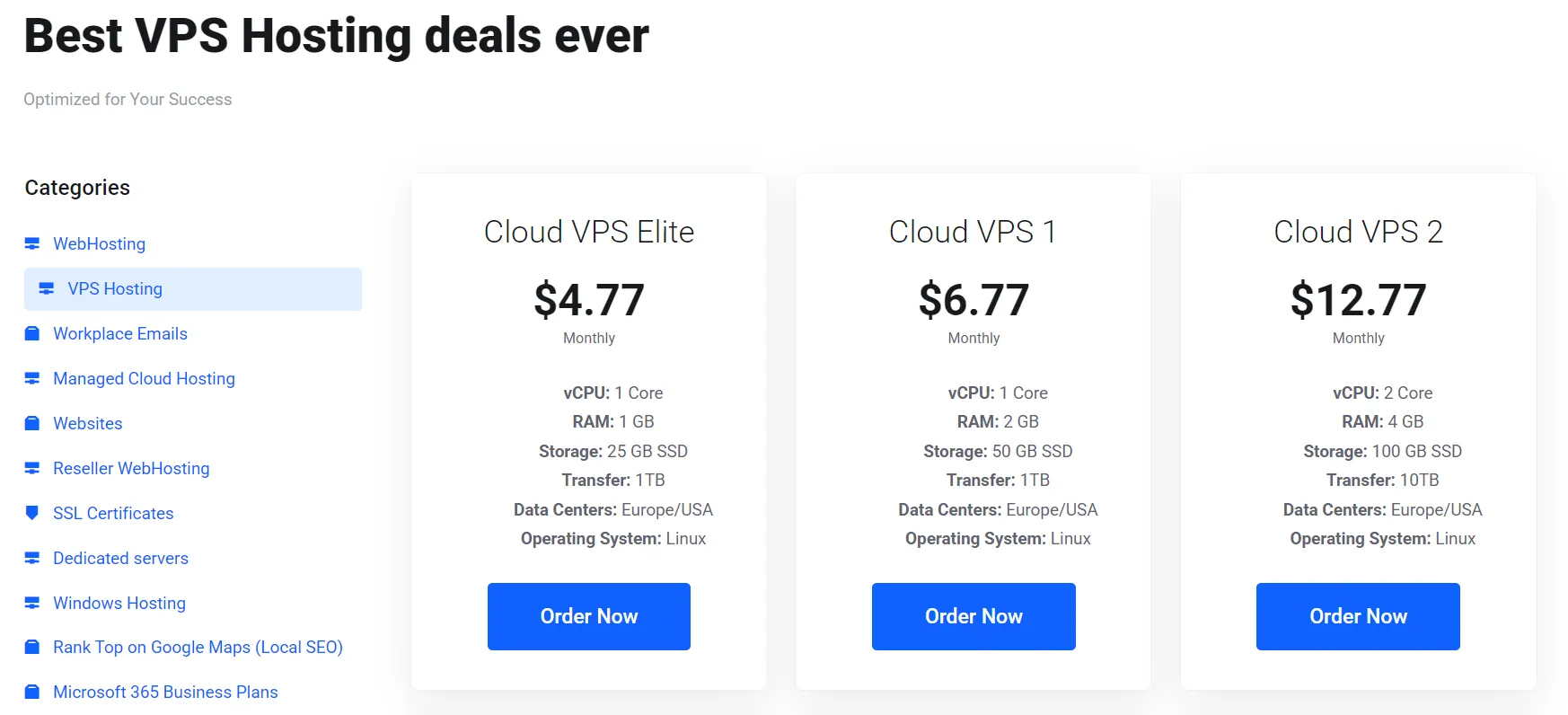
Truehost runs its Linux VPS on NVMe SSD storage, with disk speeds reaching up to 100,000 IOPS on its nodes.
That kind of throughput helps database-heavy sites, such as WooCommerce stores, stay responsive under load.
Each node also receives a dedicated 2 Gbps bandwidth allocation, which maintains steady performance even during traffic spikes.
Every VPS plan runs on KVM virtualization and gives you full root access. You can install custom software or tune configurations.
You can even run a completely different application stack than the one that shipped with the default image.
Truehost handles kernel and operating system updates on its managed plans, which takes patch management off your plate entirely.
Security comes built in rather than sold as an add-on. Enterprise-grade DDoS protection and IP firewalls run at the hardware level, blocking attacks before they reach your VPS.
Support is available 24/7 via live chat, WhatsApp, tickets, email, and phone. That’s a wider set of channels than most budget providers offer.
Truehost gives you a choice between managed and unmanaged plans. Managed plans cover updates, security, and backups for you.
Unmanaged plans give buyers full control to configure everything themselves.
Plans start at $4.56 to $23.53 per month, with data centers across the US, Europe, and other global regions.
Best for: US small businesses that want US-based data centers, real 24/7 human support, and the flexibility to switch between managed and unmanaged setups without changing providers.
2) DigitalOcean
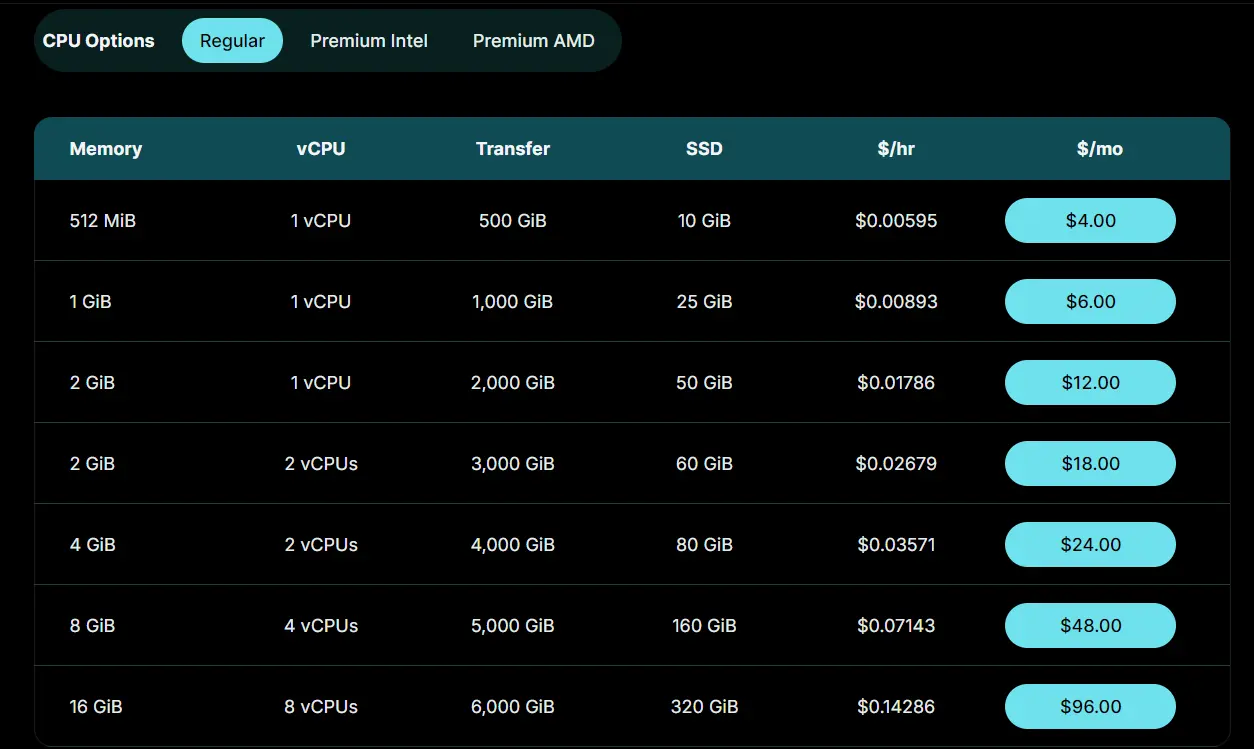
DigitalOcean calls its VPS instances Droplets, and it built its reputation on making them simple to deploy.
A new Droplet typically spins up in under a minute. A clean dashboard called the Cloud Console guides the process.
Pricing runs on per-second billing as of January 2026, with a 60-second minimum charge.
That change mainly benefits short-lived workloads, like CI pipelines or batch jobs. You only pay for the compute time you actually use.
A monthly cap still applies, so an always-on Droplet never costs more than its listed monthly rate.
Every Droplet plan includes a set of free tools: DNS management, cloud firewalls, VPC networking, and a small container registry.
Outbound bandwidth is pooled across your account and starts at 500 GiB a month on the smallest plans. Inbound bandwidth is always free.
Backups are available weekly or daily, with usage-based plans supporting backups as often as every four hours.
Basic Droplets use shared vCPUs, which suit bursty workloads that can handle some performance variability.
Premium CPU-Optimized Droplets use dedicated vCPUs with newer Intel or AMD processors and NVMe storage. They’re built for applications that need consistent, predictable performance.
Best for: developers and technically comfortable small business owners who want clean documentation, transparent billing, and the option to grow into managed databases or Kubernetes later.
3) Hostinger
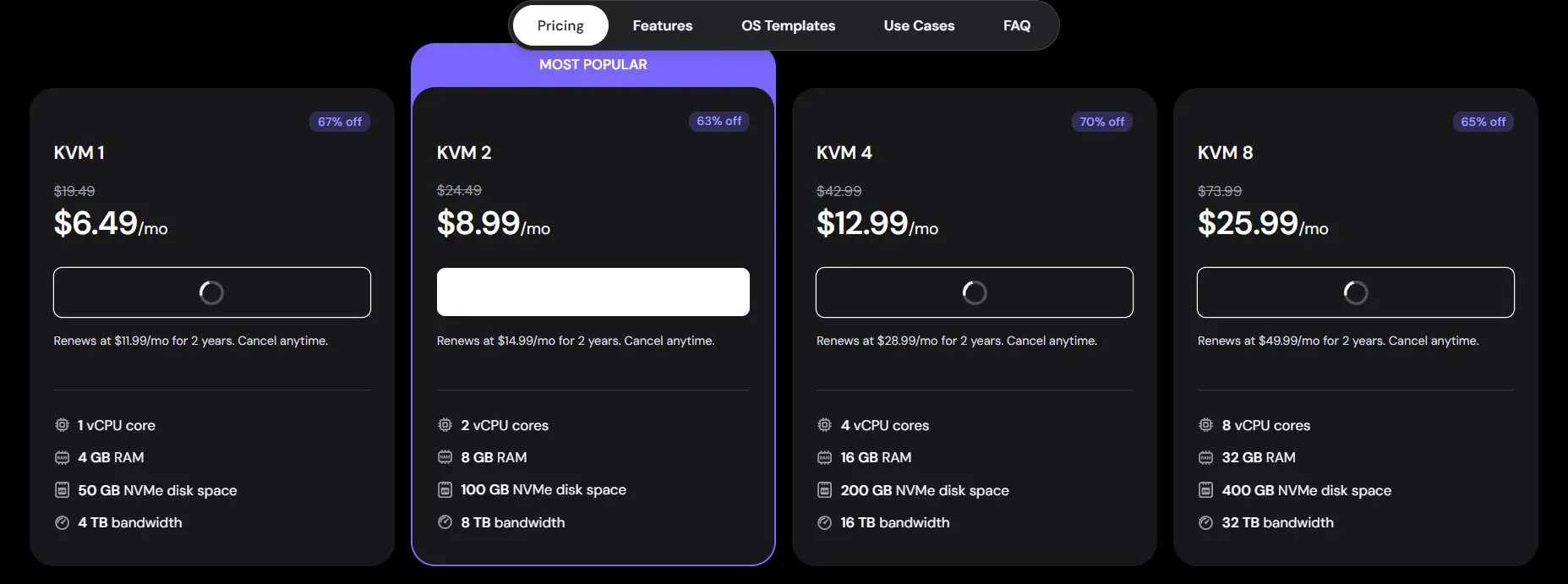
Hostinger built its VPS lineup around a simple pitch: strong specs at a low price. Every plan includes NVMe SSD storage, KVM virtualization, and AMD EPYC processors as standard. None of that gets reserved for higher tiers only.
The control panel is Hostinger’s own tool, called hPanel, rather than cPanel or Plesk. It covers resource monitoring, firewall rules, OS reinstalls, and snapshot management from a browser dashboard.
Most routine tasks don’t require dropping into a terminal. A one-click template library covers Ubuntu, Debian, AlmaLinux, Rocky Linux, and CentOS Stream. Preconfigured templates for common setups, such as WordPress, are included as well.
Plans include full root access via SSH and a dedicated IPv4 address at no extra cost. Backups run weekly by default, with daily backups available on higher tiers or as an add-on.
The top VPS tier offers 8 vCPU cores, 32GB of RAM, and 400GB of storage. That’s enough for high-concurrency applications or larger databases.
Data centers are located in several US locations, as well as in the UK, the Netherlands, Singapore, Brazil, and India.
That gives US buyers a genuine local option, not a distant one. Promotional pricing usually requires a longer commitment, typically 12 to 24 months on VPS plans. Check the renewal rate before signing up.
Best for: budget-conscious small business owners and developers who want NVMe performance without paying for cPanel licensing or premium support tiers.
4) Kamatera
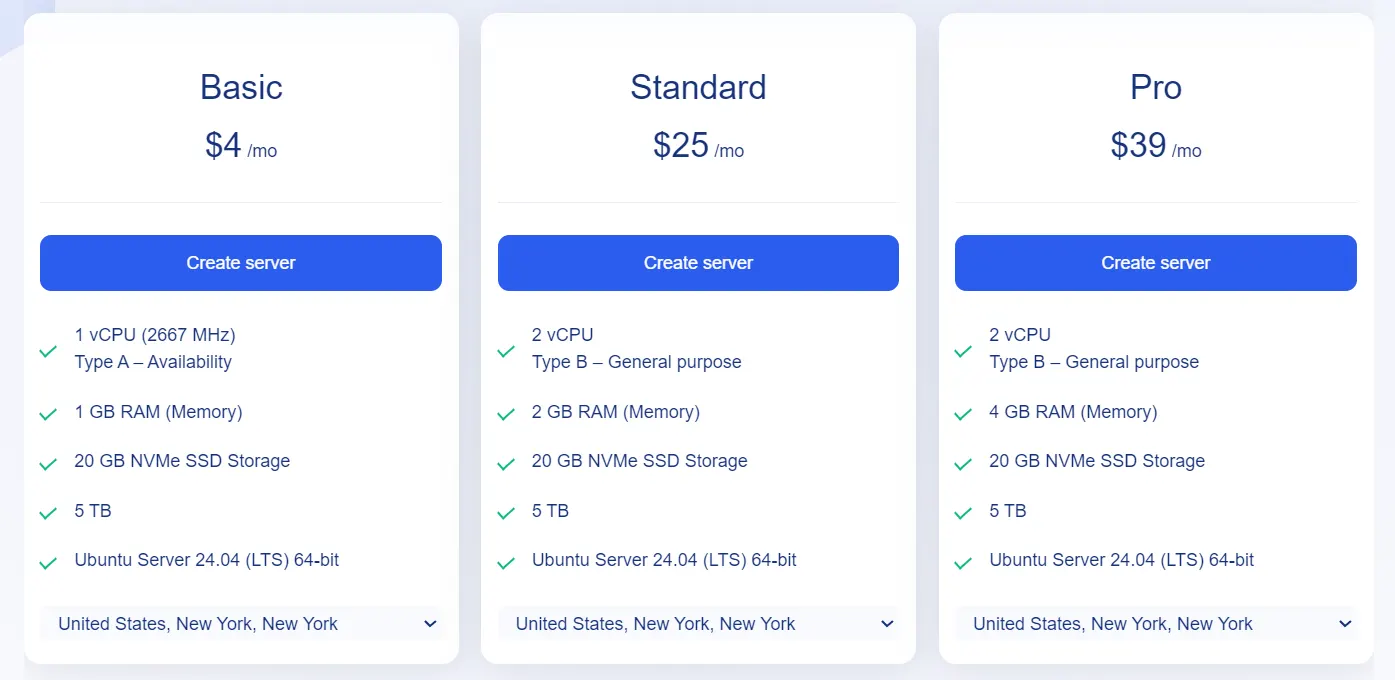
Kamatera works differently from most providers on this list. Instead of picking from a handful of fixed plans, you build your own server.
You choose the exact CPU, RAM, storage, and bandwidth you need. That flexibility makes it easier to match your VPS to your actual workload. You won’t pay for resources you don’t use.
Entry configurations start around $4 a month for 1 vCPU and 1GB of RAM. Custom configurations scale up to 128 vCPUs and 512GB of RAM.
Billing runs in real time, so costs track your actual usage closely. A 30-day free trial with up to $100 in server credit lets you test real workloads before committing any money.
Kamatera operates data centers in 10 regions, including multiple US locations, giving small businesses a nearby option for lower latency.
Linux distribution support includes Ubuntu, Debian, CentOS, AlmaLinux, and Rocky Linux. You can also upload a custom ISO for less common setups.
Add-ons cost extra here, which is worth planning around. Managed technical support ranges from $0 to $150 per server per month, and extra NVMe storage costs $0.05 per GB.
The customization that makes Kamatera flexible also makes the checkout process more involved than a fixed-tier competitor.
Best for: businesses with specific, unusual resource needs who want to configure a server precisely rather than choosing from preset plans.
5) Vultr
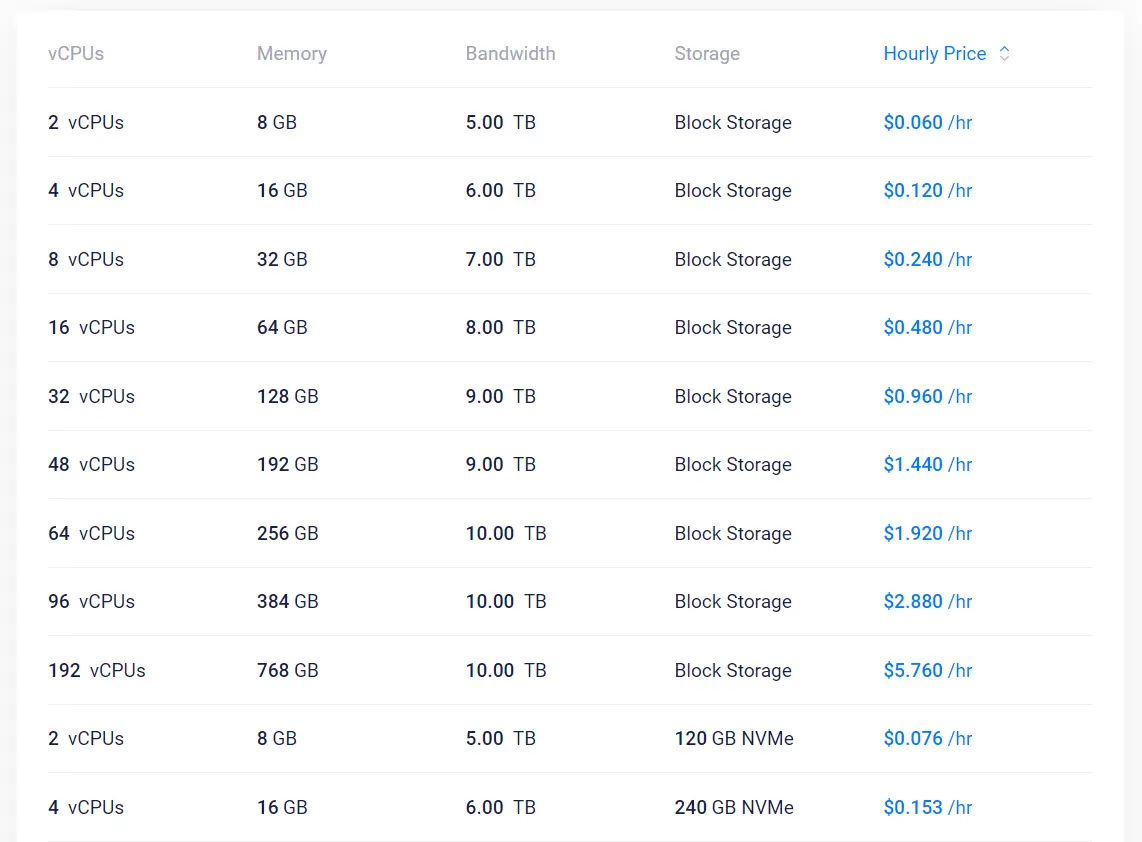
Vultr sells its VPS instances as Cloud Compute plans. Entry pricing starts at $2.50 to $5 per month, depending on the region and IPv4 availability.
Billing runs hourly with a 672-hour monthly cap, so an always-on instance never costs more than its listed monthly price.
The lineup splits into tiers. Regular Cloud Compute uses shared CPUs and is well-suited to smaller sites, staging servers, or lightweight applications.
High Frequency Cloud Compute adds NVMe SSDs and faster processors for CPU-intensive workloads.
Optimized Cloud Compute reserves guaranteed resources for applications that need consistent performance under load.
Vultr runs data centers across 32 locations worldwide, including several in the US. New York, Los Angeles, Chicago, and Dallas are among them.
That spread makes it easy to pick a region close to your customers. The OS library covers common Linux distributions, as well as Windows Server, FreeBSD, and OpenBSD. That’s a wider spread than most competitors offer.
A few billing details catch new users off guard. Powering off an instance doesn’t stop charges, since resources stay reserved until you destroy it.
Backups cost roughly 20 percent of the instance’s base price, and bandwidth overage runs $0.01 per GB.
Factor those into your budget before comparing headline prices against other providers.
Best for: developers and small technical teams who want the flexibility of hourly billing and a wide range of global data center options.
6) ScalaHosting
ScalaHosting takes a managed-first approach, built around two tools it developed in-house.
SPanel replaces cPanel entirely, covering website management, email, databases, backups, file management, DNS, and SSL.
You skip the rising licensing fees that come with third-party control panels.
Shield is the other core feature, a real-time security system that continuously monitors traffic and file changes.
It blocks the large majority of attacks before they reach your site. It also actively learns from traffic patterns, rather than relying on a static rule set.
Daily offsite backups run automatically on every managed plan, with free website migration included for buyers switching from another host.
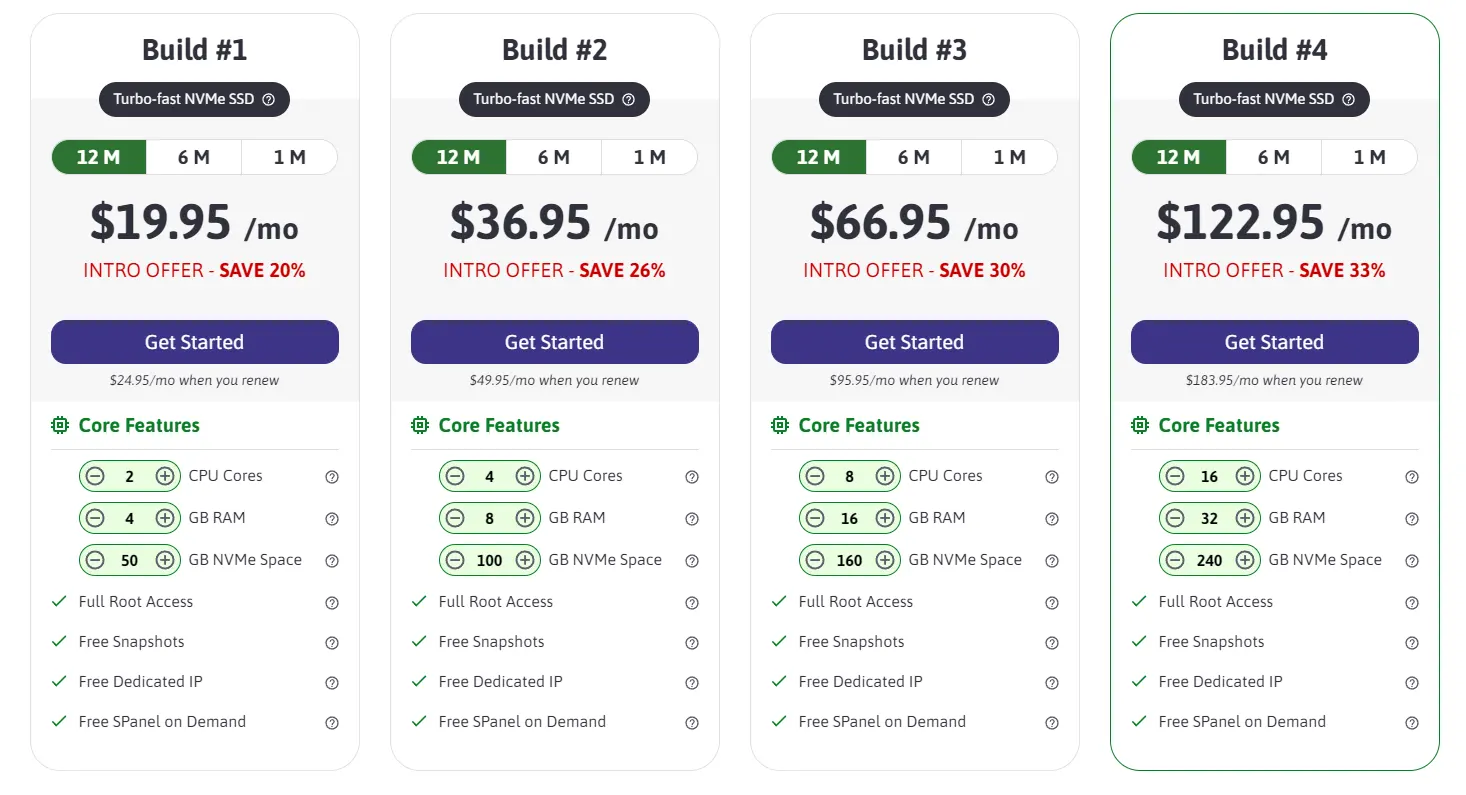
VPS resources are fully customizable, priced at roughly $3 per CPU core and $1 per GB of RAM.
Most buyers start from a fixed Entry Cloud plan and scale from there. Every managed plan includes a dedicated IP address and unmetered bandwidth.
Server locations span the US, Europe, and Asia, so latency remains manageable for a US small-business audience.
ScalaHosting handles server setup, security updates, and ongoing maintenance for you.
That keeps the learning curve lower than that of unmanaged competitors. That convenience shows up in the price, which is higher than that of a comparable unmanaged plan from Vultr or DigitalOcean.
Best for: non-technical small-business owners who want managed WordPress or WooCommerce hosting without having to learn server administration.
What to Check Before You Buy a Linux VPS
A spec sheet only tells part of the story. Two providers can list the same RAM and CPU numbers. Real traffic can still expose a completely different experience on each one.
Before you compare prices, walk through these four checks so you know what you’re actually buying.
I) Managed vs Unmanaged: Which One Fits Your Business
The first real decision is who runs the server day-to-day. Ask yourself plainly: does anyone on your team have the time to patch software, monitor uptime, and fix overnight problems?
Managed VPS plans handle security patching, automated backups, uptime monitoring, and most day-to-day server admin work for you. That coverage costs more each month.
Unmanaged VPS plans hand you full control and full responsibility. They suit teams with an in-house developer or a sysadmin on call.
They also suit owners who genuinely enjoy learning server management and want to configure every detail themselves.
II) RAM, CPU, and Storage, Sized to Real Small Business Workloads
Specs mean little without a real workload to measure them against. Here’s a rough guide to three common small-business setups.
A basic brochure or marketing site with light traffic runs comfortably on 1 vCPU and 1-2GB of RAM. That covers a handful of pages, a contact form, and moderate monthly visits without strain.
A WooCommerce store handling regular sales traffic needs more headroom. Plan for roughly 2 vCPUs and 4GB of RAM, since ecommerce plugins and database queries pull more resources.
A small SaaS app or staging environment often needs 2 to 4 vCPUs and 4 to 8GB of RAM. The exact number depends on concurrent users and background processes.
Storage type changes site speed, sometimes more than plan size does. NVMe SSD storage delivers read speeds between 3,000 and 7,000 MB per second. Standard SATA SSDs top out closer to 500 MB per second.
III) Uptime SLA and What the Fine Print Actually Means
Uptime percentages sound similar until you convert them into actual hours. A 99.9% SLA still allows roughly 8.76 hours of downtime a year, or about 43 minutes a month.
A 99.99% SLA cuts that down to about 52.6 minutes per year, or closer to 4 minutes per month.
Read the SLA terms closely, not just the headline percentage. Most providers exclude scheduled maintenance windows from the uptime calculation, so ask whether planned downtime counts against you.
Ask providers a direct question: What happens if the physical server hosting your VPS fails? If the answer involves manual staff intervention and hours of waiting, your business carries that risk.
IV) Backups, Security, and Root Access
Automated backups are not optional for a business site, full stop. Look for daily automated backups with a retention window of at least seven days.
You also want the option to restore with a single click. That beats filing a support ticket and waiting for a response.
Confirm exactly what gets backed up. Some providers only capture the VPS itself and skip attached storage volumes or external databases. That leaves a gap in your recovery plan. Ask where backups are stored, too.
DDoS protection and free SSL certificates should come standard on any serious plan. They shouldn’t be sold as premium add-ons tacked onto your bill later.
Root access rounds out the picture, giving you full control over the software stack your business runs.
FAQs
How much does Linux VPS hosting cost per month?
Prices vary widely based on resources and support level. Basic unmanaged plans can start under $10 a month. Managed plans with more RAM and CPU often run $20 to $60 a month or more.
Is Linux VPS hosting secure for ecommerce?
Yes, when set up correctly. Look for daily backups, DDoS protection, free SSL, and a clear patching schedule to keep customer data protected.
Can I upgrade my Linux VPS plan later?
Most providers let you scale CPU, RAM, and storage as your site grows. This usually happens through a dashboard upgrade or a support request. Confirm upgrade flexibility before you sign up, since some providers cap how far you can scale within a plan tier.
What Linux distributions can I install on a VPS?
Common options include Ubuntu, Debian, CentOS, Rocky Linux, and AlmaLinux. Ubuntu and Debian are often the friendliest starting points for small business owners new to server management.
Do Linux VPS providers offer 24/7 support?
Many do, though response speed and quality differ by provider. Managed plans usually come with faster, more hands-on support than unmanaged plans. Unmanaged plans often limit you to ticket-based help.
Pick the VPS That Matches Your Team
The right Linux VPS is the one your team can actually run day-to-day. It also needs to hold up on price during a slow month.
Specs and pricing tables only tell part of the story. The real test is whether your business can operate the server you choose without added stress.
If you’re ready to compare real specs against everything covered here, check Truehost’s Linux VPS plans. See how the pricing and support stack up for your business.