Domain RegistrationFind and register the perfect domain for your website.
 .COM DomainChoose a widely recognized domain to build global credibility.
 Domain TransferSeamless domain transfers with zero downtime and complete control.
 All TLDsFind and register your perfect domain. Choose from local and global extensions.
 SSL CertificatesKeep your website safe with reliable SSL Certificates that protect customer data and build trust.
 whoisCheck domain ownership details, expiration dates, and registrar information.
 US DomainRegister a .US domain and build trust in the USA.
 Web HostingEverything your website needs to run smoothly
 WordPress HostingWordPress hosting that just works
 Windows HostingReliable hosting for Windows environments
 Reseller HostingTurn hosting into your business
 Email HostingEmail that looks professional and works anywhere
 cPanel HostingFull control of your hosting with cPanel
 Affiliate ProgramJoin as a partner and earn commissions on every referral you send our way.
 Vps HostingScalable virtual servers that expand as you need.
 Dedicated ServersGet complete access and full control over your dedicated physical server.
 Managed vpsNot tech-savvy? We will take care of everything with our fully managed VPS hosting for you.
 AI Website BuilderCreate stunning websites in seconds with AI.
 Online ShopSet up a professional online store. No coding required.
 Web design serviceGet a tailored website designed to match your brand and support your goals.
 BlogFind helpful guides on web hosting, online selling, digital marketing, and more.
 Contact USYou can reach us anytime, day or night, through chat or email.
 SupportBrowse helpful guides and answers for all of our services.
Truehost and InMotion Hosting are both established web hosting providers, but they take fairly different approaches to pricing, plan structure and who they’re really built for.
This comparison looks at Truehost vs InMotion web hosting across price, features, performance, ease of use, support, scalability and overall value, rather than simply declaring one provider better for everyone.
The right pick genuinely depends on your budget, your website’s needs, and how much you plan to grow.
Rather than treating this as a simple popularity contest, it helps to break the decision down into the specific factors that actually affect your day to day experience running a website.
Some of these will count for far more to a small blog owner than to a business running an online store, so it’s worth reading with your own use case in mind rather than looking for one universal winner.
It’s also worth keeping in mind that hosting prices can vary quite a bit by billing term and promotional pricing.
Both Truehost and InMotion’s current pricing pages show different billing terms and renewal structures, so it’s worth comparing the introductory price and the renewal price separately rather than just going by the number on the homepage.
Truehost vs InMotion Web Hosting: Features Compared

| Feature | Truehost | InMotion Hosting |
| Starting price | From $2.06 on longer-term billing | From $4.99/mo, renews at $13.99/mo |
| Hosting types | Shared, WordPress, VPS, reseller, dedicated | Shared, WordPress, VPS, dedicated |
| Entry-level storage | 30 GB SSD | 100 GB NVMe |
| Websites | Up to 10 on Starter | 2 on Launch |
| Bandwidth | Unlimited | Unmetered |
| Control panel | cPanel | cPanel |
| SSL | Free SSL | Free SSL |
| Backups | Daily backups on listed plans | Backups available depending on plan |
| Migration | Free migration available | Free website transfer available |
| Performance | SSD storage and optimized hosting infrastructure | NVMe storage and UltraStack technology |
| Support | 24/7 support | Human support via live chat and other channels |
| Upgrade options | VPS, reseller and dedicated hosting | WordPress, VPS and dedicated hosting |
With the overview out of the way, here’s a closer look at each factor.
1) Cost and Pricing
Cost is usually one of the biggest deciding factors, so it’s worth starting here.
InMotion’s shared hosting plans commonly start with a low introductory price, often somewhere in the $2 to $3 range per month on longer terms, before renewing at a noticeably higher rate, sometimes several times the original price.
Truehost tends to position its entry level plans as budget friendly too starting from $2.50, with regional pricing that varies depending on the market you’re buying in.
Both providers bundle in extras like a free domain, SSL and email on many plans, though what’s included and for how long varies.
It’s worth checking whether backups and migration are included in the base price or charged separately, since these add up quickly if they’re not.
Overall value comes down to comparing the full package, not just the number on the pricing page.
It’s also worth reading the terms attached to any promotional pricing carefully.
A plan advertised at a strikingly low monthly rate often assumes a two or three year commitment paid upfront, and the actual monthly figure on shorter terms can look quite different once you check it directly.
2) Hosting Plans and Options
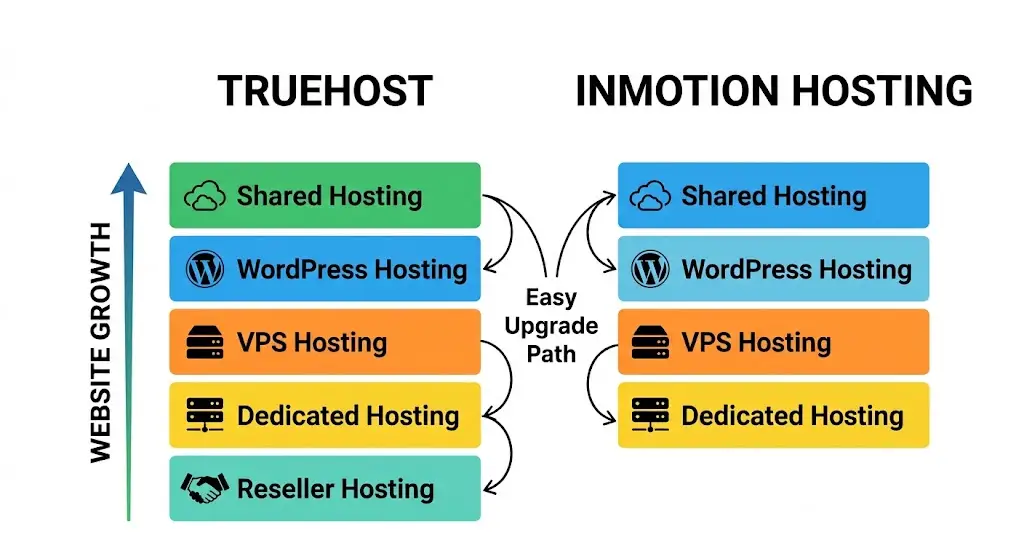
Both providers offer shared hosting, WordPress hosting, VPS hosting and dedicated hosting, with Truehost also offering reseller hosting for anyone looking to run their own hosting business on top of its infrastructure.
Both make it reasonably easy to upgrade as a website grows, moving from shared to VPS and eventually to dedicated resources if needed.
Shared hosting from either provider tends to suit smaller sites and blogs, while VPS and dedicated options are aimed at higher traffic sites, applications and businesses that need more control.
3) Storage and Resources
Truehost’s shared hosting plans scale from 30 GB SSD on Starter to 50 GB SSD on Pro, while the Unlimited plan removes the stated SSD storage cap.
Starter and Pro support 10 and 30 websites respectively, with both plans also listing unlimited bandwidth and email accounts.
InMotion takes a different approach, with NVMe storage on its shared hosting plans and higher storage allowances on some tiers.
The important comparison isn’t simply SSD versus NVMe, though.
CPU allocation, RAM, database limits, inode limits and the number of websites you can run can have a bigger effect on a busy WordPress site.
For Truehost, the Starter and Pro plans are positioned around roughly 50,000 monthly visits, so the better comparison is the resources included at the price point rather than the maximum storage advertised by either provider.
4) Website Performance
Truehost’s hosting infrastructure combines SSD storage, LiteSpeed and caching, with its current infrastructure page also highlighting NVMe drives and edge caching.
Its cPanel plans are specifically marketed for WordPress and other CMS platforms.
InMotion’s WordPress hosting uses its UltraStack environment, with features including NGINX reverse proxy, PHP-FPM workers, Redis persistent object caching, OPcache and Brotli compression.
Its WordPress infrastructure also advertises 99.99% maximum uptime for its production servers.
For a fair comparison, look at storage technology, caching, server software, PHP configuration, CDN compatibility and the resources available on the exact plan.
A faster storage technology on paper doesn’t automatically make every WordPress website faster.
5) WordPress Hosting
Truehost puts WordPress directly into its cPanel hosting offering.
Its WordPress plans include cPanel access, one-click installation, automated SSL, free migrations, daily backups and WordPress hosting on every listed shared tier.
InMotion also offers WordPress hosting through cPanel, alongside its separate InMotion Central platform.
Its WordPress environment includes features such as caching, PHP-FPM, Redis object caching and automatic backups on applicable plans.
For someone who specifically wants WordPress plus the familiar cPanel interface, Truehost’s setup is straightforward.
If advanced WordPress optimization is the priority, compare the caching, server stack, staging and resource features available on the specific plans rather than choosing based on the WordPress label alone.
6) cPanel and Ease of Management
cPanel is one of Truehost’s strongest selling points for users who want to manage WordPress without working directly from the command line.
The cPanel plans include tools for domains, files, databases, email, SSL and application installation, while Softaculous provides one-click installation for WordPress and other applications.
InMotion also provides cPanel on its relevant hosting plans, giving users access to the familiar tools for managing websites, domains and hosting accounts.
Its WordPress offering now gives customers a choice between traditional cPanel hosting and InMotion Central on eligible plans.
If you’re already comfortable with cPanel or want a hosting environment that can handle more than WordPress, Truehost’s cPanel plans offer a straightforward all-in-one setup.
Users looking specifically for a newer WordPress management interface may also want to compare InMotion Central.
7) Website Migration
Truehost makes migration a significant part of its hosting offering.
Its current hosting information advertises free inbound migrations, including websites, applications, servers and reseller accounts, with most transfers completed within about 24 hours.
For WordPress users, Truehost also provides migration guidance covering files, databases, plugins, themes, domain configuration and .htaccess settings.
Its cPanel documentation supports both full account backups and individual file, database and email backups.
InMotion also offers website migration options, including automated migration on applicable hosting plans.
When comparing the two, check whether migration is included in the specific plan, how many websites are covered and whether email and databases are transferred alongside the website.
8) Security
Truehost’s standard hosting setup includes automated SSL certificates, daily backups and security features built into its hosting environment.
Its support documentation also covers tools such as ModSecurity, SSL management and server-level security configuration on supported environments.
InMotion similarly includes free SSL on its WordPress hosting and offers additional security and infrastructure protections depending on the hosting product and plan.
The important comparison is therefore what is included without an add-on: SSL, backups, malware protection, firewalling, account isolation and server monitoring.
Higher-level security features should be compared at the individual plan level.
9) Backups

Truehost includes daily automated backups on its cPanel hosting plans.
The current Unlimited plan also specifies five days of incremental backup retention, while Truehost’s cPanel documentation allows customers to generate full and partial account backups themselves.
InMotion lists automatic backups as available on its WordPress hosting, although the exact backup features depend on the product and plan.
For either provider, check how frequently backups run, how long they are retained and whether restoring a backup is self-service.
Keeping an independent copy of important website data is still sensible rather than relying entirely on the host’s backup system.
10) Email Hosting
Truehost includes unlimited email accounts on its Starter and Pro cPanel plans, allowing businesses to create addresses using their own domains.
Its cPanel environment also provides webmail and the usual tools for managing mailboxes, forwarding and related settings.
Email availability and mailbox limits should be checked against the specific InMotion plan being considered, particularly if the hosting account will be used for a business with multiple employees.
For someone who wants website hosting, WordPress, cPanel and domain-based email in one account, Truehost’s bundled approach can be particularly convenient.
11) Developer Features
Truehost’s cPanel environment goes beyond basic WordPress hosting.
Its current plans list Python and Node.js support, while its documentation covers Git deployment, SSH access, databases, PHP configuration and server management.
InMotion also provides developer-oriented features across its hosting lineup, with considerably more control available once you move from shared hosting to VPS.
Developers should compare PHP versions, SSH, Git, cron jobs, database options and application support on the exact plan rather than assuming every shared hosting tier provides the same capabilities.
For developers who need complete server-level control, the comparison eventually shifts from shared hosting to VPS.
Truehost supports cPanel, CyberPanel and CWP on its VPS environment, while cPanel on a VPS can involve a separate license depending on the setup.
12) VPS Hosting and Scalability
Truehost gives customers a clear path beyond shared hosting, with VPS, reseller and dedicated hosting available when a website outgrows its current environment.
Its cloud infrastructure is designed to support websites, applications and virtual machines, so upgrading doesn’t necessarily mean moving to an entirely different provider.
InMotion similarly offers VPS and dedicated hosting for customers who need more CPU, RAM, storage and server control.
Its VPS plans provide substantially more resources than shared hosting and are aimed at higher-demand workloads.
For a growing website, compare the actual upgrade path: available VPS resources, migration assistance, control panels, managed versus unmanaged options, and the cost of moving up.
The cheapest shared plan isn’t necessarily the cheapest long-term option if you expect the website to grow quickly.
13) Customer Support
Truehost provides 24/7 support, alongside a large online knowledge base covering cPanel, WordPress, domains, SSL, backups, migrations and server administration.
Its current hosting pages also highlight live support and written guides for both beginners and more technical users.
InMotion also provides customer support through its available channels and maintains documentation for its hosting products.
Its support setup and response options should be compared against the specific plan and your location.
For someone choosing between the two, support isn’t only about whether a provider says 24/7.
Check whether the support team can actually assist with cPanel, WordPress migrations, DNS, email and server issues relevant to your hosting plan.
14) Uptime and Reliability

Truehost currently advertises 99.99% uptime on its cPanel hosting page, while its broader infrastructure page reports a 99.99% uptime figure over the previous 90 days.
InMotion advertises up to 99.99% uptime for its WordPress production infrastructure, which it describes as triple-failover redundant.
These figures are useful indicators, but they shouldn’t be treated as a promise that a website will never experience downtime.
Look at the infrastructure behind the guarantee, including redundancy, monitoring, backup systems and data center availability.
Which Web Hosting Provider Should You Choose?
The better choice depends on what you’re hosting and how much control you need, but Truehost has a particularly strong case for users looking for affordable cPanel hosting with multiple websites, email, backups and a straightforward upgrade path.
1) Your Budget: Start with the actual billing period. Truehost’s current entry-level cPanel plan is $2.06 when billed triennially, while InMotion’s Launch plan is advertised at $4.99/month before its higher renewal price.
2) Your Website Type: Truehost supports WordPress alongside other CMS platforms and applications, making its cPanel hosting suitable if you want more than a single WordPress installation.
3) Your Expected Traffic: Don’t choose based on “unlimited bandwidth” alone. Check the plan’s website, CPU, RAM and other resource limitations. Truehost currently gives approximate monthly visit figures alongside its Starter and Pro plans, which provides more context than bandwidth alone.
4) The Resources You Need: Compare the actual storage, website limits and server resources at the tier you can afford. Truehost’s Starter gives you 30 GB SSD and 10 websites, while Pro increases that to 50 GB and 30 websites.
5) Your Technical Experience: If you want a familiar control panel rather than managing everything through SSH, Truehost’s cPanel setup gives you access to website, domain, database, email and application management from one interface.
6) Your Growth Plans: Truehost offers a path from shared hosting into VPS and dedicated infrastructure, so you can scale the hosting environment as resource requirements increase.
7) The Features You Actually Need: Free migration, daily backups, cPanel, WordPress installation, email, Python/Node.js support and SSL are already bundled into Truehost’s relevant cPanel plans. Compare those inclusions against the equivalent InMotion tier rather than comparing headline prices alone.
For budget-conscious users, beginners, small businesses and people managing several websites, Truehost is the stronger starting point in this comparison because more of the core hosting tools are bundled into its shared hosting plans.