Domain RegistrationFind and register the perfect domain for your website.
 .COM DomainChoose a widely recognized domain to build global credibility.
 Domain TransferSeamless domain transfers with zero downtime and complete control.
 All TLDsFind and register your perfect domain. Choose from local and global extensions.
 SSL CertificatesKeep your website safe with reliable SSL Certificates that protect customer data and build trust.
 whoisCheck domain ownership details, expiration dates, and registrar information.
 US DomainRegister a .US domain and build trust in the USA.
 Web HostingEverything your website needs to run smoothly
 WordPress HostingWordPress hosting that just works
 Windows HostingReliable hosting for Windows environments
 Reseller HostingTurn hosting into your business
 Email HostingEmail that looks professional and works anywhere
 cPanel HostingFull control of your hosting with cPanel
 Affiliate ProgramJoin as a partner and earn commissions on every referral you send our way.
 Vps HostingScalable virtual servers that expand as you need.
 Dedicated ServersGet complete access and full control over your dedicated physical server.
 Managed vpsNot tech-savvy? We will take care of everything with our fully managed VPS hosting for you.
 AI Website BuilderCreate stunning websites in seconds with AI.
 Online ShopSet up a professional online store. No coding required.
 Web design serviceGet a tailored website designed to match your brand and support your goals.
 BlogFind helpful guides on web hosting, online selling, digital marketing, and more.
 Contact USYou can reach us anytime, day or night, through chat or email.
 SupportBrowse helpful guides and answers for all of our services.
Claude Skills are reusable instruction files that help Claude build, troubleshoot, and optimize n8n workflows more accurately. Instead of repeating the same prompts or correcting the same mistakes in every conversation, you can give Claude task-specific guidance that it automatically applies to relevant workflows.
For n8n, Claude Skills are not a native feature. They work in one of two ways:
- Claude Code Skills, where Claude loads reusable instructions while generating or editing n8n workflow JSON.
- Community-built AI agent workflows, where the same instructions are added to an AI Agent’s system prompt or loaded from external files during workflow execution.
By breaking guidance into focused Skills rather than a single large prompt, Claude can provide more consistent workflow structures, write better expressions, configure nodes correctly, and troubleshoot issues more efficiently. This also reduces repetitive prompting and unnecessary token usage.
This guide covers the seven core Claude Skills for n8n, what each one does, and how to install them so you can build more reliable automations.
1) Expression Syntax
n8n’s expressions; the snippets wrapped in {{ }}; are where a lot of workflows quietly break. This skill keeps Claude precise about how to write and debug them.
What it helps with
- Writing valid n8n expressions
- Accessing data with variables like $json, $node, $now, and $env
- Referencing webhook data correctly ($json.body)
- Using fallback values with ??
- Knowing when a Code node is a better fit than a sprawling expression
Example
Instead of:
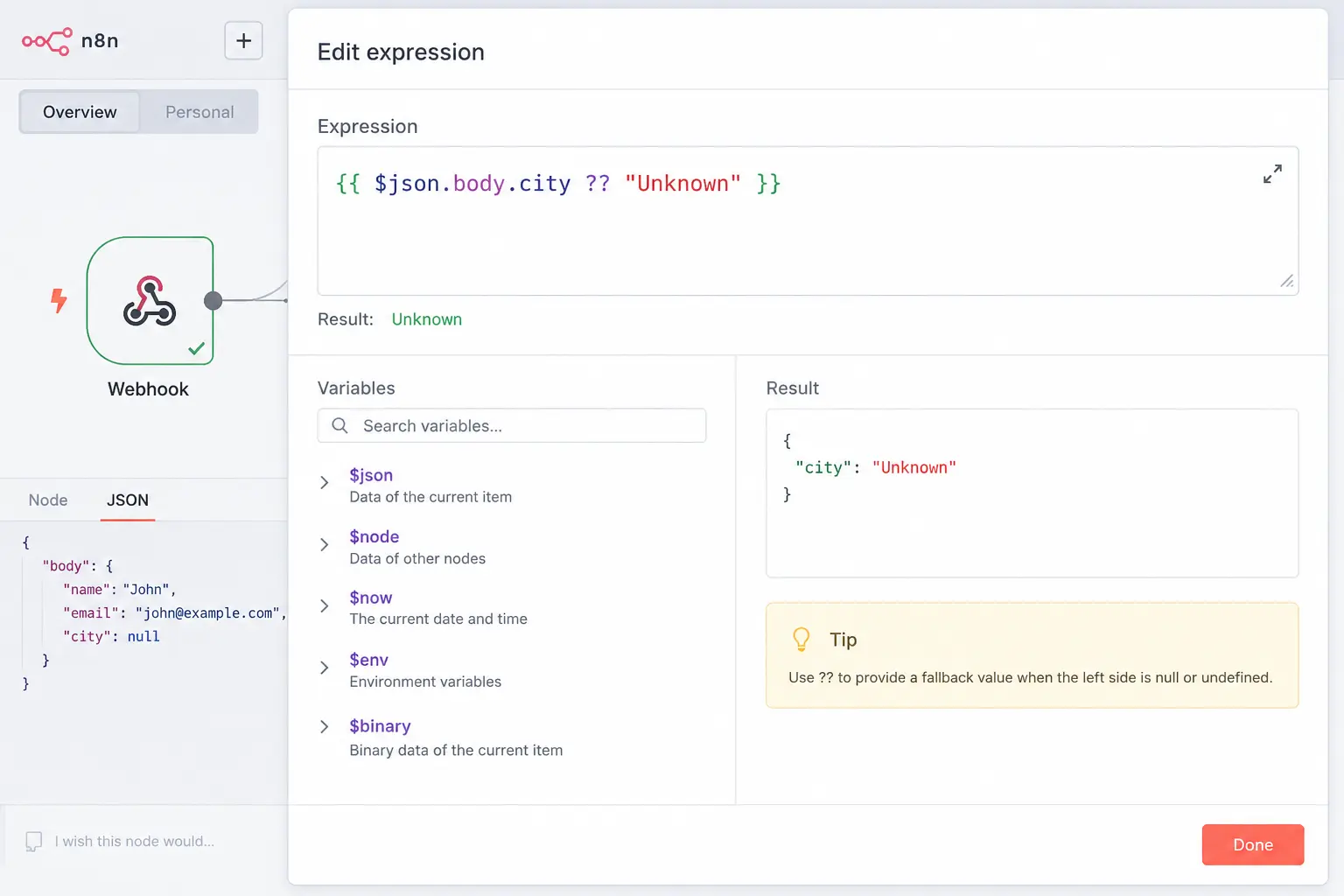
$json.city
Use, when the data comes from a Webhook node:
$json.body.city ?? "Unknown"
The difference counts because webhook payloads land under body, not at the top level of $json; a mistake that produces silent undefined values rather than an obvious error.
Tips
- Always wrap expressions in {{ }}.
- Keep expressions simple; move anything with real logic into a Code node.
- Remember expressions execute once per item, not once per workflow run.
2) MCP Tools Expert
This skill governs how Claude chooses and uses n8n MCP tools; the interface that lets Claude actually search for nodes, build workflows, and validate them rather than just guessing at JSON from memory.
What it helps with
- Finding the right node for the job
- Managing workflows programmatically
- Running validation checks at the right time
- Selecting the appropriate validation mode (quick vs. strict)
- Using correct node types and parameter shapes
Example
Rather than dropping in a generic Set node from memory, Claude uses the MCP tools to pull the node’s actual current configuration schema and validates it before adding it to the workflow, catching parameter mismatches before they become runtime errors.
Tips
- Validate after every major structural change, not just at the end.
- Use quick validation while iterating, and switch to strict validation before deploying to production.
3) Workflow Patterns
This skill gives Claude a library of proven shapes for common automation problems, so it reaches for a tested structure instead of inventing one from scratch each time.
Common workflow types
- Webhook workflows
- API integrations
- Database workflows
- AI agent workflows
- Scheduled automations
What it helps with
- Organizing workflows logically
- Connecting nodes correctly
- Adding error handling
- Reusing workflow sections across projects
Example
A scheduled workflow that pulls records from a database on a timer, summarizes them with an AI model, and posts the summary to a Slack channel, a pattern common enough that Claude can scaffold it correctly on the first pass rather than through trial and error.
Tips
- Every production workflow should include error handling; don’t treat it as optional polish.
- Split large workflows into reusable sub-workflows once they grow past a manageable size.
4) Validation Expert
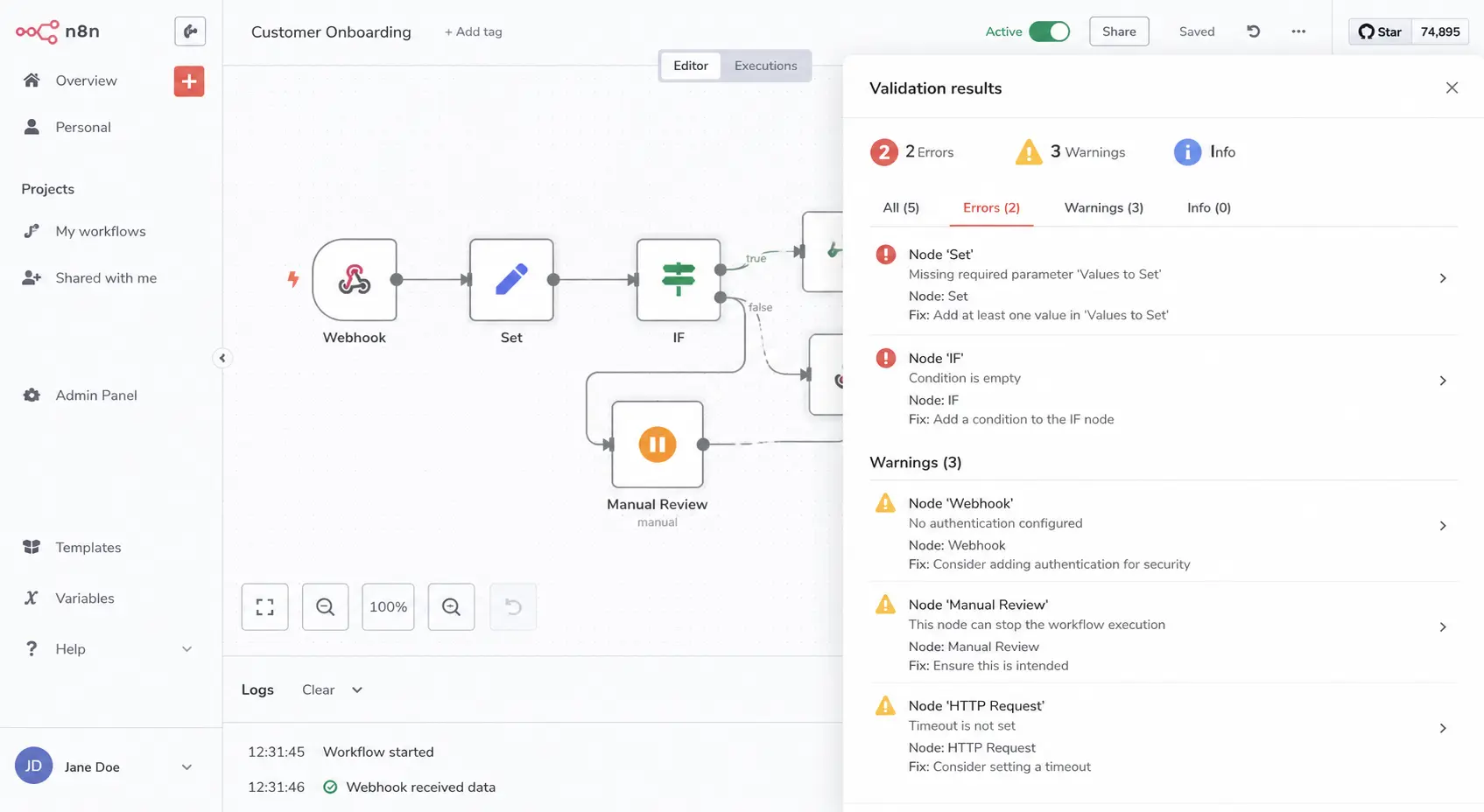
n8n’s validation output is useful, but it’s also noisy; some warnings count, some aren’t, and telling the difference takes context this skill supplies.
What it helps with
- Explaining what a given validation message actually means
- Identifying false or low-priority warnings
- Fixing genuine workflow problems
- Rechecking workflows after changes are made
Example
If a validator flags “missing error handling,” Claude uses this skill to judge whether that’s actually necessary for the workflow’s use case; a low-stakes internal script and a customer-facing production pipeline don’t need the same rigor.
Tips
- Passing validation is not the same as a workflow running correctly; test it.
- Prioritize real errors over minor stylistic warnings.
5) Node Configuration
Different n8n nodes and different operations within the same node expose different fields. This skill keeps Claude from configuring nodes with settings that don’t apply or missing ones that do.
What it helps with
- Required settings for a given node and operation
- Dependencies between properties
- AI Agent node connections
- Credential setup
- Pagination and data format handling
Example
When configuring an HTTP Request node, Claude knows which fields become relevant based on the chosen method and body type; a GET request doesn’t need a body-encoding setting, but a POST with form-data does.
Tips
- Don’t assume one operation’s settings carry over to another on the same node.
- Double-check that credentials are actually attached and valid before relying on a node.
6) AI Agents
This is the most involved of the seven skills, activating whenever the task touches @n8n/n8n-nodes-langchain.* nodes, AI Agent, LLM Chain, Text Classifier, tool calling, $fromAI, memory, structured output, RAG, or chatbot design.
What it helps with
- Choosing between Agent, LLM Chain, and Text Classifier, and correctly wiring the model/memory/tools/output-parser slots for whichever is chosen
- Writing tool names and descriptions so they function as part of the prompt; the model picks tools based on how they’re worded, not just what they technically do.
- Structuring $fromAI parameters so the model can populate them correctly at runtime
- Adding structured output with auto-fixing, so malformed model output gets repaired instead of failing the run outright
- Wiring memory with a proper sessionId so conversations stay isolated per user or thread
- Adding human-in-the-loop review steps before sensitive tool actions execute
- Designing multi-agent topologies (a shell agent, a core agent, and sub-agents) with anti-loop filtering so agents don’t call each other in circles
Example
Building a support chatbot with a sub-agent dedicated to order lookups, Claude writes the core agent’s tool description precisely enough that it only delegates order-related questions to the sub-agent, keys memory to a sessionId tied to the chat user so conversations don’t bleed between users, and adds an auto-fixing output parser so a malformed JSON reply gets corrected rather than breaking the run.
Tips
- Treat tool names and descriptions as prompt engineering, not just labels; wording changes which tool gets picked.
- Always set a sessionId in memory; without it, conversations can mix across users.
- Prefer auto-fixing output parsers for agents; raw structured parsing is less forgiving inside an agent loop.
- Add anti-loop filtering before nesting multiple agents together.
7) Binary & Data
Binary handling is a quiet source of pain in n8n: workflows that run clean, report no errors, and still lose the file somewhere along the way. This skill exists specifically to catch that class of bug.
What it helps with
- $binary and $json are separate file contents that never live in $json, so referencing a file field there simply returns nothing.
- Keeping binary data alive through Merge nodes, which drop it by default unless the correct combine mode is selected
- Working around the AI Agent node’s binary boundary: agents don’t forward binary data directly, so files need to be pre-staged to storage and passed in as a key or URL instead
- Knowing that displaying an image in a chat surface requires a real hosted URL, a raw binary or base64 field won’t render
Example
A workflow uploads a PDF, converts it to an image, and sends it to an AI Agent for OCR. Rather than wiring the binary directly into the agent, which won’t carry through, Claude configures a Merge node with the correct combine mode so the original file and the analysis land on the same item, then stages the file to storage so the agent receives a reference it can actually use.
Tips
- If a downstream node can’t “see” a file, check whether a Merge node dropped it; this is the single most common cause.
- Don’t hand binary data directly to an AI Agent node; store it and pass a key or URL instead.
- Use a hosted URL, not raw binary, whenever an image needs to actually display in a chat interface.
Setup / Installation
Option A: Claude Code + skills repo
i) Install Claude Code, and make sure you’re on a Claude plan with Skills access (Skills are available to Pro, Max, Team, and Enterprise users).
ii) Method 1: Plugin install (recommended): run /plugin install czlonkowski/n8n-skills directly in Claude Code. This installs the skills in one step with no manual file handling.
iii) Alternative: Marketplace: run /plugin marketplace add czlonkowski/n8n-skills, then /plugin install and select n8n-mcp-skills from the list.
iv) Alternative: Manual clone:
git clone https://github.com/czlonkowski/n8n-skills.git
then copy the skill folders into ~/.claude/skills/. This route is useful if you want to inspect or customize individual skill files before installing.
v) Restart Claude Code so the skills load.
vi) (Optional, recommended) Connect the n8n-mcp MCP server so Claude can validate and deploy workflows directly, not just generate JSON.
vii) Test it: ask Claude to “build a webhook workflow that posts to Slack” and confirm it references the relevant skill in its reasoning.
Note: The n8n-skills project has expanded beyond the original seven Skills and now includes additional guidance for Code nodes, error handling, sub-workflows, self-hosting, and more.
However, the seven Skills covered in this guide remain the foundation for most everyday n8n workflow development.
Best Practices When Using Claude Skills
- Keep Skills focused on one task. A skill that tries to cover expressions, validation, and node configuration all at once is harder for Claude to apply correctly than three narrow ones.
- Avoid overlapping Skills. If two skills describe the same trigger conditions, Claude may load the wrong one or both unnecessarily.
- Version-control your Skill files. Treat them like code; track changes, and roll back if an update makes Claude’s output worse.
- Test Skills independently before using them in production. Confirm a skill actually improves behavior on its own before combining it with others.
- Store reusable examples in separate resource files. Keep the main SKILL.md lean and let Claude pull in longer examples only when needed.
- Keep sensitive credentials outside Skill definitions. Skills are instructions, not a secrets store; use environment variables or a credentials manager instead.
- Combine Skills only when necessary. Loading every skill for every task adds context and cost without adding accuracy.
Get More Out of n8n with Claude Skills
Claude Skills make building n8n workflows faster, more consistent, and easier to maintain. By providing Claude with reusable, task-specific instructions, you can spend less time fixing repetitive issues and more time designing reliable automations.
Whether you’re creating simple workflows or advanced AI agents, the right combination of Skills helps improve accuracy, streamline development, and reduce troubleshooting.
As your automation projects grow, you can expand your Skills library to cover more specialized tasks, keeping your workflows organized and easier to manage.
Ready to build powerful AI-powered automations? Deploy n8n on fast, reliable hosting from Truehost and start creating workflows with confidence. Check Truehost n8n hosting today.
Claude Skills for n8n FAQs
Are Claude Skills free?
Skills themselves are free, open-source instruction files; the n8n-skills repository is MIT-licensed. What costs money is the Claude plan or API usage needed to run them; Skills require a Claude plan with Skills access (Pro, Max, Team, or Enterprise) or API/Claude Code access.
How do I use Claude for n8n?
The most common path is Claude Code paired with the n8n-mcp MCP server, which lets Claude read your n8n instance’s available nodes, build and validate workflow JSON, and optionally deploy it directly. Skills layer on top of that to keep Claude’s output accurate to n8n’s specific behavior.
Can I create custom Skills?
Yes. A skill is just a folder with a SKILL.md file (YAML frontmatter plus instructions) and, optionally, scripts or reference files. You can write your own for internal nodes, house style conventions, or workflow patterns specific to your team.
Do Claude Skills work with self-hosted n8n?
Yes, the skills describe n8n’s behavior and the MCP tooling, not the hosting method. The n8n-skills project even includes a dedicated self-hosting skill for deployment tasks like setting up n8n on a VPS.
Can multiple Skills be used in one workflow?
Yes, and this is the normal case. Building a single workflow with an AI Agent, a webhook trigger, and file handling might draw on the Workflow Patterns, AI Agents, and Binary & Data skills all in the same session. Claude loads whichever apply based on the task.
Do Claude Skills replace prompts?
No, they supplement prompts rather than replace them. You still tell Claude what you want built; Skills make sure Claude applies the right n8n-specific conventions while building it, so you don’t have to restate those conventions every time.
What’s the difference between Claude Skills and MCP servers?
They solve different problems. An MCP server (like n8n-mcp) gives Claude tools to query node schemas, validate workflows, and push changes to a live n8n instance. A Skill gives Claude knowledge– the instructions for how to use those tools well and how n8n’s behavior actually works. In practice, the two are meant to be used together: the MCP server provides the access, and the skills provide the expertise.