Domain RegistrationFind and register the perfect domain for your website.
 .COM DomainChoose a widely recognized domain to build global credibility.
 Domain TransferSeamless domain transfers with zero downtime and complete control.
 All TLDsFind and register your perfect domain. Choose from local and global extensions.
 SSL CertificatesKeep your website safe with reliable SSL Certificates that protect customer data and build trust.
 whoisCheck domain ownership details, expiration dates, and registrar information.
 US DomainRegister a .US domain and build trust in the USA.
 Web HostingEverything your website needs to run smoothly
 WordPress HostingWordPress hosting that just works
 Windows HostingReliable hosting for Windows environments
 Reseller HostingTurn hosting into your business
 Email HostingEmail that looks professional and works anywhere
 cPanel HostingFull control of your hosting with cPanel
 Affiliate ProgramJoin as a partner and earn commissions on every referral you send our way.
 Vps HostingScalable virtual servers that expand as you need.
 Dedicated ServersGet complete access and full control over your dedicated physical server.
 Managed vpsNot tech-savvy? We will take care of everything with our fully managed VPS hosting for you.
 AI Website BuilderCreate stunning websites in seconds with AI.
 Online ShopSet up a professional online store. No coding required.
 Web design serviceGet a tailored website designed to match your brand and support your goals.
 BlogFind helpful guides on web hosting, online selling, digital marketing, and more.
 Contact USYou can reach us anytime, day or night, through chat or email.
 SupportBrowse helpful guides and answers for all of our services.
n8n (pronounced “n-eight-n,” short for “nodemation”) is a workflow automation platform that helps you connect apps, APIs, databases, and AI tools.
It lets you automate repetitive tasks and build workflows with a simple drag-and-drop editor. If you need more advanced features, you can also add JavaScript or Python code.
You can even self-host n8n on your own server, giving you full control over your data and workflows.
n8n has become popular because it combines ease of use with powerful features. It works well for beginners, developers, businesses, and anyone building AI-powered automations.
The platform was created to fix some of the biggest problems with older automation tools like Zapier and Make. Those tools often charge per task, make complex workflows harder to build, and don’t let you host them yourself. n8n was designed to remove those limits.
It lets you build more advanced workflows, write custom code when needed, and keep full ownership of your data by self-hosting it for free.
How n8n Works
Workflows
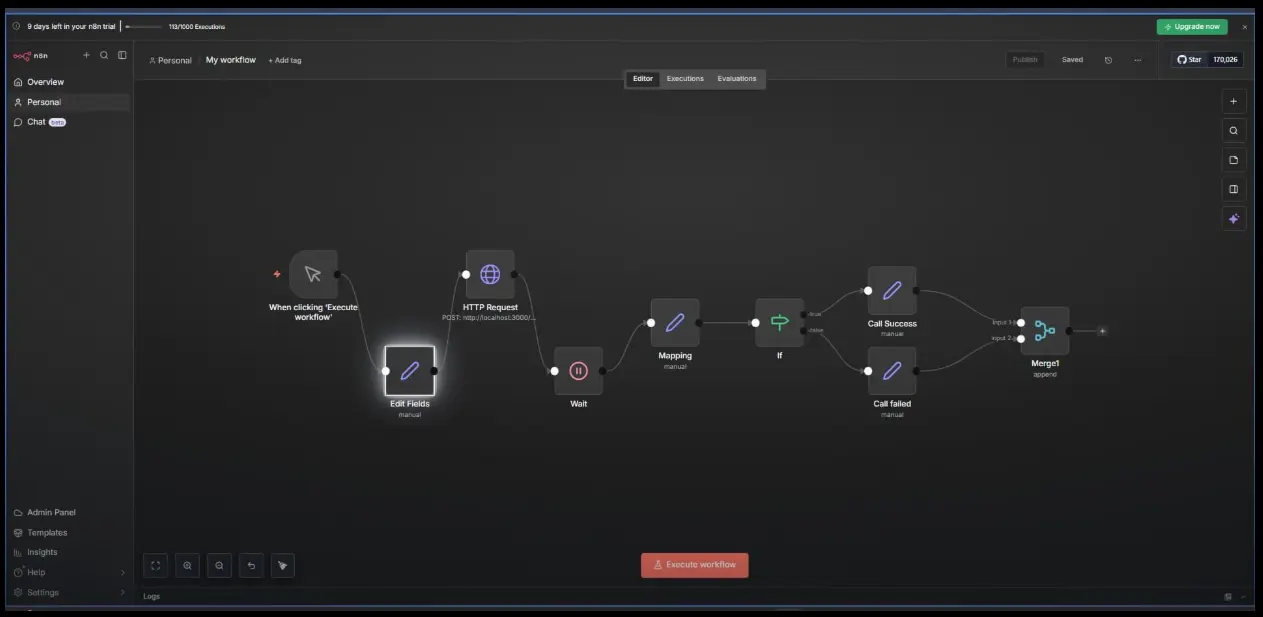
A workflow is a series of connected steps that automate a task from start to finish. Most workflows follow the same basic shape: Trigger → Actions → Logic → Result. Something happens (a new form submission, a scheduled time, an incoming chat message), and the workflow takes it from there, pulling data, transforming it, making decisions, and pushing a result somewhere else.
Nodes
Nodes are the building blocks of every workflow. Each node represents a single step, connecting to an app, calling an API, querying a database, running an AI model, or executing a snippet of custom code. You wire nodes together on a canvas to define how data flows from one step to the next.
Triggers
Triggers are the nodes that start a workflow automatically. Common ones include:
- Webhooks: start a workflow the instant an external system sends data
- Schedules: run a workflow on a timer (every hour, every morning, every Monday)
- App events: a new row in a spreadsheet, a new email, a new CRM record
- Manual clicks: trigger a run yourself for testing or one-off tasks
- Chat messages: trigger a workflow from a chatbot or messaging interface
Logic and Data
This is where n8n moves beyond simple “if this, then that” automation. IF and Switch nodes let a workflow branch based on conditions. Dedicated data nodes let you filter, transform, merge, and loop through data as it moves between steps.
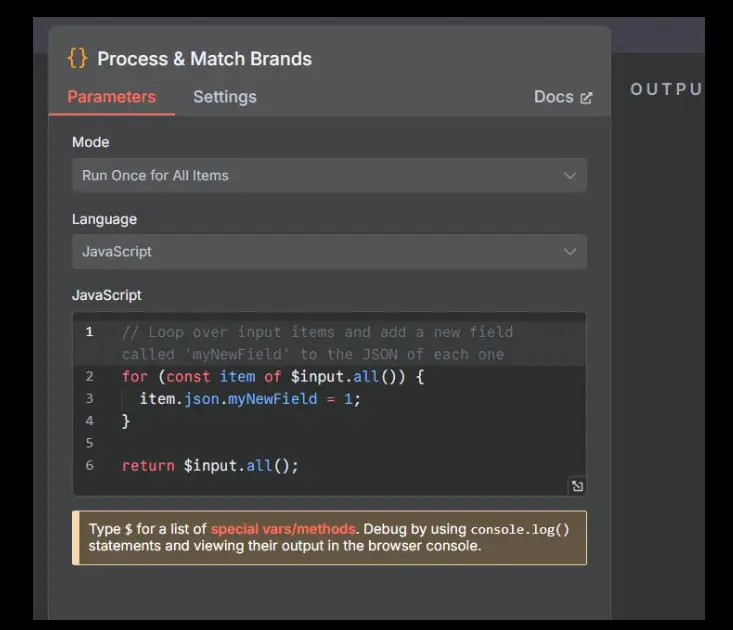
When the built-in nodes aren’t enough, you can add JavaScript or Python for custom functionality. Use code to parse complex data formats, call niche APIs, or apply business logic that isn’t possible with pre-built nodes.
Workflow Execution
Every time a workflow runs, it’s called an execution.
Before publishing a workflow, n8n lets you test it to make sure everything works as expected. After each run, you can view detailed execution logs and inspect every step to quickly identify and fix errors.
Executions are also important for pricing. If you use n8n Cloud, your monthly plan is based on the number of workflow executions rather than the number of individual steps or tasks.
Visual Builder + Code
At its core, n8n is a drag-and-drop canvas: you place nodes, connect them, and configure each one through a form-based interface. No coding is required to get a working automation.
But because n8n is built for technical users too, you can add JavaScript or Python nodes at any point for advanced logic, custom data transformations, or edge cases the visual nodes don’t cover.
Few tools let you move this fluidly between “no-code” and “full-code” inside the same workflow.
Core Features
- Visual drag-and-drop workflow editor for building automations without writing code
- A large and growing library of pre-built integrations. It includes thousands of nodes for popular apps and services. There’s also a generic HTTP node that can connect to virtually any REST API, even without a dedicated integration.
- AI nodes with LangChain support; build agents, retrieval-augmented generation (RAG) pipelines, and connect to essentially any large language model provider
- Code nodes for JavaScript or Python, for when logic gets too complex for the visual builder alone
- A wide range of triggers: webhooks, schedules, app events, and more
- Built-in data tools; merge, filter, loop, and split data as it moves through a workflow
- A templates gallery with pre-built workflows you can copy and adapt
- Error handling and debugging tools, including execution logs and step-by-step inspection
- Unlimited users and unlimited workflows on every plan, including the free self-hosted edition
Pricing and Plans
n8n’s pricing splits cleanly into two paths: self-host it yourself for free, or let n8n host it for you and pay based on usage.
Community Edition (Self-Hosted): Free forever, with unlimited workflows, executions, integrations, and custom code. The only cost is whatever server or hosting you run it on.
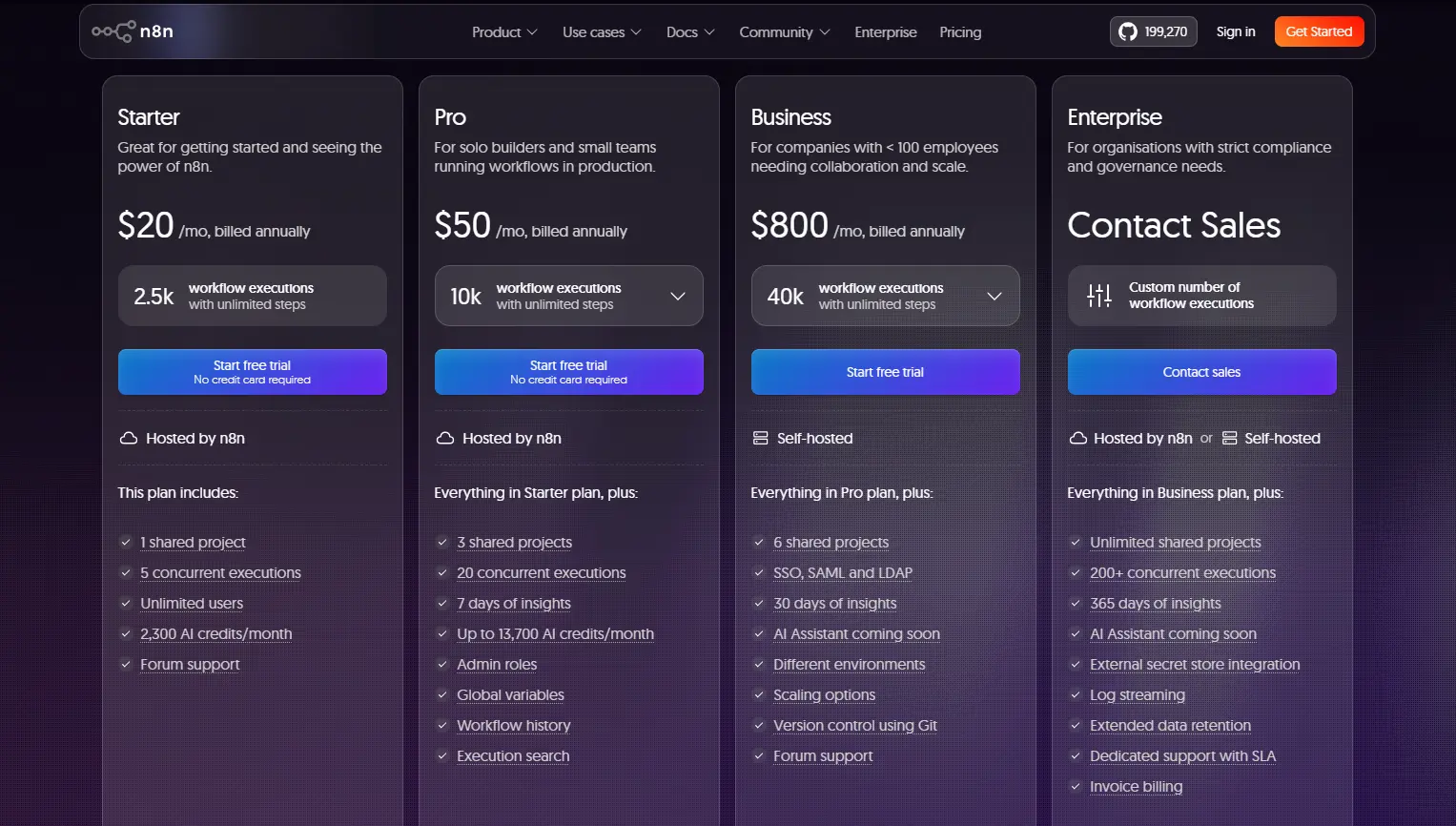
Cloud Plans: Priced by monthly workflow executions rather than by individual steps or tasks, meaning a five-step workflow and a fifty-step workflow both cost the same per run. Every cloud tier includes unlimited users, unlimited workflows, and access to all integrations.
- Starter: from roughly $20/month billed annually (about $24/month billed monthly). Includes 2,500 executions per month, AI credits, and community forum support.
- Pro: from roughly $50/month billed annually (about $60/month billed monthly). Includes 10,000 executions per month, more AI credits, workflow history, and advanced team features.
- Business: from roughly $800/month billed annually (about $960/month billed monthly). Includes 40,000 executions per month, single sign-on (SSO), Git-based version control, and additional scaling options. Notably, this tier is offered as a self-hosted deployment rather than a fully managed cloud product and is aimed at organizations with fewer than 100 employees.
- Enterprise: custom pricing for larger organizations, with negotiated execution limits, advanced security and compliance features, and dedicated support.
A practical note worth flagging: n8n counts an “execution” as one full run of a workflow, regardless of how many steps or nodes it contains.
That makes n8n’s pricing model meaningfully different from per-task tools like Zapier, especially for longer, more complex workflows; a ten-step workflow that runs once still counts as a single execution.
Use Cases and Real-World Examples
i) AI Agents & Intelligence: Chatbots, RAG-based document Q&A, turning meeting notes into tasks, sentiment analysis, and lead scoring or enrichment.
ii) Business Operations: Lead qualification, customer support triage and escalation, content generation and distribution, and revenue operations such as CRM syncing and billing workflows.
iii) Data & IT: Database syncing, backups, API orchestration, threat intelligence gathering, and email or Slack automation.
iv) Personal & Productivity: Social media scheduling, personalized news digests, and personal assistant bots (for example, a Telegram-based AI assistant).
Alternatives to n8n
a) Zapier: Easy to use with no coding required, but billed per task, which can get expensive for complex, high-volume workflows. Best for beginners and small teams that want the simplest possible setup.
b) Make (formerly Integromat): A visual workflow builder with more flexibility than Zapier, though it also uses task-based pricing. Best for users who want more advanced automations without writing code.
c) UI Bakery: Focused on building internal dashboards and apps rather than automation itself. Works well alongside n8n rather than as a replacement, giving teams a front end for the automations n8n runs in the background.
d) Activepieces: Open-source and easy to get started with, but simpler than n8n with fewer advanced features. Best for small teams handling basic automations.
e) Windmill: Built for developers who prefer writing code directly. Great for scripts, workflows, and internal tools. Best for engineering teams comfortable working closer to the code.
Why n8n Is Worth Considering
n8n gives you the best of both worlds. You can build workflows quickly with its visual editor, then add custom code whenever you need more control. Whether you’re automating everyday tasks, connecting business apps, or building AI-powered workflows, n8n has the flexibility to grow with your needs.
You can also choose how you run it. Self-host n8n for complete control over your data, or use the managed cloud version if you prefer not to manage your own server.
Ready to start automating? Deploy n8n with Truehost’s managed self-hosting solution and launch your workflows on reliable infrastructure in minutes
n8n Automation FAQs
What can you automate with n8n?
Nearly anything that involves moving or acting on data between systems, syncing CRMs, triaging support tickets, generating and distributing content, running AI agents, backing up databases, posting to social media, and more. If a service has an API, n8n can generally connect to it, either through a pre-built node or the generic HTTP node.
Is n8n automation free?
Yes, in its self-hosted Community Edition, it’s free forever, with unlimited workflows and executions; you only pay for your own server. The fully managed n8n Cloud version is a paid service with plans based on the number of monthly executions.
Does n8n require coding?
No. You can build fully functional workflows using only the visual drag-and-drop editor. Coding is optional; JavaScript and Python are available for advanced logic, but most workflows don’t require them.
What are the system requirements for self-hosting n8n?
n8n is commonly self-hosted via Docker on a small virtual private server, and it can also run on Kubernetes for larger deployments. Actual requirements scale with your workflow volume and complexity, but a modest VPS is generally enough to get started.
Is n8n better than Zapier or Make?
It depends on your needs. Zapier and Make are simpler and require no technical background, but bill per task, which adds up for complex workflows. n8n offers more flexibility, custom code support, and self-hosting, and prices cloud usage by execution rather than by task, but it does come with a steeper learning curve for non-technical users.
How many integrations does n8n have?
n8n ships with a large and growing library of pre-built integrations, commonly cited as 1951, plus a generic HTTP node that lets you connect to virtually any service with a REST API. Self-hosted users can also install community-built node packages to extend coverage further.
Is n8n suitable for beginners or non-technical users?
It’s more approachable than writing custom scripts, thanks to the visual editor and templates gallery, but it does have more of a learning curve than pure no-code tools like Zapier. Non-technical users can get productive with n8n, especially using templates, but teams with at least some technical comfort tend to get the most out of its advanced features.