Domain RegistrationFind and register the perfect domain for your website.
 .COM DomainChoose a widely recognized domain to build global credibility.
 Domain TransferSeamless domain transfers with zero downtime and complete control.
 All TLDsFind and register your perfect domain. Choose from local and global extensions.
 SSL CertificatesKeep your website safe with reliable SSL Certificates that protect customer data and build trust.
 whoisCheck domain ownership details, expiration dates, and registrar information.
 US DomainRegister a .US domain and build trust in the USA.
 Web HostingEverything your website needs to run smoothly
 WordPress HostingWordPress hosting that just works
 Windows HostingReliable hosting for Windows environments
 Reseller HostingTurn hosting into your business
 Email HostingEmail that looks professional and works anywhere
 cPanel HostingFull control of your hosting with cPanel
 Affiliate ProgramJoin as a partner and earn commissions on every referral you send our way.
 Vps HostingScalable virtual servers that expand as you need.
 Dedicated ServersGet complete access and full control over your dedicated physical server.
 Managed vpsNot tech-savvy? We will take care of everything with our fully managed VPS hosting for you.
 AI Website BuilderCreate stunning websites in seconds with AI.
 Online ShopSet up a professional online store. No coding required.
 Web design serviceGet a tailored website designed to match your brand and support your goals.
 BlogFind helpful guides on web hosting, online selling, digital marketing, and more.
 Contact USYou can reach us anytime, day or night, through chat or email.
 SupportBrowse helpful guides and answers for all of our services.
You lose more time to admin tasks than you think.
The average small business owner loses about 96 minutes of productive time every day. That’s close to a full workday gone every single week.
Zoom out further, and it gets worse. Entrepreneurs report spending roughly 36% of their working week on small admin tasks: invoicing, data entry, chasing payments, formatting documents.
That’s over a third of your week gone before you even start growing the business.
Customers today expect fast, personalized service. Your margins are too thin to absorb the cost of a manual error slipping through a spreadsheet.
This is where automation earns its keep. And this ultimate n8n automation guide is built specifically for business owners, not developers.
n8n stands out from most automation tools for one simple reason: it charges per execution, not per task.
Your costs don’t spiral just because you scale up. It can also bring AI into the mix, so your workflows make judgment calls instead of only following rigid ‘if this, then that’ rules.
Let’s start with the basics.
Core Concepts Every Business User Needs
You don’t need to code to understand n8n. You just need five ideas.
a) Triggers. A trigger is the event that starts a workflow. It could be a new form submission, an incoming email, a set schedule, or a webhook from another app.
A trigger is like replacing ‘someone checks the inbox every hour.’
b) Nodes. Nodes are the individual steps inside a workflow. n8n connects natively to over 400 apps: Gmail, Slack, HubSpot, Google Sheets, OpenAI, and more. Anything outside that list, you can usually reach through a generic API connection.
Some nodes make decisions, using if/then branching. Others run custom logic. AI nodes can classify, summarize, or make a judgment call on messy, real-world input.
c) How data moves. Information flows from node to node as it’s processed. You can pull a specific field, a customer’s name, an email address, into any step along the way.
d) Executions. One full run of a workflow, start to finish, is one execution. This is the unit n8n Cloud pricing is based on. Keep this in mind. It is important later, in the Cost Breakdown section.
Self-hosted n8n has no execution limits. Cloud plans do.
e) Reusability. Break complex processes into smaller, reusable workflows instead of one giant chain. It’s easier to maintain as you scale.
f) Built-in resilience. n8n includes retry logic and error alerts. A workflow doesn’t fail silently just because an app it depends on goes down for a few minutes.
Here’s the business value: genuine orchestration across your tools. A lead form submission can flow into enrichment, then your CRM, then a welcome email, with an AI step handling the judgment calls in between.
Practical starting point: map your current manual process, step by step, before you build anything. You can’t automate a process you can’t describe clearly.
n8n Cloud vs Self-Hosted Hosting
There are three real paths here. Each fits a different kind of business.
- n8n Cloud: official, hosted by n8n. No server to manage.
- Self-Hosted: this is where our Truehost n8n plans fit. You own the server. We handle the setup. Ongoing maintenance is yours.
Here’s how they compare:
| Feature | n8n Cloud | Self-Hosted (Truehost) |
|---|---|---|
| Setup time | Minutes, no server needed | Minutes, one-click install with n8n, SSL, and queue mode pre-configured |
| Monthly cost | $24/mo (2,500 executions) to $60/mo (10,000 executions); custom Enterprise above that | From $6.77/mo (1 vCPU, 2GB RAM) up to $24.77/mo (4 vCPU, 8GB RAM) |
| Executions | Capped by plan | Unlimited |
| Who owns the server | n8n (your data sits on their infrastructure) | You, fully |
| Ongoing maintenance | Fully handled by n8n | Your responsibility setup is done, upkeep isn’t |
| Data control | Data sits on n8n’s servers | Full control, stays on your own server |
| Best for | Non-technical teams wanting zero setup, low or testing volume | Businesses who want their own server and full control, without building it from scratch |
With us at Truehost, you get your own instance with n8n, SSL, and queue mode pre-installed.
You skip the manual build. But you still own the server. Ongoing updates and security patching are on you, same as any self-hosted setup.
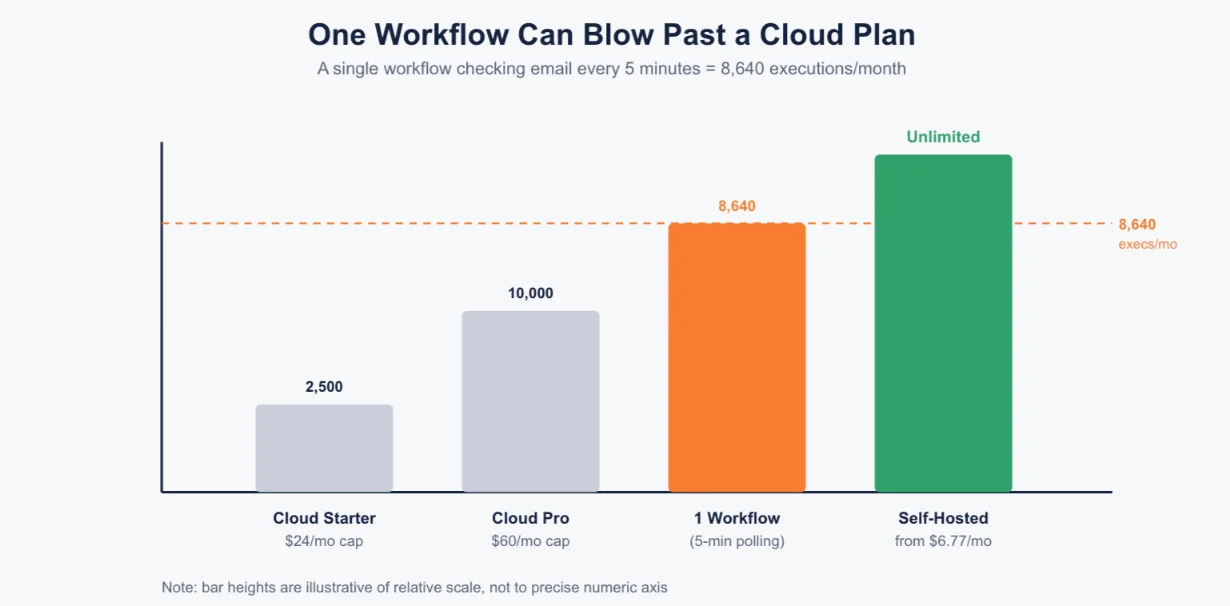
Cost climbs fast on Cloud, and it climbs faster than most business owners expect.
A single workflow that checks email every 5 minutes can generate around 8,640 executions a month on its own.
That’s enough to outgrow a starter Cloud plan by itself, with no other workflows running.
Ask yourself three questions before you choose a path:
- How technical is your team, and are you comfortable owning ongoing server maintenance?
- What’s your expected execution volume?
- How much does data control or compliance is important to you?
Quick tip: some businesses start on Cloud just to validate that a workflow is worth building. Once volume justifies the switch, they move to self-hosted. Our pre-configured setup is the easier on-ramp if you don’t want to build the server yourself.
How to Set Up Your First n8n Workflow
Step 1: Choose your hosting and deploy.
Sign up on n8n Cloud, or use our one-click install to launch your own self-hosted instance. n8n, SSL, and queue mode come pre-configured, so you skip the manual server build.
Step 2: Learn the basic building blocks.
A Trigger starts the workflow a webhook, a schedule, an incoming email, a form submission. Nodes carry out the steps: actions, if/then logic, AI processing. The final step delivers the Output.
Step 3: Build a first example end to end.
Here’s a realistic one: an email arrives. AI reads and classifies it. It gets routed to the right place, Notion, Slack, or your CRM.
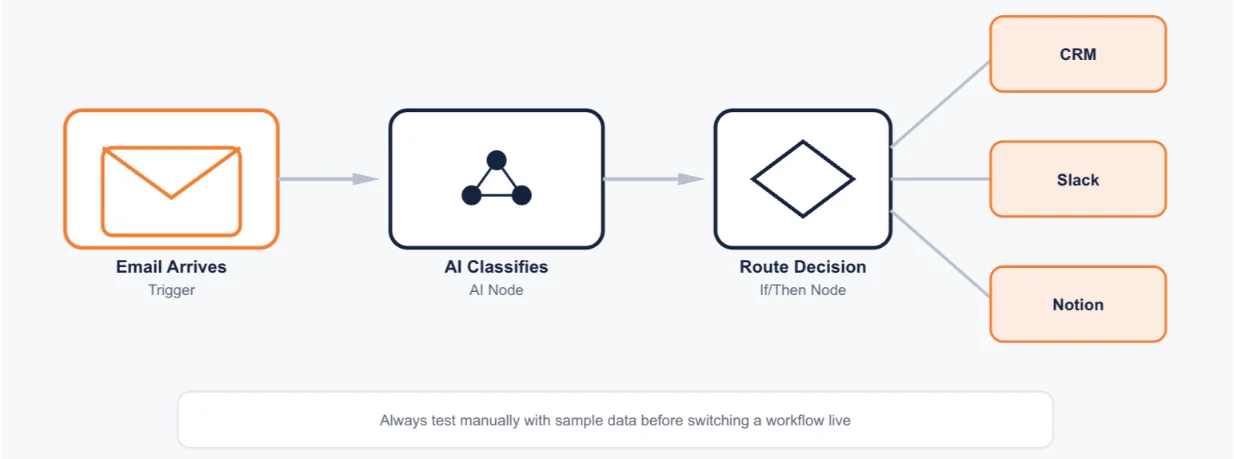
Test it manually with sample data first. Don’t switch it on live until you’ve seen it work.
Step 4: Don’t build from scratch if you don’t have to.
n8n includes over 100 ready-made templates. Import one, adjust it to your process, and save yourself the setup time.
Turn on basic error handling from day one. Don’t wait to add it later, once something has already gone wrong.
Security and Compliance for Business Automation
Automation touches sensitive data. Treat it that way from the start.
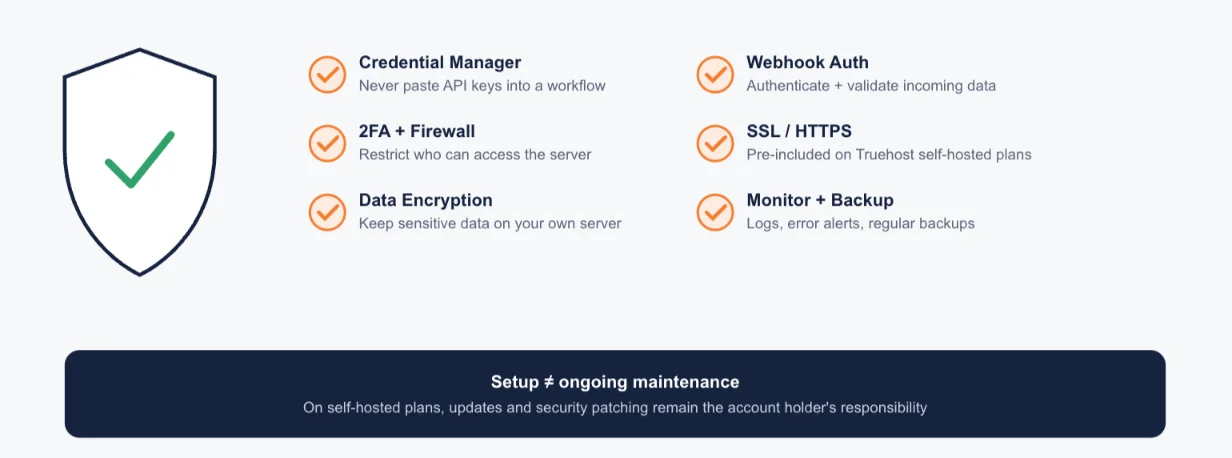
Store credentials properly. Use n8n’s built-in credential manager for API keys and passwords. Never paste them directly into a workflow.
Control access. Use strong passwords and two-factor authentication wherever it’s available. If you’re self-hosting, keep the server behind a firewall and restrict who has direct access.
Handle data responsibly. Self-hosting keeps sensitive data fully on your own infrastructure. That is important for regulations like GDPR. Encrypt data where you can, and don’t hold onto more than you need.
Secure your webhooks. Require authentication tokens. Validate incoming data, so outside requests can’t be spoofed.
Enable SSL. We include this automatically at setup on our self-hosted plans. If you’re fully DIY self-hosting elsewhere, make sure HTTPS is live before you go live with real data.
Monitor and audit. Keep execution logs. Set up alerts for errors. Back up regularly. Higher-tier plans add extras like detailed audit logs.
Remember it’s still on you. Our n8n plans are self-hosted. Initial setup is handled, but ongoing updates and security patching stay the account holder’s responsibility.
Review third-party data sharing regularly. Rotate credentials. Test what happens when something fails, before it does.
Common Mistakes and How to Avoid Them
Most n8n problems come from a short list of habits. Here’s how to sidestep them.
- Hardcoding secrets. API keys pasted directly into a workflow are hard to rotate. They can leak if the workflow is ever exported or shared. Fix: always use the credential manager.
- Skipping error handling. A workflow that fails silently when an app goes down can cause bigger problems downstream. Fix: add error alerts and retry logic. Test what happens when a step fails, on purpose.
- Building one giant workflow. A workflow with 50-plus steps becomes hard to manage or fix. Fix: break it into smaller, clearly named, reusable pieces.
- No duplicate protection. If a workflow retries after a hiccup, it can repeat an action, like sending the same email twice. Fix: add checks so the same item isn’t processed more than once.
- Wrong assumptions about the data. Workflows sometimes break because the data isn’t shaped the way you expected. Fix: test with real sample data before publishing, not just in theory.
- No ongoing monitoring. Workflows that run unmonitored can fail for weeks before anyone notices. Fix: set up logs and alerts, and build in a manual review step for anything high-stakes.
Cost Breakdown and ROI
Let’s talk real numbers.
Self-hosted n8n pricing with Truehost (current pricing):
- N8n Starter: $6.77/mo: 1 vCPU, 2GB RAM, 50GB NVMe storage, 4TB bandwidth
- N8N Pro: $12.77/mo: 2 vCPU, 4GB RAM, 100GB NVMe storage, 6TB bandwidth
- N8N Business: $24.77/mo: 4 vCPU, 8GB RAM, 200GB NVMe storage, 8TB bandwidth
Every plan includes unlimited workflows, unlimited concurrent executions, 100+ pre-made workflows, automated installation, and dedicated support. Setup itself is free.
Compare that to n8n Cloud, where Starter runs $24/mo for 2,500 executions, and Pro runs $60/mo for 10,000 executions.
Remember that single email-polling workflow from earlier? It alone can burn through 8,640 executions a month, more than the entire Cloud Starter allowance.
What else you’ll want to set up alongside it:
- A domain name pointed at your server, needed for stable webhook URLs and secure dashboard access
- An SSL certificate for secure access, check whether it’s auto-included, or add it separately
- A business email service, if any of your workflows send or receive email
Why this beats per-task pricing at volume: SaaS tools like Zapier charge per task, so your costs climb with volume. Flat-rate hosting stays the same, no matter how often your workflows run.
How to estimate your own ROI: multiply the hours you save per week by your staff’s hourly cost. Compare that number to the monthly hosting cost above.
Payback period, in plain terms: even our $12.77/mo Pro plan typically pays for itself within the first workflow that saves your team a few hours a week.
Want to see current pricing and specs for yourself? Check our n8n self-hosting plans here.
Build It Yourself or Hire a Professional
Not every workflow needs a professional. Some genuinely don’t.
Signs you can DIY: simple, single-path workflows, a single trigger leading to one or two clear actions, like routing a form submission to Slack, or updating a spreadsheet from a new email. You’ll need some time to learn, but the complexity stays low.
Signs you should hire help: workflows involving multiple systems, exception handling, compliance-sensitive data, or anything mission-critical to daily operations.
Before you start building anything, prepare the ground:
- Centralize your data: a CRM instead of spreadsheets or sticky notes
- Standardize how information comes in, structured forms instead of free-text emails
- Write your process down, step by step. If you can’t describe it clearly, it can’t be automated well
If you do decide to hire help, bring this to the conversation: your business goal, your current manual process, the tools you already use, your expected volume and frequency, your budget, and what ‘success’ looks like.
n8n Automation Guide for Businesses FAQ
How long until I see results from automation?
Most businesses see time savings within the first week or two, once a workflow is live and tested. The bigger ROI, hours saved every week, and fewer manual errors compound the longer the workflow runs.
Is my business data safe and private with these workflows?
It depends on your setup. Self-hosting keeps your data on your own server, which gives you the most control. n8n Cloud stores your data on n8n’s infrastructure instead. Either way, use the credential manager, enable SSL, and follow the security steps covered earlier.
Will this replace my staff, or free them up for other work?
Automation is built to remove repetitive, low-value tasks, not people. The goal is to free your team to spend time on work that needs a human judgment call.
What happens if a workflow breaks or an integration changes?
A well-built workflow includes error alerts and retry logic, so you’re notified quickly instead of finding out weeks later. Regular monitoring and testing catch most breakages before they cause real damage.
How much should I budget to get started?
For self-hosted, budget from under $7/mo for a basic instance. Add a domain and, if needed, business email on top. For Cloud, budget from $24/mo, and expect that to climb with execution volume.
Can I start small and expand later?
Yes. Many businesses start with one simple workflow, prove it saves time, then expand from there. Our plans support unlimited workflows from day one, so you’re not boxed in as you grow.
Get Truehost n8n Self Hosting
Automation isn’t about replacing people. It’s about reclaiming the hours your business loses to repetitive work, the 96 minutes a day, the 36% of the week, gone to admin instead of growth.
If you’re not sure where to start, pick your single highest-impact workflow first.
For most businesses, that’s the one draining the most manual hours right now, usually invoicing, lead routing, or email triage.
Ready to build it on infrastructure that scales with you, without the per-task pricing trap? Get started with Truehost’s n8n self-hosting plans and skip straight to building, not server setup.