 Domain RegistrationFind and register the perfect domain for your website.
 .COM DomainChoose a widely recognized domain to build global credibility.
 Domain TransferSeamless domain transfers with zero downtime and complete control.
 All TLDsFind and register your perfect domain. Choose from local and global extensions.
 SSL CertificatesKeep your website safe with reliable SSL Certificates that protect customer data and build trust.
 whoisCheck domain ownership details, expiration dates, and registrar information.
 US DomainRegister a .US domain and build trust in the USA.
 Web HostingEverything your website needs to run smoothly
 WordPress HostingWordPress hosting that just works
 Windows HostingReliable hosting for Windows environments
 Reseller HostingTurn hosting into your business
 Email HostingEmail that looks professional and works anywhere
 cPanel HostingFull control of your hosting with cPanel
 Affiliate ProgramJoin as a partner and earn commissions on every referral you send our way.
 Vps HostingScalable virtual servers that expand as you need.
 Dedicated ServersGet complete access and full control over your dedicated physical server.
 Managed vpsNot tech-savvy? We will take care of everything with our fully managed VPS hosting for you.
 AI Website BuilderCreate stunning websites in seconds with AI.
 Online ShopSet up a professional online store. No coding required.
 Web design serviceGet a tailored website designed to match your brand and support your goals.
 BlogFind helpful guides on web hosting, online selling, digital marketing, and more.
 Contact USYou can reach us anytime, day or night, through chat or email.
 SupportBrowse helpful guides and answers for all of our services.

KVM is a Linux kernel module that turns the host into a hypervisor. It uses CPU virtualization extensions, so guest code runs directly on the processor with no emulation.
Meanwhile, QEMU supplies the virtual devices. Each virtual machine runs as an ordinary Linux process.
That last point surprises many readers. The guest isn’t translated instruction by instruction. Instead, the kernel steps in only when the guest performs a sensitive operation.
Those moments are called VM exits, and they shape most of KVM’s performance behavior.
Here, we follow one guest from creation to shutdown. Along the way, you’ll see five mechanisms: CPU modes, the /dev/kvm interface, QEMU, memory handling, and I/O.
You should already know what a VM is. Everything else gets explained as we go.
What KVM Is and Why It Counts as a Hypervisor
KVM ships as a small set of kernel modules. The generic module is kvm.ko. On top of it sits a vendor module: kvm-intel.ko for Intel CPUs or kvm-amd.ko for AMD CPUs. Once both load, the Linux kernel itself can create and run virtual machines.
A hypervisor is software that creates and runs virtual machines. Type 1 hypervisors run directly on the hardware. Type 2 hypervisors run as applications inside a host operating system.
KVM sits between those two descriptions. Its hypervisor code lives inside the Linux kernel, which already controls the hardware. For that reason, most vendors class KVM as type 1.
Some engineers disagree, since Linux is also a general-purpose operating system. In practice, the label changes nothing about how KVM runs.
KVM also has a short history. Qumranet released it in 2006. Linux 2.6.20 merged it in early 2007, and Red Hat bought Qumranet in 2008. Mainline status brings a real benefit.
KVM gets every kernel improvement automatically, including new CPU support, scheduler fixes, and security patches.
Three pieces work together in a typical setup:
| Layer | Component | Job |
|---|---|---|
| Kernel | KVM (kvm.ko plus a vendor module) | Runs vCPUs, virtualizes memory, handles interrupts |
| Userspace | QEMU | Emulates devices, loads firmware, handles migration |
| Management | libvirt | Defines VMs and starts QEMU with the right settings |
Hardware Support: Intel VT-x and AMD-V
Software alone can’t run a guest kernel safely at full speed. Guest kernels expect to control the hardware.
Early hypervisors had to trap and rewrite their instructions, which was slow. So Intel and AMD added virtualization extensions to their processors. Intel calls its version VT-x, and AMD calls its version AMD-V.
KVM needs one of them. Linux reports the matching CPU flag in /proc/cpuinfo: vmx for Intel and svm for AMD. If neither flag appears, KVM can’t load. Firmware can also hide the feature, so check your BIOS or UEFI settings.
The extensions add two CPU modes. The host runs in root mode. The guest runs in non-root mode. Inside non-root mode, the guest kernel still sees ring 0, the most privileged level. However, that ring 0 is sandboxed. It can’t touch the host or other guests.
Each vCPU also gets a control block in memory. Intel calls it the VMCS, and AMD calls it the VMCB. The block stores guest state, host state, and control fields. Those fields tell the CPU which events must hand control back to the host.
On Intel, KVM starts a guest with the VMLAUNCH instruction and re-enters it with VMRESUME. From then on, the guest runs natively on the physical CPU.
What Triggers a VM Exit
A VM exit happens when the CPU leaves non-root mode and returns control to the host. First, the CPU saves the guest state into the control block. Then KVM reads the exit reason and decides what to do.
Common triggers include:
- Privileged instructions that the hardware won’t let the guest run directly
- I/O port access, such as a legacy disk or serial controller
- MMIO, which means reads and writes to emulated device memory
- EPT violations, which fire when the guest touches an unmapped address
- Interrupts and special instructions such as CPUID and HLT
Simple exits get handled inside the kernel. Anything involving a device goes up to QEMU in userspace.
Every exit costs time, since the CPU must save and restore state. A busy guest can trigger thousands of exits per second. As a result, much of KVM’s design aims to cut them. Memory virtualization and virtio, covered below, both exist for that reason.
The /dev/kvm Interface: How a Program Controls KVM
KVM exposes its features through a device file named /dev/kvm. A userspace program opens it and receives a file descriptor.
After that, the program controls KVM through ioctl calls. QEMU works exactly this way. Access usually requires root or membership in the kvm group.
Three Layers of Descriptors
The interface uses three kinds of file descriptors:
- System descriptor: You get it by opening
/dev/kvm. It checks the API version and creates VMs. - VM descriptor:
KVM_CREATE_VMreturns it. It sets up guest memory and creates vCPUs. - vCPU descriptor:
KVM_CREATE_VCPUreturns it. It reads and writes registers and runs the guest.
Each layer has its own set of ioctls. The nesting mirrors the objects: one system, many VMs, and many vCPUs per VM.
The Run Loop in Practice
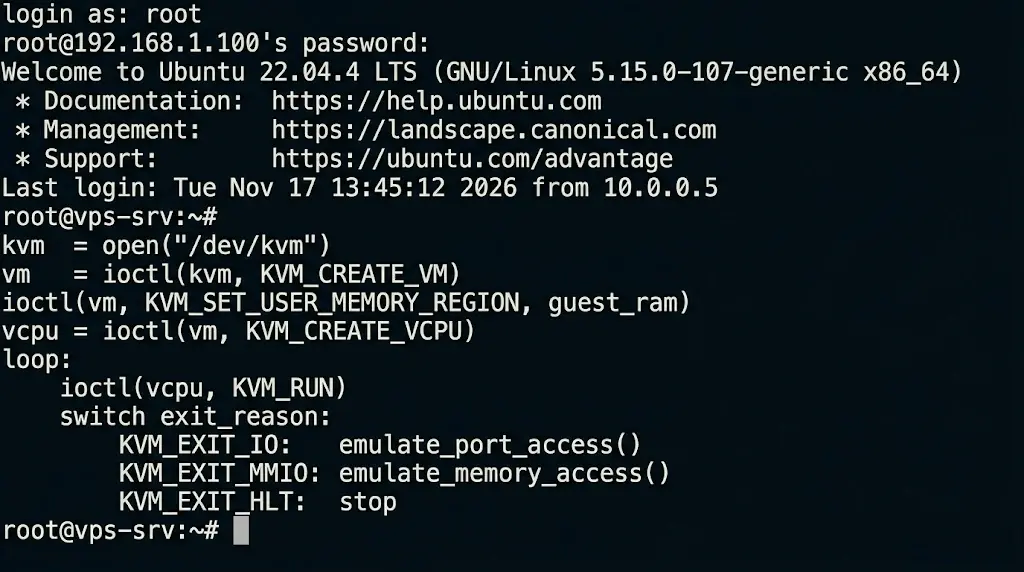
The usual sequence is short. First, the program creates a VM. Next, it maps a chunk of its own memory as guest RAM with KVM_SET_USER_MEMORY_REGION. Then it creates a vCPU and calls KVM_RUN.
KVM_RUN enters the guest. It returns only when an exit needs userspace help. The program then reads the exit reason from a shared structure, handles it, and calls KVM_RUN again.
kvm  = open("/dev/kvm")

vm   = ioctl(kvm, KVM_CREATE_VM)

ioctl(vm, KVM_SET_USER_MEMORY_REGION, guest_ram)

vcpu = ioctl(vm, KVM_CREATE_VCPU)

loop:

    ioctl(vcpu, KVM_RUN)

    switch exit_reason:

        KVM_EXIT_IO:   emulate_port_access()

        KVM_EXIT_MMIO: emulate_memory_access()

        KVM_EXIT_HLT:  stop
That loop is the whole idea in miniature. Real monitors add threads, device models, and error handling, but the pattern stays the same.
Since the interface is generic, any userspace monitor can drive it. QEMU is the best known. Firecracker and Cloud Hypervisor use the same interface for lightweight VMs.
How KVM and QEMU Work Together
KVM can’t build a complete virtual machine on its own. It handles the CPU and memory. A guest also needs a disk controller, a network card, a display, and firmware. QEMU supplies all of those.
| KVM handles | QEMU handles |
|---|---|
| vCPU execution | Device models (disk, network, display) |
| Memory virtualization | Firmware (BIOS or UEFI) |
| In-kernel interrupt controllers | Live migration and snapshots |
Here is what happens when a guest touches a virtual device:
- The guest driver writes to a device register.
- The CPU triggers a VM exit.
- KVM sees that it can’t handle the access and returns from
KVM_RUN. - QEMU emulates the device and records the result.
- QEMU calls
KVM_RUN, and the guest resumes where it stopped.
From the guest’s view, the register simply responded. It never learns that a host process stepped in.
QEMU can also run without KVM. In that mode, it uses the Tiny Code Generator (TCG), which translates guest instructions in software.
TCG works on any CPU, even one with a different architecture. However, it runs far slower. That’s why QEMU command lines include -enable-kvm.
Most admins never call QEMU directly. Instead, libvirt and tools like virt-manager build the command line for them.
Why Each KVM Virtual Machine Is a Linux Process
When you start a guest, QEMU launches as a normal process. It creates one thread for each vCPU. A guest with four vCPUs therefore has four vCPU threads. The Linux scheduler places those threads on physical cores like any other thread.
Guest RAM is ordinary memory mapped inside the QEMU process. As a result, the host manages it with standard kernel tools. It can swap pages, merge identical pages, and back guest memory with huge pages.
This design explains what VPS customers see. Hosts can overcommit CPU by selling more vCPUs than physical cores. When many guests compete, a vCPU thread waits for its turn.
Inside the guest, that wait appears as steal time, shown as st in top. A well-run host keeps it near zero.
Hosts also use cgroups to cap CPU and memory per guest. That limits the damage a noisy neighbor can cause.
Containers differ here. A container shares the host kernel, while a KVM guest brings its own. Each guest therefore has a separate kernel, which is why many hosts trust KVM for isolation.
Memory Virtualization With EPT and NPT
A guest believes it controls physical memory. In reality, its physical addresses are another layer on top of the virtual ones.
Two translations are involved. The first maps guest virtual addresses to guest physical addresses. The second maps guest physical addresses to real host memory.
Early hypervisors used shadow page tables. The hypervisor kept a merged copy of both mappings. It also trapped every guest page table change, and each trap was a VM exit. Memory-heavy workloads suffered badly.
Hardware now handles this job. Intel calls its feature EPT, and AMD calls its feature NPT, also known as RVI. The CPU walks both tables itself. As a result, the guest edits its own page tables freely, with no exits.
The host table still has a role. When the guest touches an address the table doesn’t map, the CPU raises an EPT violation. That is a VM exit. KVM then allocates the page, maps it, and resumes the guest.
This lets hosts lazily hand out guest RAM. Device memory regions are intentionally left unmapped, so accesses to them reach QEMU.
Two-level lookups incur an extra cost on a TLB miss. Huge pages shrink that cost by reducing the number of entries. Hosts often back guests with huge pages for this reason.
I/O Virtualization: Emulated Devices, virtio, and vhost
QEMU can imitate real hardware, such as an Intel e1000 network card. Guests do not need a special driver for it. However, every register access is a VM exit. A single packet can trigger many exits. That overhead adds up quickly under load.
The virtio standard fixes this. The guest knows it runs on virtual hardware, so it uses a paravirtual driver. Guest and host share memory rings called virtqueues.
The guest makes many requests in a ring, then sends a single notification. The host processes the whole batch. Fewer exits mean higher throughput. Linux ships virtio drivers. Windows guests need them installed separately.
The vhost-net module goes one step further. Without it, QEMU handles each packet in userspace. The packet bounces between kernel and userspace on its way through. vhost-net moves that data path into the host kernel. QEMU still sets everything up, but packets skip the detour.
Device Passthrough With VT-d and AMD-Vi
An IOMMU lets the host hand a physical device to one guest. Intel calls its version VT-d, and AMD calls its version AMD-Vi. The IOMMU confines the device’s memory access to that guest. A rogue device, therefore, can’t read other guests’ memories. Linux uses VFIO to wire this up.
The guest gets near-native speed from a GPU or network card. The tradeoff is flexibility. The device belongs to a single guest, so live migration is usually impractical.
Seeing KVM at Work on a Real Host
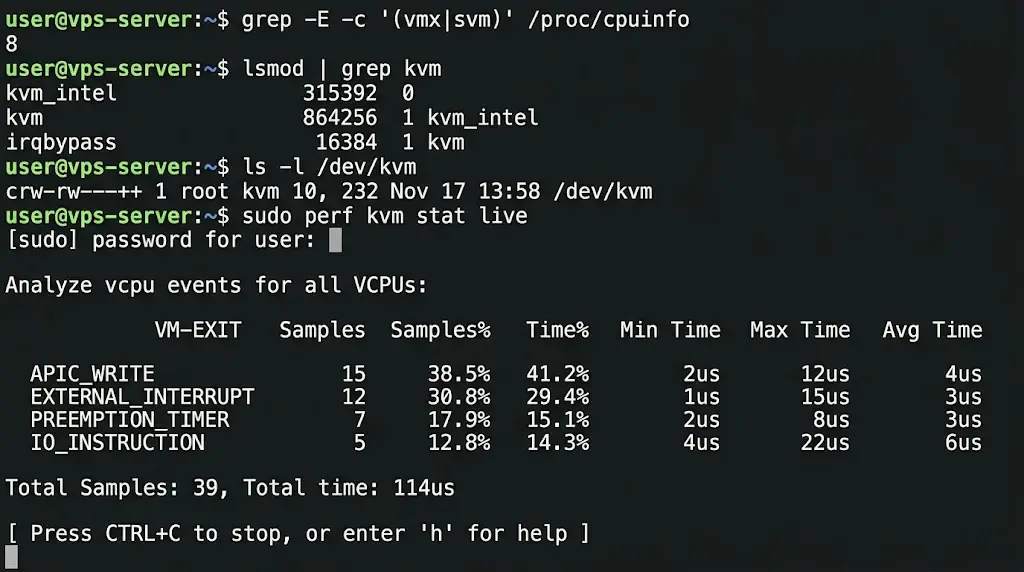
You can check each piece of this on a Linux server. Four commands cover the basics:
grep -E -c '(vmx|svm)' /proc/cpuinfo

lsmod | grep kvm

ls -l /dev/kvm

sudo perf kvm stat live- The grep count: A number above zero means the CPU supports hardware virtualization.
- lsmod: You should see kvm plus
kvm_intelorkvm_amd. - ls on /dev/kvm: The device appears once the modules load. It belongs to the root and kvm groups.
- perf kvm stat live: It lists exit reasons and counts, so you can see which exits dominate.
Inside a guest, run systemd-detect-virt. It prints KVM when the guest runs under KVM. A result of qemu usually means software emulation without KVM.
FAQs
How is KVM different from containers like Docker?
Containers share the host kernel and isolate processes with namespaces and cgroups. A KVM guest runs its own kernel on virtual hardware. Containers start quicker and use less memory. KVM gives stronger isolation and lets you run a different operating system. Many teams run containers inside KVM guests to get both benefits.
How is KVM different from VMware ESXi?
Both run guests on a bare-metal style hypervisor design. KVM is open source and part of Linux, so it inherits Linux drivers and tools. ESXi is a commercial product with its own kernel and licensing.
Can KVM run on Windows, macOS, or non-x86 hardware?
The host must run Linux. Windows and macOS can’t host KVM. However, Windows runs fine as a guest. KVM also supports ARM64, IBM Z, and RISC-V, each using its own hardware extensions.
Put KVM to Work on Your Own Server
Good KVM performance comes down to one habit: avoid VM exits. Hardware extensions, EPT, and virtio all exist for that job. When a VPS feels sluggish, exit rates, steal time, and driver choice are the first places to look.
A KVM VPS also gives you a dedicated kernel. You can tune sysctl settings, load your own modules, and run container runtimes without sharing a kernel with other customers.
Curious what your current server runs on? Run systemd-detect-virt and find out. Then deploy a KVM VPS with Truehost and test every command in this article on your own virtual machine.