 Domain RegistrationFind and register the perfect domain for your website.
 .COM DomainChoose a widely recognized domain to build global credibility.
 Domain TransferSeamless domain transfers with zero downtime and complete control.
 All TLDsFind and register your perfect domain. Choose from local and global extensions.
 SSL CertificatesKeep your website safe with reliable SSL Certificates that protect customer data and build trust.
 whoisCheck domain ownership details, expiration dates, and registrar information.
 US DomainRegister a .US domain and build trust in the USA.
 Web HostingEverything your website needs to run smoothly
 WordPress HostingWordPress hosting that just works
 Windows HostingReliable hosting for Windows environments
 Reseller HostingTurn hosting into your business
 Email HostingEmail that looks professional and works anywhere
 cPanel HostingFull control of your hosting with cPanel
 Affiliate ProgramJoin as a partner and earn commissions on every referral you send our way.
 Vps HostingScalable virtual servers that expand as you need.
 Dedicated ServersGet complete access and full control over your dedicated physical server.
 Managed vpsNot tech-savvy? We will take care of everything with our fully managed VPS hosting for you.
 AI Website BuilderCreate stunning websites in seconds with AI.
 Online ShopSet up a professional online store. No coding required.
 Web design serviceGet a tailored website designed to match your brand and support your goals.
 BlogFind helpful guides on web hosting, online selling, digital marketing, and more.
 Contact USYou can reach us anytime, day or night, through chat or email.
 SupportBrowse helpful guides and answers for all of our services.

A content delivery network (CDN) is a group of servers spread across many locations. It stores copies of your website files. Each visitor then receives those files from the closest server. As a result, pages load quicker, and your main server carries less load.
This guide explains what a CDN is, how it works, and when you need one. You will also learn how a CDN differs from web hosting.
What Is a Content Delivery Network (CDN)?
A CDN is a network of servers placed in many cities across the globe. Each server keeps cached copies of your site’s files. Visitors then receive those files from a nearby location rather than from a distant machine.
A simple comparison helps here. A retail chain with a single central warehouse ships every order from that location. As a result, customers farther away wait longer. Regional warehouses cut that wait. A CDN does the same job for your website files.
The delay between a request and a response is called latency. Distance is a major cause of it. Data travels through cables and routers, so a longer route adds delay. For example, say a visitor in Lagos opens a site hosted in the United States. That visitor waits longer than someone in New York.
You may also see the term content distribution network. Both names describe the same technology. Adoption is high, too. 6sense data cited by IBM indicates that close to 4 million companies use at least one CDN tool.
How Does a CDN Work, Step by Step?
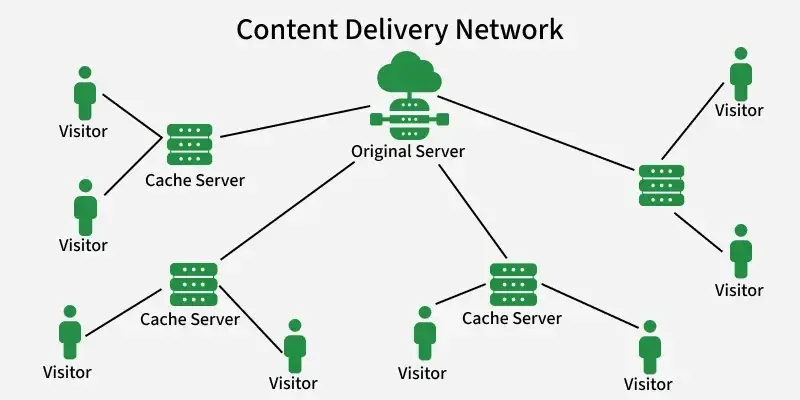
A CDN copies your files to many servers and routes each visitor to the nearest one. Here is what happens during a single page load.
- The visitor asks for your page. The browser asks the Domain Name System (DNS) where your site is hosted.
- The CDN answers the DNS request. It points the browser to a nearby edge server instead of your origin server.
- The edge server checks its cache. It looks for a stored copy of each requested file.
- A cache hit returns the file immediately. The visitor gets the page without your origin server doing any work.
- A cache miss triggers a fetch. The edge server requests the file from your origin server, stores a copy, and forwards it.
- The next visitor benefits. Anyone nearby now receives the stored copy.
The diagram below shows both paths.
Cache hit:   Visitor <--> Edge server

Cache miss:  Visitor <--> Edge server <--> Origin server
Without a CDN, every request travels to your origin server, regardless of how far away the visitor is. With a CDN, most requests are served from a nearby edge server. The table below compares both setups.
| Without a CDN | With a CDN | |
|---|---|---|
| Where files come from | One origin server | The nearest edge server |
| Visitor in a distant region | Waits for a long round trip | Waits for a short round trip |
| Traffic spike | Hits one machine | Spreads across many servers |
| Origin server workload | Handles every request | Handles cache misses and dynamic requests |
Cached copies do not last forever. Each file carries a time-to-live (TTL). When the TTL runs out, the edge server fetches a fresh copy from your origin. This keeps visitors from seeing outdated pages.
What Are Edge Servers and Points of Presence (PoPs)?
An edge server is a CDN server placed close to visitors. A point of presence (PoP) is a location that houses several edge servers and networking gear. Providers place PoPs in or near major cities and internet exchange points. As a result, more PoPs usually mean shorter distances for visitors.
How Does CDN Caching Work?
Caching means storing a copy of a file for reuse. A CDN caches static content, such as images, CSS, JavaScript, and video files. Static content looks the same for every visitor. A product photo on a store page is a good example. The edge server stores it once and serves it repeatedly.
Dynamic content works differently. It changes by user, login, or location. For instance, a shopping cart page looks different for each shopper. Caching works poorly for such pages, so the CDN usually passes those requests to your origin.
What Are the Benefits of Using a CDN?
A CDN brings four main benefits to a typical website.
Quicker page loads. Shorter distances mean quicker responses. Slow pages push visitors away. A CDN reduces that risk by shortening the trip each file takes.
Lower server load. Edge servers answer most requests for static files. As a result, your origin handles fewer requests. That reduces bandwidth usage and can lower hosting costs.
Better uptime. A CDN spreads traffic across many servers. If one server or data centre fails, the network reroutes visitors to another. Likewise, a sudden traffic spike is distributed across multiple machines instead of hitting a single machine.
SEO support. Page speed shapes how visitors experience your site. Google measures it through page experience metrics, such as Largest Contentful Paint. A CDN can improve those scores by speeding up file delivery. However, it will not rescue weak content or poor page design. Treat it as one helpful factor, not a ranking guarantee.
CDN vs Web Hosting: What Is the Difference?
A CDN does not replace web hosting. Your host stores your original files, databases, and code. The CDN keeps copies of those files closer to visitors. Without a host, a CDN has nothing to copy.
| Web hosting | CDN | |
|---|---|---|
| Stores original site files | Yes | No, it stores copies |
| Runs your site code and database | Yes | No |
| Server locations | One or a few data centres | Many locations across the globe |
| Main job | Keeps your site running | Delivers copies of your files quickly |
| Can work alone | Yes | No |
The two work as a team. Your host acts as the origin. The CDN sits in front of it and handles most visitor requests.
Do You Need a CDN for Your Website?
A CDN helps most when several of these points apply:
- Your visitors come from several countries or regions.
- Your pages carry many images, videos, or scripts.
- Traffic jumps during sales, launches, or campaigns.
- Your site loads slowly for visitors far from your server.
Some sites gain little. For example, a clinic page that serves one town may already load quickly from a nearby host.
Test before you decide. Run your page through a free speed test that checks performance across multiple locations, such as WebPageTest. If distant locations load much slower, a CDN is worth adding.
CDN FAQs
Does a CDN protect against DDoS attacks?
Partly. A DDoS attack floods a site with traffic to knock it offline. A CDN spreads that traffic across many servers, which dilutes the attack. Many providers also add filtering tools. However, a CDN is not a full security setup. You still need updated software, strong passwords, and a firewall.
What are examples of CDN providers?
Major providers include Cloudflare, Akamai, Amazon CloudFront, and Fastly. Each offers different features and pricing. Also, many hosting companies bundle a CDN or let you connect one in a few steps. Check your hosting plan before you buy a separate service.
Can a CDN speed up dynamic content?
Partly. A CDN cannot cache a page that changes for every user. However, many CDNs still speed up dynamic requests. They route traffic over quicker network paths and reuse open connections to your origin. As a result, even uncached pages can load sooner.
Is a CDN Worth Adding to Your Site?
A CDN is worth adding when your visitors sit far from your server. The farther they are, the more you gain. It shortens the trip for every file, takes load off your host, and keeps your site reachable during spikes. Still, it works alongside your hosting, never in place of it.
Start with a speed test from a few locations. Then browse Truehost’s hosting plans and ask the support team how to connect a CDN to your site. A quicker site is often one setup step away.