Domain RegistrationFind and register the perfect domain for your website.
 .COM DomainChoose a widely recognized domain to build global credibility.
 Domain TransferSeamless domain transfers with zero downtime and complete control.
 All TLDsFind and register your perfect domain. Choose from local and global extensions.
 SSL CertificatesKeep your website safe with reliable SSL Certificates that protect customer data and build trust.
 whoisCheck domain ownership details, expiration dates, and registrar information.
 US DomainRegister a .US domain and build trust in the USA.
 Web HostingEverything your website needs to run smoothly
 WordPress HostingWordPress hosting that just works
 Windows HostingReliable hosting for Windows environments
 Reseller HostingTurn hosting into your business
 Email HostingEmail that looks professional and works anywhere
 cPanel HostingFull control of your hosting with cPanel
 Affiliate ProgramJoin as a partner and earn commissions on every referral you send our way.
 Vps HostingScalable virtual servers that expand as you need.
 Dedicated ServersGet complete access and full control over your dedicated physical server.
 Managed vpsNot tech-savvy? We will take care of everything with our fully managed VPS hosting for you.
 AI Website BuilderCreate stunning websites in seconds with AI.
 Online ShopSet up a professional online store. No coding required.
 Web design serviceGet a tailored website designed to match your brand and support your goals.
 BlogFind helpful guides on web hosting, online selling, digital marketing, and more.
 Contact USYou can reach us anytime, day or night, through chat or email.
 SupportBrowse helpful guides and answers for all of our services.
For most OpenClaw users, a VPS wins this comparison.
The exceptions are narrow. You need iMessage integration. Or your workflow has a hard data-privacy requirement.
In either case, local hosting is the better call.
Outside those cases, the deciding factor isn’t price or specs. It’s how much setup work you’re signing up for.
OpenClaw has to stay online continuously to do its job. So the hosting choice that wins is the one that doesn’t get in the way of that.
This is the OpenClaw VPS vs local question. Not which is more powerful, but which one keeps working while you’re asleep.
Here’s how the two options compare.
Openclaw VPS vs Local Comparison Table
| Feature | Openclaw VPS (Truehost) | Local (Home Server) |
|---|---|---|
| Uptime & Availability | Data-center grade, consistent regardless of location | Depends on your own power and internet, varies by region |
| Monthly Cost | $14.99–$19.99/mo, pre-configured | ~$0/month after hardware payoff |
| Time to Live | Under 5 minutes, one-click deployment | Hours to days (install, expose, secure) |
| Data Privacy | Data leaves your premises | Full data sovereignty |
| Messaging Platforms | WhatsApp, Telegram, Slack, Discord, Signal, Teams | Same, plus iMessage (macOS hardware only) |
| Security Responsibility | You secure the OS; Truehost secures infrastructure | You secure everything, including home network |
| Scalability | Upgrade in a few clicks, no downtime | Limited by physical hardware |
| Setup Difficulty | Minimal, pre-configured, one-click deploy | Moderate to hard (port forwarding, dynamic IPs, Docker) |
1) Uptime & Availability
Let’s start with the number that is most important for an always-on assistant: how often the power stays on.
Firms worldwide report an average of 3.8 outages a month, according to a June 2025 World Bank brief drawing on Enterprise Surveys across 159 economies. Each outage lasts about 0.6 hours on average.
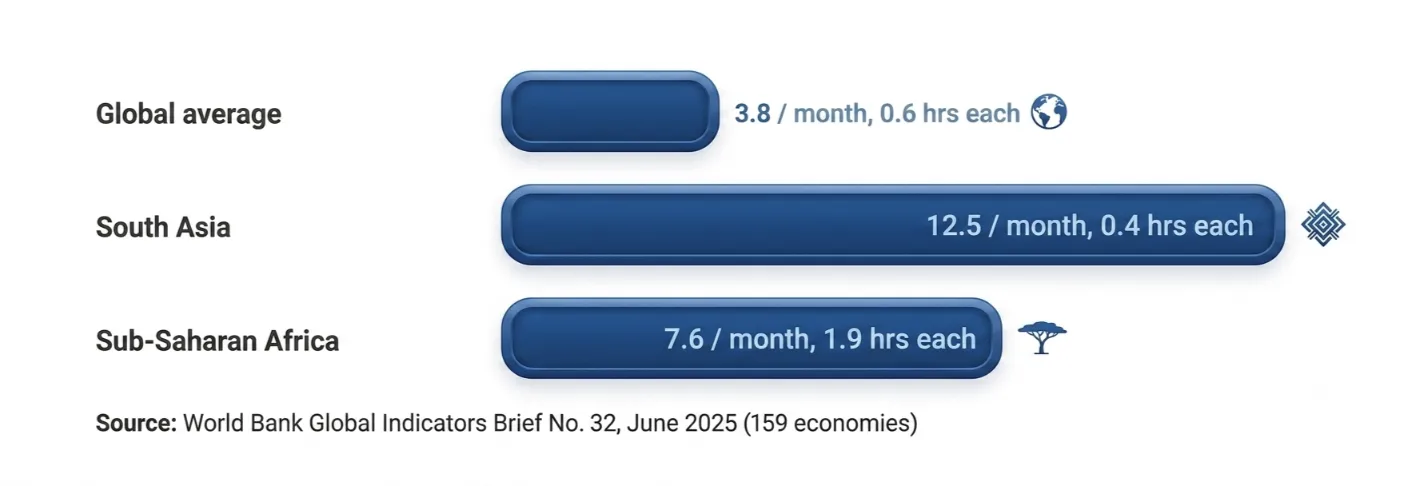
But that average hides a huge gap, and it’s not just about frequency.
- South Asia sees the most outages: about 12.5 a month. But each one is short, averaging 0.4 hours.
- Sub-Saharan Africa sees fewer outages, about 7.6 a month, but each one runs much longer, averaging 1.9 hours. Add it up, and firms there lose roughly 14 hours a month without power.
- Many high-income regions sit well below the global average.
So if you’re in a low-outage region, you might think local hosting is safe. It usually is, mostly.
But even a strong grid isn’t the only threat. ISP maintenance windows still happen. Routers still reboot. Wi-Fi still drops.
Your home ‘99.9% uptime’ isn’t a guarantee. It’s a ‘usually fine.’
A data center’s 99.9% is backed by redundant power, redundant networking, and staff watching it around the clock. Your home setup has one power line and one router.
Bottom line: a VPS wins on consistency. Not because home setups are unreliable everywhere. But because they carry more points of failure, and every one of those points can take OpenClaw offline.
2) Monthly Cost vs. Upfront Hardware
Cost is where local hosting looks the most attractive on paper.
Let’s look at what we at Truehost charge first. Our KVM1 plan runs $14.99/mo.
You get 1 vCPU, 2GB of RAM, 50GB of NVMe storage, and 4 TB of bandwidth.
KVM2 runs at $19.99/mo, with 2 vCPUs, 4GB of RAM, 100GB of NVMe storage, and 8TB of bandwidth.
Both ship pre-configured for OpenClaw. No Docker setup or gateway wiring.
You’ll find generic VPS options elsewhere for under $10/mo. But those are empty boxes. You still have to install Docker yourself.
You still have to configure the gateway. You still have to harden SSH on your own. The sticker price hides the setup hours.
Now, local hardware. Prices here have moved a lot recently, and not in the direction most guides assume.
A Raspberry Pi 5 (8GB) cost around $80 at launch. After three rounds of memory-driven price hikes tied to the global DRAM shortage, it now costs roughly $120 as of April 2026.
The cause: AI data centers are buying up so much memory capacity that component prices have spiked across the board.
A Mac mini tells a similar story. Apple’s entry-level M4 Mac mini used to start at $599. As of May 2026, Apple discontinued that configuration.
The starting price is now $799, for the same chip with more storage. Apple has pointed to the same memory shortage driving up costs.
On top of the box itself, budget for a UPS (roughly $50–150) as insurance against any outage, anywhere.
The tally: local can still be cheaper in raw dollars over a couple of years. But that gap has narrowed sharply in 2026. And that’s before you count your own setup hours as worth anything. Once you do, Truehost’s pre-configured VPS usually wins on total cost, not just convenience.
Check our OpenClaw VPS plans to see current pricing before you commit to buying hardware.
3) Data Privacy & Control
OpenClaw generates a lot of sensitive data as it works: message logs, automation history, tool traces.
Where that data lives is the one area where local hosting wins.
On a VPS, your data leaves your premises. We at Truehost encrypt it and follow standard security practices.
For everyday business automation, that’s a reasonable trade-off. Most workflows don’t need anything stronger.
But some workflows aren’t ‘most workflows.’ If you’re handling GDPR-sensitive data, HIPAA-covered health information, or legal casework, full data sovereignty isn’t a preference. It’s a requirement.
In those cases, local hosting is the correct call. Your data never leaves a device you physically control.
We’re saying this plainly because it is important for the sections ahead, where the VPS case gets stronger. If we’re honest here, you can trust the rest of this comparison.
4) Security Responsibilities
Security splits into two layers: infrastructure and application.
On our OpenClaw VPS plans, we handle the infrastructure layer. That includes firewall rules, DDoS filtering, and automated NVMe snapshots.
You’re responsible for the application layer only: your OS updates, your OpenClaw configuration, your access controls.
Local hosting gives you both layers, whether you want them or not. You own the server. You own the router. You own every port-forwarding rule you set up.
One misconfigured rule is all it takes. One missed firmware update on your router, and your home network is exposed.
The ruling here is straightforward. A VPS wins because your responsibility is scoped down to just the application layer. You’re not defending a whole home network on top of your AI assistant.
5) Messaging Platform Support
OpenClaw’s gateway connects to WhatsApp, Telegram, Slack, Discord, Signal, Microsoft Teams, and iMessage.
Almost all of these run fine on a Linux VPS. iMessage is the one exception, and it’s a hard one. Apple’s iMessage protocol only runs on real macOS hardware.
That’s true if you’re on a VPS or at home. Cloud providers can’t get around it because there’s no version of macOS licensed to run on generic cloud infrastructure.
If you’re US-based or iPhone-heavy, don’t underestimate this. For a large share of readers, iMessage isn’t a nice-to-have. It’s the primary way they text.
If that’s you, local hosting on a Mac (or a dedicated Mac mini) is your only path to native iMessage support.
The verdict: local wins, but only for iMessage-first users. Everyone else, the majority, gets full platform support on a Linux VPS with zero compromise.
6) Scalability
As you add agents or heavier workloads, RAM is usually the first thing to run out.
A rough rule of thumb: budget 2–3GB of RAM per additional agent for comfortable headroom.
On our OpenClaw VPS, upgrading from KVM1 to KVM2 takes a few clicks. No downtime or reinstall. You just resize and keep going.
Local hardware doesn’t offer that path. Once you hit your RAM ceiling, your only options are buying new hardware or living with degraded performance.
There’s no ‘upgrade’ button on a physical box you already paid for.
Scorecard: the VPS wins easily here. Scaling without disruption is one of cloud hosting’s strongest arguments, and it shows clearly in the comparison.
7) Setup Complexity
This is where the gap between local and VPS hosting is widest.
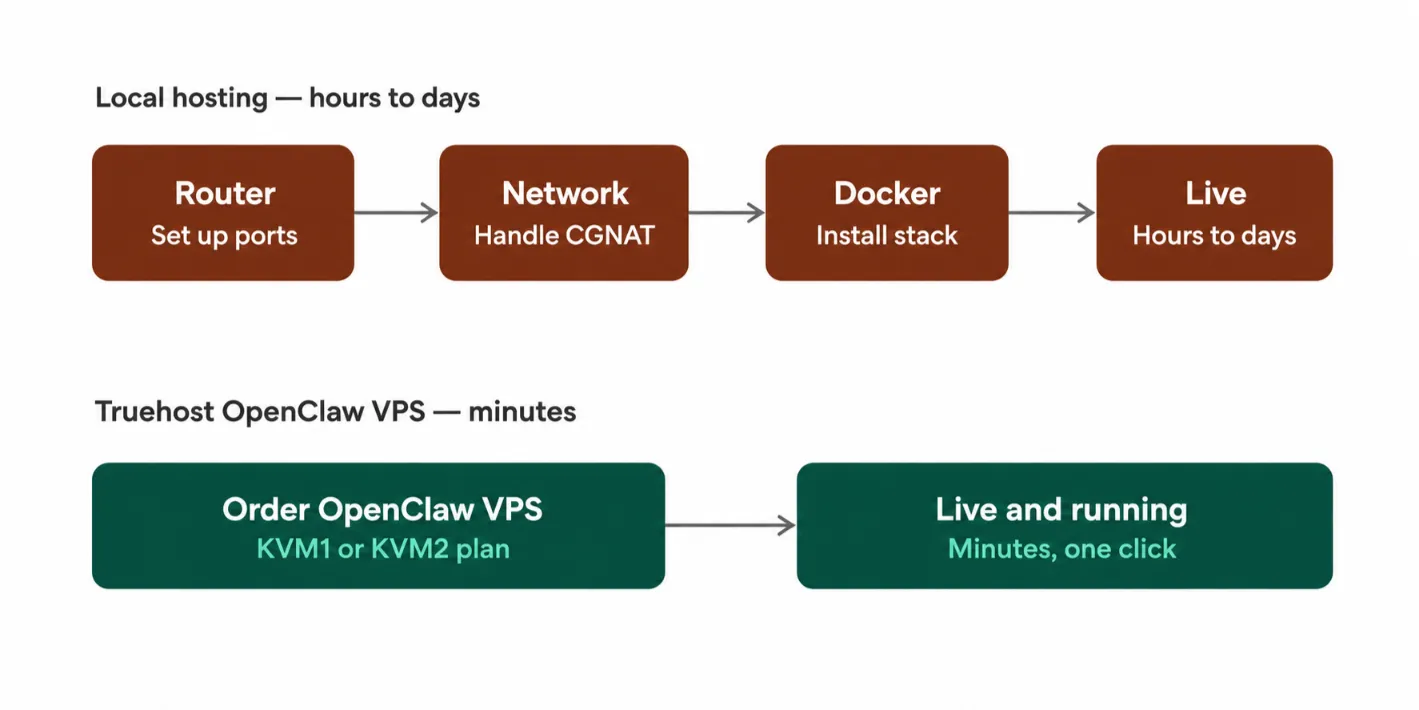
Exposing a home server to the internet means dealing with port forwarding. That setup breaks the moment your ISP rotates your IP address.
Some home ISPs also use CGNAT, Carrier-Grade NAT, which can block inbound connections entirely.
Not all ISPs do this, but enough do that it’s worth checking before you start.
Workarounds exist: Tailscale, tunnel services, or a paid static IP add-on. All of them add more moving parts.
Even a generic, cheap VPS from another provider doesn’t fully solve this. You’re still installing Docker yourself.
You’re still configuring the gateway. You’re still debugging on your own when something breaks at 2 a.m.
Our OpenClaw VPS closes that gap. It’s pre-configured and deploys with one click. You’re live in minutes, not days.
Final word: a VPS wins on setup complexity. A pre-configured VPS wins by an even wider margin.
When to Choose an Openclaw VPS
- You need consistent uptime for business automation, customer-facing agents, or scheduled workflows.
- You want zero manual configuration. Deploy, then start using OpenClaw immediately.
- Your messaging platforms are WhatsApp, Telegram, Slack, Discord, or Signal, all fully supported.
- You anticipate scaling to more agents or heavier workloads.
- You’d rather pay a predictable monthly fee than debug your own network setup.
When to Choose Local
- iMessage is your primary communication platform, and you need direct integration.
- Maximum data privacy is a hard requirement: legal work, health data, or other regulated use cases.
- You already own suitable hardware (Mac mini, Raspberry Pi 5, an always-on spare PC).
- You’re comfortable managing your own network security, port routing, and uptime.
Which One Wins?
For most people asking openclaw VPS vs local, the VPS wins.
A pre-configured VPS widens that lead even further, since it removes the setup labor that trips up most self-hosted attempts.
That said, local hosting has a niche. If you need iMessage specifically, if your data privacy requirements are non-negotiable, or if you already own the hardware, local is the right call for you.
This isn’t a one-sided comparison. Both paths make sense for the right person.
Our edge at Truehost is simple: you get the same VPS benefits any provider offers, minus the setup labor.
No Docker install or gateway configuration, not even debugging a fresh Linux box on your own.
Deploy Openclaw VPS with Truehost
Let us help you skip the setup work entirely.
We offer two plans built specifically for OpenClaw:
- KVM1 at $14.99/mo, ideal for a single agent or light workloads.
- KVM2 at $19.99/mo, built for heavier automation or multiple agents.
Both are pre-configured, and both deploy with one click. You’ll be live in minutes, without touching Docker or a gateway config file.
Deploy your OpenClaw VPS now and skip straight to using your assistant, not building it.