Domain RegistrationFind and register the perfect domain for your website.
 .COM DomainChoose a widely recognized domain to build global credibility.
 Domain TransferSeamless domain transfers with zero downtime and complete control.
 All TLDsFind and register your perfect domain. Choose from local and global extensions.
 SSL CertificatesKeep your website safe with reliable SSL Certificates that protect customer data and build trust.
 whoisCheck domain ownership details, expiration dates, and registrar information.
 US DomainRegister a .US domain and build trust in the USA.
 Web HostingEverything your website needs to run smoothly
 WordPress HostingWordPress hosting that just works
 Windows HostingReliable hosting for Windows environments
 Reseller HostingTurn hosting into your business
 Email HostingEmail that looks professional and works anywhere
 cPanel HostingFull control of your hosting with cPanel
 Affiliate ProgramJoin as a partner and earn commissions on every referral you send our way.
 Vps HostingScalable virtual servers that expand as you need.
 Dedicated ServersGet complete access and full control over your dedicated physical server.
 Managed vpsNot tech-savvy? We will take care of everything with our fully managed VPS hosting for you.
 AI Website BuilderCreate stunning websites in seconds with AI.
 Online ShopSet up a professional online store. No coding required.
 Web design serviceGet a tailored website designed to match your brand and support your goals.
 BlogFind helpful guides on web hosting, online selling, digital marketing, and more.
 Contact USYou can reach us anytime, day or night, through chat or email.
 SupportBrowse helpful guides and answers for all of our services.
Most AI chatbots are great at answering questions. OpenClaw takes things a step further by completing tasks on your behalf.
Now, at the center of the many OpenClaw deployments, you have OpenAI, which provides the reasoning engine that helps the agent plan, solve problems, and decide what to do next.
At the same time, OpenClaw remains model-agnostic. You can connect it to OpenAI, Anthropic, Gemini, Mistral, Ollama, or any OpenAI-compatible API, giving you the freedom to choose the model that best fits your workflow.
So that combination creates an agent that plans, adapts when something changes, uses tools in sequence, and recovers from errors without being reprompted.
The control interface is a message.
You send a message through Telegram, WhatsApp, or another supported interface, and the agent gets to work.
To see how the agent works, we’ll look at real OpenClaw OpenAI examples shared by the community.
These are verified workflows built by actual users, showing how OpenClaw is already automating everyday routines, software development, business operations, smart homes, and much more.
As you go through them, you’ll likely find ideas you can adapt for your own projects.
OpenClaw OpenAI Examples That People Are Already Using
The best way to see what the OpenAI-powered agent can do is to look at how people are already using it.
1) Automating Your Morning
Mornings often begin with the same routine.
You check your calendar, read through emails, look at the weather, review package deliveries, and scan the day’s tasks before deciding what deserves your attention first.
By the time you have a picture of the day, you’ve already spent valuable time gathering information from several different apps.
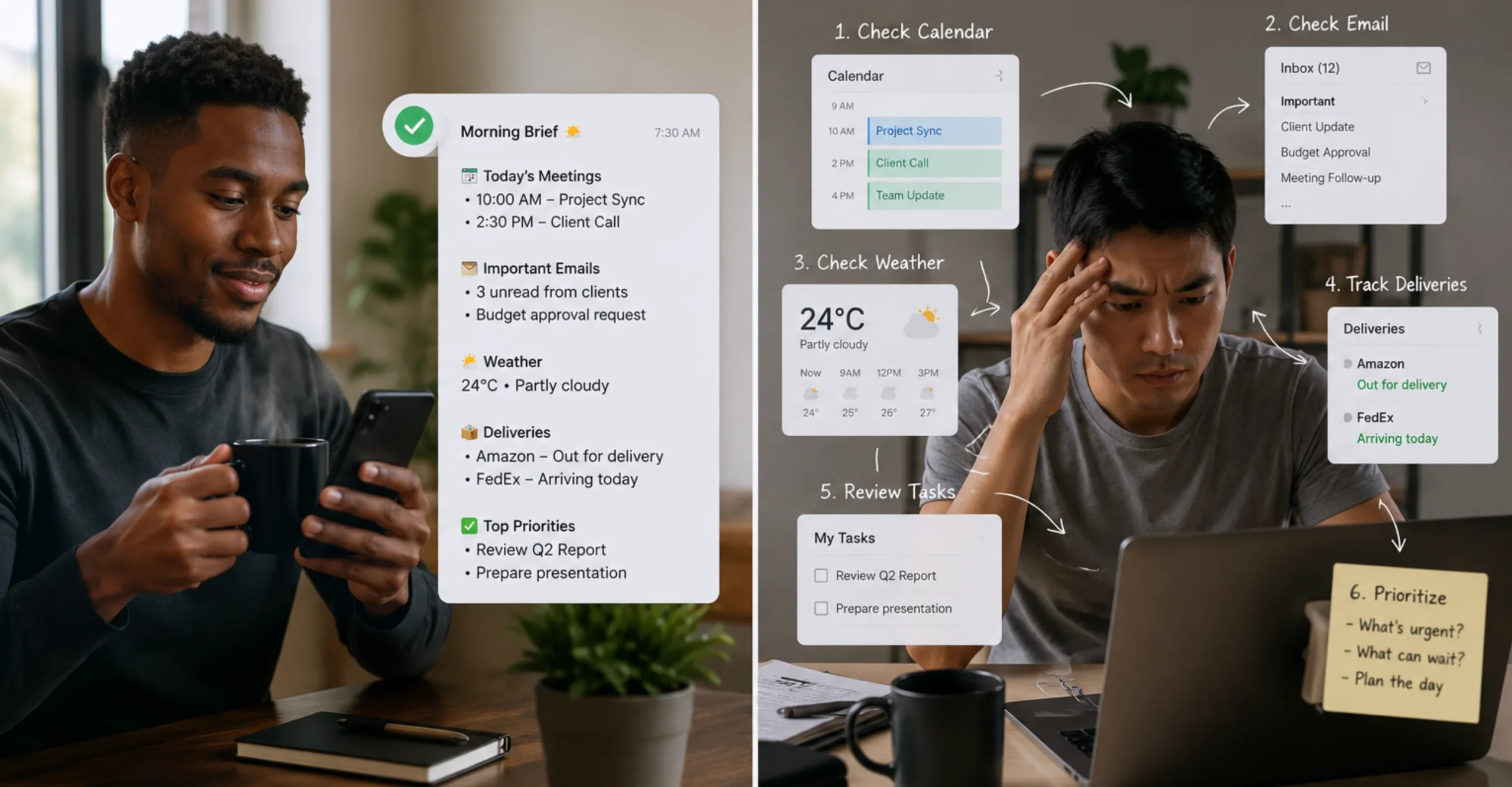
This is how the OpenClaw agent helps:
Using OpenAI to reason through your priorities, it checks your calendar, summarizes important emails, reviews weather forecasts, tracks deliveries, and even highlights upcoming deadlines.
Once everything is ready, it sends a single briefing to your preferred messaging app, such as Telegram or WhatsApp.
One of the most impressive community projects is a personal operating system built with OpenClaw.
The agent automatically time-blocks the user’s calendar, prepares meeting briefings, monitors school deadlines, resolves scheduling conflicts, generates invoices, and performs weekly reviews from meeting notes, all without requiring constant prompts.
So, instead of opening five or six different applications each morning, you receive one concise update with everything you need to know. You spend less time organizing your day and more time getting started on meaningful work.
2) Overnight Coding
Software development doesn’t always fit into a standard workday. Large coding tasks, testing, debugging, documentation, and code reviews can take hours, leaving unfinished work waiting until the next morning.
How does OpenClaw help?
You set the agent on a task before bed. The agent analyzes existing code, creates implementation plans, writes new features, fixes bugs, runs tests, and commits completed work to Git repositories while coordinating specialized coding agents where needed.
Because the agent remembers project context and adapts as tasks progress, it makes informed decisions throughout the session instead of repeatedly waiting for new prompts.
One well-known example from the OpenClaw community shows an agent supervising multiple OpenAI Codex workers overnight. This was also demonstrated on YouTube by LLMJunky, one of the most active OpenClaw community members
As a result, you wake up to completed code, updated documentation, or pull requests that are ready for review.
Overnight becomes productive time, allowing projects to move forward even while you are asleep.
3) Multi-Agent Team for Running a Business
Running a business often means switching between strategy, marketing, customer support, software development, and daily operations.
As the workload grows, it becomes difficult for one person to keep track of everything without constantly changing focus.
This is how OpenClaw helps:
OpenClaw allows you to build a team of AI agents, each responsible for a different role.
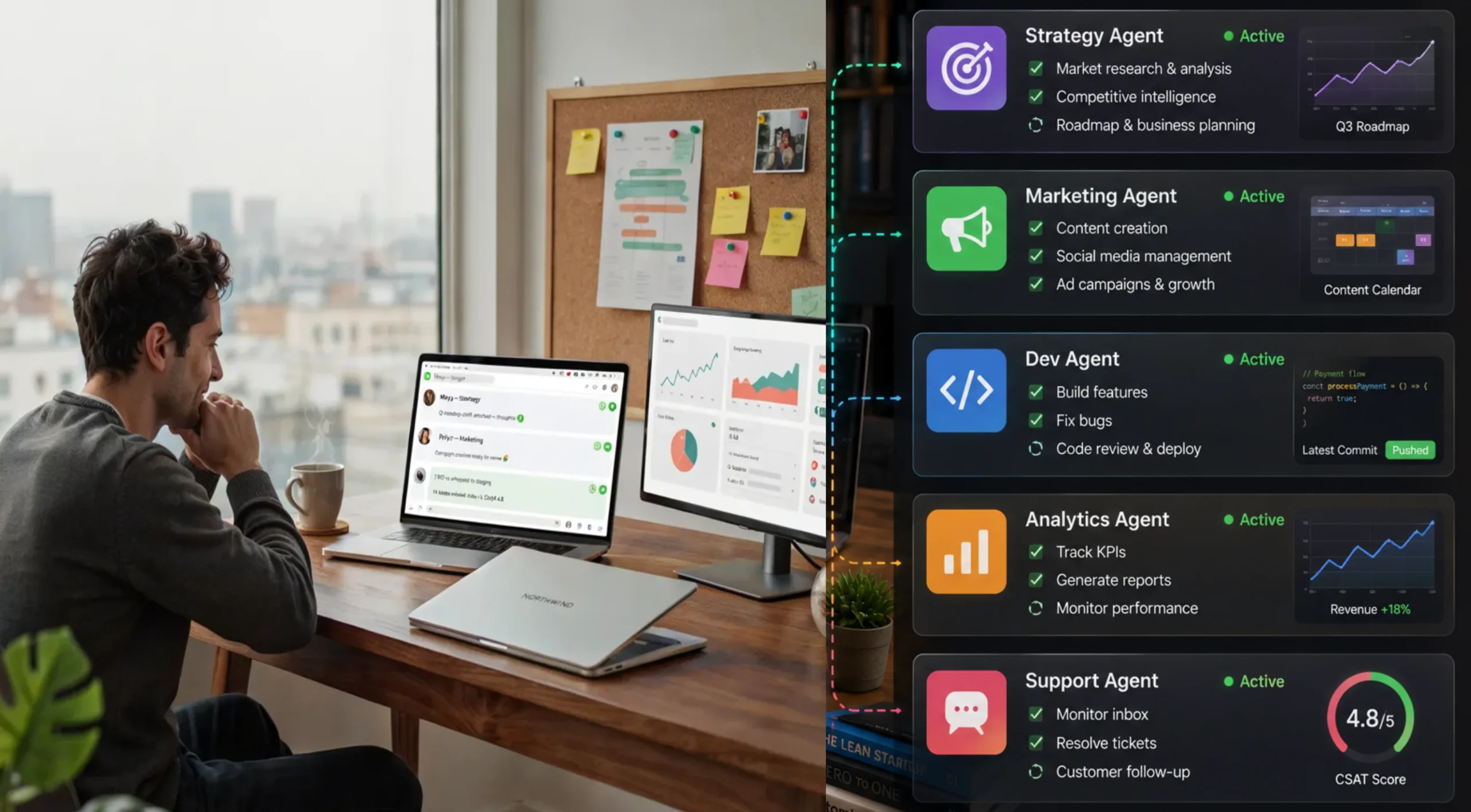
Each agent can focus on a role:
- Business strategy, planning, big picture, coordinates the others
- Marketing, content, competitor research
- Business metrics, pricing, pragmatic and numbers-driven
- Coding, architecture, technical execution
Although each agent has its own responsibilities, they share project context and coordinate with one another to complete larger goals.
You manage these agents through Telegram or WhatsApp, assigning new work with a simple message. Scheduled tasks continue running in the background, while OpenAI provides the reasoning that helps each agent make informed decisions throughout the workflow.
At the end you have a 24/7 team available for the cost of a server. Instead of managing every task yourself, you oversee the team of AI agents working together around the clock.
Routine work is completed automatically, projects continue moving forward, and you can spend more time making business decisions instead of handling repetitive operations.
4) Autonomous Negotiation and Complex Purchases
Buying high-value items or negotiating with multiple vendors can take hours of research, emails, phone calls, and follow-up conversations. Comparing offers, asking questions, and negotiating the best deal is time-consuming, especially when several sellers are involved.
You can instead use the OpenClaw agent to do that on your behalf.
OpenClaw can automate much of this process by using browser automation together with OpenAI’s reasoning capabilities.
The agent researches products, compares listings, contacts multiple sellers, tracks responses, and continues negotiations based on your instructions.
One widely shared community example featured developer @astuyve, whose OpenClaw agent negotiated with multiple car dealerships simultaneously through browser automation, email, and iMessage.
After several rounds of autonomous back-and-forth discussions, the agent reduced the purchase price by $4,200.
So, you save money on purchases, you save time you’d have used making the calls, and you save yourself the effort of back-and-forth conversations.
5) Smart Home and IoT Ecosystem Control Through a Message
Smart home setups are rarely as smart as advertised. You end up with four apps, three voice assistants, and a Raspberry Pi that needs SSH access to do anything useful.
The automation is there in theory; getting it to work requires more configuration than most people have time for.
As the number of devices grows, so does the complexity of keeping everything synchronized.
How does the OpenClaw agent rescue this situation?
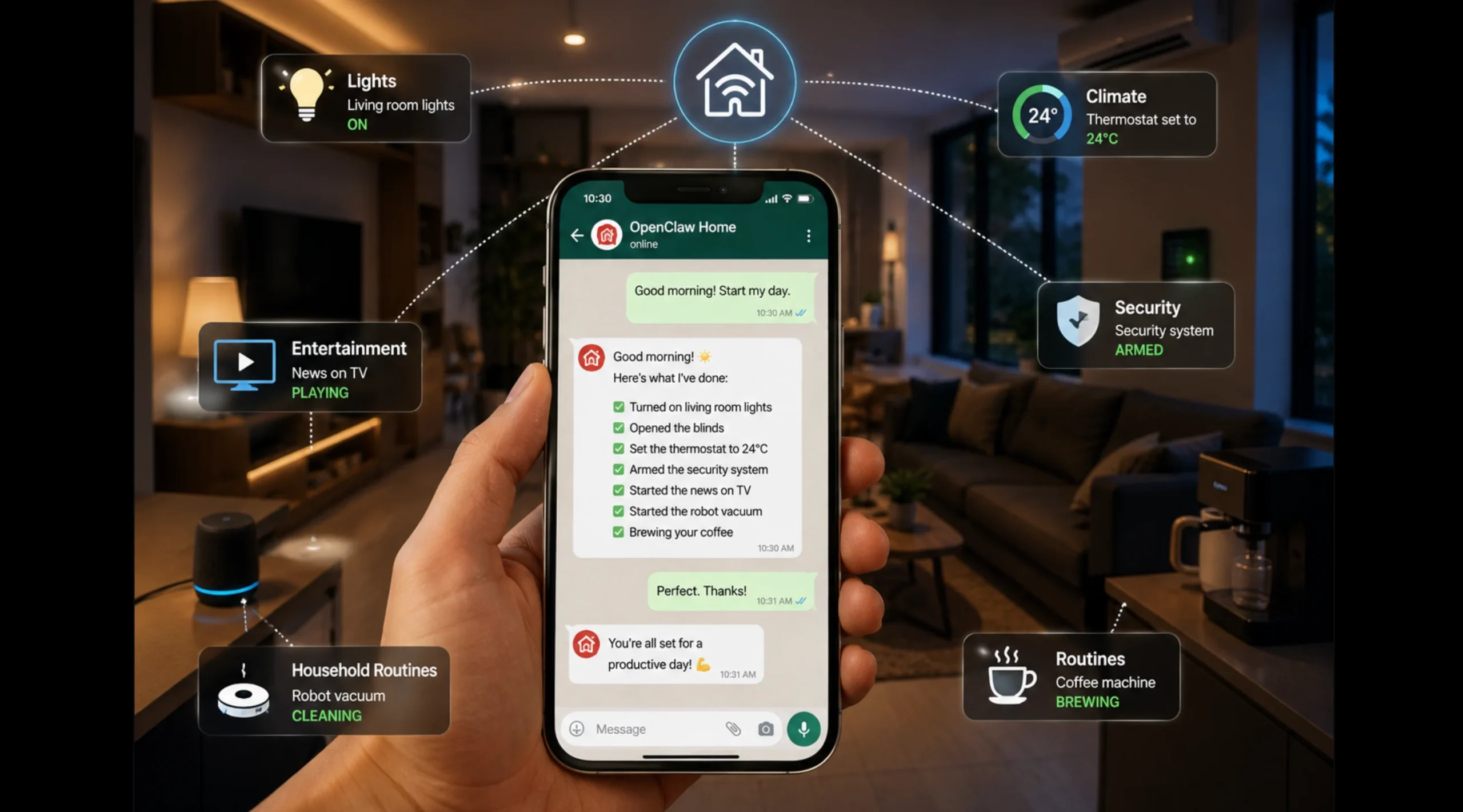
OpenClaw acts as a single control layer for your smart home. Instead of opening multiple apps, you simply send a message describing what you want, and the agent coordinates the necessary actions through integrations such as Home Assistant.
One community showcase demonstrates a Home Assistant skill that lets users control and automate connected devices using natural language.
Other community projects include a self-built HomePod skill that OpenClaw generated after discovering devices on the local network, as well as integrations for Roborock robot vacuums and broader home automation systems.
Eventually, instead of juggling multiple smart home apps, you interact with your entire home through a single conversation.
Lights, climate, security devices, entertainment systems, and household routines are all managed from your preferred messaging platform.
6) Content Creation and Distribution on Autopilot
A single piece of content can become a Short, a Reel, an X thread, a newsletter section, and a podcast clip. Almost no creator has time to do all of that manually, so most content gets posted once and abandoned.
How OpenClaw helps:
The agent monitors for new video uploads, extracts clips using clipping tools, writes the scripts for each format, and schedules them across platforms, all triggered by a single upload event.
A popular community example featured in the official OpenClaw Showcase is Creator Media Studio by @cedric_chee, which combines text-to-speech, transcription, browser automation, and AI models to simplify media production from a chat interface.
The final result is one piece of content, multiplied automatically. The distribution that used to take an afternoon now takes a message.
The skill ecosystem compounds with every tool built, making the next agent more capable from the start.
7) Managing Health Data and Personal Biometrics
Health information is often scattered across fitness trackers, medical records, laboratory reports, and wellness apps.
Finding trends or keeping everything organized can become difficult, especially as more data accumulates over time.
OpenClaw can assist with organizing and making sense of your health data.
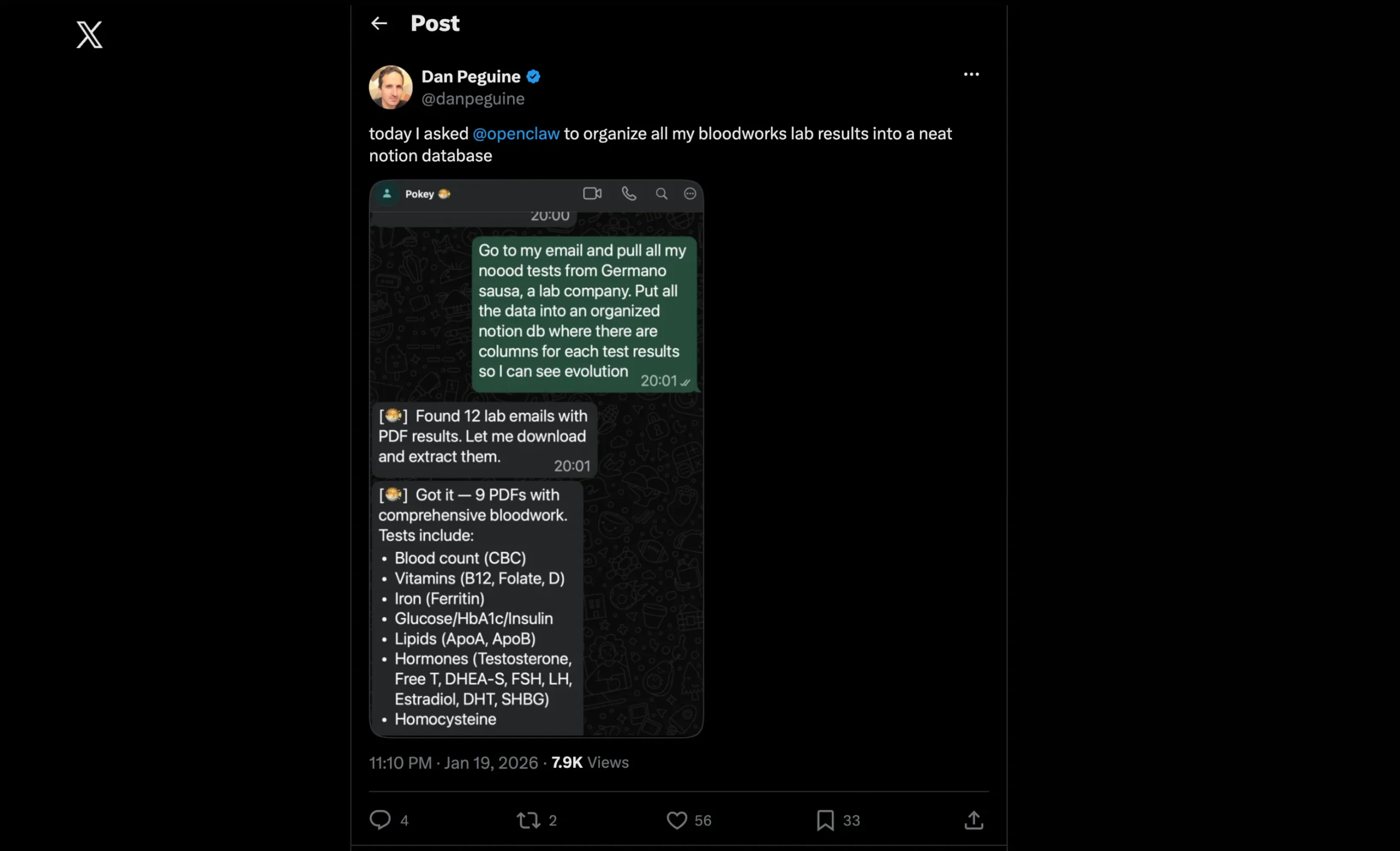
The agent collects information from connected health platforms, organizes it into a central location, and generates meaningful summaries using OpenAI.
Instead of manually sorting through reports or exporting spreadsheets, you can ask questions in plain language and receive actionable insights based on your data.
One user gave their agent access to Garmin data; it built an interactive global heatmap of all their runs with only two prompts, a full map with navigation and a time slider.
Another had OpenClaw take years of blood work results and organize them into a structured Notion database from a single instruction.
Generally, your health data becomes something you can read and act on, not a stack of exports you keep meaning to sort through.
8) Coordinating Multi-Agent Workflows Across Teams and Tools
Most tools do not talk to each other. Coordination between people and systems means constant copy-pasting, status updates across platforms, and the kind of overhead that grows faster than the team does.
How does the agent help with this?
Well, OpenClaw allows multiple AI agents to collaborate on the same objective while sharing context and using specialized skills.
One agent can gather requirements, another can write code, another can prepare documentation, while another communicates progress to the team through messaging platforms.
A notable example from the OpenClaw community demonstrates developers publishing reusable skills through ClawHub, allowing other OpenClaw users to install them with a single command instead of rebuilding the same integrations from scratch.
As a result of all these, coordination that used to require status calls now happens inside a message thread. The agents attend to the workflow; you attend to the decisions.
Why These OpenClaw OpenAI Examples Demand Reliable Hosting
Three things are non-negotiable for any of these workflows to run in production:
1. Isolated resources (vCPU, RAM): OpenClaw uses Playwright and Chromium for headless browser tasks. These are memory-intensive. On a dedicated VPS with guaranteed allocations, your agent runs on what it was given.
2. Always-on uptime: Cron jobs, overnight tasks, and real-time monitoring don’t tolerate downtime. But your laptop is not built to run 24/7. A VPS is.
3. Privacy: The examples above involve email, calendars, 1Password vaults, banking notifications, and health data. That information lives on your server, not on a third-party cloud platform making decisions about retention and access.
An agent that goes offline misses the overnight coding session, the 3am flight check-in, and the morning briefing.
It needs a machine that stays on, which is why we built Truehost OpenClaw VPS hosting specifically for these workloads.
To start your own OpenClaw tasks, get Truehost OpenClaw VPS hosting, connect Telegram or WhatsApp, configure your first skill, and run one workflow.
Pick the example that would change your day most. That is your starting point.