Domain RegistrationFind and register the perfect domain for your website.
 .COM DomainChoose a widely recognized domain to build global credibility.
 Domain TransferSeamless domain transfers with zero downtime and complete control.
 All TLDsFind and register your perfect domain. Choose from local and global extensions.
 SSL CertificatesKeep your website safe with reliable SSL Certificates that protect customer data and build trust.
 whoisCheck domain ownership details, expiration dates, and registrar information.
 US DomainRegister a .US domain and build trust in the USA.
 Web HostingEverything your website needs to run smoothly
 WordPress HostingWordPress hosting that just works
 Windows HostingReliable hosting for Windows environments
 Reseller HostingTurn hosting into your business
 Email HostingEmail that looks professional and works anywhere
 cPanel HostingFull control of your hosting with cPanel
 Affiliate ProgramJoin as a partner and earn commissions on every referral you send our way.
 Vps HostingScalable virtual servers that expand as you need.
 Dedicated ServersGet complete access and full control over your dedicated physical server.
 Managed vpsNot tech-savvy? We will take care of everything with our fully managed VPS hosting for you.
 AI Website BuilderCreate stunning websites in seconds with AI.
 Online ShopSet up a professional online store. No coding required.
 Web design serviceGet a tailored website designed to match your brand and support your goals.
 BlogFind helpful guides on web hosting, online selling, digital marketing, and more.
 Contact USYou can reach us anytime, day or night, through chat or email.
 SupportBrowse helpful guides and answers for all of our services.
As of July 2026, ChatGPT Plus and Pro subscribers can authenticate OpenClaw agents through the Codex OAuth flow. One command does it: openclaw models auth login --provider openai.
That means you can reuse your existing ChatGPT plan. No separate API key needed.
This is a big shift. It removes one of the biggest setup barriers for new OpenClaw users.
This guide breaks down how the Openclaw OpenAI subscription auth works.
You’ll get the real cost per tier, the exact setup steps, and an honest answer to the question that are important: does it hold up for serious automation?
Here’s what we’ll cover:
- How subscription auth compares to API key auth
- What Plus and Pro unlock inside OpenClaw
- Step-by-step setup, from install to your first live task
- Whether it’s reliable enough for production workflows
- Which option fits your use case
Let’s get into it.
Subscription Auth vs. API Key
OpenClaw uses a single provider openai, for both auth methods. That keeps things simple.
You just choose how you want to pay.
Subscription auth routes through the bundled Codex app-server runtime. It bills against your existing ChatGPT Plus or Pro quota.
API key auth is pay-per-token, billed directly by OpenAI. It’s used for non-agent features, or as a fallback when your quota runs dry.
Here’s how the two stack up side by side.
| Subscription (OAuth) | API Key | |
|---|---|---|
| Cost structure | Flat monthly fee (Plus/Pro), bundled into your existing ChatGPT plan | Pay-per-token, billed as you go |
| Usage limits | Capped by plan quota (resets periodically) | No fixed cap, scales with spend |
| Best use case | Regular or moderate agent use, personal automation, everyday tasks | High-volume, continuous, or production workloads |
| Reliability for long workflows | Can hit quota mid-task on heavy usage | Predictable, won’t throttle unless you hit billing limits |
| Setup | OAuth login, no key management | Requires generating and securing an API key |
| Non-agent features (images, embeddings, etc.) | Needs API key | Fully supported |
Notice that last row. Subscription auth doesn’t cover everything.
If your agent generates images through the image_generate tool, for example, it still needs an API key behind the scenes for that specific feature.
For everyday agent chat and task work, though, subscription auth is enough for most people.
Cost Breakdown by Tier
Let’s talk real numbers, because this is where most guides get vague.
ChatGPT Plus costs $20/month. It’s the entry point, and it now includes Codex access across web, CLI, IDE extension, and mobile.
Inside a five-hour rolling window, Plus gives you roughly 15 to 90 messages on OpenAI’s top reasoning model, and up to 280 messages on its fastest, lightest model.
The range depends on task complexity and how much context your agent loads at the start of a session.
That’s plenty for personal automations. Think daily reminders, quick research tasks, or a WhatsApp assistant that fields a few dozen messages a day.
ChatGPT Pro starts at $100/month for 5x Plus limits, or $200/month for 20x limits. Both tiers include Codex, plus perks like deep research runs and higher context ceilings.
For OpenClaw users running longer agent sessions, or multiple automations at once, Pro buys real breathing room. The 20x tier especially suits someone running several always-on workflows in parallel.
Practical example: picture a multi-step automation that scrapes a webpage, summarizes it, and sends a Telegram digest. Under Plus, that task might use 5 to 45 credits, depending on the model and how much text it processes. Run that same workflow a dozen times a day, and Plus users on a heavier model may bump into the five-hour cap.
On Pro, that same load barely registers against your quota.
On API key billing, you’d pay per token instead, roughly $1 to $5 per million input tokens depending on the model.
For occasional automations, subscription auth is usually cheaper. For constant, heavy use, metered API billing can work out more predictable.
Step-by-Step Setup
Ready to connect your subscription? Here’s the full flow, start to finish.
Prerequisites:
- Node.js 22 or 24 installed
- OpenClaw installed globally:
npm install -g openclaw@latest - An active ChatGPT Plus or Pro subscription
Step 1: Install daemon
Run this to set up OpenClaw as a background service:
openclaw onboard --install-daemon
This installs the gateway so it keeps running, even after you close your terminal.
Step 2: Authenticate
Now connect your OpenAI account:
openclaw onboard --auth-choice openai
Or, if you’ve already onboarded and just want to add the provider:
openclaw models auth login --provider openai
Either command kicks off the OAuth flow.
Step 3: Browser OAuth vs. headless setup
On a local machine, this opens a browser tab automatically. You log in, approve access, and you’re done.
On a remote VPS, there’s no browser to open. Use the device-code flow instead:
openclaw models auth login --provider openai --device-code
This gives you a short code and a URL. Open that URL on any device, enter the code, and approve.
Example: you’re running OpenClaw on a Truehost VPS over SSH. The device-code flow lets you authorize from your phone, without ever opening a browser on the server itself.
Step 4: Verify
Confirm the connection worked:
openclaw models list --provider openai
openclaw status
You should see your subscription profile listed, along with its quota status.
Step 5: Optional API-key fallback
Want a safety net for when your quota runs out? Set an auth order:
openclaw config set auth.order.openai [subscription, api-key]
This tells OpenClaw to try your subscription first, then fall back to API billing if needed.
Step 6: Connect channels
Now hook up where you’ll talk to your agent:
openclaw channel add telegram
Swap telegram for whatsapp, slack, or discord, depending on where you work.
Step 7: Test it
Send your agent a real task. Something simple works best for a first run.
Then open the Control UI and watch your usage tick up in real time. This is the easiest way to learn how fast your quota burns.
Troubleshooting: if anything breaks along the way, these three commands solve most issues.
openclaw doctor --fix
openclaw logs
Run openclaw doctor --fix first. It repairs common auth and config problems automatically. Then check openclaw status in the Control UI to confirm your quota and connection are both healthy.
Reliability for Production Automation
Here’s the real concern for anyone thinking about scaling up: will your automation run out of credits mid-task?
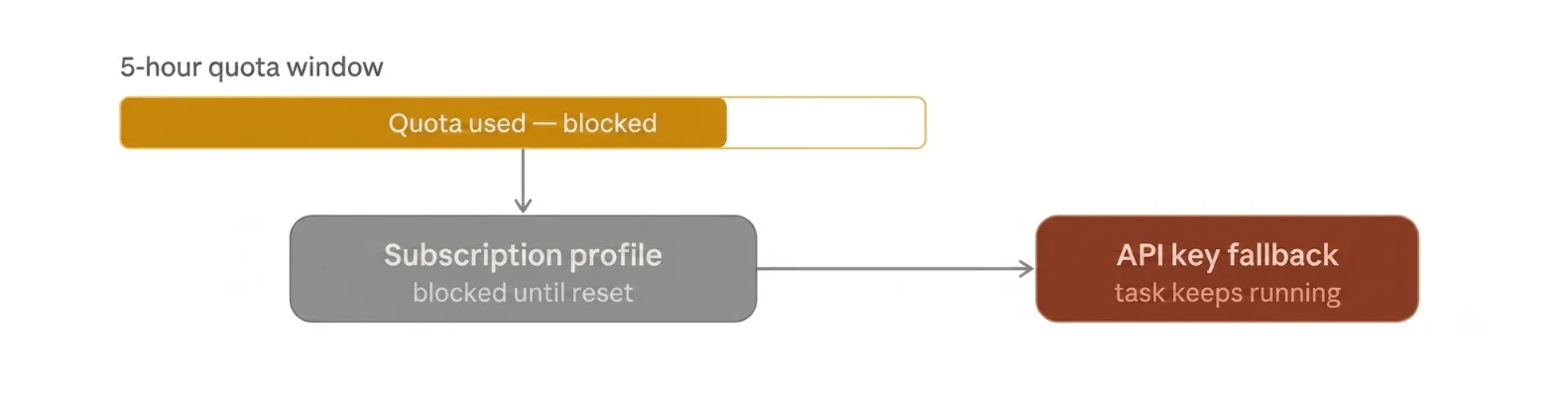
Subscription auth caps you by plan tier. That cap resets on a schedule, but it doesn’t scale with demand.
API key billing works differently. It’s metered, so it scales with whatever you’re willing to spend.
For continuous or high-volume workloads, that predictability is important. You won’t get throttled mid-workflow just because a lot happened in the last five hours.
Throttling risk is real on subscription auth. If your agent hits a tier limit mid-task, OpenClaw doesn’t just fail silently.
It marks that profile as blocked until the next reset window. If you’ve set up an auth order fallback, it rotates to your next available profile or the API key, without changing your selected model.
Without a fallback configured, though, your agent simply waits.
Example: an agent running a long research task pulls from a dozen sources in a row. If it’s on Plus and hits the five-hour cap halfway through, the task stalls until the window resets or you switch providers.
That’s a real gap if you’re running anything time-sensitive.
Which Tier Should You Pick?
This comes down to how much you run your agent, and how tolerant you are of occasional delays.
Light use: a few automations a day, casual chat, simple reminders. Plus covers this comfortably, at $20/month.
Moderate use: several workflows running daily, some longer research or multi-step tasks. Pro at $100/month (5x limits) gives you real headroom without jumping to metered billing.
Heavy or continuous use: always-on agents, multiple parallel workflows, business-critical automation. Here, either Pro at $200/month (20x) or a straight API key makes more sense. API key billing scales cleanly, without any quota anxiety.
Cost comparison across real workflow types:
- Personal WhatsApp assistant, 20-30 messages/day: Plus is enough, costs stay at $20/month flat
- Daily content research and summarization, moderate depth: Pro 5x handles it, still cheaper than metered billing for most users
- 24/7 customer-facing agent, high message volume: API key billing, cost scales with actual usage instead of a fixed cap
Whichever you choose, none of it works well on a machine that isn’t always online. We’ll get to that.
Openclaw OpenAI Subscription FAQs
Can I switch between subscription and API key?
Yes. Set your auth order with openclaw config set auth.order.openai, and OpenClaw will try each method in the sequence you define.
What happens if I run out of credits mid-workflow?
Your subscription profile gets marked blocked until the reset window passes. If you’ve configured a fallback, OpenClaw rotates to the next available auth method automatically.
Does my personal ChatGPT usage affect my OpenClaw agent’s quota?
Yes. Subscription auth draws from the same plan quota you use for regular ChatGPT chats, since Codex, Work, and other agentic features can share the same usage pool.
Which OpenAI model for OpenClaw?
This depends on your task. Faster, lighter models suit quick chat and simple tasks. Reasoning-heavy models suit research, coding, and multi-step automation, but they burn through quota faster.
Does subscription OAuth work over SSH, or does it require local terminal access?
It works over SSH. Use the device-code flow (--device-code) instead of the browser redirect, and you can authorize from any device with a browser, even if the server itself has none.
Run OpenClaw on Reliable Infrastructure with Truehost
Subscription auth assumes one thing: an always-on machine.
A laptop that sleeps, loses wifi, or shuts down overnight breaks long-running agents. Mid-task failures aren’t a quota problem at that point. They’re an infrastructure problem.
That’s where we come in. We at Truehost offer preconfigured OpenClaw hosting with one-click deployment, so your gateway stays running 24/7, without you touching server setup.
We have three plans built to match how much you use OpenClaw:
- OpenClaw Starter, $13/month: 1 vCPU, 2GB RAM, 50GB NVMe storage, 4TB bandwidth. Solid for personal automations and light daily use.
- OpenClaw Pro, $19/month: 2 vCPU, 4GB RAM, 100GB NVMe storage, 6TB bandwidth. Built for moderate to heavy workflows, multiple channels, or several automations running at once.
- OpenClaw Business, $24.77/month: 4 vCPU, 8GB RAM, 200GB NVMe storage, 8TB bandwidth. The fit for teams running OpenClaw as a shared, always-on gateway multiple concurrent agents, higher message volume, or several integrations pulling on the server at once without slowdown.
Both Starter and Pro come pre-configured with automated installation and dedicated support included; Business adds the headroom for scale on top of that same setup.
Run the setup commands above to connect your Openclaw OpenAI subscription. Then deploy OpenClaw on Truehost and pick the plan that fits your workflow.