Domain RegistrationFind and register the perfect domain for your website.
 .COM DomainChoose a widely recognized domain to build global credibility.
 Domain TransferSeamless domain transfers with zero downtime and complete control.
 All TLDsFind and register your perfect domain. Choose from local and global extensions.
 SSL CertificatesKeep your website safe with reliable SSL Certificates that protect customer data and build trust.
 whoisCheck domain ownership details, expiration dates, and registrar information.
 US DomainRegister a .US domain and build trust in the USA.
 Web HostingEverything your website needs to run smoothly
 WordPress HostingWordPress hosting that just works
 Windows HostingReliable hosting for Windows environments
 Reseller HostingTurn hosting into your business
 Email HostingEmail that looks professional and works anywhere
 cPanel HostingFull control of your hosting with cPanel
 Affiliate ProgramJoin as a partner and earn commissions on every referral you send our way.
 Vps HostingScalable virtual servers that expand as you need.
 Dedicated ServersGet complete access and full control over your dedicated physical server.
 Managed vpsNot tech-savvy? We will take care of everything with our fully managed VPS hosting for you.
 AI Website BuilderCreate stunning websites in seconds with AI.
 Online ShopSet up a professional online store. No coding required.
 Web design serviceGet a tailored website designed to match your brand and support your goals.
 BlogFind helpful guides on web hosting, online selling, digital marketing, and more.
 Contact USYou can reach us anytime, day or night, through chat or email.
 SupportBrowse helpful guides and answers for all of our services.
Short on time? Here’s the quick answer.
Use ChatGPT for fast answers, drafts, and research in your browser. Use OpenClaw when you want an AI that works 24/7 inside your messaging apps and executes tasks.
Most people who try both end up keeping both. They’re not solving the same problem.
ChatGPT lives in a browser tab. It answers when you ask. OpenClaw lives inside WhatsApp, Telegram, Discord, and dozens of other apps. It works when online and offline.
That difference shapes everything else: pricing, setup effort, and even the risks you need to think about.
This guide breaks down pricing, main differences, and when to pick each tool. We’ll also show you the fastest path to deploying OpenClaw, in case you decide it’s the right fit.
One quick note: we at Truehost offer a one-click OpenClaw deploy option. More on that further down.
OpenClaw vs ChatGPT Comparison Table
| Feature | ChatGPT | OpenClaw |
|---|---|---|
| Primary use | Conversational AI in browser/app | Always-on AI agent across messaging apps |
| Always-on / proactive | No (session-based) | Yes (24/7 daemon) |
| Executes actions (not just advice) | Limited (Agent mode, sandboxed) | Yes (real system/tool access) |
| Works in WhatsApp/Telegram/Discord | No | Yes |
| Model choice | GPT models only | 200+ models (Claude, GPT, Gemini, DeepSeek, local) |
| Self-hostable | No | Yes (open source, MIT license) |
| Persistent memory | Limited, improving | Yes, stored as local files |
| Setup effort | None, sign in and go | Requires hosting + configuration |
| Starting price | Free / $8/mo (Go) | Free (self-host) / ~$15/mo (managed VPS) |
Now let’s break each of these down properly.
1) Pricing Compared
The cost structures are fundamentally different here. ChatGPT is a subscription. OpenClaw is infrastructure plus API usage.
ChatGPT
| Plan | Price | Notes |
|---|---|---|
| Free | $0 | Limited daily messages, base model, ads shown in the US |
| Go | $5/mo | Higher limits than Free, still not the flagship model |
| Plus | $20/mo | Flagship model access, image generation, Agent mode, Custom GPTs |
| Pro | $100 – $116 or $200/mo | Usage-tier toggle: 5x vs 20x Plus limits |
| Business | $20/user/mo billed annually, $25/user/mo billed monthly | Admin controls, SSO, data excluded from training by default |
| Enterprise | Custom | Compliance, data residency, dedicated support |
OpenClaw
OpenClaw itself is $0. It’s open source. Your real cost is hosting, LLM API usage, and your own time to maintain it.
A typical self-hosted setup runs $20–100+ a month, depending on your model choice and usage volume.
That number comes from community cost breakdowns tracking VPS spend against token spend for always-on agents.
If you’d rather skip the DIY route, managed OpenClaw hosting from third parties commonly runs $19–55+ a month.
Notice what’s missing from that range: a flat, predictable subscription. That’s the trade-off. ChatGPT gives you one number on a bill.
OpenClaw gives you a VPS bill plus a separate, usage-based API bill from whichever model provider you choose.
Security & Reliability Considerations
This is more important for OpenClaw than for ChatGPT. A sandboxed chatbot can’t touch your files. An agent with real shell access can.
Here’s the honest picture. OpenClaw had several disclosed vulnerabilities in 2026, including remote code execution flaws and privilege escalation bugs.
Security researchers also found tens of thousands of publicly exposed, misconfigured self-hosted instances during the same period. Many were running without authentication enabled at all.
One flaw let a malicious webpage silently connect to an exposed OpenClaw instance and pull its authentication token.
Another lets an attacker jump from basic pairing access to full admin control with a single request. Neither required advanced skill from the attacker.
The pattern across nearly every incident is the same. The vulnerability existed in the code, but exposure is what made it exploitable.
Instances kept off the open internet, patched regularly, and paired with authentication turned on were largely unaffected.
That’s not a reason to avoid OpenClaw. It’s a reason to configure it properly. Here’s how:
- Keep OpenClaw updated to the latest patched version.
- Never expose the gateway directly to the open internet.
- Use firewall rules or a VPN, not a public port.
- Vet third-party skills before installing them. The skill marketplace has had malicious uploads before.
Correctly configured hosting reduces this exposure from the start. That’s the gap we built our OpenClaw hosting plans to close.
Main Differences
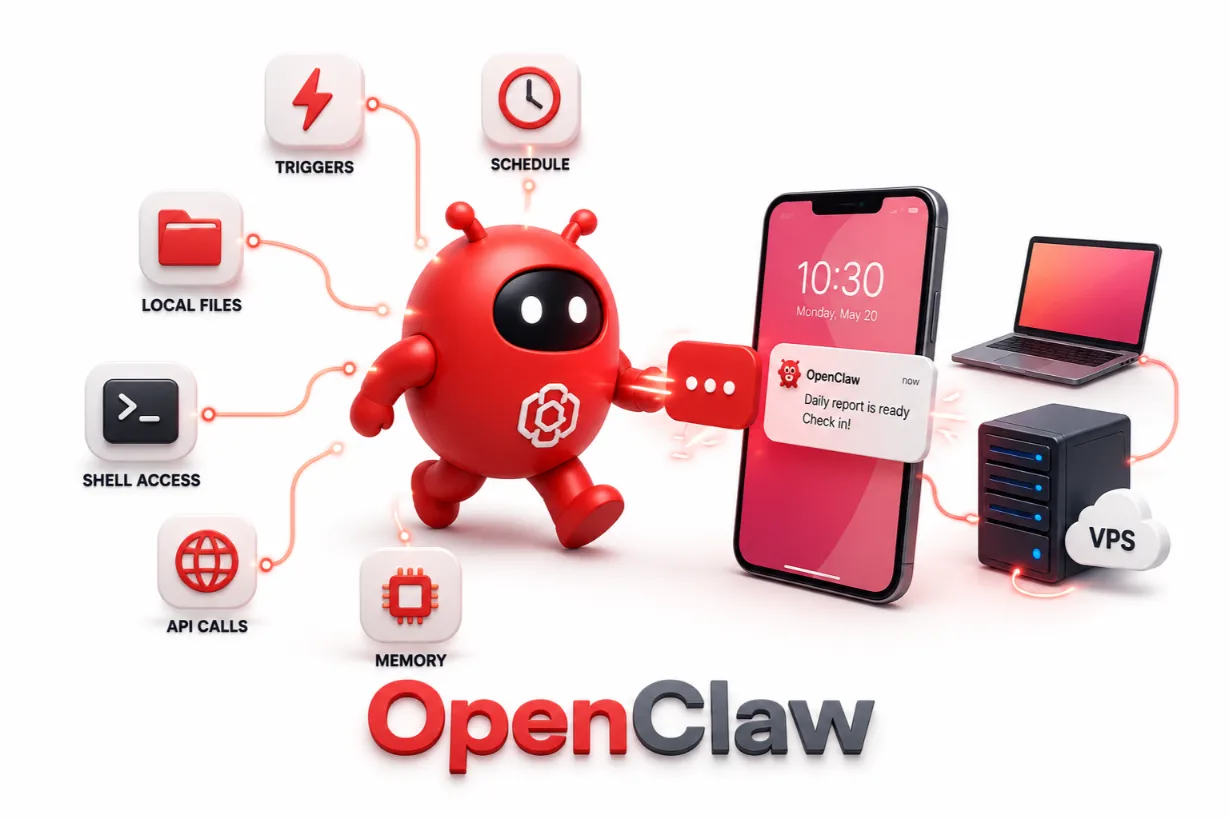
a) Proactive vs. Reactive
ChatGPT waits for you to type something. It has no idea what happened while you were away.
OpenClaw runs on its own schedule. It messages you first, based on triggers you set.
b) Data Ownership and Where It Runs
Your ChatGPT conversations live on OpenAI’s infrastructure. You don’t control the server.
Your OpenClaw agent runs wherever you deploy it. That could be your own laptop, or a VPS you manage.
c) Tool Access and Consequences
ChatGPT’s Agent mode runs in a sandbox. Mistakes are contained.
OpenClaw has real system access by default. It can run shell commands, touch files, and call APIs. That power is why the security section is important.
d) Memory and Long Context
ChatGPT’s memory has improved, but it’s still session-bound in many cases.
OpenClaw stores memory as local Markdown files on disk. You can open them, edit them, or version them like any other file.
e) Setup Effort
ChatGPT needs zero setup. Sign in, and you’re chatting.
OpenClaw is a project. You configure a gateway, connect a messaging channel, and maintain it over time.
When to Choose ChatGPT
Pick ChatGPT when you want:
- Fast answers, writing help, or editing support
- Brainstorming without any infrastructure to manage
- Data analysis or code help in a single browser tab
- One-off research where memory across sessions is not important
- Zero setup and zero ongoing maintenance
It’s the right call for anyone who wants an assistant, not a project.
When to Choose OpenClaw
Pick OpenClaw when you want:
- Automation that runs around the clock, not just during a chat session
- A workflow that lives inside messaging apps, code repos, or internal tools
- Memory you can inspect and control yourself
- Self-hosting for privacy or compliance reasons
- Infrastructure built for a team or community, not just one person
One honest caveat: OpenClaw is not for zero technical involvement. A preconfigured VPS narrows that gap, but it doesn’t erase it entirely.
Can You Use Both?
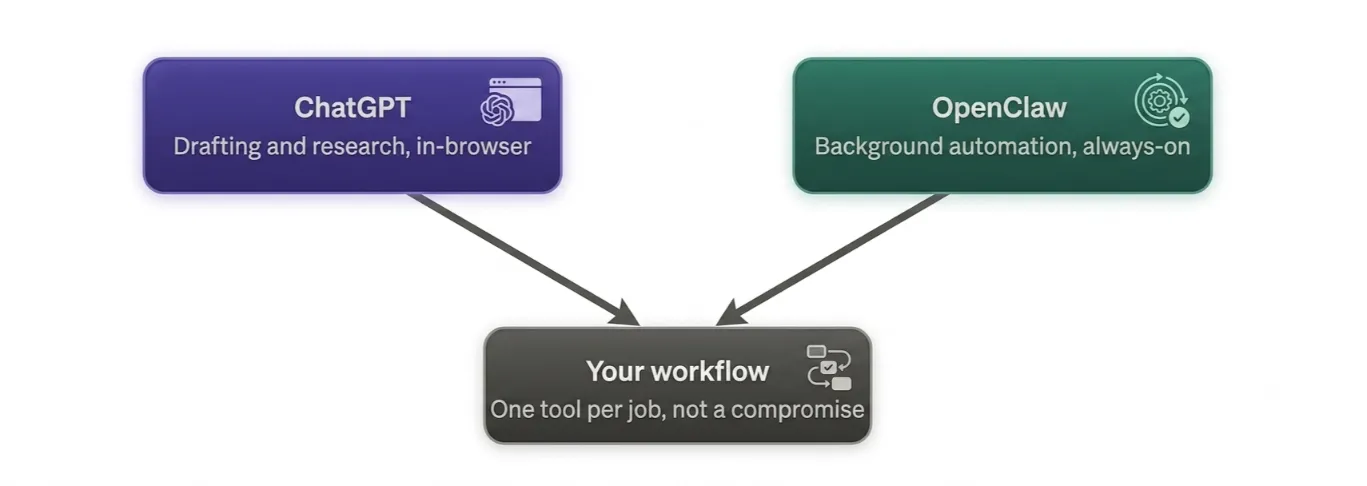
For most people, this isn’t a compromise. It’s the realistic answer.
Use ChatGPT for interactive drafting and research, right in your browser. Use OpenClaw for background automation and anything that lives in your messaging apps.
They’re not competing for the same job. One is a fast conversational tool. The other is an always-on worker.
Getting OpenClaw Running the Easy Way
Most OpenClaw guides walk you through Docker setup, VPS hardening, and gateway configuration. That’s real friction if you’re not a developer.
We at Truehost built a simpler path. Our preconfigured, one-click OpenClaw hosting skips the manual setup entirely.
| Plan | Price | Specs |
|---|---|---|
| OpenClaw KVM 1 | $14.99/mo | 1 vCPU, 2GB RAM, 50GB NVMe, 4TB bandwidth |
| OpenClaw KVM 2 | $19.99/mo | 2 vCPU, 4GB RAM, 100GB NVMe, 8TB bandwidth |
Here’s what’s included and what isn’t:
- We handle: the VPS, the one-click OpenClaw deployment, firewall basics, and ongoing hosting.
- You bring: your own AI model or API key, from Anthropic, OpenAI, Google, or another provider.
That split is important. It means you’re never locked into one model, and you still have full root access if you want to configure things further down the line.
This works out cheaper than most managed OpenClaw hosts, which commonly run $19–55+ a month, without losing the ability to configure things yourself.
Ready to skip the manual setup? Deploy OpenClaw with Truehost and connect your first messaging channel today.
OpenClaw vs ChatGPT FAQ
Is OpenClaw free?
The software is free and open source. Your real cost is hosting and API usage, typically $20–100+ a month depending on your setup.
Can OpenClaw replace ChatGPT entirely?
For some workflows, yes. But most users keep both. ChatGPT handles quick interactive tasks; OpenClaw handles always-on automation.
Is it safe to self-host OpenClaw?
It can be, if you keep it updated, avoid exposing the gateway to the internet, and vet any skills you install. Misconfigured, exposed instances are where most reported incidents come from, not the software itself when configured correctly.
A managed VPS with authentication enabled by default removes most of that risk from the start.
Do I need coding skills to use OpenClaw?
Basic comfort with the command line helps. A preconfigured VPS, like our OpenClaw KVM plans, removes most of the technical setup for you.
Can I use Claude or Gemini with OpenClaw instead of GPT?
Yes. OpenClaw is model-agnostic. It supports over 200 models, including Claude, Gemini, DeepSeek, and local options, so you’re not locked into GPT.
Want the easiest way in? Get started with Truehost’s OpenClaw hosting and have your agent live in minutes.