Domain RegistrationFind and register the perfect domain for your website.
 .COM DomainChoose a widely recognized domain to build global credibility.
 Domain TransferSeamless domain transfers with zero downtime and complete control.
 All TLDsFind and register your perfect domain. Choose from local and global extensions.
 SSL CertificatesKeep your website safe with reliable SSL Certificates that protect customer data and build trust.
 whoisCheck domain ownership details, expiration dates, and registrar information.
 US DomainRegister a .US domain and build trust in the USA.
 Web HostingEverything your website needs to run smoothly
 WordPress HostingWordPress hosting that just works
 Windows HostingReliable hosting for Windows environments
 Reseller HostingTurn hosting into your business
 Email HostingEmail that looks professional and works anywhere
 cPanel HostingFull control of your hosting with cPanel
 Affiliate ProgramJoin as a partner and earn commissions on every referral you send our way.
 Vps HostingScalable virtual servers that expand as you need.
 Dedicated ServersGet complete access and full control over your dedicated physical server.
 Managed vpsNot tech-savvy? We will take care of everything with our fully managed VPS hosting for you.
 AI Website BuilderCreate stunning websites in seconds with AI.
 Online ShopSet up a professional online store. No coding required.
 Web design serviceGet a tailored website designed to match your brand and support your goals.
 BlogFind helpful guides on web hosting, online selling, digital marketing, and more.
 Contact USYou can reach us anytime, day or night, through chat or email.
 SupportBrowse helpful guides and answers for all of our services.
OpenClaw is an agent that acts, not an assistant that waits for you to type something.
Most AI tools stop after giving you an answer. You still have to open another app, copy information, click through websites, send emails, or complete the task yourself.
OpenClaw works differently. It’s an AI agent that can be configured to take action on your behalf. It can read emails, browse websites, run commands, connect to APIs, and complete multi-step workflows with little or no manual input.
That opens up opportunities for businesses to automate work that normally takes hours each week.
Instead of spending time on repetitive administrative tasks, your team can focus on serving customers, growing revenue, and making better decisions while OpenClaw handles the routine work in the background.
In this guide, we’ll look at seven practical ways businesses are using OpenClaw in 2026 to save time, improve productivity, and simplify daily operations.
From managing overflowing inboxes to monitoring servers and creating content, these OpenClaw usecases show how an autonomous AI agent can become part of your everyday business operations.
Now all of these examples assume the agent is running around the clock. It has to respond to events, run scheduled jobs, and complete workflows even when nobody is logged in.
That’s why businesses usually deploy OpenClaw on an always-on VPS instead of running it from a personal laptop.
OpenClaw Usecases to Simplify Your Business
1) Email Triage and Morning Intelligence Briefing
The inbox is where urgency goes to hide.
Important client requests, urgent support tickets, and internal updates often end up buried beneath newsletters, promotions, and automated notifications.
Before you know it, you’ve spent half an hour sorting through your inbox just to figure out what deserves your attention first.

OpenClaw is configured to remove that daily bottleneck. It connects securely to your Gmail or Outlook account, reviews new unread messages, identifies the ones that need immediate action, and ranks them by priority.
You receive a concise summary delivered to Slack or Telegram every morning by 7 a.m., highlighting what needs your attention first. That means you can start your workday with a clear plan instead of spending valuable time filtering through messages.
Teams respond faster and nothing important slips through.
Since this workflow runs on a schedule every day, OpenClaw needs to stay online continuously. It needs to be live at 7am every day, not waiting for a laptop to wake up.
Hosting OpenClaw on a Truehost VPS keeps the agent running 24/7, ensuring your summaries are always delivered on time.
2) Client Onboarding on Autopilot
Bringing in a new client should be an exciting moment, but the work that follows is often repetitive.
Someone has to create user accounts, send a welcome email, update the CRM, schedule a kickoff meeting, and make sure everything is ready before the client gets started. When teams are busy, these small tasks can easily be delayed or forgotten.
OpenClaw is configured to automate the entire onboarding process.
As soon as a new deal is marked as closed in your CRM, a webhook triggers the agent to begin the workflow.
It creates the required accounts, sends a personalized welcome email, schedules calendar invitations, updates your CRM, and records the completion status, all within minutes. If a step fails, it flags you rather than silently skipping it.
The result is a smooth and consistent onboarding experience for every client.
New customers receive the information they need immediately, your team spends less time on repetitive administrative work, and there are no awkward moments where someone realizes the welcome email was never sent.
3) Brand Monitoring and Rapid Response on X
Your customers are already talking about your business online. Some are asking questions, others are sharing positive experiences, and a few may be reporting problems that need immediate attention.
The challenge is keeping up with those conversations before they turn into missed opportunities or public complaints.

OpenClaw helps you stay ahead by checking the X API on a scheduled (hourly) basis for mentions of your brand, products, or services. It analyzes each post, classifies the sentiment, and identifies messages that require attention.
Complaints, support requests, and customer questions are then delivered to Slack with the original post, relevant context, and a suggested response category so your team can act quickly.
You or your team still decide what to say. The agent just makes sure you know about urgent comments in under an hour instead of two days later.
Now, responding within minutes instead of days can make a huge difference to customer satisfaction.
Questions get answered before potential customers lose interest. Also, issues can be resolved before they escalate, and your business stays engaged in conversations that strengthen your brand’s reputation.
4) Content Repurposing Across Platforms
Creating a high-quality blog post takes time. The challenge comes after it’s published. To get the most value from that content, someone still needs to adapt it for LinkedIn, create a thread for X, write an email newsletter, and prepare posts for other platforms.
For many businesses, that work gets pushed aside because there simply isn’t enough time.
OpenClaw is configured to automate the repurposing process from the moment a new article goes live. It monitors your blog’s RSS feed for new posts, then generates platform-specific versions of the content.
It can create a LinkedIn summary, an X thread, and an email newsletter section before automatically placing each one into a review queue for approval.
This allows your team to reach more people without creating content from scratch for every platform. One blog post becomes multiple marketing touchpoints, helping you maintain a consistent online presence while reducing the workload on your marketing team.
It’s especially valuable for agencies and small to medium-sized businesses that publish content regularly but have limited resources.
5) Server Health Monitoring with Contextual Alerts
Server problems rarely happen during business hours, and unfortunately, nobody is watching the server at 2am.
A website can run out of disk space in the middle of the night, a service can stop unexpectedly, or memory usage can spike long before anyone notices. By the time someone logs in to investigate, customers may already be experiencing downtime.
OpenClaw is configured to continuously monitor your servers by running scheduled health checks for CPU usage, memory consumption, disk space, and critical services.
Instead of sending a simple alert that says “disk space is high,” it provides useful context, such as “disk usage increased by 15% in the last hour. Investigate before storage is exhausted.”
These contextual alerts are delivered through platforms like Slack or Telegram, giving your team the information they need to respond quickly.

With early warnings and actionable insights, your team can resolve issues faster before they become outages. That means better uptime, fewer emergency troubleshooting sessions, and greater confidence that your services remain available for customers around the clock.
6) KPI Snapshots Delivered to Slack
Making informed decisions starts with having the right data at the right time. The problem is that business metrics are often spread across different systems.
Sales figures might be in your CRM, website traffic in your analytics platform, and support metrics in your help desk. Gathering all that information into a single report can become a daily manual task.
OpenClaw automates the entire reporting process. At scheduled times each day, it connects to your business tools, collects the latest key performance indicators, and generates a concise summary of your most important metrics.
The report can include figures such as these:
- Daily sales
- New leads
- Website traffic
- Open support tickets
- Marketing campaign performance
- Any other KPIs your business tracks
Instead of logging into multiple dashboards, your team receives a clear snapshot delivered directly to Slack every morning.
With important metrics arriving automatically, managers can spot trends, identify potential issues, and make faster decisions without waiting for someone to compile reports.
Everyone starts the day with the same up-to-date information, improving visibility across the business and keeping teams aligned on shared goals.
7) Private AI Document Assistant (No Data Leaving Your Server)
Many businesses want to use AI to search contracts, policies, meeting notes, and internal reports, but there’s one major concern: sensitive information.
Uploading confidential documents to third-party AI services may violate company policies, client agreements, or industry compliance requirements. For organizations handling proprietary data, privacy is just as important as productivity.
OpenClaw can orchestrate a private AI document assistant on your own VPS.
Combined with local AI tools such as Ollama and a document retrieval pipeline, employees can search indexed documents and ask questions in plain English without sending confidential data to external AI services.
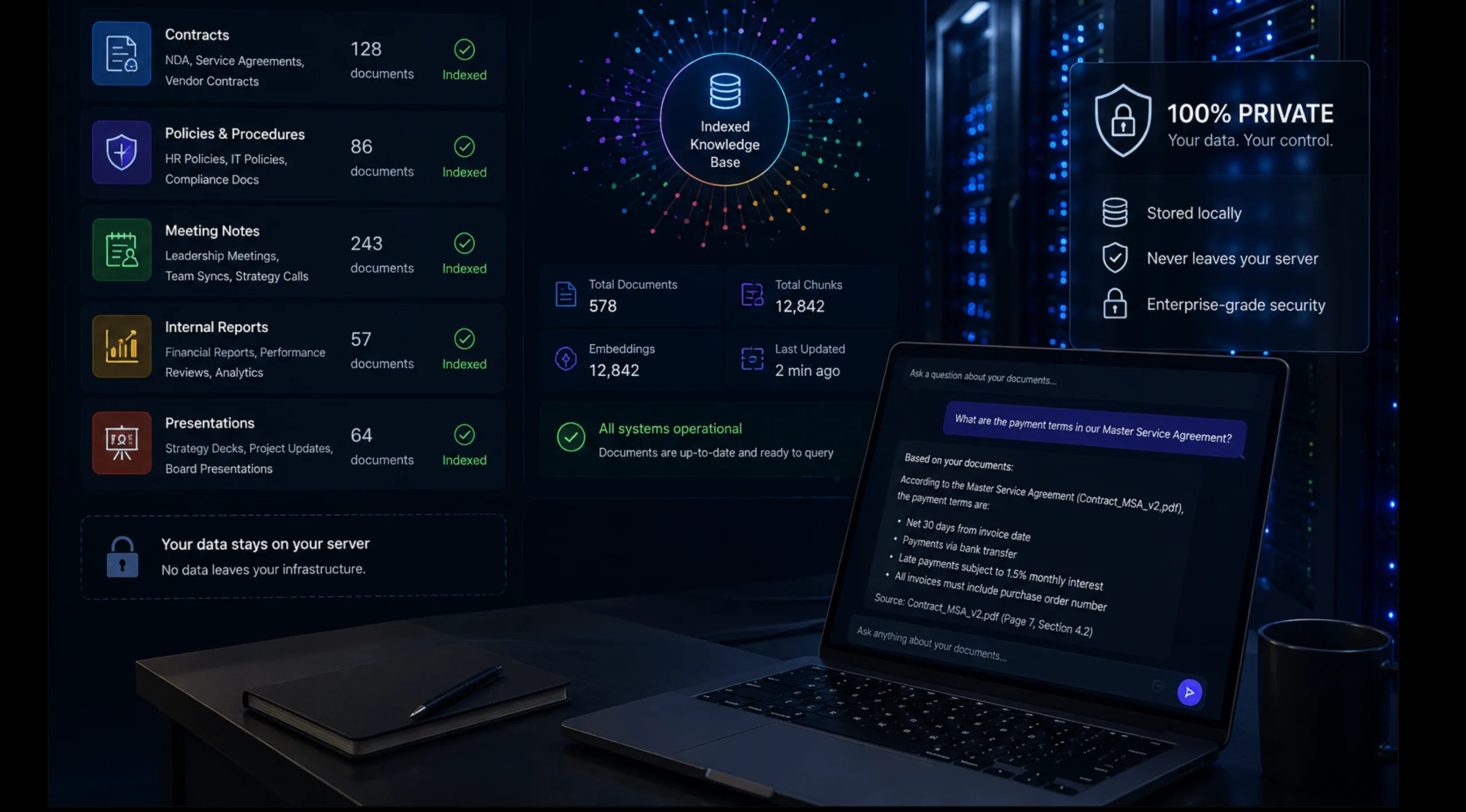
Instead of manually searching through folders, they can ask questions like “What are the payment terms in the ABC contract?” or “Summarize last month’s board meeting decisions,” and receive answers within seconds.
Because both the AI model and your documents remain on your server, sensitive business information never leaves your infrastructure.
This gives your team the speed and convenience of AI-powered document search while maintaining full control over confidential data.
Legal teams can review contracts faster, and HR can quickly locate company policies. Also, managers can retrieve information from reports without exposing sensitive files to external AI providers.
Running local AI models requires dedicated computing resources, which is why a VPS is essential. However, the resource requirements depend on the chosen AI model and workload.
For instance, a plan with at least 4 GB of RAM is recommended for local inference with Ollama but may not be sufficient for all local models.
Hosting OpenClaw on a Truehost VPS provides the isolated environment and computing power needed to keep your private AI assistant running securely around the clock.
Why OpenClaw Needs Reliable VPS Hosting to Actually Work
OpenClaw is designed to automate work continuously. It monitors emails, responds to webhooks, runs scheduled tasks, checks servers, generates reports, and coordinates workflows throughout the day.
If it’s running on a laptop that’s asleep, disconnected, or turned off, those automations simply stop.
A reliable VPS keeps OpenClaw online 24/7, providing the consistent performance needed for business-critical automation.
Dedicated resources help prevent interrupted workflows. Meanwhile, fast NVMe storage improves responsiveness for browser automation, local AI models, and background tasks. With an isolated environment, your automations remain stable even as workloads grow.
Here is what Truehost’s OpenClaw VPS hosting gives you: one-click deployment, AMD virtualization, NVMe storage, and a pre-configured OpenClaw environment.
You are not spending the weekend installing dependencies before you can test your first workflow.
Starter ($11/mo): 1 vCPU, 2GB RAM, 50GB NVMe. Right for one or two email or notification workflows.
Pro ($17/mo): 2 vCPU, 4GB RAM, 100GB NVMe. Handles content repurposing, monitoring, and client onboarding running simultaneously.
Business ($23.08/mo): 4 vCPU, 8GB RAM, 200GB NVMe. Built for private document AI, multi-team KPI dashboards, and anything involving heavy browser automation.
Pick the use case that would save you the most hours this week and get it running. The only thing left to figure out is which task you’re finally done doing by hand.