Domain RegistrationFind and register the perfect domain for your website.
 .COM DomainChoose a widely recognized domain to build global credibility.
 Domain TransferSeamless domain transfers with zero downtime and complete control.
 All TLDsFind and register your perfect domain. Choose from local and global extensions.
 SSL CertificatesKeep your website safe with reliable SSL Certificates that protect customer data and build trust.
 whoisCheck domain ownership details, expiration dates, and registrar information.
 US DomainRegister a .US domain and build trust in the USA.
 Web HostingEverything your website needs to run smoothly
 WordPress HostingWordPress hosting that just works
 Windows HostingReliable hosting for Windows environments
 Reseller HostingTurn hosting into your business
 Email HostingEmail that looks professional and works anywhere
 cPanel HostingFull control of your hosting with cPanel
 Affiliate ProgramJoin as a partner and earn commissions on every referral you send our way.
 Vps HostingScalable virtual servers that expand as you need.
 Dedicated ServersGet complete access and full control over your dedicated physical server.
 Managed vpsNot tech-savvy? We will take care of everything with our fully managed VPS hosting for you.
 AI Website BuilderCreate stunning websites in seconds with AI.
 Online ShopSet up a professional online store. No coding required.
 Web design serviceGet a tailored website designed to match your brand and support your goals.
 BlogFind helpful guides on web hosting, online selling, digital marketing, and more.
 Contact USYou can reach us anytime, day or night, through chat or email.
 SupportBrowse helpful guides and answers for all of our services.
The main difference comes down to one thing: convenience versus control.
An n8n VPS is pre-installed and pre-configured. You log in and start building workflows. No command line, no dependency setup, no guesswork.
A regular VPS is a blank server. You install Node.js, npm, Docker, and every dependency n8n needs, yourself.
If you want to automate immediately, an n8n VPS suits you. If you’re comfortable with SSH and want full control over your stack, a regular VPS suits you better.
Either way, you’re self-hosting. Your workflows stay on your own server. Your data stays private. There’s no vendor lock-in.
The n8n VPS vs VPS tradeoff is this: pay a little more for convenience, or spend your own time and effort for control.
Neither path is objectively better. A solo founder automating invoice reminders needs something different from an agency running client workflows across ten different apps. What is important is matching the server to the job in front of you.
Let’s break both options down in detail.
n8n VPS vs Regular VPS Quick Comparison Table
| Aspect | n8n VPS | Regular VPS |
|---|---|---|
| Setup Time | Minutes | 1–2+ hours |
| Technical Skill | Minimal | Linux/Docker knowledge needed |
| Pre-installed Software | n8n, Docker, queue mode, templates | Blank OS only |
| Database Setup | Pre-configured | Manual install/config |
| SSL/HTTPS | Pre-configured | Manual setup |
| Updates & Maintenance | We at Truehost manage it | User responsible |
| Multi-App Hosting | n8n only | Any app/service |
| Performance Tuning | Pre-optimized queue mode | Manual config |
| Pricing | $11–$32/mo (monthly billing) | $4.77–$24.77/mo (monthly billing) |
9 Main Differences of n8n VPS vs Regular VPS
1) Setup Time
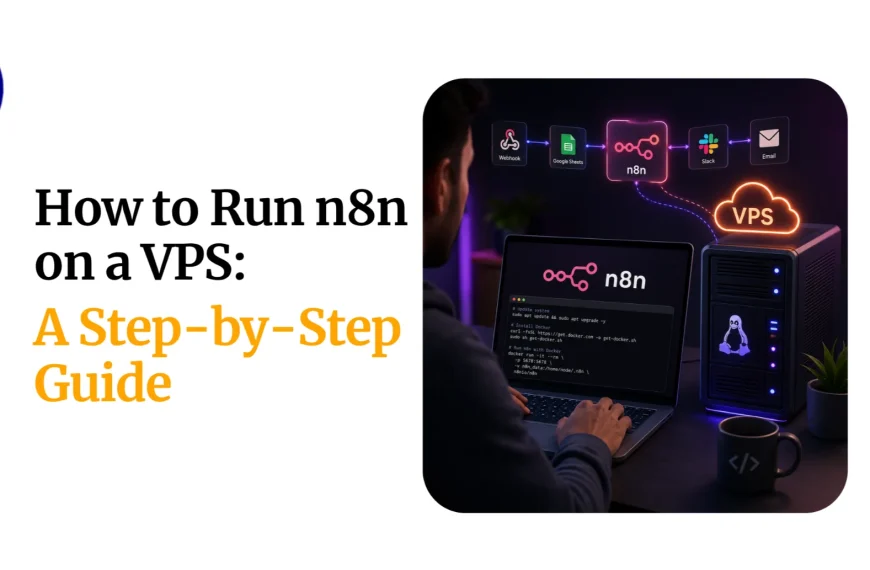
On a regular VPS, you handle everything yourself. That means installing the OS packages, setting up Docker, configuring a reverse proxy, and generating SSL. Budget 1–2 hours, more if you hit an error along the way.
On an n8n VPS, the install is one-click. You’re logged into a working n8n instance in minutes.
Takeaway: the time you save is the value you’re paying for.
Example: A freelancer setting up a client automation on a Friday afternoon can have an n8n VPS live and building workflows before their coffee gets cold. The same task on a regular VPS often spills into the evening.
2) Technical Skill Required
A regular VPS asks more of you. You need to be comfortable with the command line, know basic Docker commands, and know your way around Linux networking.
An n8n VPS asks for almost nothing technical. You log in through your browser and start building.
This makes the regular VPS route better suited to developers and sysadmins. The n8n VPS route suits non-technical business owners who just want automation running.
Example: A small e-commerce owner wants to connect Shopify orders to a WhatsApp confirmation message. On an n8n VPS, that’s all about dragging two nodes together. On a regular VPS, the same owner would first need to learn how to SSH in, run Docker commands, and troubleshoot port issues, none of which relate to the actual automation they’re trying to build.
3) Pre-installed Software
A regular VPS gives you a blank operating system. Nothing is bundled. You install every piece yourself.
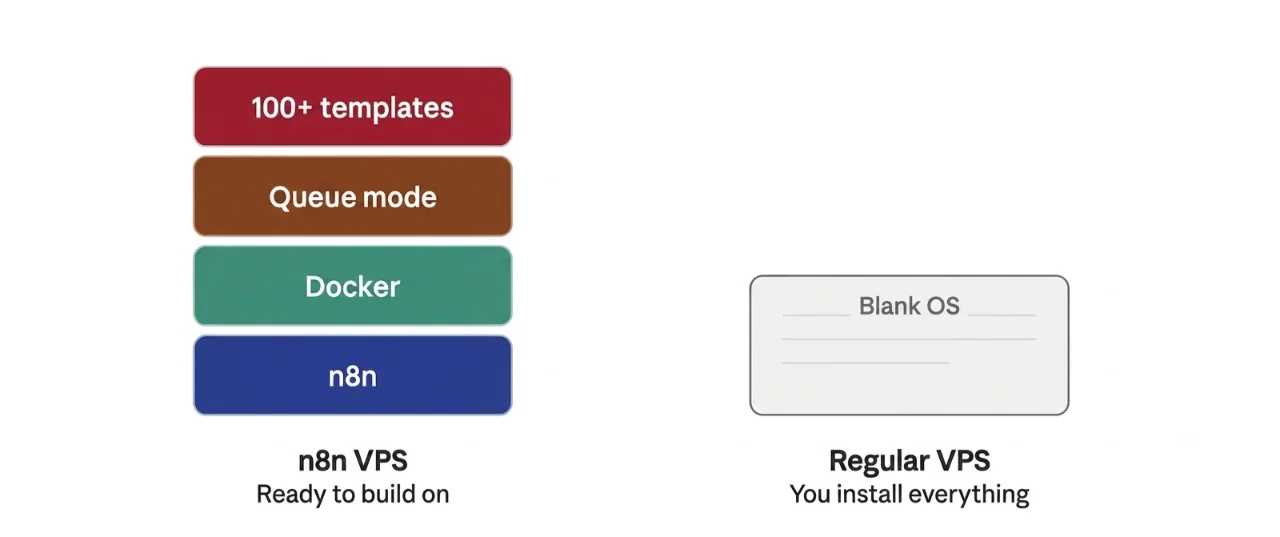
An n8n VPS with us comes with n8n, Docker, queue mode, over 100 pre-made workflow templates, and community nodes already in place.
Installing dependencies manually opens the door to version conflicts. A pre-configured stack avoids that entirely.
n8n itself is open-source, with an active community behind it. The project has passed 198,000 stars on GitHub, and over 100 million Docker pulls, and it now supports more than 400 integrations out of the box.
That ecosystem is what feeds the pre-made templates and community nodes an n8n VPS gives you access to from the first login.
4) Database Management
On a regular VPS, you install and configure your own database, usually PostgreSQL or SQLite, and connect it to n8n yourself.
On an n8n VPS, the database is already configured to support n8n’s execution and workflow data.
Database choices are very important. n8n’s official guidance points to PostgreSQL as the production-ready option for anything beyond light testing, since SQLite doesn’t handle concurrent writes well at scale.
Example: A workflow that fires 50 times an hour on SQLite may run fine for weeks, then suddenly throw database-lock errors the moment two executions overlap. PostgreSQL, pre-configured on an n8n VPS, avoids that failure mode from day one.
5) SSL/HTTPS Setup
A regular VPS needs manual SSL work. That means generating a certificate, setting up renewal, and configuring a reverse proxy in front of n8n.
An n8n VPS ships with SSL pre-configured across the stack.
This isn’t a small detail. n8n relies heavily on webhooks to trigger workflows, and most third-party services (Slack, Stripe, WhatsApp Business API) require HTTPS endpoints before they’ll even send a request. Skip SSL, and those webhooks simply won’t fire.
Example: Connect a payment provider’s webhook to an n8n instance without HTTPS, and the request gets rejected before it ever reaches your workflow. You won’t get an error inside n8n. You’ll just notice orders never trigger the automation you built.
6) Updates & Maintenance
On a regular VPS, you’re responsible for OS patches, Docker updates, and keeping n8n itself current. Miss a patch cycle, and you’re exposed.
On an n8n VPS, we at Truehost manage the platform-level updates for you.
Risk callout: a neglected regular VPS is a security risk waiting to happen. Unpatched servers are one of the most common entry points for automated attacks.
7) Multi-App Hosting Flexibility
A regular VPS can host more than n8n. Run WordPress, a database, or another app alongside it, all on the same server.
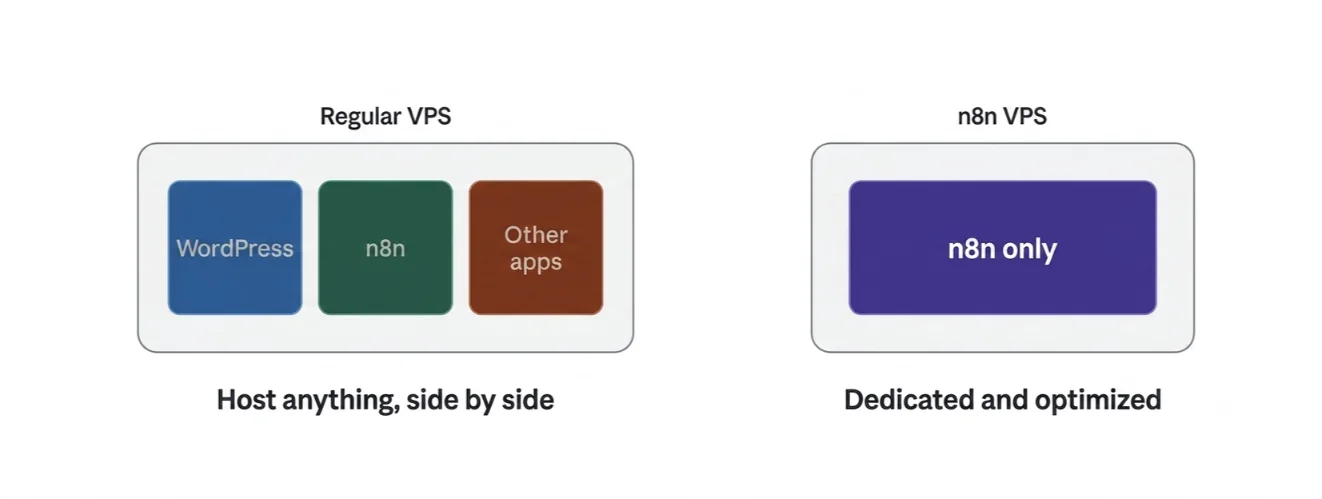
An n8n VPS is dedicated and optimized for n8n alone.
This distinction is most important for agencies and freelancers juggling mixed workloads.
If you’re already hosting client sites and want to bolt on automation without a second bill, a regular VPS lets you do that. If automation is the whole job, the dedicated route wins.
Example: An agency running three client WordPress sites and a shared n8n instance for lead-routing automations can consolidate all of it on one Cloud VPS. Splitting that same agency’s workload across a regular VPS and a separate n8n VPS means paying for, and managing, two servers instead of one.
8) Performance Optimization
On a regular VPS, you configure queue mode, worker processes, and Redis yourself if you want n8n to handle concurrent executions well.
On an n8n VPS, queue mode is pre-enabled from day one.
This is important once your automation volume grows. If you’re running dozens of workflows at once, or handling high-frequency webhooks, queue mode keeps executions from backing up and choking your editor.
Example: A business processing 500 WhatsApp order confirmations during a flash sale needs those executions distributed across worker processes, not queued one after another in the main thread. Without queue mode configured, a spike like that can freeze the entire editor until the backlog clears.
9) Pricing
Every difference above shows up in one place: the price tag.
Let’s look at what that costs, plan by plan.
Pricing Comparison Table
| Plan | Type | Price/mo | vCPU | RAM | Storage | Bandwidth |
|---|---|---|---|---|---|---|
| Cloud VPS Elite | Regular VPS | $4.77/ mo | 1 | 1 GB | 25 GB SSD | 1 TB |
| Cloud VPS 1 | Regular VPS | $6.77/mo | 1 | 2 GB | 50 GB SSD | 1 TB |
| N8N Starter | n8n VPS | $6.77/mo | 1 | 2 GB | 50 GB NVMe | 4 TB |
| Cloud VPS 2 | Regular VPS | $12.77/mo | 2 | 4 GB | 100 GB SSD | 10 TB |
| N8N Pro | n8n VPS | $12.77/mo | 2 | 4 GB | 100 GB NVMe | 6 TB |
| Cloud VPS 3 | Regular VPS | $24.77/mo | 4 | 8 GB | 200 GB SSD | 25 TB |
The prices are for a monthly billing cycle ( the prices go down as the billing cycle increases due to discounts). These prices are as of July 2026 and based on Truehost prices.
You can get a discount with us if you choose a longer period, e.g., quarterly, semi-annually, annually, etc. Check our current prices and billing terms on our n8n self-hosting plans.
Look closely at Cloud VPS 1 and N8N Starter. Same 1 vCPU. Same 2 GB RAM. Same 50 GB of storage.
The pattern repeats at the next tier. N8N Pro and Cloud VPS 2 share the same 2 vCPU, 4 GB RAM, 100 GB footprint.
If you’re going the DIY route, Cloud VPS Elite at $4.77/mo is the cheapest entry point available.
Which One Should You Choose?
Choose n8n VPS if:
- You have limited time or DevOps experience
- You want to automate the same day you sign up
- You only need to run n8n, nothing else
- You prefer a predictable, managed setup
Choose regular VPS if:
- You want full control over your server
- You plan to host multiple apps or services
- You’re comfortable with Docker and Linux administration
- You want the lowest possible cost and don’t mind manual setup
There’s no wrong answer here. It depends entirely on what you value more: your time, or your budget.
Some teams even run both. A regular VPS for their websites and internal tools, and a dedicated n8n VPS for anything mission-critical that needs guaranteed uptime and pre-tuned performance.
If your automations are generating revenue or handling customer-facing workflows, that separation is worth the extra few dollars a month.
n8n VPS vs Regular VPS FAQ
Can I install n8n on a regular VPS myself?
Yes. n8n is open-source and free to run on any server that meets the minimum specs. You’ll need to install Node.js or Docker, set up a database, configure a reverse proxy, and handle SSL yourself. It’s entirely doable if you’re comfortable with the command line.
Is an n8n VPS worth the extra cost long-term?
If your time is valuable and you’d rather build automations than manage a server, yes. The extra few dollars a month buys back the hours you’d otherwise spend on setup, patching, and troubleshooting.
Can I migrate from a regular VPS to an n8n VPS later (or vice versa)?
Yes. n8n stores your workflows and credentials in its database, so migrating means exporting your workflows and moving your database over to the new server. It takes some planning, but it’s a well-documented process.
What are the minimum specs to run n8n smoothly?
At minimum, plan for 1 vCPU and 2 GB of RAM. n8n’s own footprint is light, but Docker overhead, your database, and concurrent workflow executions eat into that fast. 1 GB of RAM works for testing only, and even then, you risk silent failures under load.
Does Truehost support both hosting types?
Yes. We offer both regular Cloud VPS plans and dedicated N8N VPS plans, so you can pick the setup that fits how you work.
Get Production-Ready n8n in Minutes on Truehost
Here’s the core answer, restated plainly: this was never about which server is ‘better.’ It’s about if you’re paying for setup time, or buying it back.
Both options run on the same dependable Truehost infrastructure. Reliability isn’t the deciding factor here. Your workflow needs are.
If you want to automate today, the n8n self-hosting plans get you there in minutes. If you’d rather build it your way, a regular VPS gives you the room to do that.