Domain RegistrationFind and register the perfect domain for your website.
 .COM DomainChoose a widely recognized domain to build global credibility.
 Domain TransferSeamless domain transfers with zero downtime and complete control.
 All TLDsFind and register your perfect domain. Choose from local and global extensions.
 SSL CertificatesKeep your website safe with reliable SSL Certificates that protect customer data and build trust.
 whoisCheck domain ownership details, expiration dates, and registrar information.
 US DomainRegister a .US domain and build trust in the USA.
 Web HostingEverything your website needs to run smoothly
 WordPress HostingWordPress hosting that just works
 Windows HostingReliable hosting for Windows environments
 Reseller HostingTurn hosting into your business
 Email HostingEmail that looks professional and works anywhere
 cPanel HostingFull control of your hosting with cPanel
 Affiliate ProgramJoin as a partner and earn commissions on every referral you send our way.
 Vps HostingScalable virtual servers that expand as you need.
 Dedicated ServersGet complete access and full control over your dedicated physical server.
 Managed vpsNot tech-savvy? We will take care of everything with our fully managed VPS hosting for you.
 AI Website BuilderCreate stunning websites in seconds with AI.
 Online ShopSet up a professional online store. No coding required.
 Web design serviceGet a tailored website designed to match your brand and support your goals.
 BlogFind helpful guides on web hosting, online selling, digital marketing, and more.
 Contact USYou can reach us anytime, day or night, through chat or email.
 SupportBrowse helpful guides and answers for all of our services.
If you just want to get n8n up and running on a VPS, you’ll need at least 1 vCPU core, 2 GB of RAM, and 20 GB of storage, with Ubuntu 24.04 as your operating system.
That’s your starting line.
However, that minimum spec is enough to get started. It doesn’t mean it’s the right fit for what you want to build.
There’s a big difference between triggering a simple automation once a day and running a production system that handles hundreds of webhooks every hour.
So, your use case dictates your requirements.
Knowing what you need saves you from paying for too much or having insufficient resources.
The Bare Minimums for n8n VPS
a) CPU
Minimum: 1 vCPU core
Recommended: 2-4 vCPU cores
N8n isn’t particularly CPU-hungry.
One vCPU can handle the n8n application and execute simple workflows sequentially.
However, if you plan to run multiple workflows simultaneously or have complex data transformations, more cores make a noticeable difference.
b) RAM
Minimum: 2 GB
Recommended: 4-8 GB
RAM is a critical resource for n8n.
So, n8n is memory-bound, not CPU-bound. An idle n8n instance uses roughly 100 MB of memory, but active workflows can spike depending on data volume and node complexity.
A rule of thumb: count your active workflows, multiply by 50 MB, and add a gigabyte for n8n itself plus PostgreSQL overhead.
Running on 2 GB is sufficient for testing and light use.
But if you’re processing large datasets, using AI nodes, or running browser automation, you’ll want at least 4 GB, and 8 GB gives you comfortable headroom.
c) Storage
Minimum: 20-50 GB SSD
Recommended: 40-80 GB NVMe SSD
You need storage space for your operating system and n8n installation, as well as for database performance.
The 20 GB minimum gives you room for the OS, Docker, n8n itself, and a small amount of workflow data and logs.
But if you’re using PostgreSQL (which is recommended for production), you’ll want more space for execution history.
NVMe storage makes a real difference for database I/O, which is usually the bottleneck, not the CPU. If you have the option, choose NVMe over standard SSD.
d) Bandwidth
Minimum: 1 TB
Recommended: 2 TB+
Bandwidth handles all communication between your n8n instance and external services, including API calls, webhooks, and data transfers.
The 1 TB baseline is suitable for testing and light use. If you’re running frequent workflows that pull data from multiple APIs, you’ll want the 2TB +.
e) Operating System
Operating System: Ubuntu 24.04
Ubuntu 24.04 LTS is the recommended choice due to its stability and extensive community support.
It’s what most n8n deployment guides are written for, and you’ll find the most help online for this specific version.
What You Can Achieve with the Bare Minimums
- Run multiple simple workflows. Basic automations that connect two or three services and handle small data payloads run fine on minimum specs.
- Handle 50-100 executions per day. At this volume, you won’t run into performance issues.
- Support 1-2 users. If it’s just you or one other person building and monitoring workflows, minimum specs work.
- Run in SQLite mode. The default database works well for low-volume usage.
- Manage scheduled tasks. Workflows that run on a timer rather than responding to webhooks.
- Serve as a test environment. Perfect for learning n8n, building workflows, and experimenting before moving to production.
- Connect to popular APIs with moderate payloads. Integrations with services like Google Sheets, Slack, or CRM tools work fine at this scale
How Much Does a Bare Minimum n8n VPS Cost?
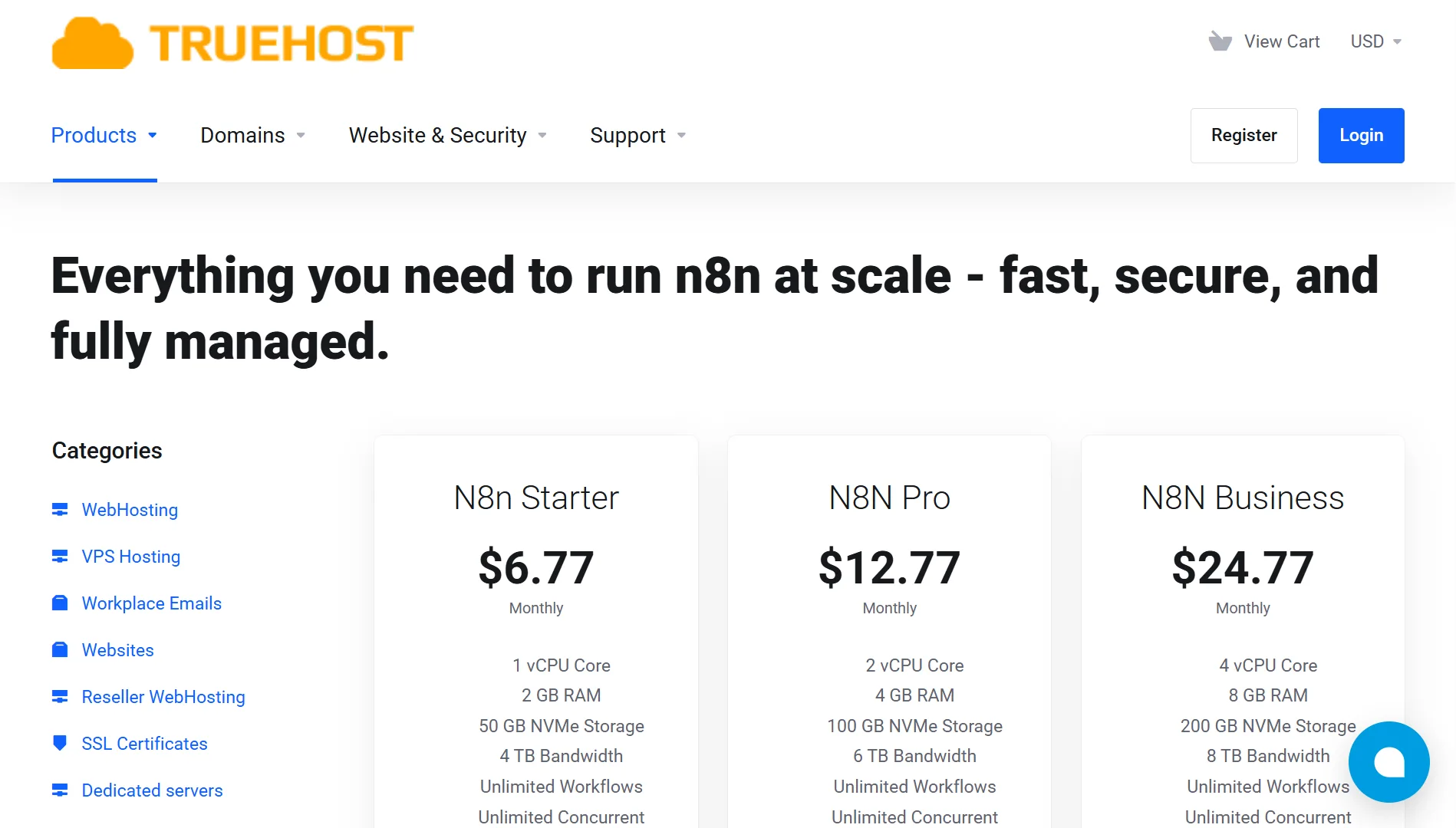
Here is a comparison of what providers charge for entry-level VPS plans that can run n8n:
- Truehost: N8N starter at $6.77/month (includes 1 vCPU, 2 GB RAM, 50 GB NVMe, 4 TB bandwidth)
- Hostinger: KM1 at $6.49/month for the first term, then $11.99/month on renewal
- Scala Hosting: Starts around $29.95/month for managed VPS plans
The prices vary significantly depending on whether you’re getting a basic VPS or a pre-configured n8n setup.
Pros and Cons of Running n8n on Minimum VPS Requirements
| Pros | Cons |
| Low cost; ideal for learning and testing | Limited capacity for complex workflows |
| Adequate for personal projects and small teams | Can’t run PostgreSQL comfortably |
| Good for 50-100 daily executions | Poor performance with large payloads |
| Works fine with SQLite database | Runs into memory errors with AI nodes or browser automation |
| Sufficient for scheduled (non-real-time) tasks | No room for simultaneous workflow execution |
| Low maintenance; less to manage | Not suitable for production environments |
| Easy to upgrade later if needed | Performance degrades as workflow count grows |
When to Ditch Bare Minimums and Get the Recommended n8n VPS Requirements
You’ll know it’s time to upgrade when you hit any of these thresholds:
- Exceeding 100 daily executions. More executions mean more resource usage.
- Adding multiple users. Each additional user creates more workflows and concurrent activity.
- Running complex workflows. Workflows with 10+ nodes, data transformations, or conditional logic need more memory.
- Moving to production. Don’t run mission-critical workflows on bare-minimum specs. The official recommendation is 4-8 GB RAM for production.
- Using PostgreSQL. SQLite is fine for testing, but PostgreSQL is better for production because it requires more memory and storage. If you’re running n8n with workers and queue mode, PostgreSQL is the way to go.
- Processing large files. Binary data processing spikes memory usage. The Code node, for example, creates pre- and post-processing copies of your data, which can consume all available resources when working with large files.
- Experiencing slow performance. If workflows are taking too long to execute or the interface feels sluggish, you’ve outgrown your specs.
- Requiring high availability and uptime. Production environments need redundancy and reliability that minimum specs can’t guarantee.
n8n VPS Requirements FAQs
What is the best VPS for n8n?
For production use with 4-8 GB RAM and NVMe storage, providers like Truehost offer pre-configured n8n plans with queue mode and PostgreSQL already set up. Hostinger’s KVM 2 plan with 2 vCPU, 8 GB RAM, and 100 GB NVMe storage is also a solid choice for growing needs.
What technical skills do I need to manage a VPS for n8n?
You’ll need basic Linux command-line skills, including SSH access, running Docker commands, editing configuration files, and managing services. If you go with a pre-configured n8n plan, you skip most of this setup. For manual setup, Docker and Docker Compose are the main tools you’ll use.
Can I use n8n without a VPS?
Yes. You can use n8n’s cloud version (n8n.cloud) with a paid subscription, or run it locally on your own machine for testing. The VPS approach gives you full control, unlimited workflows, and predictable costs.
Can I migrate my existing n8n instance to a new VPS?
Yes. Export your workflows as JSON files and re-import them on the new server. Some providers offer migration support, such as Truehost’s team, which provides free migration.
Is self-hosting legal?
Absolutely. n8n is open-source and licensed for self-hosting. Running it on your own VPS is fully permitted. The only restrictions would be around your own data handling and compliance requirements.
Deploy on Truehost’s n8n Self-hosting
With our n8n hosting, you get a fully optimized automation environment.
- 1-Click Deployment & Instant Setup. Your n8n instance runs in seconds; no Linux, Docker, or server setup needed. Just click Deploy, log in, and start building workflows.
- Optimized High-Performance Servers. Our VPS environments are tuned for automation-intensive tasks, with high CPU power, NVMe SSD storage, low-latency networks, and auto-scaling. Perfect for large workflows and high-frequency triggers.
- Secure Hosting With Built-In Protection. We include free SSL certificates, firewall and DDoS protection, regular security patches, and server-level hardening. Your workflows run in a safe, private environment.
- Automatic Backups & Monitoring. We run daily backups with one-click restore, downtime monitoring, and performance alerts.
- 24/7 Human Support From Real Engineers. Our engineers are available day and night for help with workflow deployment, integration troubleshooting, scaling recommendations, and server tuning.