Domain RegistrationFind and register the perfect domain for your website.
 .COM DomainChoose a widely recognized domain to build global credibility.
 Domain TransferSeamless domain transfers with zero downtime and complete control.
 All TLDsFind and register your perfect domain. Choose from local and global extensions.
 SSL CertificatesKeep your website safe with reliable SSL Certificates that protect customer data and build trust.
 whoisCheck domain ownership details, expiration dates, and registrar information.
 US DomainRegister a .US domain and build trust in the USA.
 Web HostingEverything your website needs to run smoothly
 WordPress HostingWordPress hosting that just works
 Windows HostingReliable hosting for Windows environments
 Reseller HostingTurn hosting into your business
 Email HostingEmail that looks professional and works anywhere
 cPanel HostingFull control of your hosting with cPanel
 Affiliate ProgramJoin as a partner and earn commissions on every referral you send our way.
 Vps HostingScalable virtual servers that expand as you need.
 Dedicated ServersGet complete access and full control over your dedicated physical server.
 Managed vpsNot tech-savvy? We will take care of everything with our fully managed VPS hosting for you.
 AI Website BuilderCreate stunning websites in seconds with AI.
 Online ShopSet up a professional online store. No coding required.
 Web design serviceGet a tailored website designed to match your brand and support your goals.
 BlogFind helpful guides on web hosting, online selling, digital marketing, and more.
 Contact USYou can reach us anytime, day or night, through chat or email.
 SupportBrowse helpful guides and answers for all of our services.
Do you focus on keywords, blog posts, and backlinks, but still struggle to rank?
Those help, but one small technical piece often gets ignored and is costing you rankings every day.
That piece is your sitemap. The way you structure your sitemap shapes how quickly Google finds your pages, how often it crawls them, and how much trust it places in your site.
A sitemap is a simple file that lists your key pages and sends them to Google. It works like a map. Without it, Google has to search your site on its own. With a clean sitemap, Google can quickly find your best pages. With a messy one, it wastes time on weak pages.
And you can see the impact in real numbers. Around 94% of pages get zero traffic, often because Google never indexes them. At the same time, about 15% of sites have no sitemap, and 17% use broken ones. That slows everything down.
Clean structure helps your pages get indexed faster.
Today we are going to look at;
- Keeping Only High-Value Pages in Your Sitemap
- Split Your Sitemap Into Clean Sections (Sitemap Index)
- Match Your Sitemap to Your Site Structure
- Prioritize Fresh and Up-to-Date Content
- Limit Sitemap Size (Very Important)
- Remove “Noindex” Pages from Sitemap
- Add Only Canonical URLs
- Connect Sitemap to Internal Linking
- Submit and Monitor Properly
- Keep It Clean Over Time
- Do Better With Better Hosting From Truehost
1) Keep Only High-Value Pages in Your Sitemap

Search engines treat your website’s sitemap like a priority list. Whatever you put in there, you are essentially telling Google: “Please go here first.” The first rule for structuring your sitemap is to include only pages that are actually worth indexing.
Only include:
- Your main pages: home, services, key landing pages
- Blog posts you actually want to rank
- Product pages, if you run an online store
Remove:
- Tag pages, which are automatically generated pages grouping posts by topic label
- Author pages
- Thin content, pages with barely any useful text
- Duplicate pages, multiple URLs that show the same content
In SEO plugins like Yoast SEO or Rank Math, you can turn off these page types in the sitemap settings with just a few clicks. Consequently, your sitemap becomes a clean, curated list that Google actually trusts.
2) Split Your Sitemap Into Clean Sections (Sitemap Index)
Instead of dumping all pages into a single giant file, structure your sitemap with a sitemap index. This is just a master file that points to smaller, organized sitemap files, one for each content type.
A good split looks like this:
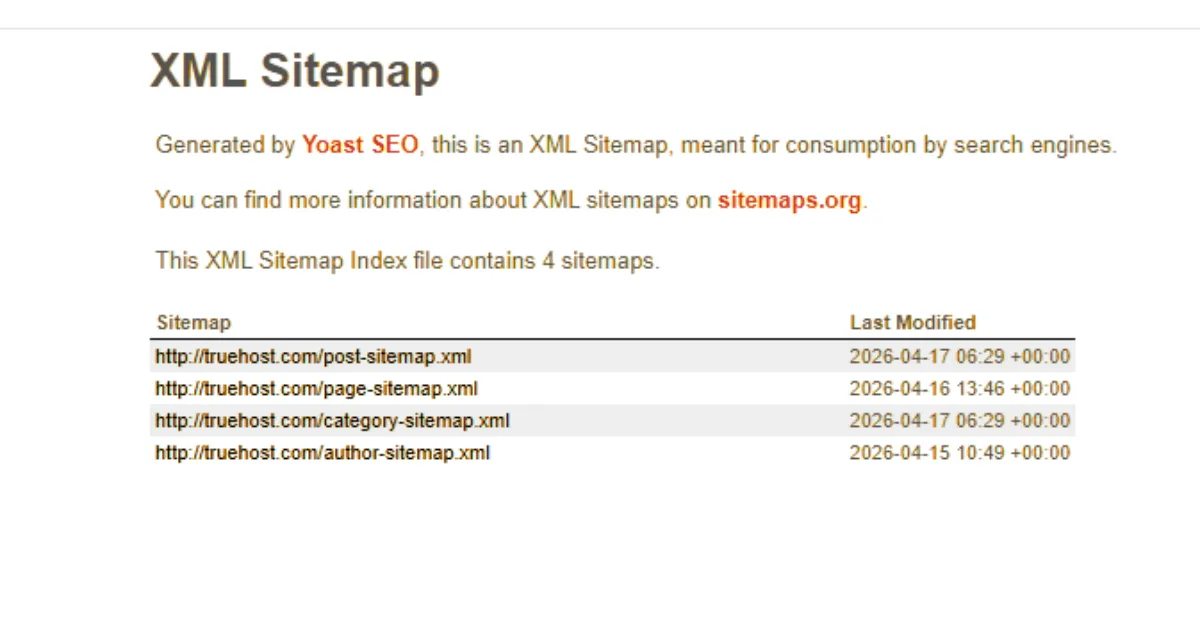
- /post-sitemap.xml: for all your blog posts
- /page-sitemap.xml: for your main pages
- /category-sitemap.xml: for your categories
This structure helps search engines crawl faster because they can go straight to the section they need. It also makes it much easier for you to monitor which sections are being indexed in Google Search Console.
3) Match Your Sitemap to Your Site Structure
Your sitemap should reflect how your site is actually organized, not just list random pages. When Google sees your sitemap and your internal links all pointing to the same logical hierarchy, it understands your site much better.
For example, a clean content hierarchy looks like: Homepage → Category (such as Hosting) → Blog Post. Each level links naturally down to the next. When you structure your sitemap to match this flow, every page has a logical home, and Google knows exactly where it fits.
The rule to remember is this: if a page is in your sitemap, it must be easy to find on your site through internal links.
A page listed in the sitemap but buried with no links pointing to it sends Google a very weak signal. In other words, your sitemap and your internal linking must always agree.
4) Prioritize Fresh and Up-to-Date Content
Search engines revisit updated pages far more often than pages that have not been touched in years. When structuring your sitemap, ensure fresh content is included and visible.
Here is what to do:
- Go back to old blog posts regularly and update them with new information
- Keep these updated posts in your sitemap, so Google knows to come back
- Remove outdated, irrelevant pages rather than leaving them to collect dust
Plugins like Yoast SEO automatically update the timestamps in your sitemap whenever you publish or update content.
That timestamp, called a lastmod tag, tells Google when a page was last meaningfully changed. Use it correctly, and Google will crawl your updates faster.
5) Limit Sitemap Size (Very Important)
Google has official limits on the size of a single sitemap file. Exceeding these limits causes your sitemap to fail silently, and pages stop being discovered as a result.
Keep each sitemap file:
- Under 50,000 URLs
- Or under 50MB in file size
If your site has grown large, with thousands of blog posts, product pages, or categories, split everything into multiple smaller files using the sitemap index approach from Step 2. That way, each individual file stays well within the limits, and the index file ties them all together cleanly.
6) Remove “Noindex” Pages from Sitemap
This is one of the most common and costly mistakes you make when structuring your sitemap.
A noindex tag is a small piece of code that tells Google: “Do not show this page in search results.” But here is the problem: if that same page is also in your sitemap, you are sending Google two contradictory messages at once.
You are saying “here is a page I want you to visit” and “please ignore this page” at the same time.
Google Search Console will flag this with a “Submitted URL marked noindex” error, and it erodes trust in your sitemap overall. The fix is simple: either remove the page from your sitemap or remove the noindex tag if the page should be indexed.
Never have both at the same time. Pick one direction and go with it.
7) Add Only Canonical URLs
A canonical URL, say that as “can-ON-ih-kul,” is the main, official version of a page. When a page exists at more than one web address, Google needs to know which one is the real version to rank.
Avoid including:
- /page/ and /page?ref=123 — both leading to the same content but with different URLs
- HTTP and HTTPS duplicates of the same pages
When you structure your sitemap only to include canonical URLs, you eliminate this confusion entirely. Google knows exactly which version to index, which version to rank, and which version to link to. Additionally, you stop wasting crawl budget on duplicate versions of the same page.
8) Connect Sitemap to Internal Linking
This is what most SEO guides never tell you, and it is one of the most impactful hidden ranking boosts you can get when you structure your sitemap correctly.
Your sitemap and your internal links must work together, not independently. A page listed in your sitemap but not linked to from any other page on your site is what SEOs call an orphan page. Google finds it through the sitemap, but because nothing links to it, it assumes the page has no authority or importance. The result is weaker indexing and lower rankings.
So whenever you add a page to your sitemap, make sure at least two or three other pages on your site link to it using natural, descriptive anchor text, that is, the clickable words in a hyperlink.
When the sitemap and internal links align, Google’s trust in that page increases significantly.
9) Submit and Monitor Properly
Once you structure your sitemap correctly, submit it to Google Search Console, the free tool Google provides to help you understand how your site appears in search.
After submitting, check back regularly. Look at the Indexed vs Submitted numbers. If you submitted 80 pages but only 40 are indexed, something is wrong. Look for specific errors like “Crawled not indexed” or “Discovered not indexed.” These tell you which pages Google visited but chose not to add to its search results.
Furthermore, use this data to keep refining.
- Remove the weak pages causing these errors.
- Update the pages that are getting ignored.
- Monitoring is not a one-time task; it is an ongoing habit that separates sites that grow in search from those that stay invisible.
10) Keep It Clean Over Time
A sitemap is not something you structure once and forget—the web changes. Your content evolves. New posts go up, old ones become irrelevant, and weak pages pile up over time if you are not careful.
Set aside a small window every month to:
- Remove low-performing pages that bring in no traffic and have no real ranking potential
- Keep only the pages that genuinely contribute to your SEO goals
Here is a principle worth remembering: a smaller, cleaner sitemap beats a big, messy one every single time. The more junk you have in your sitemap, the more of Google’s budget gets wasted. The leaner your sitemap, the more budget goes toward the pages you actually want to rank.
Do Better With Better Hosting From Truehost

Here is something most sitemap guides leave out. Even a perfectly structured sitemap will not reach its full potential if your hosting is slow or unstable.
Google’s crawlers have a limited time budget for each site. If your server loads slowly when they show up, they crawl fewer pages, and your perfectly clean sitemap gets only half the attention it deserves.
Truehost gives your site the fast, reliable foundation that makes every sitemap decision count.
With fast servers, reliable uptime, and performance-oriented infrastructure, Google can crawl your pages quickly and consistently. This means faster indexing, more pages in search, and better rankings over time.