Domain RegistrationFind and register the perfect domain for your website.
 .COM DomainChoose a widely recognized domain to build global credibility.
 Domain TransferSeamless domain transfers with zero downtime and complete control.
 All TLDsFind and register your perfect domain. Choose from local and global extensions.
 SSL CertificatesKeep your website safe with reliable SSL Certificates that protect customer data and build trust.
 whoisCheck domain ownership details, expiration dates, and registrar information.
 US DomainRegister a .US domain and build trust in the USA.
 Web HostingEverything your website needs to run smoothly
 WordPress HostingWordPress hosting that just works
 Windows HostingReliable hosting for Windows environments
 Reseller HostingTurn hosting into your business
 Email HostingEmail that looks professional and works anywhere
 cPanel HostingFull control of your hosting with cPanel
 Affiliate ProgramJoin as a partner and earn commissions on every referral you send our way.
 Vps HostingScalable virtual servers that expand as you need.
 Dedicated ServersGet complete access and full control over your dedicated physical server.
 Managed vpsNot tech-savvy? We will take care of everything with our fully managed VPS hosting for you.
 AI Website BuilderCreate stunning websites in seconds with AI.
 Online ShopSet up a professional online store. No coding required.
 Web design serviceGet a tailored website designed to match your brand and support your goals.
 BlogFind helpful guides on web hosting, online selling, digital marketing, and more.
 Contact USYou can reach us anytime, day or night, through chat or email.
 SupportBrowse helpful guides and answers for all of our services.
You have a business name. You have a logo. You even have a website.
But your email still says gmail.com.
To a potential client deciding whether to trust you with their money, that is the first red flag. A custom domain email like [email protected] costs nothing extra when you pair it with the right provider. Free email hosting for a custom domain is very much available in 2026, and setting it up is simpler than most people think.
Providers like Truehost bundle free business email hosting with domain registration and hosting plans, while standalone options like Zoho Mail offer a solid free tier for small teams.
If you are already paying for web hosting, check out Truehost’s email hosting options because your free business email accounts may already be waiting for you. This guide walks you through everything you need to know to get set up today.

Why Every Small Business Needs a Custom Domain Email
If you are still sending quotes from a Gmail or Yahoo address, some potential clients are quietly moving on. It might sound harsh, but a free email address signals that a business is either very new or not taking itself seriously.
A professional email address like [email protected] or [email protected] tells people your business is real, established, and worth trusting. It also keeps your brand in front of people every single time you send a message.
Beyond impressions, a custom domain email gives you control. If you ever switch email providers, your address stays the same. With a personal Gmail, you are essentially tied to Google’s terms forever.
For freelancers and small businesses especially, a professional email address is one of the cheapest credibility upgrades you can make. And in many cases, it does not have to cost anything extra
What Is Free Email Hosting for a Custom Domain?
Free email hosting for a custom domain means you can send and receive emails using your own domain name, like [email protected], without paying a separate monthly fee for email service.
In most cases, this happens in one of two ways. Either the email service is bundled into a hosting or domain plan you already purchased, or the provider offers a limited free tier that supports custom domains.
It is worth knowing upfront that truly unlimited, fully featured free business email hosting is rare. Most free plans come with storage caps, account limits, or reduced features. But for a small team or solo business owner, those limits are often more than enough.
The Best Options for Free Email Hosting for Custom Domains in 2026
Here are some of the most practical options available right now, with honest details on what each one actually offers.
1) Truehost
What It Offers
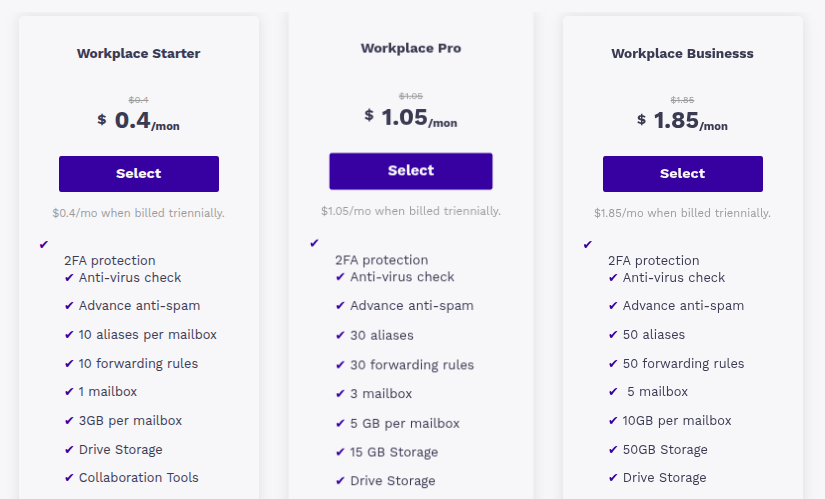
Truehost is a hosting provider popular across Africa that bundles free business email hosting with its web hosting and domain registration plans. If you register a domain or sign up for hosting through Truehost, you get email accounts included at no extra cost.
Pricing and Free Plan Details
Email hosting is included with Truehost’s shared hosting plans, which start at very affordable rates. You do not pay separately for email. Visit Truehost to see current domain and hosting pricing.
Key Features
Truehost supports webmail access, POP3 and IMAP configuration for mobile and desktop clients, and basic spam filtering. You can set up multiple email accounts depending on your hosting plan.
Best For
Small businesses and freelancers in Africa and beyond who want a one-stop setup for domain, hosting, and email without juggling multiple providers.
2) Zoho Mail
What It Offers
Zoho Mail has one of the most well-known free tiers for custom domain email. Their Forever Free plan allows up to five users with 5GB of storage per user, which is solid for a small team.
Pricing and Free Plan Details
The free plan is genuinely free for up to five users. Paid plans start at around $1 per user per month when billed annually, with more storage and features. Zoho Mail free plan details are available on their official site.
Key Features
Zoho Mail offers an ad-free inbox, calendar integration, mobile apps, and strong security features. It also integrates well with other Zoho tools if you use them for CRM or project management.
Best For
Startups and small businesses that want a clean, professional email setup without paying anything for a small team.
3) Cloudflare Email Routing + Gmail
What It Offers
This is a slightly technical but clever setup. Cloudflare offers free email routing for any domain managed through its DNS. You can forward emails from your custom domain to an existing Gmail inbox.
Pricing and Free Plan Details
Cloudflare Email Routing is completely free. You only need a Cloudflare account and a domain with its DNS managed there. Learn more about Cloudflare Email Routing here.
Key Features
Emails sent to [email protected] land in your Gmail. It is not a full email hosting solution, but it works well for receiving. Sending from your custom address requires a free SMTP workaround through Gmail settings.
Best For
Solo freelancers or very small businesses who want to receive professional email without setting up a separate inbox.
4) cPanel Hosting Providers (Including Truehost)
What It Offers
Many web hosting providers that use cPanel include free email hosting as part of any hosting plan. This includes free SMTP email hosting for sending, webmail access, and easy account creation.
Pricing and Free Plan Details
Email is bundled with hosting. Prices vary by provider. If you are already paying for web hosting, you likely already have access to free business email hosting through your cPanel dashboard.
Key Features
Full SMTP and IMAP support, spam filters, autoresponders, catch-all addresses, and forwarding options. Easy to manage even for non-technical users.
Best For
Any small business already paying for web hosting who has not yet activated their email accounts.
How to Get Free Email Hosting for Your Custom Domain
Setting up a custom domain email is not as complicated as it sounds. Here is a simple walkthrough.
1) Choosing a Domain Name
Your domain name is your business address online, so choose something short, easy to spell, and close to your business name. If your business is called Green Leaf Bakery, something like greenleafbakery.com or greenleafbakery.us works well.
Register your domain through a reliable provider. Truehost offers affordable domain registration with email included, which makes the whole process simpler from the start.
2) Selecting an Email Hosting Provider
If you are registering a new domain or already have hosting, check whether email is already included in your plan. For cPanel-based hosts like Truehost, it usually is.
If you need a standalone email solution, Zoho Mail’s free plan is a strong choice for teams of up to five people.
3) Connecting DNS Records (MX, SPF, DKIM)
This is the part that trips most people up, but it is actually straightforward once you understand what each record does.
MX records tell the internet where to deliver email for your domain. Think of it as a forwarding address for your inbox.
SPF records tell receiving servers which mail servers are allowed to send email on your domain’s behalf, which reduces the chance of your messages being marked as spam.
DKIM is a digital signature attached to your outgoing emails that proves they actually came from you.
Your email provider will give you the exact values to enter. You just need to paste them into the DNS settings of wherever your domain is registered. Most providers also offer step-by-step setup guides.
4) Creating Your First Business Email Address
Once DNS is set up, log into your email host’s control panel and create your first account. Choose something clean and professional. Options like info@, hello@, or your first name @ your domain all work well for most businesses.
Avoid addresses like admin123@ or randomname@ because they look unpolished and can reduce trust.
5) Testing and Sending Emails
After creating your account, send a test email to a personal address to make sure everything is working. Also send one from your personal email to the new business address to confirm you are receiving mail correctly.
If emails are not arriving, the DNS records may not have fully updated yet. DNS propagation can take up to 24 hours, though it is often much faster.
Free vs Paid Email Hosting: What’s the Difference?
Free plans are a great starting point, but there are real trade-offs worth knowing about before you commit.
Storage is usually the first limitation you will hit. Free plans often offer 1GB to 5GB per inbox, which fills up faster than you expect if you receive large attachments. Paid plans typically offer much more generous storage.
Support is another difference. Free users are often limited to community forums or documentation, while paid plans include direct support. If something breaks on a busy day, that matters.
Paid plans also tend to include features like email archiving, team aliases, better spam filtering, and higher sending limits. These become important as your business grows.
For most solo operators and small teams just starting out, a free plan on Zoho Mail or a bundled plan through a host like Truehost covers the basics well.
Common Mistakes When Setting Up Custom Domain Email
- Not verifying DNS records properly
Always double-check MX, SPF, and DKIM records against your provider’s instructions. Even a small typo can prevent emails from being delivered.
- Using unprofessional email addresses
Email addresses should reflect your business professionally. Avoid informal names like [email protected] when communicating with clients.
- Ignoring spam protection settings
Configure SPF and DKIM records to improve email deliverability. Without these settings, your messages are more likely to end up in spam folders.
- Choosing a free plan without checking limitations
Some providers restrict daily email sending limits. Important features may be unavailable unless you upgrade to a paid plan.
- Not setting up backup and recovery options
Always link a recovery email address to your account.This helps prevent permanent access loss if you forget your password or encounter provider issues.
Why Some Free Email Hosting Isn’t Really Free
There is a difference between genuinely free and free with a catch, and it is worth knowing before you set things up.
Some providers advertise free email but require you to purchase hosting or a domain from them first. That is not dishonest, but it means the email is really a perk bundled with something you are paying for.
Others offer a free tier but show ads inside the webmail interface. A few charge for essential features like IMAP access or mobile app sync, which you pretty much need to use email properly.
Limited free plans also tend to have tight sending limits that can be a problem if you send newsletters or follow-up emails frequently. If you grow beyond a small team, the jump to a paid plan becomes necessary faster than you might expect.
How Truehost Helps with Free or Affordable Email Hosting
Truehost makes the custom domain email setup process genuinely easy for small businesses, especially if you are new to all of this.
When you register a domain or sign up for a hosting plan with Truehost, email accounts come included. You do not need to configure a separate service, link different accounts, or worry about additional monthly fees just to send mail from your own domain.
The setup is handled through a familiar cPanel dashboard, which means creating new inboxes, setting up forwarders, and managing passwords is all done in one place. For small businesses that do not have a dedicated IT person, that kind of simplicity is genuinely valuable.
Truehost also supports SMTP, IMAP, and POP3, so you can connect your business email to Outlook, Apple Mail, Thunderbird, or any mobile email app with no extra tools required. You can learn more about getting started with email hosting on Truehost here.
If your business grows and you need more accounts or more storage, upgrading is straightforward. Truehost offers plans at different price points, so you are not locked into a single option. You can explore Truehost’s web hosting options to see what fits your business size and budget.
FAQs
Can I Get Free Email Hosting with a Custom Domain?
Yes, you can. Several providers offer free email hosting as part of a domain or hosting purchase. Zoho Mail also offers a genuine free tier for up to five users. The key is reading the details so you understand what limits apply.
What Is the Easiest Way to Create a Business Email Address?
The easiest path is to register your domain with a hosting provider that includes email, like Truehost. You get domain, hosting, and email in one place, with a single dashboard to manage everything.
Do I Need Web Hosting to Use a Custom Email Domain?
Not always. You can get a custom domain email through Zoho Mail without purchasing web hosting. However, if you already have hosting, email is often included for free.
Is Gmail Free for Custom Domain Email?
Google Workspace, which allows Gmail with a custom domain, is not free. Plans start at around $6 per user per month. There is a workaround using Cloudflare Email Routing to forward custom domain email to Gmail, but sending from your custom address through Gmail requires additional configuration.
How Many Email Accounts Can I Create for Free?
It depends on the provider. Zoho Mail’s free plan allows up to five accounts. Hosting-based plans through providers like Truehost typically allow multiple accounts depending on your plan tier.
Can I Use My Custom Email on My Phone?
Yes. Any custom domain email that supports IMAP can be added to your phone using the built-in mail app on Android or iPhone, or through apps like Outlook or Gmail. Just enter your incoming and outgoing server settings from your hosting provider.
Ready to Get a Free Business Email for Your Custom Domain?
Your email address is often the first thing a client sees. Make it count.
Whether you go with Truehost for an all-in-one domain and email setup or Zoho Mail for a standalone free tier, getting off a generic Gmail address is a move worth making today. It costs less than most people expect, and in many cases nothing at all.
Explore Truehost’s domain and hosting plans and set up your free email hosting for a custom domain in minutes.