Domain RegistrationFind and register the perfect domain for your website.
 .COM DomainChoose a widely recognized domain to build global credibility.
 Domain TransferSeamless domain transfers with zero downtime and complete control.
 All TLDsFind and register your perfect domain. Choose from local and global extensions.
 SSL CertificatesKeep your website safe with reliable SSL Certificates that protect customer data and build trust.
 whoisCheck domain ownership details, expiration dates, and registrar information.
 US DomainRegister a .US domain and build trust in the USA.
 Web HostingEverything your website needs to run smoothly
 WordPress HostingWordPress hosting that just works
 Windows HostingReliable hosting for Windows environments
 Reseller HostingTurn hosting into your business
 Email HostingEmail that looks professional and works anywhere
 cPanel HostingFull control of your hosting with cPanel
 Affiliate ProgramJoin as a partner and earn commissions on every referral you send our way.
 Vps HostingScalable virtual servers that expand as you need.
 Dedicated ServersGet complete access and full control over your dedicated physical server.
 Managed vpsNot tech-savvy? We will take care of everything with our fully managed VPS hosting for you.
 AI Website BuilderCreate stunning websites in seconds with AI.
 Online ShopSet up a professional online store. No coding required.
 Web design serviceGet a tailored website designed to match your brand and support your goals.
 BlogFind helpful guides on web hosting, online selling, digital marketing, and more.
 Contact USYou can reach us anytime, day or night, through chat or email.
 SupportBrowse helpful guides and answers for all of our services.
A client sends you an urgent message. It bounces back. Your reply lands in their spam folder. Your inbox gets hit by a phishing attack that leaks sensitive data. These are not edge cases, they are what happens when a business runs on the wrong email setup.
Email is the backbone of business communication, yet most businesses treat it as an afterthought. A shared Gmail account or a free inbox from your internet provider is not built for business. It lacks the security, reliability, and professionalism that clients and partners expect.
This article explains what email hosting is, how it works, how to choose the right provider, and how to set it up securely. It also highlights why we built Truehost to give businesses a more reliable, affordable, and practical email solution.
What Is Professional Email Hosting?

Email hosting is a service where a provider runs and manages dedicated email servers on your behalf. You get email accounts tied to your own domain like [email protected] instead of a generic free address.
A professional email hosting provider handles the server infrastructure, delivery systems, spam filtering, and security layers. You focus on running your business while the provider keeps your inbox working around the clock.
Professional email hosting is different from a free webmail account or a basic inbox bundled with a web hosting plan. It is purpose-built for business communication, with higher storage limits, stronger security, better deliverability, and dedicated support.
For example, if your website domain is www.yourbakery.com, email hosting lets you create addresses like [email protected] or [email protected]. Every email you send reinforces your brand instead of raising doubts about who is behind it.
How Email Hosting Works
When you send an email, it travels through a series of servers before it reaches the recipient. Here is what happens behind the scenes:
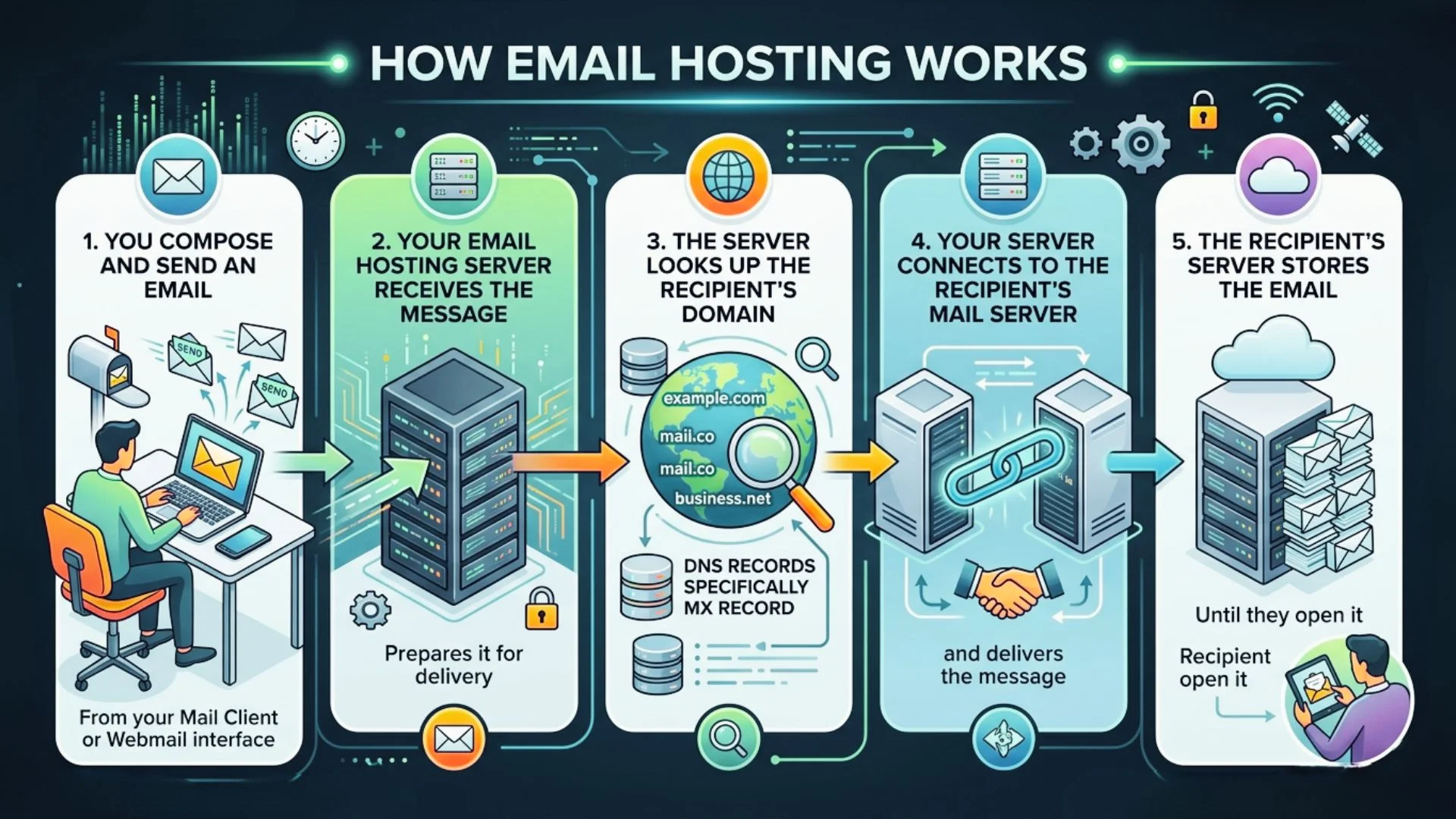
- You compose and send an email from your mail client or webmail interface
- Your email hosting server receives the message and prepares it for delivery
- The server looks up the recipient’s domain using DNS records specifically the MX record
- Your server connects to the recipient’s mail server and delivers the message
- The recipient’s server stores the email until they open it
Key Email Protocols You Should Know
Several technical protocols power your email behind the scenes. You do not need to configure most of these manually a good provider handles them but knowing what they do helps you ask the right questions when choosing a host.
- SMTP sends outgoing email from your server to the recipient’s server
- IMAP syncs your inbox across multiple devices in real time
- POP3 downloads emails to one device and removes them from the server
- SSL/TLS encrypts email data in transit to prevent interception
- SPF verifies that the sending server is authorized to send email for your domain
- DKIM adds a digital signature to prove messages are genuinely from you
- DMARC sets a policy for handling emails that fail SPF or DKIM checks
At Truehost, we configure SPF, DKIM, and DMARC on every account from day one. You do not need to be a technical expert to stay protected.
Why a Professional Email Address Is Critical for Your Business
Free email addresses are easy to get. Anyone can sign up for one in minutes, which is exactly why scammers rely on them. When your business uses a free domain email, you risk being associated with that crowd even if your intentions are entirely legitimate.
Here are reasons why professional email hosting is worth every penny.
1. It Builds Trust With Your Customers
A domain-based email shows your business is real and trustworthy, while a free email can raise doubts. If your site is yourbakery.com but you email from Gmail, customers may question its authenticity and walk away.
A custom domain email instantly builds trust and protects all the effort you’ve put into your business.
2. It Lets You Assign Proper Email Addresses to Your Team
Using free emails for staff looks messy and makes your business harder to reach. Professional email hosting lets you create clean, branded addresses like [email protected], [email protected], and [email protected].
They are easier to remember, more professional, and give you control over access as your team changes
3. It Keeps Your Email Marketing From Getting Blocked
For newsletters and promotions, a professional email isn’t optional—it’s essential. Free email providers often block bulk emails, so your campaigns may never reach inboxes.
Platforms like Mailchimp, Klaviyo, and ActiveCampaign also discourage or restrict free addresses. A domain-based email ensures your campaigns are delivered.
4. It Protects Sensitive Business Information
Business emails often contain sensitive data like contracts, invoices, and client details, so a breach can lead to fraud or penalties.
Professional hosting adds strong, round the clock security, scanning emails before they reach you and filtering threats into spam. Free providers do not offer the same level of protection, making your data more vulnerable.
Types of Email Hosting Services
Not all email hosting is the same. The right type depends on your business size, technical comfort level, and budget.
1) Shared email hosting
Is the most affordable entry point. Your accounts share server resources with other users on the same infrastructure. It works well for small businesses, freelancers, and early-stage startups.
2) Dedicated email hosting
Gives your business its own server with no shared resources. This suits larger organizations that need maximum performance, custom configurations, or strict data separation.
3) Cloud-based email hosting
Runs across a network of servers rather than one machine. Providers like Google Workspace and Microsoft 365 use this model. It offers high availability and easy scaling as your team grows.
4) Self-hosted email
Means running your own mail server on your own hardware or a VPS. You get total control, but maintaining it properly requires significant technical expertise and continuous attention to security.
5) Managed business email hosting
Is where the provider takes care of everything setup, security, updates, and support. This is the model we follow at Truehost. You get full control over your inboxes without needing to manage the underlying infrastructure yourself.
Key Features to Look for in an Email Hosting Provider
Not every provider delivers the same value. These are the features that genuinely affect day-to-day business operations:
- Custom domain email [email protected] from day one, not a generic address
- Spam and malware filtering protection built into the server, not just the inbox
- SSL/TLS encryption all data encrypted in transit and at rest
- SPF, DKIM, and DMARC support the authentication trio that protects your sender reputation
- Adequate storage per mailbox at least 5 GB per user to avoid constant cleanups
- Webmail access a browser-based client for access from any device, anywhere
- IMAP and SMTP support full compatibility with Outlook, Apple Mail, Thunderbird, and mobile apps
- Uptime guarantee 99.9% or higher with a published SLA you can hold them to
- 24/7 customer support email problems do not follow office hours
- Scalability the ability to add mailboxes as your team grows without switching plans
Benefits of Email Hosting for Businesses
Switching to dedicated email hosting delivers real, measurable advantages from day one.
- Stronger security. Dedicated email hosts invest in infrastructure that free services cannot match. Virus scanning, spam filtering, two-factor authentication, and encryption come as standard not as expensive add-ons.
- Better deliverability. Emails sent from a reputable host with proper authentication are far less likely to land in spam. This directly affects how many clients and prospects actually read your messages.
- Greater professionalism. Every email your team sends carries your domain name. That consistency reinforces your brand and builds recognition over time.
- More storage. Business email hosting gives each user dedicated storage that scales on demand. You are not sharing limits with millions of strangers on a free platform.
- Full control over your data. You set the rules retention policies, access permissions, forwarding rules, and filters. You own your data and can export or migrate it whenever you choose.
- Compliance readiness. For healthcare, legal, and financial businesses, hosted email with audit trails and encryption is often a regulatory requirement, not just a best practice.
How Much Does Email Hosting Cost?
Email hosting is one of the most affordable business tools available for companies in the United States.
In the U.S. market, email hosting pricing is generally competitive, especially for small businesses and startups looking for professional communication tools without high overhead costs.
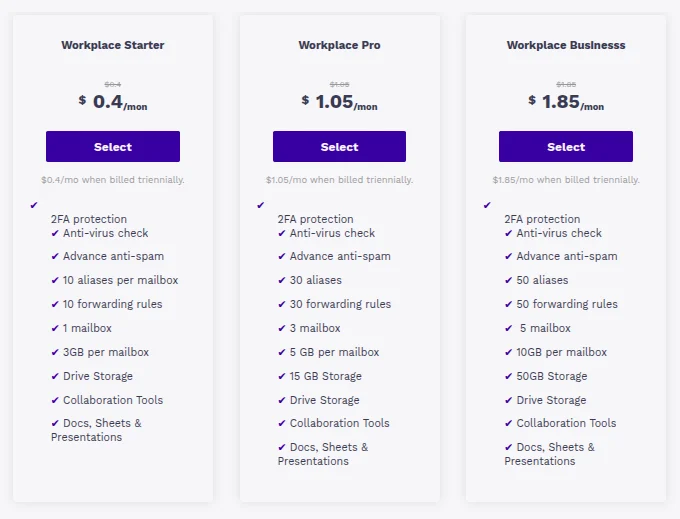
For example, with Truehost, you can get started with professional business email hosting at a very affordable monthly rate per user, making it ideal for startups, freelancers, and small businesses that want a credible email address without heavy costs.
A typical Individual plan includes:
- Email that matches your domain
- Professional custom email address (e.g. [email protected])
- Up to 10GB of email storage
- Mobile-friendly webmail access
- Calendar, contacts, and task management tools
The Individual plan is ideal for freelancers, solopreneurs, and early-stage businesses. However, as your business grows, you may need additional storage, shared inboxes, and team collaboration features.
Whether you choose a basic or team-based plan, most professional email hosting services include:
- Clean, ad-free webmail experience
- 256-bit encryption for secure communication
- High uptime guarantees (typically 99.9% or higher)
- 24/7 customer support
- Advanced spam and malware filtering
Many providers like Truehost bundle email hosting with productivity tools like Microsoft 365 or Google Workspace.
For instance, Microsoft 365 business plans often start around $6 to $12.50 per user per month, depending on the package. These plans typically include:
- Professional business email
- Access to Word, Excel, and PowerPoint
- Cloud storage (often 1TB per user via OneDrive)
- Installation across multiple devices
These bundled solutions are especially useful for growing businesses that want email, storage, and productivity tools in one ecosystem.
Free Email Hosting vs Paid Email Hosting
Free email has its place for personal use, quick testing, or a hobby project with no clients involved. For business, it falls short in almost every category that actually counts.
What you give up with free email hosting:
- No custom domain, so every email comes from a generic address that weakens your credibility
- Ads inside your inbox, because the provider needs to fund the service somehow
- Limited storage that fills up quickly when clients start sharing documents and attachments
- No uptime SLA, meaning there is no accountability when your inbox goes down
- No dedicated support when something breaks at a critical moment
- The provider often retains certain rights over your data
What you gain with paid email hosting:
- A branded email address that matches your domain from the very first send
- Per-user storage that scales alongside your team
- Multi-layer spam and malware protection running at the server level
- A guaranteed uptime commitment backed by a written SLA
- 24/7 support from real people who know the product
- Full ownership and portability of your email data
Paid business email hosting from Truehost costs less per day than a cup of coffee. The returns in credibility, deliverability, and security are immediate and compound over time.
Email Hosting Setup Basics
Getting a business email running is simpler than most people expect. Here is the general flow:
- Choose your provider and plan. Match the plan to your current team size and leave room to grow. Truehost offers plans that work for solo professionals and expanding business teams alike.
- Connect your domain. Log into your domain registrar and update the MX records to point to your new email hosting provider. Truehost includes a guided setup that walks you through this step in plain language with the exact values you need.
- Create your mailboxes. Set up individual accounts for each team member. Add role-based addresses like info@, support@, or billing@ at the same time.
- Configure your authentication records. Add SPF, DKIM, and DMARC entries to your DNS. This protects your domain from spoofing and significantly improves deliverability. Truehost provides the exact DNS values during onboarding.
- Connect your email client. Add your new account to Outlook, Apple Mail, Thunderbird, or your mobile email app using the IMAP and SMTP settings from your control panel.
- Test before going live. Send test emails to Gmail, Outlook, and Yahoo addresses. Confirm they land in the inbox not the spam folder. Use a free tool like Mail Tester to check your spam score before emailing clients.

Email Security Best Practices for Businesses
Setting up email hosting secures the foundation. Keeping it secure over time requires a few consistent habits across your team.
- Enable two-factor authentication on every mailbox. This one step blocks the vast majority of unauthorized access attempts. Make it mandatory not optional for all team members from day one.
- Use strong, unique passwords. Every mailbox should have a password that is at least 12 characters long and not reused on any other platform. A password manager makes this practical across a team.
- Verify your SPF, DKIM, and DMARC records are active. These three authentication records work together to confirm that emails from your domain are legitimate. Without them, your domain is exposed to spoofing and impersonation.
- Train your team to spot phishing. The most sophisticated technical defenses can be bypassed by a single person who clicks the wrong link. Regular awareness sessions are more effective than any filter working alone.
- Audit forwarding rules monthly. When someone gains unauthorized access to an inbox, one of the first things they do is create a silent forwarding rule to copy all incoming messages to an outside address. Check these settings regularly across all active mailboxes.
- Enforce SSL/TLS-only connections. Every connection to your mail server must be encrypted. Never allow plaintext email access across your organization, especially on mobile devices.
FAQs
How to Get Started With Email Hosting Step by Step
Here is the full journey from zero to a working, secure business inbox:
- Register your domain if you do not already have one. Your domain is the foundation of your business email address. Register a domain with Truehost and keep everything in one place from the start.
- Choose a business email hosting plan that fits your current team. Starting with what you need now upgrading later is straightforward.
- Sign up and access your control panel. At Truehost, your panel is ready the moment your purchase completes.
- Update your MX records at your domain registrar. This tells the internet where to send your incoming email.
- Create your mailboxes, one for each team member, plus any role-based addresses your business needs.
- Add your SPF, DKIM, and DMARC records to your DNS. Truehost provides the exact values to copy during onboarding.
- Configure your preferred email client using the IMAP and SMTP settings from your control panel.
- Run a deliverability check using MXToolbox to confirm your DNS records are correctly configured before going live.
- Send a test email to a Gmail or Outlook address and verify it arrives in the inbox not the spam folder.
- Enable 2FA on all mailboxes and walk your team through the basics of email security before the first day of full use.
The whole process typically takes under an hour. If anything is unclear at any point, Truehost support is available 24/7 to walk you through it directly.
How to Choose the Right Email Hosting Provider
With dozens of providers on the market, the decision comes down to a few practical questions.
What is your team size now and in six months? Choose a provider whose pricing stays reasonable as you add users. Some providers keep per-user costs flat; others increase sharply at higher tiers.
What level of security do you actually need? If you handle sensitive client data, look specifically for providers that include end-to-end encryption, 2FA, and DMARC configuration out of the box not listed as paid extras.
How much storage does each person realistically need? A team that regularly exchanges large design files or legal documents needs far more than one that sends short text messages. Aim for at least 5 to 10 GB per user as a baseline.
Do you need integration with other business tools? Confirm compatibility with your CRM, calendar system, and productivity suite before committing. Most providers support CalDAV and CardDAV, but not all integrate equally well with every platform.
What happens when something breaks? Test a provider’s support before you need it urgently. Send a pre-sales question and measure how fast and how clearly they respond. That interaction tells you a lot about how they will behave when something actually goes wrong.
Does the provider publish their uptime SLA? If a provider does not commit to uptime in writing, they will not be accountable when downtime costs you business.
Can You Use Different Providers for Email and Website Hosting?
Yes, you can use different providers for email and website hosting. This is done by updating your domain’s MX records so email is routed to a separate provider.
Businesses often do this for better email performance, improved security, or flexibility when switching website hosts without affecting email.
The benefit is more control and uninterrupted email service during website changes, though it means managing two providers instead of one.
With Truehost, we provide the MX records and guide you through the setup so your email works smoothly while your website stays wherever you host it.
Make the Right Decision for Your Business Email

Unreliable email costs far more than the price of a hosting plan. Missed messages, lost deals, damaged reputation, and data breaches are real financial risks and a proper email hosting setup prevents all of them.
The right provider gives you a custom domain email, strong security, reliable delivery, and real support when you need it all at a price that makes sense for a growing business.
We built Truehost to be exactly that provider. Whether you are setting up your first business inbox or migrating a team of fifty, we have a plan that fits and a team ready to help you get it right.