Domain RegistrationFind and register the perfect domain for your website.
 .COM DomainChoose a widely recognized domain to build global credibility.
 Domain TransferSeamless domain transfers with zero downtime and complete control.
 All TLDsFind and register your perfect domain. Choose from local and global extensions.
 SSL CertificatesKeep your website safe with reliable SSL Certificates that protect customer data and build trust.
 whoisCheck domain ownership details, expiration dates, and registrar information.
 US DomainRegister a .US domain and build trust in the USA.
 Web HostingEverything your website needs to run smoothly
 WordPress HostingWordPress hosting that just works
 Windows HostingReliable hosting for Windows environments
 Reseller HostingTurn hosting into your business
 Email HostingEmail that looks professional and works anywhere
 cPanel HostingFull control of your hosting with cPanel
 Affiliate ProgramJoin as a partner and earn commissions on every referral you send our way.
 Vps HostingScalable virtual servers that expand as you need.
 Dedicated ServersGet complete access and full control over your dedicated physical server.
 Managed vpsNot tech-savvy? We will take care of everything with our fully managed VPS hosting for you.
 AI Website BuilderCreate stunning websites in seconds with AI.
 Online ShopSet up a professional online store. No coding required.
 Web design serviceGet a tailored website designed to match your brand and support your goals.
 BlogFind helpful guides on web hosting, online selling, digital marketing, and more.
 Contact USYou can reach us anytime, day or night, through chat or email.
 SupportBrowse helpful guides and answers for all of our services.
Is n8n free, or will it cost you money later? The short answer is both, and it depends on which version you pick. If you self-host n8n, the software itself is completely free with no license fee at all. Costs can show up in everything around the software, like the server it runs on.
n8n comes in two versions, and knowing the difference is the fastest way to answer this question for your own setup. The first is the Community Edition, which you download and run yourself. The second is n8n Cloud, where n8n runs everything for you on their servers.
Before you pick a plan, it helps to see both options side by side. The Community Edition is the self-hosted, fully free route, while n8n Cloud is the managed, paid route. Which one fits you depends mostly on whether you want to run your own server or hand that job to someone else. Both versions give you the same core n8n software and the same set of building blocks for creating workflows.
You will also find that a handful of features, such as Single sign( SSO), Git version control, multiple environments, and log streaming, stay locked behind paid or Enterprise plans.
- Single sign-on, or SSO, lets your whole team log in through one shared company account.
- Git version control tracks every change you make to a workflow, much like developers track changes to code.
- Multiple environments give you separate spaces to test a workflow before pushing it live.
- Log streaming sends your workflow activity to another tool, allowing you to monitor it in real time.
A few other features stay free but only unlock once you register with an email address. These include folders to organize your workflows and built-in tools to debug them.
Now, the real difference between the free edition and n8n cloud versions comes down to who manages the server and how you pay.
This guide breaks down the cost of each version so you know exactly what to expect before you sign up.
a) The n8n Community Edition: What “Free” Includes
The Community Edition gives you a lot for zero dollars. You get:
- No limit on workflows
- No limit on runs either
A run is often called an execution. It just means one full pass of your workflow. You also get access to hundreds of app tools. These tools link n8n to apps like Gmail, Slack, and Google Sheets. Each tool is called a connector. It simply lets two apps talk to each other. Think of a connector as a small bridge. It carries data from one app straight into the next.
You can even write your own code inside a n8n workflow. This works if you know a bit of JavaScript. This makes the free plan strong, not just basic. But there is a catch. You have to set it up yourself.
n8n does not run your server for you. You are the one keeping it safe and up to date. That means checking for updates now and then. It also means watching for anything that looks broken. So is n8n free with zero work on your end? Not quite. Someone still has to press the buttons. Most days, that work is small and quick.
b) n8n Cloud
Maybe setting up your own server sounds like more than you want to take on. If so, n8n Cloud is an easier path, since n8n runs everything for you behind the scenes. You just log in and start building your workflows right away.
There is no server to touch and no software to patch yourself. n8n handles hosting, updates, security, and uptime on their end, so your job is simply building and running workflows. This makes n8n Cloud a good fit if you would rather spend your time automating than managing infrastructure.
That ease comes at a price, since n8n Cloud plans are billed monthly based on how many executions you use rather than a flat server fee. An execution is one full run of your workflow, so a workflow with five steps still counts as one execution, and so does a workflow with fifty steps.
So is n8n free through the Cloud option? No, it is not. You pay for ease, not just for the software, and the exact numbers are worth seeing side by side with self-hosting, which is what the next section covers.
Self-Hosting n8n vs n8n Cloud Pricing
The biggest cost difference between these two paths comes down to what you are actually paying for. With n8n Cloud, you pay for convenience and a rising bill as your executions grow. With self-hosting, you pay a flat fee for a server, and that fee stays the same however busy your workflows get.
If you choose to self-host n8n, the software itself still stays free, but your setup still needs a home. That home is called a server, and you will need to rent a small server known as a VPS, short for virtual private server. A VPS is just a rented slice of a bigger machine, since many small servers sit together on one big piece of hardware.
Think of a VPS like renting a tiny apartment. Your software lives inside it, and you do not own the building, but you get full control of your unit. Here is what Truehost’s n8n hosting plans look like right now, with each plan ready to use right out of the box:
| Plan | Cost | Features | Best For |
|---|---|---|---|
| N8N Starter | $11 per month, billed triennially | 1 vCPU core, 2 GB RAM, 50 GB NVMe storage, 4 TB bandwidth, unlimited workflows, unlimited concurrent executions, community nodes, n8n with queue mode, 100+ pre-made workflows, automated installation, dedicated support | Testing n8n or running one small workflow |
| N8N Pro | $17 per month, billed triennially | 2 vCPU cores, 4 GB RAM, 100 GB NVMe storage, 6 TB bandwidth, unlimited workflows, unlimited concurrent executions, community nodes, n8n with queue mode, 100+ pre-made workflows, automated installation, dedicated support | A solo builder or a team with a few workflows |
| N8N Business | $32 per month, billed triennially | 4 vCPU cores, 8 GB RAM, 200 GB NVMe storage, 8 TB bandwidth, unlimited workflows, unlimited concurrent executions, community nodes, n8n with queue mode, 100+ pre-made workflows, automated installation, dedicated support | Teams running daily automations |
As you can see, the cost stays fixed and does not go up as your workflows get busier. That is the biggest perk of self-hosting.
If you choose n8n cloud, here are the available plans, what you’re expected to pay, and what you get.
| Plan | Price | What You Get | Renews |
|---|---|---|---|
| n8n Community Edition | Free, plus $9.33/month server cost from Truehost | Unlimited workflows, self-hosted | Monthly, server cost only |
| n8n Cloud Starter | About $20/month billed annually | 2,500 executions | Monthly |
| n8n Cloud Pro | About $50/month billed annually | 10,000 executions | Monthly |
| n8n Cloud Business | About $800/month (50% off under 20 people) billed annually | 40,000 executions | Monthly |
Small teams under 20 people can often get a discount. Each tier gives you more room to run bigger, busier workflows.
An execution is one full run of your workflow. A workflow with five steps still counts as one execution. So does a workflow with fifty steps. This makes your bill easy to guess ahead of time. So is n8n free through the Cloud option? No, it is not. You’ll pay for ease, not just for the software.
As the tables show, self-hosting stays cheaper at every tier and never punishes you for running more workflows. If your budget is tight or your workflows fire often, self-hosting is the clear pick. If you would rather pay more each month to avoid touching a server at all, n8n Cloud is the simpler route.
Hidden Costs to Watch For (Even on the n8n Free Plan)
Even the free n8n Community Edition can carry small costs.
a) First, you may want a domain name.
This gives your n8n page a clean web address. It beats using a long string of numbers. A domain also makes your setup look more like a real business tool.
b) Second, an SSL cert keeps your data safe.
It adds a lock to your web link. Many hosts toss one in for free. Some others charge extra for it.
c) Third, your workflows might use paid tools.
Think of tools like OpenAI or a paid API. Those tools bill you on their own. That cost sits apart from n8n itself. It is easy to forget this cost when you first plan your budget.
d) Fourth, your own time counts too.
Fixing a broken server at midnight has a real cost. No bill shows up for that time, but it still counts. So is n8n free with zero surprises at all? The truth is, it comes close, but not quite.
When to Choose n8n Free Version vs n8n Cloud
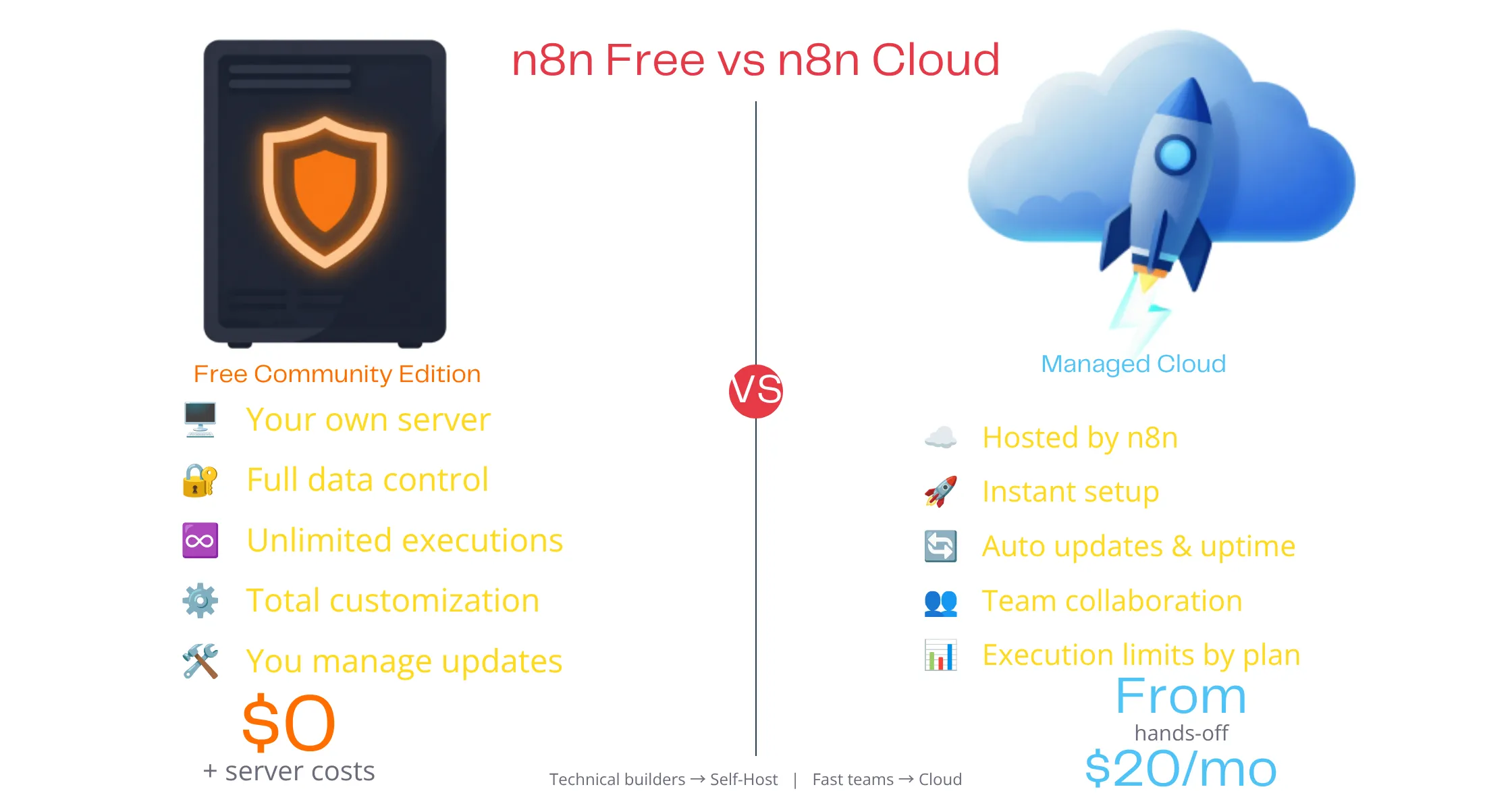
a) The free Community Edition fits some users best.
If you are a solo freelancer, a small shop owner, or a hobbyist working on a side project, this plan likely gives you all you need. It works well for anyone okay with a few technical steps, like running a few lines in a command window, and it does not take a computer science degree to get started.
If you are a team of coders who want full control, self-hosting is also a strong option. You are not locked into any other firm’s rules, and you set your own limits, not a company. You can manage a server on your own or get help through Truehost, and either way, this path makes a lot of sense for hands-on teams.
b) On the other side, some users are better off paying instead.
If your team has no time to manage a server, n8n Cloud lifts that whole load off your plate, which is why busy founders and non-technical teams often pick this path. Firms that value ease over savings do too, since time saved here often costs less than the extra monthly fee.
A managed n8n hosting plan sits in the middle ground between these two paths. Truehost offers one just like this, where you still self-host, but someone else does the work of handling backups, updates, and safety checks for you. This fits well if you want low cost without doing the technical work by hand, giving you the best parts of both worlds in one plan.
Is n8n Free FAQs
Yes, n8n is free forever and for good, but for the Community Edition. There is no clock counting down. However, there’s also an n8n Cloud option that offers not really a trial but a free tier with 2,500 executions per month. After that, billing starts right away.
Yes, you can switch from n8n Cloud to self-hosting later and move your workflows any time. You will need to export them first. Then you load them into your new setup.
No, the free version of n8n, which is the Community Edition, sets no limit on workflows. It also sets no limit on runs. There is no cap on your use at all.
When you outgrow your VPS while self-hosting n8n, you just move up to a bigger VPS plan. Your old workflows carry over with no extra work. It is a smooth, simple step.
How long it takes you to set up self-hosted n8n depends on your hosting setup. With a ready-made VPS like Truehost’s, setup is fast. It often takes less than an hour. That holds even for first-time users.
Getting Started With n8n on Truehost
By now, the answer to ” Is n8n free should feel clear. The software itself costs nothing at all. But running it well often costs a small fee each month. That fee comes through n8n Cloud, or through your own server. For most new users, self-hosting on a cheap VPS wins. It gives you the best mix of low cost and full control. You get room to grow without your bill growing with you.
Ready to start? Truehost’s n8n VPS plans give your n8n workflows a fast, safe home. There is no messy setup to fight through. Each plan ships with everything you need to launch on day one. Pick a plan, launch your server, and start automating today.