Domain RegistrationFind and register the perfect domain for your website.
 .COM DomainChoose a widely recognized domain to build global credibility.
 Domain TransferSeamless domain transfers with zero downtime and complete control.
 All TLDsFind and register your perfect domain. Choose from local and global extensions.
 SSL CertificatesKeep your website safe with reliable SSL Certificates that protect customer data and build trust.
 whoisCheck domain ownership details, expiration dates, and registrar information.
 US DomainRegister a .US domain and build trust in the USA.
 Web HostingEverything your website needs to run smoothly
 WordPress HostingWordPress hosting that just works
 Windows HostingReliable hosting for Windows environments
 Reseller HostingTurn hosting into your business
 Email HostingEmail that looks professional and works anywhere
 cPanel HostingFull control of your hosting with cPanel
 Affiliate ProgramJoin as a partner and earn commissions on every referral you send our way.
 Vps HostingScalable virtual servers that expand as you need.
 Dedicated ServersGet complete access and full control over your dedicated physical server.
 Managed vpsNot tech-savvy? We will take care of everything with our fully managed VPS hosting for you.
 AI Website BuilderCreate stunning websites in seconds with AI.
 Online ShopSet up a professional online store. No coding required.
 Web design serviceGet a tailored website designed to match your brand and support your goals.
 BlogFind helpful guides on web hosting, online selling, digital marketing, and more.
 Contact USYou can reach us anytime, day or night, through chat or email.
 SupportBrowse helpful guides and answers for all of our services.
Every website you have ever visited lives on a server somewhere, a physical machine that stores its files and serves them up to your browser whenever you type in a URL.
That is web hosting in its simplest form: renting space on a server so your site has somewhere to live and someone to keep the lights on.
But not every website needs the same kind of server.
A personal blog with a few hundred visitors a month has completely different requirements from an online store processing thousands of orders during a Black Friday sale.
That is why hosting companies split their offerings into different types of web hosting, each built around a different balance of cost, performance, and control.
In this guide, we will walk through the main types of web hosting you will come across while shopping for a plan: shared, VPS, dedicated, cloud, WordPress, reseller, and colocation.
By the end, you should have a clear framework for figuring out which one actually fits your website, rather than just picking whatever looks cheapest on the homepage.
What Are the Different Types of Web Hosting?
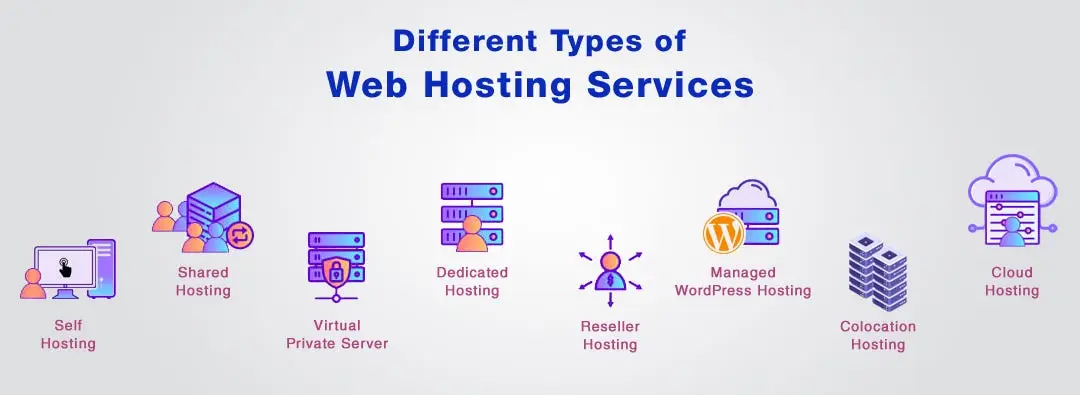
Before we go deep into each hosting option, here is the quick overview so you can see how they compare at a glance.
| Hosting Type | Best For | Cost (Truehost) | Scalability | Technical Skill |
|---|---|---|---|---|
| Shared hosting | Beginners & small websites | From $1/mo | Low–Medium | Low |
| VPS hosting | Growing websites | From $9/mo | High | Medium |
| Dedicated hosting | High-traffic websites | From $65/mo | High | High |
| Cloud hosting | Scalable websites | From $6/mo | Very High | Medium |
| WordPress hosting | WordPress websites | From $1–$13/mo | Medium–High | Low |
| Reseller hosting | Hosting businesses | From $4.99/mo | Medium | Medium |
| Colocation | Businesses managing their own servers | Varies (data center fees) | High | High |
That table gives you the shape of the decision. Now let’s break down what each of these actually means in practice.
a) Shared Hosting
Shared hosting is exactly what it sounds like.
Your website sits on the same physical server as dozens, sometimes hundreds, of other websites, and all of you share that server’s CPU, RAM, and storage.
Think of it like renting a room in a big apartment building. You have your own private space for your files, but the plumbing, electricity, and general upkeep are shared with your neighbors.
This setup keeps costs low because the hosting company spreads the expense of running the server across many customers.
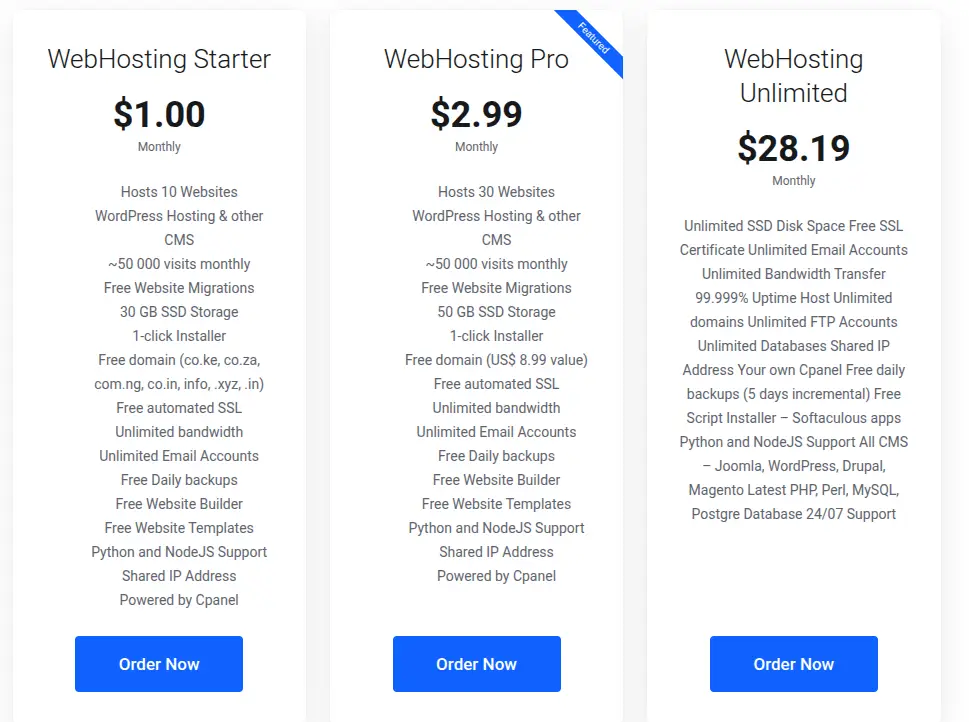
On Truehost, entry-level shared plans start from as little as $1 a month, and that price typically includes free SSL, daily backups, and unlimited bandwidth.
The tradeoff is that if a neighboring site on the same server gets hit with a traffic spike or starts misbehaving, it can occasionally slow things down for everyone else sharing that resource pool. You also have less control over server-level settings since you are working within limits set by the host.
Shared hosting is the right call if you are launching your first website, running a blog, a small business brochure site, or anything that does not expect heavy daily traffic.
It is affordable, requires no technical setup beyond installing your CMS, and gets you online fast.
b) VPS Hosting
VPS stands for virtual private server, and it sits right in the middle between shared and dedicated hosting.
Here is how it works: a hosting provider takes one powerful physical server and uses virtualization software to split it into several isolated virtual servers.
Each of those virtual servers behaves like its own independent machine, even though it is technically sharing physical hardware with a few others.
The big difference from shared hosting is that your slice of resources, your CPU allocation, your RAM, your storage, is dedicated to you alone.
Nobody else’s traffic spike can eat into your performance.
You also typically get root access, meaning you can install custom software, tweak server configurations, and manage things at a level shared hosting simply does not allow.
Truehost’s VPS plans start from $4.77 a month, running on SSD storage with both managed and unmanaged options depending on how hands-on you want to be.
If you are comfortable managing a Linux server yourself, unmanaged VPS saves money. If not, managed VPS hands the technical maintenance over to the provider.
VPS hosting makes sense once your site has outgrown shared hosting, whether that is because of rising traffic, a need for custom software, or simply wanting more predictable performance.
c) Dedicated Server Hosting
Dedicated hosting takes the isolation of VPS one step further: instead of sharing a physical server with anyone, you get the entire machine to yourself.
Every core, every gigabyte of RAM, every bit of storage belongs exclusively to your website or application.
This translates directly into performance and control.
There is no other tenant competing for resources, and you get full authority over server configuration, security settings, and software choices.
Dedicated servers also offer better isolation for sensitive workloads, since no other customer’s data or traffic ever touches your hardware.
Naturally, this comes at a cost.
Dedicated hosting is the most expensive option on our table, starting from 5 a month on Truehost, and it usually requires solid technical know-how to manage properly, or a budget for a managed plan where the provider handles the heavy lifting.
This tier is built for high-traffic websites, resource-intensive applications, or businesses with strict compliance and security requirements that make sharing a server, even a virtual one, a non-starter.
d) Cloud Hosting
Cloud hosting is one of the most misunderstood categories, so it is worth slowing down here. Instead of your website living on one physical server, cloud hosting spreads it across a network of interconnected servers working together.
If one server in that network runs into trouble, another one in the cluster picks up the load, which makes cloud hosting notably resilient against hardware failure.
The other defining feature of cloud hosting is elastic scalability. Traffic spike overnight because your product got featured somewhere?
Cloud infrastructure can pull in more resources from the wider server network almost instantly, without the delays or manual upgrades a physical server change would require.
Many cloud hosting plans also use pay-for-what-you-use pricing, so you are billed based on actual resource consumption rather than a flat monthly rate regardless of usage.
Truehost’s managed cloud hosting starts from $4.00 a month, giving smaller businesses access to this kind of flexible, distributed infrastructure without needing enterprise-level budgets.
Cloud hosting suits websites that experience unpredictable or seasonal traffic, businesses planning rapid growth, or anyone who wants strong uptime guarantees without managing physical hardware themselves.
e) WordPress Hosting
Here is something worth clarifying upfront: WordPress hosting is not usually a completely different physical infrastructure.
In most cases, it is shared, VPS, or cloud hosting that has been specifically configured and optimized to run WordPress well.
That optimization shows up in a few practical ways.
WordPress hosting plans typically come with one-click WordPress installation so you can skip the manual setup process entirely.
They also often include automatic core and plugin updates, built-in caching tools tuned specifically for WordPress’s architecture, and security hardening aimed at the vulnerabilities WordPress sites commonly face.
There is also a distinction worth knowing between managed and unmanaged WordPress hosting.
Managed WordPress hosting handles updates, backups, security, and performance tuning on your behalf, which is great if you would rather focus on content than server maintenance.
Unmanaged WordPress hosting gives you the optimized environment but leaves the ongoing upkeep to you.
On Truehost, WordPress-ready hosting starts around the same $1 to $13 a month range as standard shared plans, supported by LiteSpeed caching and one-click installers through Softaculous.
If your website runs on WordPress, and a huge portion of the internet does, choosing a host that has actually optimized for it will save you real headaches down the line.
f) Reseller Hosting
Reseller hosting caters to a completely different kind of customer: people who want to sell hosting themselves. Here is how it works.
You purchase a bulk hosting package from a provider, then divide that server space into smaller individual accounts that you sell to your own clients, under your own brand name.
This is common among web design agencies, freelance developers, and small IT businesses that want to offer hosting as an added service without building and maintaining their own server infrastructure from scratch.
The hosting provider handles the underlying hardware, while you manage billing, client accounts, and support on top of it, often through white-label branding so your clients never even see the original provider’s name.
Truehost’s reseller hosting starts from $4.99 a month and comes with the tools needed to create and manage multiple customer accounts, allocate resources between them, and run the whole operation under your own business identity.
This one is not for the average website owner. It is specifically for people looking to build a hosting side business or bundle hosting into a broader web services offering.
g) Colocation Hosting
Colocation flips the usual hosting relationship on its head. Instead of renting server space from a provider, you own or lease the physical server hardware yourself.
What you are paying for is a spot to house that server: a professional data center that supplies the power, cooling, internet connectivity, and physical security your equipment needs to run reliably.
The data center takes care of the environment, but you remain responsible for managing the server itself, its software, security patches, and configuration.
This gives you complete control over your hardware choices while outsourcing the expensive, complicated parts of running a data center yourself.
Colocation is a niche option, really only relevant to businesses that already own server hardware and have the technical staff to manage it, but need enterprise-grade infrastructure they cannot replicate in-house.
How to Choose the Right Type of Web Hosting
Rather than telling you it depends and leaving you to figure out the rest, here is a practical framework to work through.
1) Consider Your Website Size
A small brochure site with a handful of pages has very different needs from a large ecommerce catalog with thousands of product listings.
More pages, more media, and more database queries all push you toward hosting types with greater storage and processing power, like VPS or cloud.
2) Estimate Your Traffic
Traffic volume is one of the biggest factors in hosting decisions. A few hundred monthly visitors will run fine on shared hosting.
Tens of thousands of visitors, or unpredictable spikes, point toward VPS, cloud, or dedicated hosting instead.
3) Consider Your Budget
Be honest about what you can afford, both now and as your site grows. Shared hosting keeps costs minimal while you are starting out.
As your needs grow, weigh whether the performance gains from VPS or cloud hosting justify the higher monthly cost for your specific situation.
4) Think About Technical Requirements
Do you need custom software, specific server configurations, or root access?
If yes, shared hosting will feel restrictive fast, and VPS or dedicated hosting becomes worth the added complexity.
5) Consider Your Growth Plans
Think beyond where your site is today. If you expect steady growth, cloud or VPS hosting offers room to scale without a painful migration later.
If your traffic is genuinely unpredictable, cloud hosting’s elastic resources are particularly well suited to that uncertainty.
6) Decide How Much Control You Need
Some people want to log in, upload their files, and never think about server settings again. Others want full command over every configuration.
Shared and managed WordPress hosting suit the former, while VPS, dedicated, and colocation suit the latter.
Final Thoughts on the Different Types of Web Hosting
There is no single type of web hosting that works best for everyone.
The right choice depends on your website’s specific requirements, expected traffic, budget, technical experience, security needs, and how fast you plan to grow.
What counts most is matching your hosting to where your website actually is right now, not where you hope it will be in three years, and not settling for less than what it needs today either.
Whether you are launching your first website or managing a growing online business, choosing a hosting plan that matches your current needs can help you avoid paying for resources you don’t need, or outgrowing your hosting too quickly.
Start with an honest assessment of your site, use the framework above, and let that guide which type of hosting actually deserves your money.