Domain RegistrationFind and register the perfect domain for your website.
 .COM DomainChoose a widely recognized domain to build global credibility.
 Domain TransferSeamless domain transfers with zero downtime and complete control.
 All TLDsFind and register your perfect domain. Choose from local and global extensions.
 SSL CertificatesKeep your website safe with reliable SSL Certificates that protect customer data and build trust.
 whoisCheck domain ownership details, expiration dates, and registrar information.
 US DomainRegister a .US domain and build trust in the USA.
 Web HostingEverything your website needs to run smoothly
 WordPress HostingWordPress hosting that just works
 Windows HostingReliable hosting for Windows environments
 Reseller HostingTurn hosting into your business
 Email HostingEmail that looks professional and works anywhere
 cPanel HostingFull control of your hosting with cPanel
 Affiliate ProgramJoin as a partner and earn commissions on every referral you send our way.
 Vps HostingScalable virtual servers that expand as you need.
 Dedicated ServersGet complete access and full control over your dedicated physical server.
 Managed vpsNot tech-savvy? We will take care of everything with our fully managed VPS hosting for you.
 AI Website BuilderCreate stunning websites in seconds with AI.
 Online ShopSet up a professional online store. No coding required.
 Web design serviceGet a tailored website designed to match your brand and support your goals.
 BlogFind helpful guides on web hosting, online selling, digital marketing, and more.
 Contact USYou can reach us anytime, day or night, through chat or email.
 SupportBrowse helpful guides and answers for all of our services.
Yes, you need to protect any domain that controls a website, business email or recognizable brand. But you may not need every paid add-on labelled “domain protection.”
The right decision depends on the risk. A transfer lock cannot stop an expired domain. Privacy protection cannot stop someone who steals your registrar password. DNSSEC cannot remove malware from your website. Before you accept an upsell, identify the problem it solves.
For most domain owners, the essential baseline costs little or nothing: use a unique password, enable multifactor authentication when available, keep the registrar lock on, maintain a separate recovery email and protect renewal.
Add privacy if your contact data would otherwise appear publicly. Reserve registry-level controls and manual approval processes for domains whose loss would seriously damage the organization.
Domain protection is a bundle, not one feature
Registrars use similar names for very different services. “Domain protection,” “full domain protection,” “domain guard” and “domain privacy” may refer to one control or a package of several controls.
This table separates the jobs:
Protection | Main risk it addresses | What it does not solve |
|---|---|---|
Account security | Stolen registrar login | Expiry caused by failed billing |
Registrar lock | Unauthorized transfer | Someone already controlling your registrar account |
Renewal protection | Accidental expiration | Hijacking or forged DNS answers |
Privacy protection (Whois) | Public exposure of contact data | Account takeover or website attacks |
DNSSEC | Forged or altered DNS answers | Weak passwords, expiry or malware |
Registry lock | High-impact unauthorized changes | Every website, email or trademark risk |
That is why a simple yes-or-no answer can mislead you. You need layers, but you should choose each layer for a defined risk.
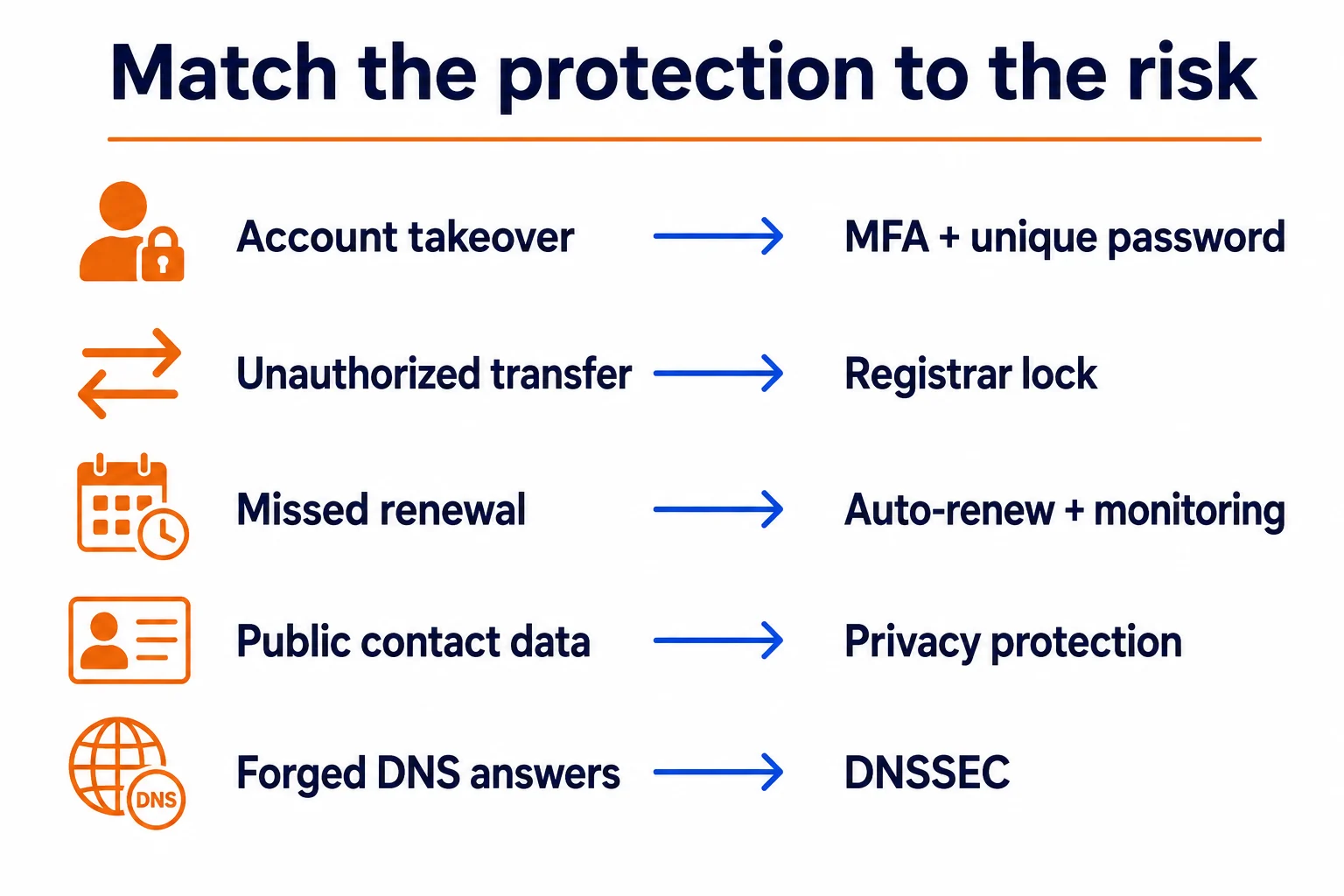
Match each risk to the control designed to reduce it. No single domain add-on covers all five.
Start with the protections every domain needs
These controls belong on a personal portfolio, a side project and a major business domain alike.
1) Use a unique registrar password and MFA
Your registrar account can control transfers, contact details and sometimes nameservers. Reusing a password from another service turns an unrelated breach into a domain risk.
Use a password manager to create a unique password. Enable multifactor authentication if the registrar supports it, then store recovery codes somewhere that does not depend on the protected domain.
That last detail matters. If yourbrand.com stops working, a recovery address at [email protected] may stop receiving mail at the exact moment you need it.
ICANN’s guidance recommends using an address that does not depend on the registered domain.
2) Keep the registrar lock enabled
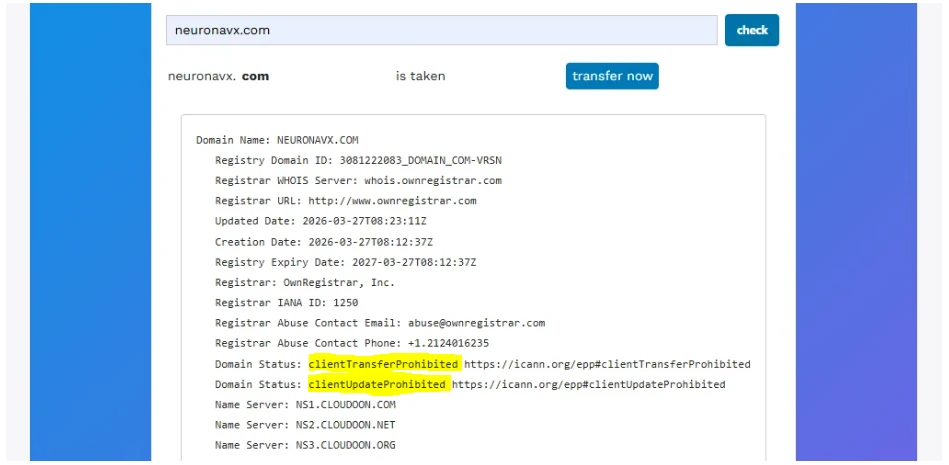
A registrar or transfer lock normally produces the EPP status clientTransferProhibited.
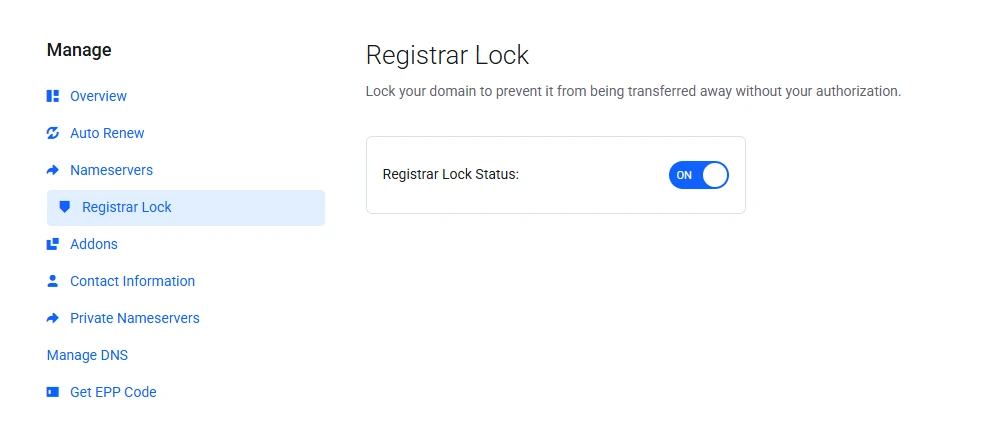
It blocks a routine transfer until an authorized user removes the lock. ICANN’s status guide explains what that code does.
Keep it on except during a transfer you initiated. A lock adds useful friction, but ICANN warns that it is not fail-safe. An attacker who controls the registrar account may also try to remove it, so the password and MFA still matter.
3) Protect the renewal path
Turn on auto-renew where available, keep a valid payment method on file and review renewal notices.
Also keep the registration contact current.
Auto-renew lowers the risk; it does not eliminate it. Cards expire, payments fail and old staff addresses become inaccessible.
Set a separate calendar reminder well before expiry, especially for a domain connected to email or revenue.
ICANN’s renewal policy requires notices for generic top-level domains, but receiving them still depends on accurate contact information.
4) Limit who can make changes
Do not share the owner login with a developer, agency or former employee. Give collaborators the narrowest role the platform supports, and document who can approve transfers, contact changes and DNS updates.
For a business, use a company-controlled account and record ownership internally. A domain registered in a contractor’s personal account can become an access dispute even when nobody intended harm.
Privacy protection is useful, but first check what is already hidden
Whois Domain privacy service replaces or hides personal registration details in public lookup results. It can reduce exposed email addresses, phone numbers and postal information.
The old claim that every registrant’s full details automatically appear in public WHOIS no longer holds across all generic domains.
ICANN’s current policy allows or requires registrars to redact specified personal data in RDAP and other registration-data responses.
Some fields may already show REDACTED, an anonymized address or a contact form.
Before paying for privacy:
Search the domain through ICANN Lookup.
Note which personal fields, if any, remain visible.
Check whether the proposed service uses privacy or proxy registration.
Read the disclosure, forwarding and renewal terms.
Confirm that the service supports your extension.
Privacy and proxy services are not identical.
With a privacy service, you remain the registrant of record while the provider publishes substitute contact details. With a proxy service, the provider becomes the registrant of record and licenses the domain’s use to you. ICANN explains this distinction in its privacy overview.
Privacy makes sense when a lookup exposes personal details or when you want a consistent forwarding layer. It offers less extra value when applicable policy and the registrar already redact the same data.
For a deeper treatment of registration data, read our privacy guide.
DNSSEC protects DNS answers, not the registration account
DNSSEC adds cryptographic signatures to DNS data. A validating resolver can use those signatures to detect a forged or altered answer before sending a visitor to the wrong address.
Enable it when your registry, registrar and DNS provider support the complete setup. Manage it carefully during a nameserver change because stale DS records can make a valid domain return SERVFAIL. Your DNS provider should give you the exact activation or migration procedure.
DNSSEC documentation explains the signature chain and shows why the registrar and DNS provider must coordinate.
DNSSEC does not encrypt browser traffic. An SSL/TLS certificate handles the HTTPS connection between a browser and the website. You may need both, but they protect different paths.
Paid advanced protection depends on the cost of losing the domain
Start with business impact, not the registrar’s package name.
Domain use | Sensible protection level |
|---|---|
Parked idea or temporary project | Unique password, MFA, registrar lock, reliable renewal and current contacts |
Personal site using your home details | Baseline controls plus privacy when public data remains exposed |
Business website or domain email | Baseline controls, privacy review, separate recovery email, change ownership records and DNSSEC when supported |
Store, SaaS product or lead-generating site | Business controls plus multiple authorized contacts, change alerts and documented recovery procedures |
Bank, major platform or high-value brand | Ask about registry lock, offline or out-of-band approval and strict role separation |
Registry lock places restrictions at the registry level, above the registrar’s ordinary client lock. Removing it commonly requires additional manual verification between the registrar and registry. That slower process can protect a high-value name, but it also slows legitimate urgent changes.
A hobby domain rarely needs that operational burden. A domain that controls thousands of customer accounts, executive email or a nationally recognized brand may justify it.
What Truehost currently offers
We currently list Domain Vault at $0.00/year. It monitors domain expiry dates, supports registration and renewal processing, and records renewal outcomes.
This is our premium domain protection service.
That makes it a practical extra layer against missed renewals, especially when you manage several domains.
Review Domain Vault before relying on it. Confirm the current terms and connect it to a domain-management routine that still includes accurate contacts, a valid payment method and your own reminder.
Our domains page also advertises WHOIS ID protection, but eligibility can depend on the extension and order configuration. Check the option and final price for the exact domain at checkout instead of assuming one privacy rule applies to every TLD.
If you still need the name itself, search domains and review registration, renewal and transfer pricing before ordering.
Domain protection does not protect everything attached to the name
Even a well-protected registration can point to an insecure website or email system. Domain controls do not replace:
software updates and malware protection;
website backups;
strong email authentication and mailbox security;
an SSL/TLS certificate for HTTPS;
trademark searches and dispute planning;
access controls at the DNS or hosting provider; or
monitoring for lookalike domains and impersonation.
The reverse also applies. A secure website cannot compensate for a stolen or expired domain. Treat the registration, DNS, website and email as connected systems with separate controls.
Our broader security guide covers threats and operational safeguards beyond the checkout decision.
Use this decision before accepting an add-on
Ask five questions:
What exact event does it prevent or detect? Look for a transfer, contact change, expiry, public-data exposure or DNS-answer risk.
Do I already have that protection? Check the registrar account, RDAP result, domain status and DNS provider.
Can I verify that it is active? A product name on an invoice does not prove a lock, privacy relay or DNSSEC chain works.
What happens during a legitimate change? Learn how to unlock, transfer, recover or update the domain before an emergency.
What would domain loss cost me? Raise the protection level as the domain becomes more important to revenue, identity, customer access or email.
The practical answer is therefore yes, protect the domain, but buy only the controls that close a real gap. Start with account security, transfer lock and renewal reliability.
Add Whois privacy after checking public registration data, add DNSSEC when the full chain supports it, and consider registry-level protection only when the domain’s value justifies slower manual controls.