Domain RegistrationFind and register the perfect domain for your website.
 .COM DomainChoose a widely recognized domain to build global credibility.
 Domain TransferSeamless domain transfers with zero downtime and complete control.
 All TLDsFind and register your perfect domain. Choose from local and global extensions.
 SSL CertificatesKeep your website safe with reliable SSL Certificates that protect customer data and build trust.
 whoisCheck domain ownership details, expiration dates, and registrar information.
 US DomainRegister a .US domain and build trust in the USA.
 Web HostingEverything your website needs to run smoothly
 WordPress HostingWordPress hosting that just works
 Windows HostingReliable hosting for Windows environments
 Reseller HostingTurn hosting into your business
 Email HostingEmail that looks professional and works anywhere
 cPanel HostingFull control of your hosting with cPanel
 Affiliate ProgramJoin as a partner and earn commissions on every referral you send our way.
 Vps HostingScalable virtual servers that expand as you need.
 Dedicated ServersGet complete access and full control over your dedicated physical server.
 Managed vpsNot tech-savvy? We will take care of everything with our fully managed VPS hosting for you.
 AI Website BuilderCreate stunning websites in seconds with AI.
 Online ShopSet up a professional online store. No coding required.
 Web design serviceGet a tailored website designed to match your brand and support your goals.
 BlogFind helpful guides on web hosting, online selling, digital marketing, and more.
 Contact USYou can reach us anytime, day or night, through chat or email.
 SupportBrowse helpful guides and answers for all of our services.
Imagine waking up to find your website offline, your business email no longer working, and customers unable to reach you. In many cases, the problem isn’t a hacked website or a server failure. It’s simply an expired domain name.
Renewing your domain on time is one of the easiest ways to keep your website, email, and online brand running without interruption. A few minutes is all it takes to avoid unnecessary downtime and the risk of losing your domain.
Renewing or managing a domain with Truehost? Log in to your client area account and handle it in minutes.
How to Renew an Active Domain Name
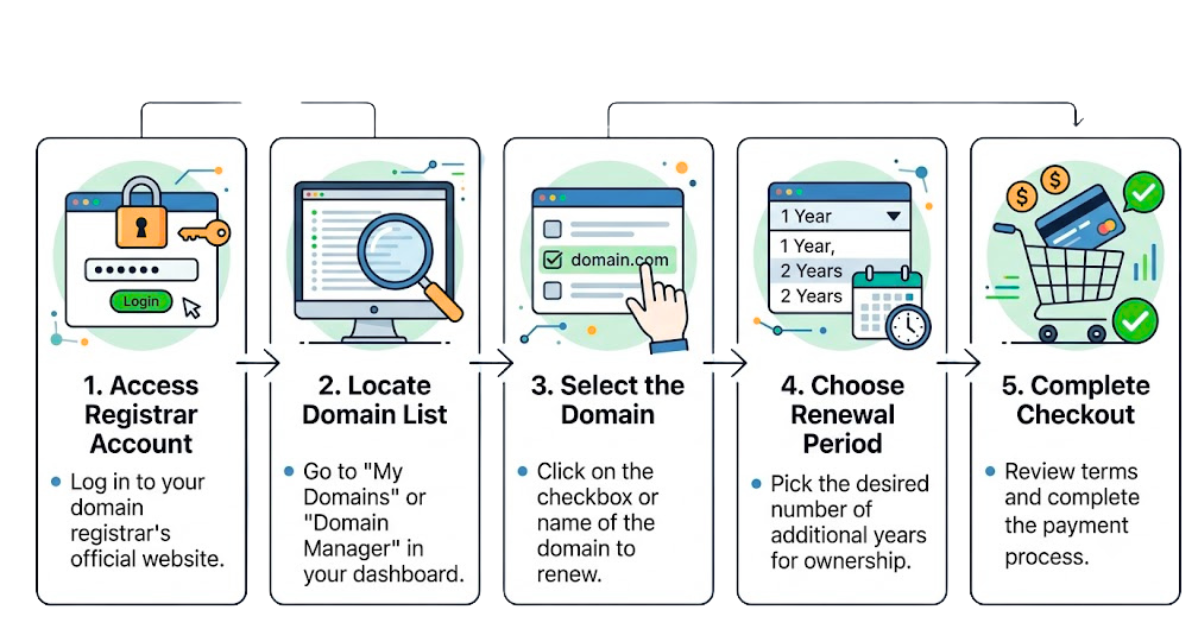
Renewing before your domain expires is the safest approach. It keeps your website and email online without any interruption.
Here’s how to do it through your Truehost client area:
- Log in to your Truehost account and go to the Domains section.
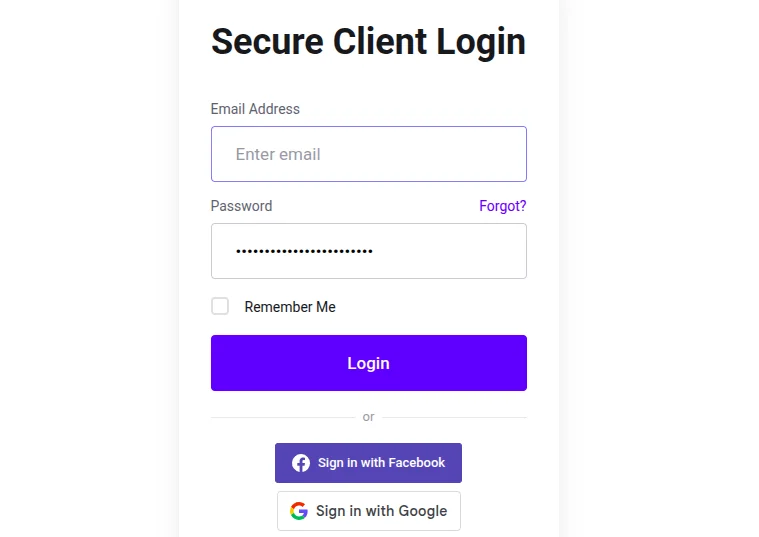
- Find the domain you want to renew and click on it to open the domain details.
- Select the Renew option next to the domain name.
- Choose your renewal period, typically one to ten years.
- Confirm your payment and complete the transaction.
- Check your domain list to confirm the new expiration date has updated.
You should receive a confirmation email immediately after the renewal processes. Keep it for your records.
How to Renew an Expired Domain Name
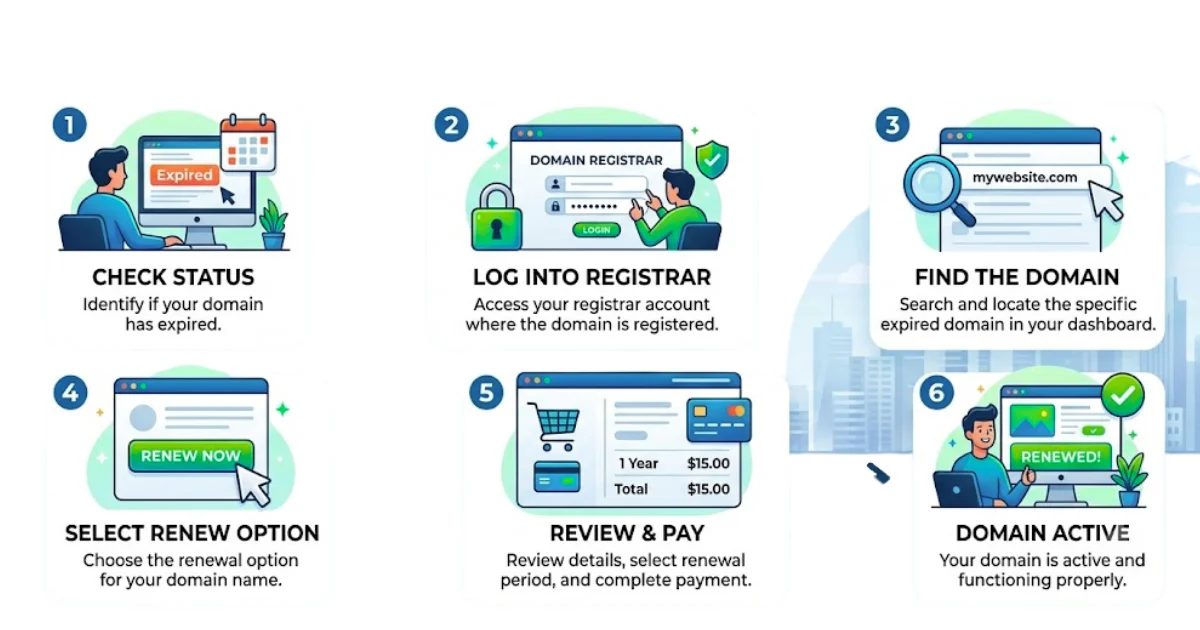
If your domain has already expired, you may still be able to recover it depending on how much time has passed.
During the Grace Period
Most domains enter a grace period of up to 30 days after expiration. During this window, you can renew at the standard rate and your domain will be reactivated once the payment processes.
Follow the same steps as an active renewal:
- Log in to your Truehost client area.
- Go to your domain list and find the expired domain.
- Click Renew and complete the payment at the standard rate.
- Confirm the domain status has changed from “Expired” to “Active.”
Your website and email should come back online within a few hours once DNS updates.
During the Redemption Period
If the grace period has passed, the domain enters a redemption period that can last up to 30 additional days. Renewal is still possible, but your registrar will charge a redemption fee on top of the standard renewal cost.
Follow the same renewal steps, but expect to pay a higher total at checkout. The domain typically becomes active within 24 hours after payment is confirmed.
Note that some domain extensions do not include a grace period and move straight into the redemption phase. ICANN’s Expired Registration Recovery Policy outlines the full timeline and your rights as a domain owner.
When a Domain Is Permanently Lost
Once the redemption period ends, the domain enters pending deletion and is eventually released to the public. At that point, recovery means either waiting for someone else to register it and contacting them, or buying it back through a domain marketplace like Sedo, often at a much higher price.
How to Enable Auto-Renewal
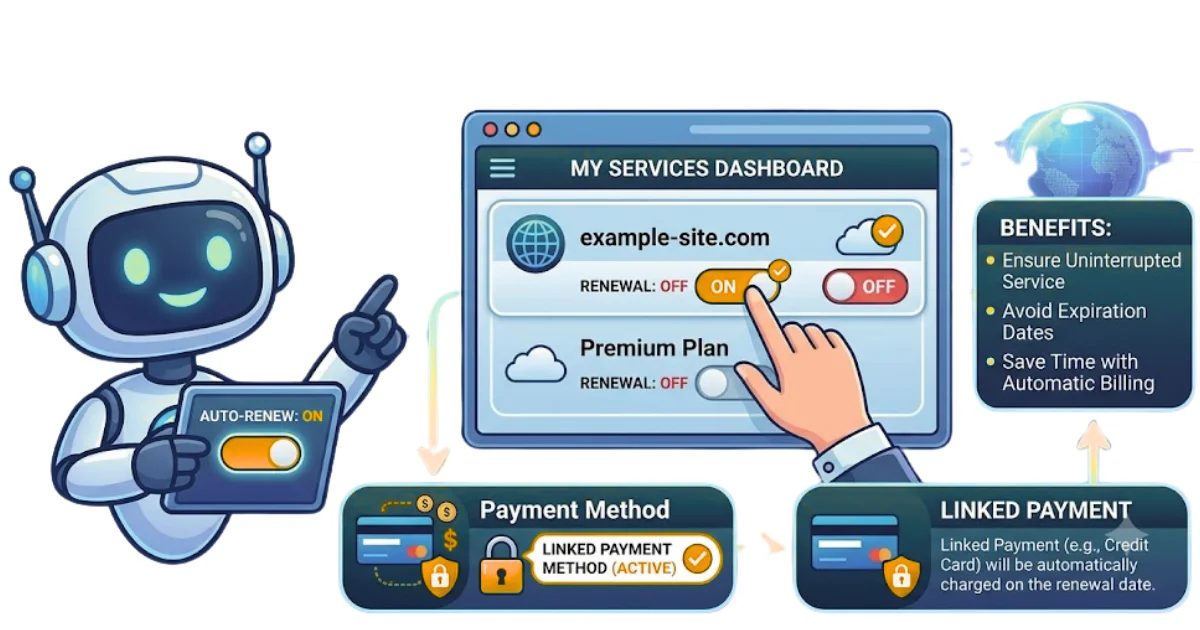
Auto-renewal takes the risk of forgetting out of the equation entirely. According to Verisign’s domain industry brief, tens of millions of domains expire unintentionally every year. Enabling auto-renewal is the simplest way to make sure yours isn’t one of them.
Here’s how to set it up in your Truehost client area:
- Log in and go to the Domains section.
- Find the domain you want to set up for auto-renewal.
- Toggle the Auto-Renewal switch to on.
- Make sure your saved payment method is current and valid.
That’s it. Your domain will renew automatically before it expires, and you’ll receive a notification when the charge is processed.
Note: Auto-renewal only works if your payment details are up to date. If your card has expired or your billing information has changed, the charge will fail and your domain will still lapse. Check your payment method at least once a year to avoid this.
How Much Does It Cost to Renew a Domain Name?
Renewal costs vary by domain extension and registrar. Here’s a general guide:
| Domain Extension | Typical Renewal Cost Per Year |
|---|---|
.com | $10 to $20 |
.net | $12 to $20 |
.org | $10 to $18 |
.us | $8 to $15 |
.co | $20 to $35 |
.io | $30 to $60 |
A few things that affect pricing:
- Registrar rates. Some offer low first-year prices but charge more at renewal. Always check the renewal rate before you register.
- Multi-year renewals. Renewing for two or more years at once can save money and reduces how often you need to think about it.
- Redemption fees. If your domain has expired and is in the redemption period, expect to pay significantly more than the standard renewal rate.
FAQs
How do I renew my domain name?
Log in to your registrar account, go to your domain list, select the domain, choose a renewal period, and complete the payment. Your expiration date updates right after the transaction.
Can I renew my domain after it expires?
Yes. During the grace period you can renew at the standard rate. During the redemption period, renewal is still possible but costs more. After the redemption period ends, the domain is released and anyone can register it.
How much does it cost to renew a domain name?
A standard .com renewal costs between $10 and $20 per year. Other extensions vary. Always check renewal pricing before registering a domain, as some registrars charge more at renewal than at initial registration.
How often do I need to renew a domain name?
At minimum once per year, though you can renew for up to ten years at a time. Longer registration periods mean fewer renewals to manage.
What happens if I don’t renew my domain name?
Your website and email go offline immediately. The domain enters a grace period and then a redemption period before being released to the public.
Should I enable automatic domain renewal?
Yes. It removes the risk of accidentally letting your domain expire. Just keep your payment method current so auto-renewal can process without issues.
Wrapping Up
Renewing your domain name on time is one of the simplest things you can do to protect your website, email, and online reputation. Here’s a quick recap:
- Active domain renewal — renew before expiration to avoid any disruption.
- Expired domain renewal — act quickly during the grace or redemption period to recover your domain.
- Auto-renewal — turn it on and keep your billing details current for complete peace of mind.
Register or renew your domain with Truehost and manage everything from one straightforward dashboard.