Domain RegistrationFind and register the perfect domain for your website.
 .COM DomainChoose a widely recognized domain to build global credibility.
 Domain TransferSeamless domain transfers with zero downtime and complete control.
 All TLDsFind and register your perfect domain. Choose from local and global extensions.
 SSL CertificatesKeep your website safe with reliable SSL Certificates that protect customer data and build trust.
 whoisCheck domain ownership details, expiration dates, and registrar information.
 US DomainRegister a .US domain and build trust in the USA.
 Web HostingEverything your website needs to run smoothly
 WordPress HostingWordPress hosting that just works
 Windows HostingReliable hosting for Windows environments
 Reseller HostingTurn hosting into your business
 Email HostingEmail that looks professional and works anywhere
 cPanel HostingFull control of your hosting with cPanel
 Affiliate ProgramJoin as a partner and earn commissions on every referral you send our way.
 Vps HostingScalable virtual servers that expand as you need.
 Dedicated ServersGet complete access and full control over your dedicated physical server.
 Managed vpsNot tech-savvy? We will take care of everything with our fully managed VPS hosting for you.
 AI Website BuilderCreate stunning websites in seconds with AI.
 Online ShopSet up a professional online store. No coding required.
 Web design serviceGet a tailored website designed to match your brand and support your goals.
 BlogFind helpful guides on web hosting, online selling, digital marketing, and more.
 Contact USYou can reach us anytime, day or night, through chat or email.
 SupportBrowse helpful guides and answers for all of our services.
Ever looked at a website and immediately thought “sketchy” before even clicking?
That snap judgment probably started with the domain name. And here’s the thing.
If you’re starting a business or building your first website, you’re probably worried about the same thing happening to you.
You don’t want potential customers thinking your site looks spammy. You’re confused about what makes a domain “professional” versus amateur.
Maybe you’re afraid of picking something you’ll regret six months from now.
Should you focus on length? Keywords? Which extension is best? And honestly, you’re worried that one wrong choice could tank your credibility before anyone even sees your fantastic content.
Here’s the reality: your domain name matters more than you think. It’s the first thing people see, type, and remember about your online presence.
In this guide, you’ll discover:
- What separates professional domains from sketchy-looking ones
- The ideal length and structure that builds trust
- Which extensions work (and which scream “spam”)
- How to check if your perfect name is available
- Common mistakes that instantly kill credibility
- Free tools that make choosing easier
Ready to pick a domain that makes your business look legitimate? Let’s jump right in.
Why Your Domain Name Counts
Think of your domain name as your digital storefront sign. Before customers walk through your door, they see that sign. If it looks weird, they’ll keep walking.
Your URL is literally the first impression potential customers get of your brand.
But beyond first impressions, your domain affects something even more important: whether people can find you at all.
Search engines pay attention to domain authority, which builds over time. The longer you keep the same domain and create quality content, the more Google trusts you.
Switch domains later? You’re basically starting from scratch.
Here’s where it gets real.
Changing your domain name down the road isn’t just annoying;
- It costs you traffic
- Confuses your audience
- Can create website downtime
That’s why getting it right the first time saves you massive headaches later.
And let’s talk branding for a second. Would you trust “glowmart.com” or “glowmart.sellmitra.com” more?
The difference is noticeable. A clean, professional domain makes you look established, even if you just launched yesterday.
So, how do you choose a professional domain name as a beginner?
Rule #1: Keep It Short and Simple
When researchers analyzed the top 75 most-visited websites in March 2025, they found shorter domains absolutely dominated the list.
Our brains handle short information better. It’s called cognitive load.
When someone hears your domain name at a networking event or sees it on a business card, they need to remember it long enough to type it later. Every extra character makes that harder.
Here’s your target.
Try keeping your domain under 12 characters, not counting the extension (.com, .org, etc.). Companies like Amazon, Google, and Nike all nailed this.
Amazon has just 6 letters.
Google? Also 6.
Nike? Only 4.
But length isn’t everything.
Your domain also needs to be stupid-easy to spell and pronounce. Imagine you’re telling someone about your website at a loud coffee shop. If they can’t hear you clearly and spell it correctly on their first try, you’ve got a problem.
Avoid using slang like “u” for “you” or creative spellings like “xpress” for “express.” Yes, these might look cool, but they send potential visitors to error pages instead of your site. Not cool.
Try this test.
Say your domain name out loud to a friend who’s never heard it. Can they spell it back correctly? If not, back to the drawing board.
Think about professional email addresses, too. If you plan to use something like [email protected], that domain better be easy for people to understand when you say it over the phone.
The sweet spot?
Somewhere between 6 and 12 characters. Short enough to remember, long enough to mean something.
Rule #2: Choose the Right Domain Extension
Let’s talk about those letters after the dot. Yes, we call them TLDs (top-level domains). Your choice here seriously impacts how professional you look.
When people forget a domain extension, they’re 3.8 times more likely to assume it’s .com. That’s not a slight difference. That’s traffic potentially going to someone else’s website.
Currently, .com domains represent about 157.2 million registrations worldwide. That massive number exists because .com feels familiar, trustworthy, and established. Around 44% of all websites use it for good reason.
Should you always choose .com?
Ideally, yes. If your perfect .com is taken, .net or .org works well as a backup. These extensions still carry credibility and won’t make people suspicious.
However, some newer extensions are industry-specific.
A tech startup might rock a .tech or .io domain.
An online store could use .store.
Artists do fine with .art.
These industry-specific options can strengthen your brand if they match what you do.
But here’s where you need to be careful.
Avoid weird extensions like .club, .space, or .pizza unless you have a particular reason. Research shows that some extensions have higher rates of spam or malicious content, so you should avoid them.
- .ws: 98%
- .company: 96%
- .digital: 74%
- .pro: 73%
Your visitors might not know that exact statistic, but their gut instinct says “something’s off here.”
If your business handles payments, onboards customers, or does anything that requires trust, stick with .com, .net, .org, or industry-specific options that make sense.
Rule #3: Make It Brandable, Not Generic
Pop quiz.
Can you tell the difference between Healthinsurance.net, Newhealthinsurance.com, and Healthinsurancesort.com? Probably not, because they’re forgettable and generic.
Now think about Amazon, Spotify, or Netflix. You remember those instantly because they’re brandable, unique names that stick in your head.
A brandable domain stands out from competitors. A generic domain gets lost in a sea of similar-sounding websites that all blend.
Look at successful companies in markets like India: Nykaa, Zomato, Flipkart, Meesho. These names are invented words that became powerful brands.
They’re memorable, distinctive, and nobody else has them.
You can create brandable names by adding trendy endings like “-ly” (Shoply), “-ify” (Beautify), “-o” (Quicko), or “-va” (Beautiva). These immediately sound more professional than keyword-stuffed alternatives.
That said, your domain should hint at what you do. Sure, Google and Amazon don’t describe their services directly, but they have massive marketing budgets to build recognition. You probably don’t.
The easier path?
Include at least one word that hints at your business. If you sell handmade products, something like “HonestKart” or “LocalLove” tells visitors what you’re about while staying brandable.
Balance is key.
You want unique enough to stand out, but clear enough that people get it. Think about how “BuyBooksOnline.com” compares to “Amazon.com.” One describes the function but sounds boring, while the other has become iconic.
Your domain plays a huge role in establishing your online presence, so make sure it connects to your brand identity in a meaningful way.
Rule #4: Avoid Numbers, Hyphens, and Tricky Spellings
This rule is simple.
Don’t use hyphens in your domain name. Ever.
Why?
Because spam sites love hyphens, when visitors see “best-deals-online.com,” their mental alarm bells start ringing. Fair or not, that’s the reality.
Plus, hyphenated domains create practical problems.
Let’s say your perfect domain was taken, so you grabbed the hyphenated version. Every time someone forgets that hyphen (which happens constantly), they land on your competitor’s site instead. You’re basically sending them free traffic.
The same logic applies to numbers. If someone hears your domain name, they won’t know if you mean “5” or “five.” Should they type the numeral or spell it out?
That confusion means lost visitors.
If you absolutely need a number or hyphen for some reason, buy all the variations, the numeral version, the spelled-out version, with hyphens, without hyphens. Forward them all to your main site.
But honestly? Just avoid this mess entirely.
Creative misspellings cause similar headaches.
You know Flicker? Probably not. But they are now known as Flickr, dropping the “e”. Their trend is poorly aged, but isn’t it a brand now? Don’t try that, though, without the money.
Using “u” instead of “you” or “xpress” instead of “express” makes it harder to find your site. People will type the normal spelling and end up somewhere else, probably at a competitor who made their domain spellable.
Clarity always beats cleverness. Your goal isn’t to show how creative you are with spelling. Your goal is to get visitors to your website without confusion or frustration.
Rule #5: Think Long-Term and Leave Room to Grow
Here’s something to consider.
Ideally, you want to choose a professional domain name you’ll keep forever.
That sounds scary, right? And yes, you can change domains later if necessary. But it’s way better if you don’t have to. Every time you change, you lose momentum, confuse existing customers, and damage the authority you’ve built.
The key is choosing something timeless.
Avoid trendy terms that’ll sound dated in three years. Remember when everyone added “cyber” or “e-” to everything? Or when “2.0” was everywhere? Those trends passed, leaving websites with outdated-sounding names.
Also, think about business growth.
Let’s say you start a flower shop and grab “cityflowers.com.” Solid choice, right? But what happens when you expand into plants, gardening supplies, or home décor? Your domain now boxes you in.
Instead, something like “cityblooms.com” leaves room to grow. You’re not locked into only selling flowers forever.
Check out how The Old Yew (theoldyew.com) named their plant shop. They focused on their brand rather than specific products. This gives them flexibility to expand in any direction without the domain feeling weird.
Think product-focused versus brand-focused. “LawnMowers.com” tells people exactly what you sell, but limits future expansion. “GreenThumb.com” works for lawn mowers, but also gardening tools, landscaping services, or anything else related to outdoor living.
Balance specificity with flexibility.
You want people to understand your general industry, but not feel confused if you expand your product line.
Rule #6: Make Sure It’s Available (And Legally Safe)
There are over 368 million active domain names worldwide, with approximately 33,000 new domains registered every single day. That’s one new domain every 2.61 seconds.
Translation? Good domain names disappear fast.
Start by using domain search tools to check availability.
Most domain registrars let you type in your desired name and instantly see if it’s available. If it’s taken, these tools usually suggest alternatives.
But availability is just step one. Before you get attached to a name, you absolutely must run a trademark search.
Head to USPTO.gov and search their trademark database.
Make sure nobody has already trademarked your desired name or something confusingly similar. This step isn’t optional. Using a trademarked name can land you in costly legal trouble.
Also, do a simple Google search.
Type your desired domain and see what comes up. Is another business using that name? Even if they haven’t trademarked it, you might confuse customers or create branding conflicts.
Don’t forget social media.
Your domain name is only one piece of your online identity. To build a consistent brand, you need matching (or very similar) usernames on Instagram, TikTok, LinkedIn, YouTube, and other platforms where your customers hang out.
Tools like Namecheckr or Namechk let you check username availability across multiple platforms at once. Finding out your perfect domain is available, but every social media handle is taken? That’s frustrating and creates branding inconsistency.
Once you find an available domain that passes trademark checks and has matching social media availability, act fast. Seriously. With 33,000 domains registering daily, waiting even a day or two could mean losing your perfect name.
What to Do When Your Perfect Domain Is Taken
Okay, so your first choice is taken. Don’t panic. You’ve got options.
Start by trying synonyms.
Instead of “store,” try “shop,” “market,” “kart,” or “bazaar.” Sometimes, a simple word swap solves everything while keeping the same meaning.
Add modifiers like “Get,” “Try,” “Use,” “My,” or “The.” GetFreshFood.com might be available even if FreshFood.com isn’t. These additions can make your domain more action-oriented.
Consider different extensions. Maybe YourBrand.com is taken, but YourBrand.store or YourBrand.io is available. If the alternative extension makes sense for your industry, this works well.
Another strategy?
Look into premium or pre-owned domains. These are domains someone already owns and is now selling. They often come with built-in authority, existing backlinks, and SEO value.
Marketplaces like Sedo, Flippa, and Afternic specialize in these.
Fair warning.
Premium domains cost more than standard registration. Sometimes a lot more. But for the right business, that existing authority and instant credibility might be worth the investment. Ask Tesla, I mean Elon Musk.
Many registrars also offer backordering.
If a domain is taken but you really want it, you can place a backorder. If the current owner lets it expire, you automatically get the first shot at registering it. No guarantees, but it’s an option.
Finally, consider protecting your brand by purchasing variations of your main domain. Buy common misspellings, plural versions, and different extensions.
You don’t need to build websites for all of them. Just forward them to your primary site. This prevents competitors from grabbing similar domains and stealing your traffic.
Tools to Help You Choose a Professional Domain Name
Feeling stuck?
Several free tools can spark ideas and check availability at the same time.
Domain name generators work by taking a keyword you provide and suggesting dozens of related available domains. Shopify’s domain name generator is popular and free. Plug in a word related to your business, and it returns creative combinations you might not have thought of.
These AI-powered tools combine words, add prefixes and suffixes, and show you what’s available right now. They’re especially helpful when you’re feeling creatively blocked.
To check availability, most domain registrars offer built-in domain search tools.
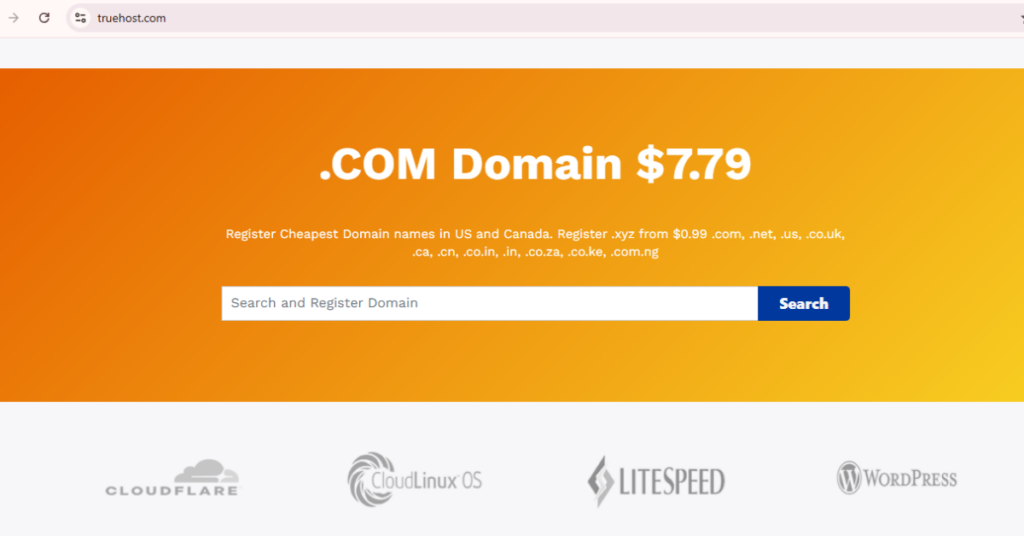
These let you check multiple extensions simultaneously. Type your desired name once and see if it’s available as .com, .net, .org, and various other extensions.
The Internet Corporation for Assigned Names and Numbers (ICANN) operates the RDAP lookup tool (formerly known as WHOIS). This shows you who owns registered domains and when they expire. It’s useful for research, but most people prefer simpler registrar search tools.
Don’t skip trademark searches. USPTO.gov is your go-to for checking U.S. trademarks. It’s free and searchable. Combine this with Google searches to make sure you’re not accidentally copying another business.
For social media username availability, use tools like Namecheckr, Namechk, or KnowEm. These check your desired username across dozens of platforms instantly, saving you the hassle of checking each site individually.
Common Mistakes That Kill Domain Professionalism
Let’s talk about what not to do, because sometimes that’s easier to understand.
First big mistake?
Making your domain too complicated.
Some people try cramming multiple keywords together, creating something like “BestAffordableQualityProductsOnline.com.” That’s not professional. It looks spammy and desperate.
Overstuffing keywords doesn’t help SEO like it used to anyway.
Modern search engines are more intelligent. They care more about quality content than keyword-stuffed domains.
Ignoring how your domain sounds when spoken aloud.
Share your ideas with friends before registering. Say it out loud. Does it sound good? Is it clear? Could it be misheard as something embarrassing?
Some domain names accidentally create awkward abbreviations or unintended meanings when said quickly. You definitely want to catch these before printing business cards.
Don’t forget mobile users.
If your domain is hard to type on a smartphone keyboard, too long, too many characters, easy to mistype, you’re creating friction. In 2026, most people are browsing on mobile devices. Make their life easy.
Finally, failing to secure variations is a major missed opportunity.
If you register YourBrand.com but someone else grabs YourBrand.net or YourBrnad.com (notice the typo?), they can capture traffic meant for you. Buy the obvious variations and forward them to your main site.
Quick Checklist: Is Your Domain Professional?
Before you click that register button, run through this checklist:
Your domain should:
- Be under 15 characters (shorter is better)
- Use .com or another credible extension
- Contain zero hyphens or numbers
- Be easy to spell when someone hears it
- Sound brandable and memorable, not generic
- Allow room for business growth
- Not be trademarked by anyone else
- Have matching social media handles available
- Sounds professional when spoken aloud
- Feel timeless, not trendy
Red flags that scream unprofessional:
- Any hyphens (
best-deals-online.com) - Numbers mixed in (
4you.com,shop2day.com) - Weird extensions (.pizza, .space, .club)
- Way too long (
BestAffordableQualityProducts.com) - Hard to spell (
Xprezz.com,Lyke.com) - Generic keyword stuffing (
BuyOnlineNow.com)
If your domain passes the good list and avoids the red flags, you’re in good shape.
How to Register Your Professional Domain
Once you’ve chosen your domain, registration takes about five minutes.
Choose an ICANN-accredited registrar first. ICANN accreditation means they’re approved to sell domains in accordance with strict security and technical standards. Trusted options include TrueHost, Namecheap, and GoDaddy.
Most standard domains cost between $10 and $25. Premium domains cost more, sometimes significantly more.
Also, check renewal pricing. Some registrars offer cheap first-year pricing but jack up the cost when you renew.
You don’t need hosting or technical skills to buy a domain. Just search for your desired name, verify it’s available, and complete the purchase. The registrar walks you through the process.
One crucial add-on: privacy protection.
When you register a domain, your personal information (name, address, email, phone number) gets recorded in the WHOIS database. This information is publicly accessible unless you add privacy protection.
Privacy protection shields your personal details from public view, reducing spam and protecting your information. Many registrars include this for free. If yours doesn’t, it’s worth paying a few extra dollars for peace of mind.
Your Professional Domain Starts Here
Choosing a professional domain doesn’t have to be complicated or stressful.
Keep it short, simple, and memorable. Aim for under 15 characters. Choose .com whenever possible, or pick credible alternatives that match your industry. Make your domain brandable rather than stuffing it with generic keywords.
Avoid hyphens, numbers, and creative misspellings that create confusion. Think long-term and leave room for your business to grow. Check availability, run trademark searches, and secure matching social media handles.
Most importantly? Act fast. With 33,000 new domains registered every single day, the perfect professional domain you want today might be gone tomorrow.
Your domain is your digital storefront, your first impression, and a permanent piece of your brand identity. Choose something that represents your business professionally and makes visitors trust you immediately.
Make it memorable. Make it professional. Make it yours.
Ready to claim your perfect domain? Search availability now on Truehost and start building your professional online presence the right way. Your business deserves a domain that looks as legitimate and trustworthy as you are.