Domain RegistrationFind and register the perfect domain for your website.
 .COM DomainChoose a widely recognized domain to build global credibility.
 Domain TransferSeamless domain transfers with zero downtime and complete control.
 All TLDsFind and register your perfect domain. Choose from local and global extensions.
 SSL CertificatesKeep your website safe with reliable SSL Certificates that protect customer data and build trust.
 whoisCheck domain ownership details, expiration dates, and registrar information.
 US DomainRegister a .US domain and build trust in the USA.
 Web HostingEverything your website needs to run smoothly
 WordPress HostingWordPress hosting that just works
 Windows HostingReliable hosting for Windows environments
 Reseller HostingTurn hosting into your business
 Email HostingEmail that looks professional and works anywhere
 cPanel HostingFull control of your hosting with cPanel
 Affiliate ProgramJoin as a partner and earn commissions on every referral you send our way.
 Vps HostingScalable virtual servers that expand as you need.
 Dedicated ServersGet complete access and full control over your dedicated physical server.
 Managed vpsNot tech-savvy? We will take care of everything with our fully managed VPS hosting for you.
 AI Website BuilderCreate stunning websites in seconds with AI.
 Online ShopSet up a professional online store. No coding required.
 Web design serviceGet a tailored website designed to match your brand and support your goals.
 BlogFind helpful guides on web hosting, online selling, digital marketing, and more.
 Contact USYou can reach us anytime, day or night, through chat or email.
 SupportBrowse helpful guides and answers for all of our services.
The cheapest VPS on the pricing page is rarely the cheapest VPS to run. A $5 unmanaged plan looks like a bargain. However, the invoice only covers the server. Updates, security, backups, and late-night fixes all land on you.
The short answer is simple. With a managed VPS, your provider runs the server. With an unmanaged VPS, you run it yourself. That one difference shapes your cost, your time, and your risk.
That said, unmanaged hosting suits skilled users well. This guide shows who handles what, what each model really costs, and how to pick. A short self-check near the end helps you decide in under a minute.
Managed vs Unmanaged VPS at a Glance
Start with the big picture. The table below summarizes the differences between managed and unmanaged VPS.
| Feature | Managed VPS | Unmanaged VPS | Better for |
|---|---|---|---|
| Who runs the server | The provider | You | Managed if you lack time |
| Support | Hands-on help, often 24/7 | Network and hardware only | Managed for peace of mind |
| Root access | Varies by plan | Full | Unmanaged for control |
| Monthly price | Higher | Lower | Unmanaged on a tight budget |
| Updates and patches | Handled for you | Handled by you | Managed with low effort |
| Flexibility | Limited by provider rules | Almost unlimited | Unmanaged for custom stacks |
| Skill needed | Low | High | Managed for beginners |
A managed VPS includes server administration. The provider patches software, watches the server, and answers technical questions.
An unmanaged VPS hands you a clean virtual server. The provider keeps the hardware and network running. You handle everything else.
Who Handles What: Responsibilities in a Managed vs Unmanaged VPS

Cost and effort both come down to one question. Who does each task?
Hosts also use different labels, so read them carefully.
- Fully managed VPS hosting: The provider handles nearly all server-level work.
- Semi-managed: The provider covers the operating system and the basics. You handle apps and tuning.
- Self-managed VPS: another term for unmanaged. You do the work.
One host’s “managed” can equal another host’s “semi-managed.” Check the support scope before you pay.
| Task | Managed VPS | Unmanaged VPS |
|---|---|---|
| Hardware and network uptime | Provider | Provider |
| Operating system installation | Provider | You |
| OS and security patches | Provider | You |
| Firewall setup | Provider | You |
| Malware scanning | Varies by plan | You |
| Backups | Varies by plan | You |
| Monitoring and alerts | Provider | You |
| Incident response | Provider | You |
| App-level bugs (plugins, custom code) | Usually you | You |
| Control panel license | Varies by plan | You |
Hardware and network uptime are the provider’s responsibility in both models. App-level problems, such as a broken plugin, usually fall outside the scope of managed support.
Control panel licenses, such as cPanel, also vary. Some plans bundle them. Others bill you separately.
Setup and Operating System
On a managed plan, the provider installs the operating system. It often adds the web server stack and a control panel, too. You can start uploading your site quickly.
An unmanaged plan arrives as a blank operating system image. You install the web server, the database, and any language runtimes. An experienced admin may finish in a couple of hours. A newcomer will need much longer.
Security and Patching
Patches close known security holes. Skipping them leaves the door open. On a managed plan, the provider applies patches on a schedule.
On an unmanaged plan, you can set up automatic updates or patches manually. You also lock down SSH, switch to key-based logins, and configure the firewall. If you miss a patch, the breach is yours to fix.
Backups and Monitoring
Managed plans often include scheduled backups and monitoring. However, not every plan does, so confirm before you buy.
Unmanaged plans leave both jobs to you. You schedule backups, store them off-server, and test a restore. A backup you never restored is only a guess. You also set up alerts for uptime, disk space, CPU, and memory.
Support Scope
Managed support covers server problems, often around the clock. Still, it rarely covers your application code. Unmanaged support typically covers only the network and hardware.
Ask for the scope of support in writing. Then you know what happens when something breaks.
Managed vs Unmanaged VPS Cost: Sticker Price vs Total Cost
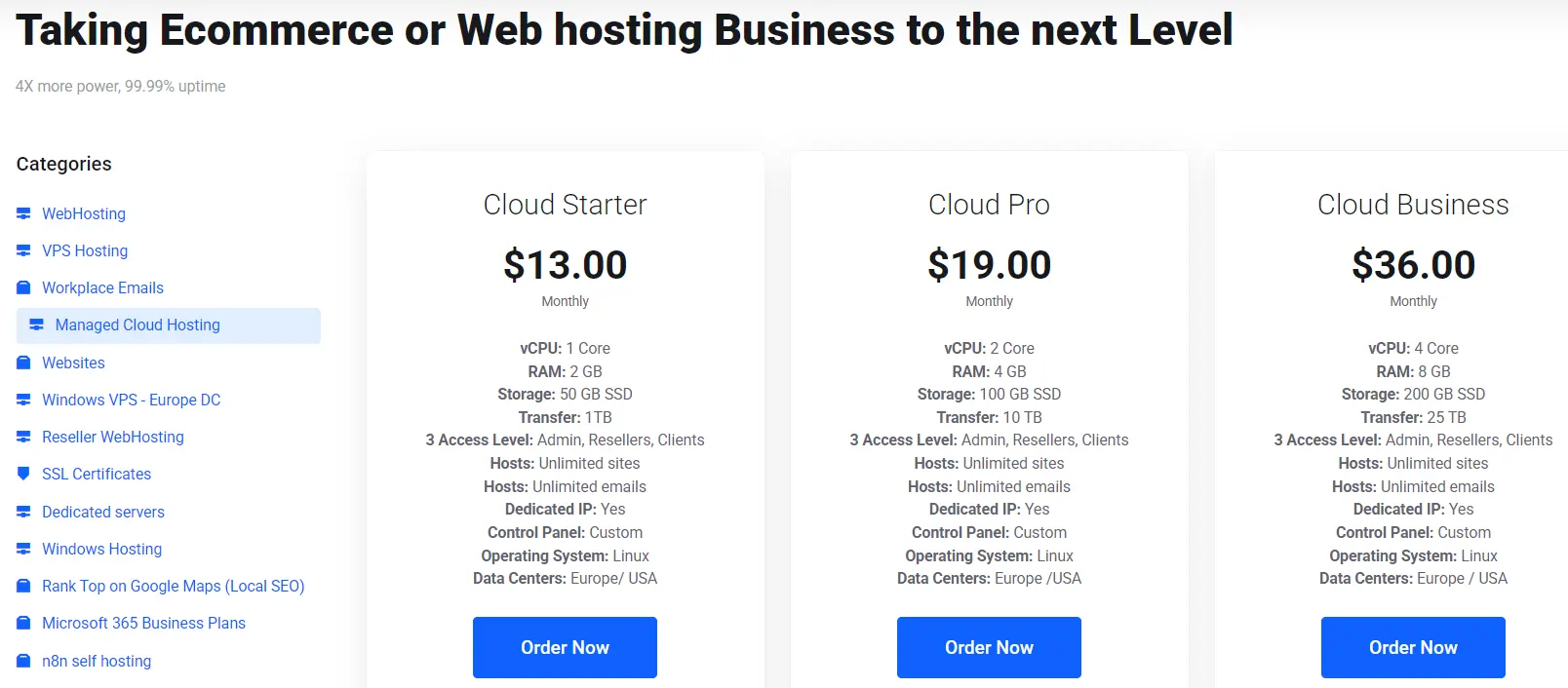
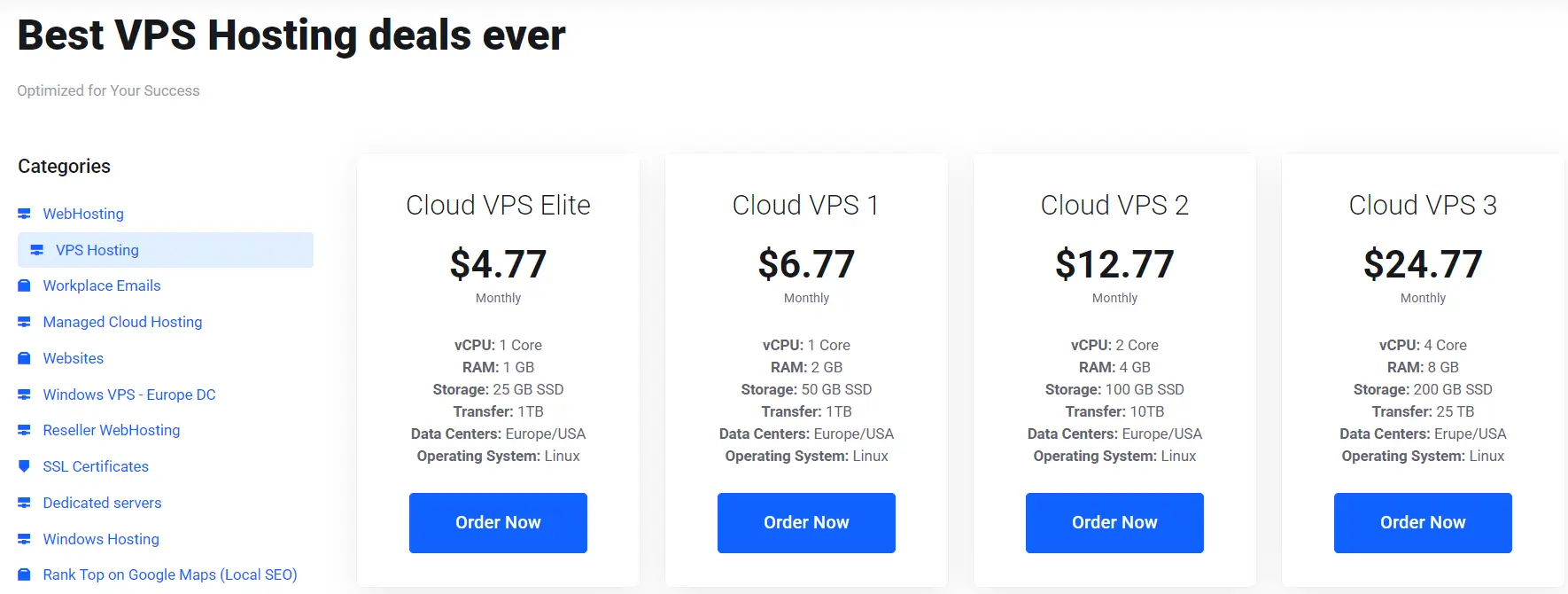
Published prices disagree, so treat any single range with care. Truehost lists managed plans at $10 to $50 per month and unmanaged plans at $2 to $30 per month.
That spread tells you something. Prices shift with specs, region, and what “managed” covers. Compare plans with matching resources instead of headline ranges.
Hidden Costs of Unmanaged VPS
The monthly fee is on a single line. Unmanaged users also pay in other ways.
- Time: Patching, monitoring, and troubleshooting take hours every month.
- Tools: You may buy a control panel license, backup storage, monitoring, and security software.
- Downtime risk: A misconfiguration can take your site offline until you fix it.
- Recovery effort: A failed server means rebuilding it yourself.
One analysis prices 10 hours of monthly server work at $50 per hour. That adds up to $6,000 per year. Use that figure as an illustration, not a rule.
Here is a worked example with labeled assumptions. Swap in your own numbers.
| Cost line | Unmanaged VPS | Managed VPS |
|---|---|---|
| Plan price | $10 | $40 |
| Backup storage and tools | $5 | $0 (included) |
| Admin time | 5 hours at $30 = $150 | 0.5 hours at $30 = $15 |
| Monthly total | $165 | $55 |
These numbers are assumptions, not quotes. They still show how the math works. Unmanaged looks cheaper until you price your hours.
However, the result flips for skilled users. Suppose your time costs nothing, unmanaged wins at $15 against $40. With automation and one hour of upkeep, the gap shrinks to $45 versus $55.
Is Managed VPS Worth the Extra Cost?
Yes, if you lack server skills or downtime costs you money. The premium buys expert support, automated maintenance, and fewer surprises.
No, if you already run servers well. A managed plan can also be poor value when the provider excludes your exact application stack. Likewise, a development server with little risk rarely needs the extra service.
Control and Customization: Root Access on Managed vs Unmanaged VPS
Unmanaged VPS root access is the main draw. You control the operating system, the software, and the security settings. Nothing stands between you and the configuration.
Managed plans differ. Hostwinds says its managed plans include root access. Other providers limit or remove it. Since policies vary, ask before you buy.
Use this checklist with any provider:
- Do I get root or sudo access?
- Can I install custom software?
- Can I change system-level settings?
- Which software versions and stacks does support cover?
- Does support still help after I change the configuration?
Consider two edge cases. First, a managed plan may block the stack you need, such as a niche database version. Then you lose the flexibility you wanted.
Second, unmanaged freedom has a cost. One wrong firewall rule can lock you out of your own server. Nobody will fix it unless you pay for help.
Skills and Time: What Running an Unmanaged VPS Really Takes
Running an unmanaged VPS takes real skill. At a minimum, you need to handle these tasks:
- Log in over SSH with key-based authentication
- Work comfortably in the Linux command line
- Install packages and apply updates
- Write and test firewall rules
- Configure a web server such as Nginx or Apache
- Manage a database
- Back up and restore data
- Read logs to find problems
The time cost follows a pattern. The first month is the heaviest. A newcomer may spend 10 to 20 hours on setup and learning. Once automation handles patches and backups, upkeep can shrink to a few hours each month. These are rough estimates, so adjust them for your own experience.
Quick Self-Check
Answer yes or no to each question.
- Can you log in to a server over SSH using keys?
- Can you restore a backup onto a fresh server?
- Can you read a log file and spot the error?
- Can you patch and reboot a server without breaking your site?
- Do you know what to do at 2 a.m. if the site goes down?
Score four or five yeses, and unmanaged is a fair bet. Score two or three, and a semi-managed or managed plan is safer. Finally score zero or one, and choose managed.
Which Should You Choose? Fit by Use Case
Match your situation to the table below.
| Use case | Best fit | Reason |
|---|---|---|
| Business website | Managed | Less admin time |
| Ecommerce store | Managed | Downtime costs sales |
| Agency hosting client sites | Managed | Support covers many sites |
| SaaS production app | Managed, or unmanaged, with a DevOps team | Needs monitoring and quick recovery |
| Small team without DevOps staff | Managed | Fills the skills gap |
| Development lab | Unmanaged | Custom testing, low risk |
| Experienced system administrator | Unmanaged | Direct control |
| Personal learning project | Unmanaged | Hands-on practice |
A middle path exists. Semi-managed plans give you root access while the provider handles the basics. They suit developers who want a custom stack but not every maintenance chore.
Choose Managed VPS If
- You lack Linux and server administration skills.
- Downtime costs you sales or clients.
- You host several client sites and need support to share the load.
- You would rather build your business than patch servers.
Choose Unmanaged VPS If
- You or your team already runs Linux servers.
- You need a custom stack that manages the rules block.
- You can automate updates, backups, and monitoring.
- The server is for development, testing, or learning.
FAQs About Managed vs Unmanaged VPS
Can I switch from unmanaged to managed VPS later?
Yes. Many hosts let you move to a managed plan. Some upgrade you in place. Others require a migration to a new server.
Plan the move carefully. Lower your DNS TTL a day or two ahead. Test the new server before you switch traffic. Choose a quiet hour to cut over. Also, ask whether your host offers free migration.
What happens if my unmanaged VPS gets hacked or goes down?
You are responsible for recovery. The provider restores the network and hardware. It may also help with a snapshot or rebuild. The cleanup itself is yours.
Act in this order. First, isolate the server. Next, restore from a clean backup. Then rotate all keys and passwords. Finally, patch the hole that let the attacker in.
Backups change the outcome. With a tested backup, recovery can take an hour. Without one, it can take days.
A managed provider usually helps with cleanup and restoration. Still, check whether your plan covers app-level compromises, since many exclude them.
Match the Model to Your Skills, Then Pick a Plan
Skip the sticker price and answer three questions instead.
- Can you run a server well today?
- Can you spare the hours every month?
- What does one day of downtime cost you?
The right choice is the one whose hidden costs you can absorb. Skilled users with spare time often save money on unmanaged hosting. Everyone else usually spends less on managed hosting once their hours are factored in.
Ready to pick? Compare the managed and unmanaged VPS plans side by side, then match one to your answers.
Still unsure what a managed plan covers? Chat with our support team before you buy and get the scope in writing.