Domain RegistrationFind and register the perfect domain for your website.
 .COM DomainChoose a widely recognized domain to build global credibility.
 Domain TransferSeamless domain transfers with zero downtime and complete control.
 All TLDsFind and register your perfect domain. Choose from local and global extensions.
 SSL CertificatesKeep your website safe with reliable SSL Certificates that protect customer data and build trust.
 whoisCheck domain ownership details, expiration dates, and registrar information.
 US DomainRegister a .US domain and build trust in the USA.
 Web HostingEverything your website needs to run smoothly
 WordPress HostingWordPress hosting that just works
 Windows HostingReliable hosting for Windows environments
 Reseller HostingTurn hosting into your business
 Email HostingEmail that looks professional and works anywhere
 cPanel HostingFull control of your hosting with cPanel
 Affiliate ProgramJoin as a partner and earn commissions on every referral you send our way.
 Vps HostingScalable virtual servers that expand as you need.
 Dedicated ServersGet complete access and full control over your dedicated physical server.
 Managed vpsNot tech-savvy? We will take care of everything with our fully managed VPS hosting for you.
 AI Website BuilderCreate stunning websites in seconds with AI.
 Online ShopSet up a professional online store. No coding required.
 Web design serviceGet a tailored website designed to match your brand and support your goals.
 BlogFind helpful guides on web hosting, online selling, digital marketing, and more.
 Contact USYou can reach us anytime, day or night, through chat or email.
 SupportBrowse helpful guides and answers for all of our services.
If you have managed a website before, you have probably heard of cPanel.
It is a graphical control panel that makes hosting tasks easier to handle.
You do not need to type complicated commands or dig through server files.
Instead, you get a simple dashboard with icons and menus that guide you through everything.
The real value of cPanel hosting features is not just the interface itself.
It comes from the way cPanel brings so many separate tools together in one place.
Rather than juggling different systems for your website, email, files and databases, cPanel puts all of it under one login.
In this guide, we will walk through the major features cPanel offers.
This includes website management, domains, files, databases, email, security, backups, software installation and resource management.
By the end, you should have a clear picture of what cPanel can actually do for you day to day.
What Are the Main cPanel Features?
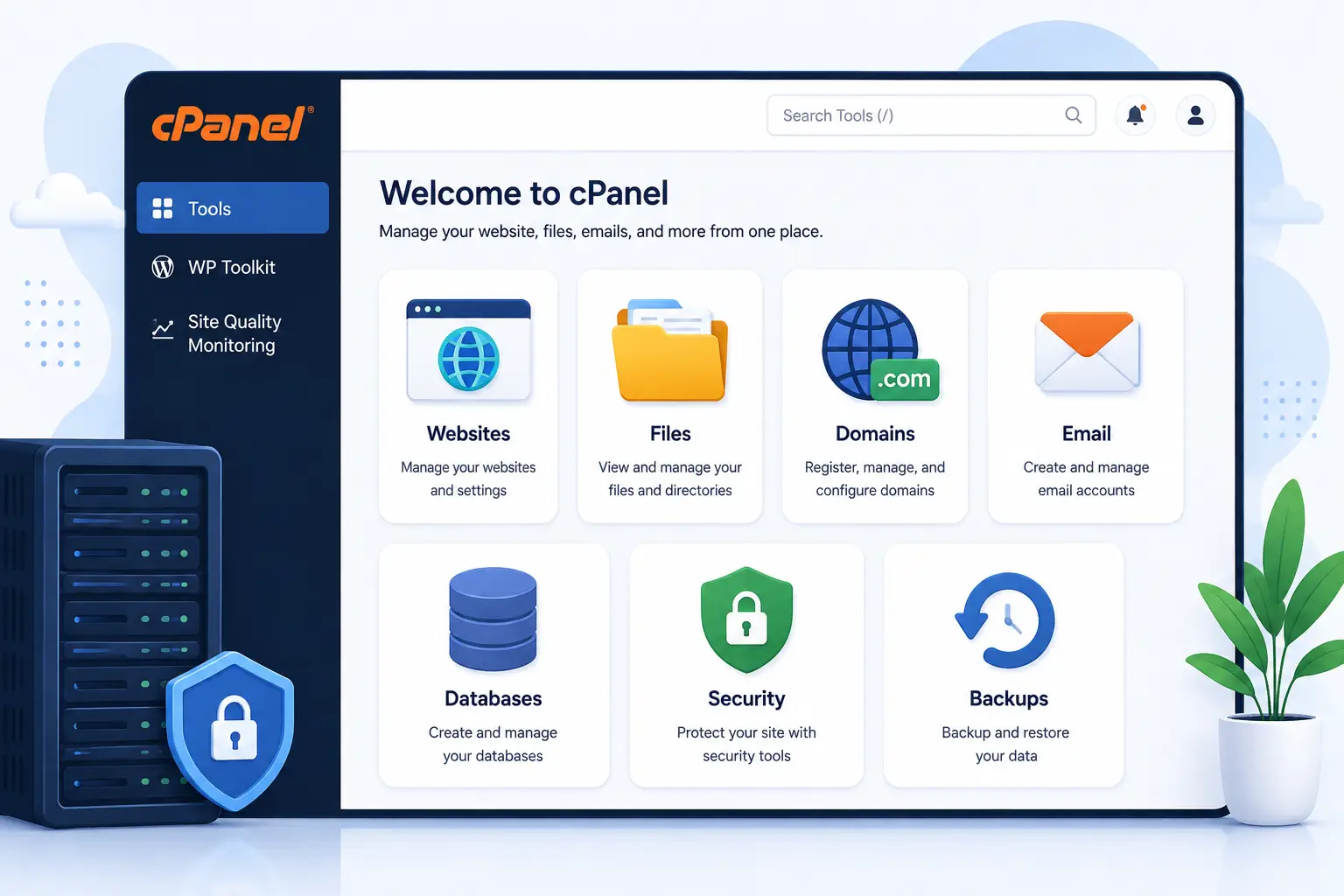
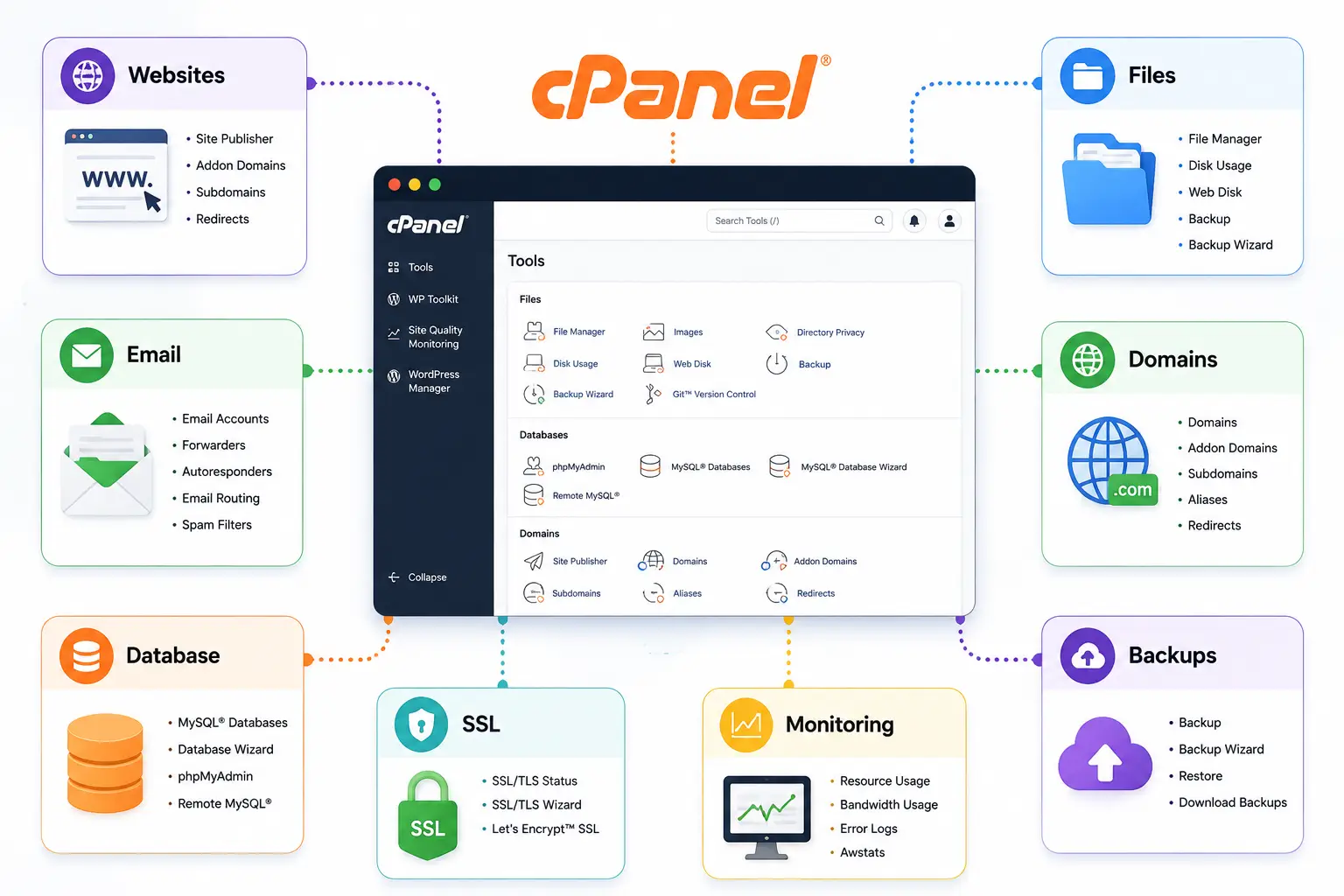
Before going deep into each category, here is a quick overview of what cPanel offers.
Think of it as your control room for everything happening on your hosting account.
a) Website Management
One of the most basic tools cPanel offers is the ability to add and manage websites from your dashboard.
You can set up new sites and manage the domains attached to your account. You can also adjust website-related settings without needing outside tools.
b) File Management
cPanel gives you a simple way to upload and manage your website files.
You can create folders to keep things organized.
From there, you can edit, move, rename or delete files whenever needed.
This is handled through a tool called File Manager, which works right in your browser.
c) Database Management
Many websites, especially those built on WordPress, rely on databases to store their content. cPanel lets you create databases and manage the users who access them.
It often gives you phpMyAdmin access too, a tool that lets you view and edit your database through a simple web interface.
d) Email Management
cPanel also handles email for your domain. You can create custom email accounts and manage your mailboxes.
Most cPanel setups include webmail access, so you can check your inbox from any browser. Email forwarding is usually included as well.
e) Domain Management
Beyond your main website, cPanel lets you manage additional domains, subdomains, aliases and redirects.
Depending on your hosting provider’s setup, you may also get access to DNS management tools from the same dashboard.
f) One-Click Software Installation
Many hosting plans include a tool called Softaculous. It lets you install popular applications like WordPress with just a few clicks.
How updates and ongoing management work will depend on the specific installer your host provides.
g) SSL and Security
cPanel includes tools for managing SSL and TLS certificates, which enable HTTPS on your website.
You will also find security tools such as IP blocking and access controls. The exact options available depend on how your host has configured things.
h) Backups
cPanel comes with backup and restore tools built in.
That said, how often backups run, how long they are kept, and whether they happen automatically all depend on your hosting provider’s policy, not on cPanel itself. cPanel provides the tool, but your host decides how it gets used.
i) Resource and Usage Monitoring
Finally, cPanel gives you visibility into your account’s resource usage. You can check your disk usage and your bandwidth or data transfer.
In some cases, you can view CPU usage too, along with general account statistics.
cPanel File Management Features
File management is one of the more useful cPanel hosting features, so it deserves a closer look.
a) File Manager
File Manager is a browser-based tool that lets you handle your website files without separate software. You can upload files directly and create new directories.
You can also extract compressed files like ZIP archives, and edit files right from the interface.
b) FTP Account Management
If you prefer using an FTP client to manage your files, cPanel lets you create FTP accounts. You can assign them access to specific directories and manage their login credentials.
This is especially handy for developers or teams who need controlled access to parts of a website.
c) File Permissions
Every file and folder on your server has permission settings. These settings determine who can read, write or execute them.
cPanel makes it fairly simple to view and adjust these permissions.
Getting them right is important, since incorrect permissions can either break your website or leave it exposed to security risks.
cPanel Domain Management Features
Domains are central to how your website gets found. cPanel gives you several tools to manage them.
a) Add-on Domains
If your hosting plan allows it, you can host additional websites under the same account using add-on domains.
This is useful for anyone managing more than one site without needing separate hosting accounts.
b) Subdomains
Subdomains let you create separate sections of your website.
A common example is blog.example.com or shop.example.com.
Each one functions somewhat independently while still living under your main domain.
c) Domain Aliases
Domain aliases let you point additional domain names toward your existing website, where your hosting setup supports it.
This can be useful if you own several domain variations and want them all to lead to the same site.
d) Redirects
Redirects send visitors from one URL to another automatically.
This is helpful when you move a page or change your domain. It also helps when you simply want to guide traffic to a different destination.
e) DNS Management
Depending on how your hosting account is set up, you may be able to manage your DNS records directly through cPanel.
This gives you control over how your domain connects to different services.
cPanel Email Hosting Features
Email is one of the biggest reasons businesses choose cPanel hosting in the first place. This section carries a lot of weight.
a) Custom Email Addresses
cPanel lets you create professional email addresses using your own domain, such as [email protected]. This is a step up from relying on a generic email provider.
b) Webmail
Webmail gives you a way to check and send email directly through your browser. You do not need to set up a separate email application.
This is handy if you need to access your inbox from a device you do not normally use.
c) Email Forwarding
Email forwarding automatically sends messages from one address to another.
This is useful if you want several addresses to funnel into a single inbox you check regularly.
d) Autoresponders
Autoresponders let you set up automatic replies.
These come in handy for things like out-of-office messages or simple acknowledgment emails.
e) Spam and Email Filtering
Most cPanel setups include filtering tools that help reduce spam reaching your inbox.
The exact strength and configuration of these tools can vary depending on how your server is set up.
f) Email Account Management
Beyond creating addresses, cPanel lets you modify or remove mailboxes whenever needed.
This gives you full control over your email setup as your needs change.
cPanel Database Management Features
Databases power a huge portion of modern websites, and cPanel makes working with them much simpler.
a) MySQL Database Management
Through cPanel, you can create new databases and set up users for those databases. You can also assign the right permissions so each user has appropriate access.
b) phpMyAdmin
Where enabled, phpMyAdmin gives you a visual way to manage your databases through a web interface.
This beats typing out database commands manually.
c) Database Backup and Import
cPanel offers basic tools for backing up and importing databases.
Keep in mind that the exact database technologies supported, and how advanced these tools are, will depend on your specific hosting environment.
cPanel Security Features
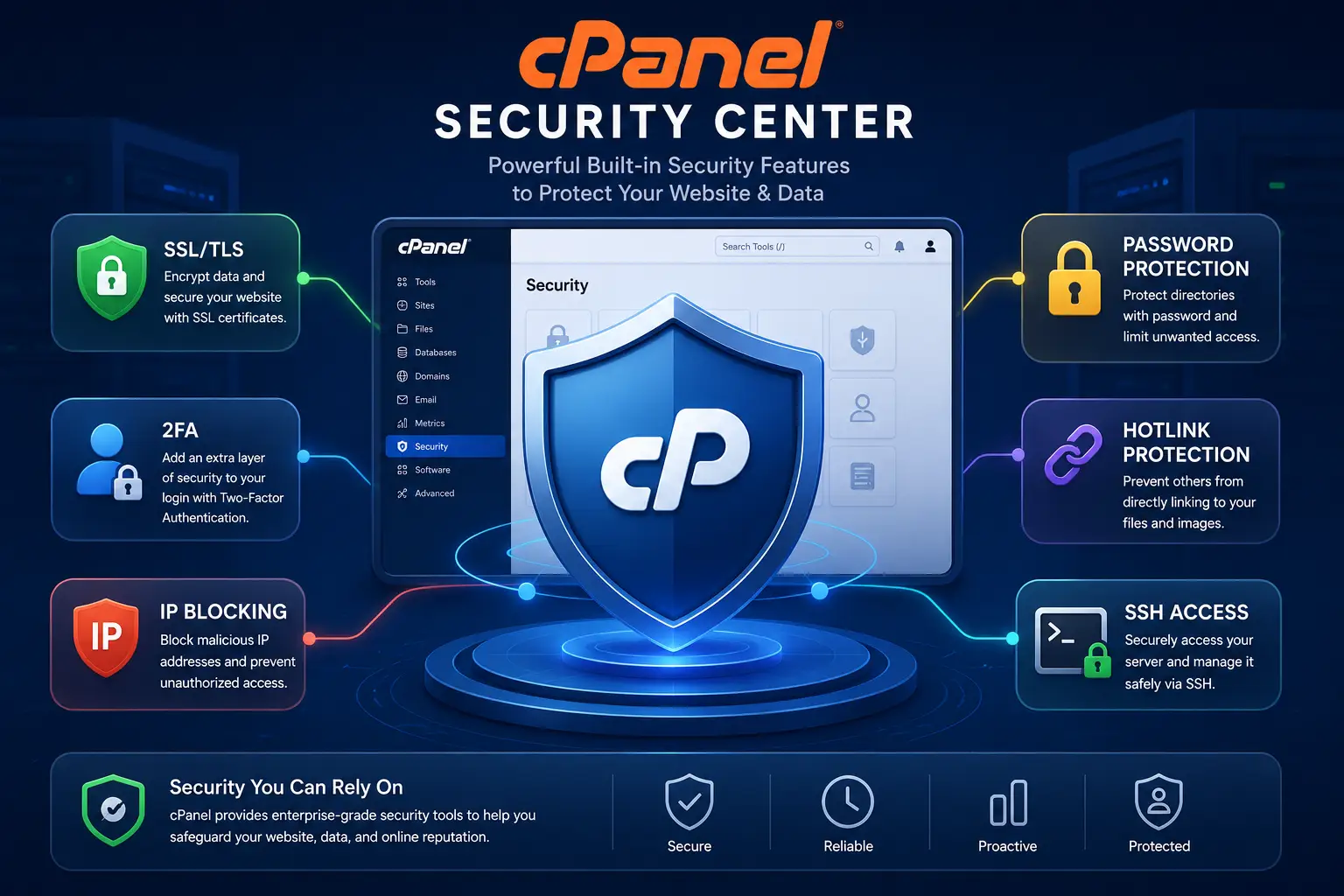
It is worth being upfront here. cPanel does not make your website automatically secure on its own.
It does, however, give you a solid set of tools to manage security.
a) SSL/TLS Management
You can manage SSL and TLS certificates to enable secure HTTPS connections for your website visitors.
b) Password-Protected Directories
You can restrict access to certain folders on your website. This is done by requiring a username and password before they can be viewed.
c) IP Blocking
If you need to block specific visitors or bots, cPanel allows you to restrict access based on IP address.
d) Hotlink Protection
Hotlink protection stops other websites from directly linking to your images or files. This can save your bandwidth and prevent unauthorized use of your content.
e) Two-Factor Authentication
Where enabled, two-factor authentication adds an extra layer of login security. It requires a second verification step beyond just your password.
f) SSH Access
Some hosting plans provide SSH access alongside cPanel. This gives more technical users a way to manage their server through the command line when needed.
g) Security Status and Tools
Many cPanel setups include a security overview section.
This shows the status of various protections, depending on how your host has configured the account.
To be clear, cPanel provides the tools to manage security.
The actual level of protection also depends on your hosting provider, how the server is configured, and how well the website itself is maintained.
cPanel Backup and Restore Features
Backups are one of the more misunderstood areas of cPanel hosting. It helps to break this down carefully.
a) Full Account Backups
A full account backup typically includes your website files, databases, email accounts and account settings.
Everything gets bundled together, so you can restore it all at once if something goes wrong.
b) Partial Backups
If you do not need a full backup, cPanel also allows partial backups.
These can cover just your files, just your databases, or specific email data, depending on what you actually need to protect.
c) Restoration
When something breaks or gets lost, cPanel gives you tools to restore your backed-up content. This brings your site back to a previous working state.
d) Why Your Hosting Provider’s Backup Policy Still Counts
This is an important point that often gets missed. cPanel provides the backup and restore tools, but your hosting provider decides how those tools get used.
This includes how often backups run and how long they are stored.
It also covers whether backups are kept off-site, whether they are included in your plan at all, and whether restoring them comes at an extra cost.
Always check your host’s specific backup policy rather than assuming cPanel alone will protect your data.
cPanel Software and Application Management
Beyond the basics, cPanel also helps you install and manage the software running your website.
a) WordPress Installation
cPanel-based hosting often makes installing WordPress far simpler than doing it manually. Much of the setup process is handled for you.
b) Softaculous
Where included, Softaculous is a one-click installer.
It lets you set up WordPress and many other applications quickly, without needing to manually upload files or configure databases yourself.
c) PHP Version Management
Where your hosting environment allows it, cPanel lets you select and manage which PHP version your website runs on.
This can be important for compatibility with certain plugins or themes.
d) Cron Jobs
Cron jobs let you schedule tasks to run automatically at set times. This might include clearing cache files or sending scheduled reports.
e) Git and Developer Tools
Depending on your hosting configuration, cPanel may also offer Git integration and other developer-friendly tools.
These give more technical users additional flexibility.
cPanel Performance and Resource Management Features
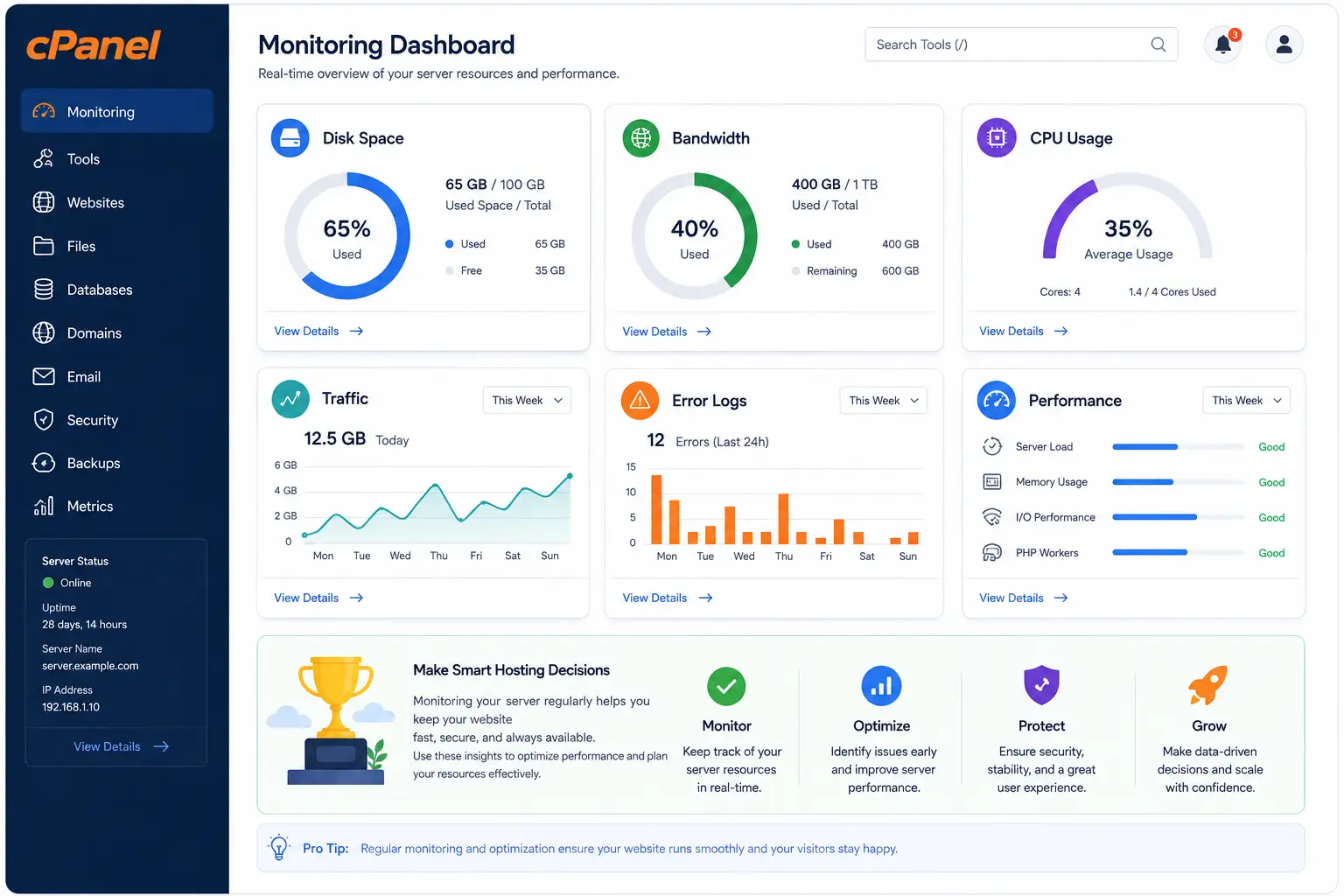
Keeping track of how your hosting account is performing is another area worth covering.
- Within cPanel, you can monitor your disk space usage and keep an eye on how much room you have left.
- Bandwidth and data transfer monitoring lets you see how much traffic your site is using over a given period.
- Resource usage stats give you a broader picture of how your account is performing overall.
- Error logs help you spot and troubleshoot issues on your website.
- Some cPanel setups also include metrics and visitor statistics.
- These give you basic insight into your site’s traffic.
- PHP configuration options may be available depending on your plan, along with caching tools where your host supports them.
- It is worth pointing out an important distinction here.
- cPanel gives you a management interface to view and adjust these settings.
The actual server resources, such as how much CPU power or bandwidth you have to work with, come from your hosting plan itself rather than from cPanel.
Is cPanel Hosting Right for You?
At its core, cPanel hosting brings website, domain, email, database, file, security and application management into a single, easy-to-use interface.
Instead of learning several separate systems, you get one dashboard that handles nearly everything you need for day-to-day website management.
That said, the exact cPanel hosting features available to you depend heavily on your hosting provider and the specific plan you choose.
Not every cPanel account includes the same tools, backup policies or resource limits.
It pays to compare what is actually included before signing up, rather than assuming all cPanel hosting is identical.
If you are looking for cPanel-based hosting that brings these features together in one reliable package, Truehost’s cPanel hosting plans are worth exploring.
Take a look and see if they fit your website and your budget.