Domain RegistrationFind and register the perfect domain for your website.
 .COM DomainChoose a widely recognized domain to build global credibility.
 Domain TransferSeamless domain transfers with zero downtime and complete control.
 All TLDsFind and register your perfect domain. Choose from local and global extensions.
 SSL CertificatesKeep your website safe with reliable SSL Certificates that protect customer data and build trust.
 whoisCheck domain ownership details, expiration dates, and registrar information.
 US DomainRegister a .US domain and build trust in the USA.
 Web HostingEverything your website needs to run smoothly
 WordPress HostingWordPress hosting that just works
 Windows HostingReliable hosting for Windows environments
 Reseller HostingTurn hosting into your business
 Email HostingEmail that looks professional and works anywhere
 cPanel HostingFull control of your hosting with cPanel
 Affiliate ProgramJoin as a partner and earn commissions on every referral you send our way.
 Vps HostingScalable virtual servers that expand as you need.
 Dedicated ServersGet complete access and full control over your dedicated physical server.
 Managed vpsNot tech-savvy? We will take care of everything with our fully managed VPS hosting for you.
 AI Website BuilderCreate stunning websites in seconds with AI.
 Online ShopSet up a professional online store. No coding required.
 Web design serviceGet a tailored website designed to match your brand and support your goals.
 BlogFind helpful guides on web hosting, online selling, digital marketing, and more.
 Contact USYou can reach us anytime, day or night, through chat or email.
 SupportBrowse helpful guides and answers for all of our services.
OpenClaw lets you connect OpenAI’s models to your personal AI agent so it can understand requests, use tools, and automate tasks across apps like WhatsApp, Telegram, Discord, and Slack. This guide walks you through setting up and configuring OpenAI with OpenClaw using the latest official documentation.
System requirements
- A recent Node.js runtime for OpenClaw itself (check the install docs for the current minimum, as this moves between releases).
- Enough RAM/disk for the local runtime, workspace, and any skills you enable (browser automation and tool use add overhead).
- Either an OpenAI Platform API key, or a ChatGPT Plus/Pro/Business/Enterprise or Codex subscription.
- For production: a VPS, container runtime (Docker/Podman), or another sandboxed host rather than a personal machine.
How OpenClaw Connects to OpenAI
OpenClaw uses a single provider id, openai, for both direct API-key billing and ChatGPT/Codex subscription auth, this is a change from earlier versions, which had a separate openai-codex provider. All OpenAI-backed models are addressed as openai/<model>.
Underneath that one provider id, requests can land on two different execution paths:
- OpenClaw’s own embedded agent runtime: a normal API call through OpenClaw’s request/response loop.
- The bundled native Codex app-server harness: OpenAI’s own Codex execution engine, which OpenClaw can hand a turn to automatically when the route and model qualify (an exact official OpenAI or ChatGPT HTTPS endpoint, with no custom request overrides).
Which path is used is controlled by agentRuntime policy: leave it unset or “auto,” and OpenClaw decides based on the route; set it explicitly to “codex” or “openclaw” to force one side. The request flow in either case is: channel message → gateway → agent runtime (OpenClaw or Codex) → OpenAI → response → tool execution → reply delivered back to the channel.
OpenAI Authentication Options in OpenClaw
Option A: API key (OpenAI Platform)
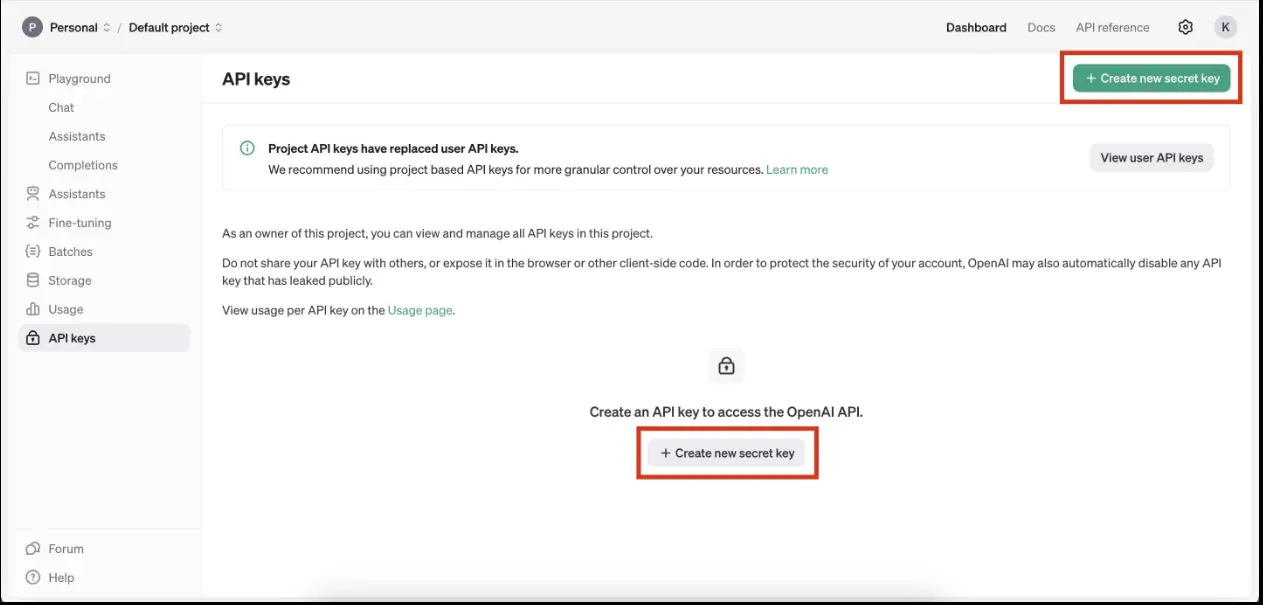
Best for direct, usage-based billing without a ChatGPT subscription.
i) Create or copy an API key from the OpenAI Platform dashboard.
ii) Run onboarding:
openclaw onboard --auth-choice openai-api-keyor pass the key inline:
openclaw onboard --openai-api-key "$OPENAI_API_KEY"iii)Verify the model is available:
openclaw models list --provider openai
Config example:
{
  env: { OPENAI_API_KEY: "your-openai-key" },
  agents: { defaults: { model: { primary: "openai/gpt-5.6" } } },
}
The bare gpt-5.6 id resolves to the flagship “Sol” tier on the direct API-key route (see model naming below). If your organization doesn’t have GPT-5.6 access, set openai/gpt-5.5 explicitly; OpenClaw will not silently downgrade a GPT-5.6 selection for you.
You can also point the primary model at openai/chat-latest, a moving alias for OpenAI’s current ChatGPT Instant model. It’s API-key only, and OpenClaw forces its text verbosity to medium regardless of what you request.
Note: OpenClaw does not expose gpt-5.3-codex-spark on the direct API-key route. It’s only reachable through a Codex subscription catalog, and only when your signed-in account has access to it.
Option B: ChatGPT/Codex subscription (OAuth)
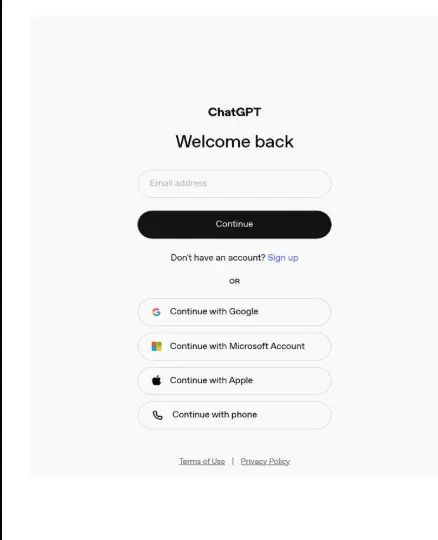
Best for using an existing ChatGPT/Codex subscription with the native Codex app-server runtime instead of separate API billing.
i) Run Codex OAuth:
openclaw onboard --auth-choice openaior directly:
openclaw models auth login --provider openaiFor headless or callback-hostile environments, add –device-code to use a ChatGPT device-code flow instead of a localhost browser callback:
openclaw models auth login --provider openai --device-codeii) Set the canonical model route; no additional runtime config is required for this exact official route:
openclaw config set agents.defaults.model.primary openai/gpt-5.6-soliii) Verify:
openclaw models list --provider openaiiii) Once the gateway is running, /codex status and /codex models in chat confirm the native app-server runtime is active.
Config example enabling the bundled Codex plugin:
{
  plugins: { entries: { codex: { enabled: true } } },
  agents: { defaults: { model: { primary: "openai/gpt-5.6-sol" } } },
}
Adding an API key backup so OpenClaw tries the subscription first and falls back to the key, while staying on the Codex harness:
{
  plugins: { entries: { codex: { enabled: true } } },
  agents: { defaults: { model: { primary: "openai/gpt-5.6-sol" } } },
  auth: {
    order: {
      openai: ["openai:[email protected]", "openai:api-key-backup"],
    },
  },
}
For multiple Codex logins on the same agent (e.g. separate accounts), use –profile-id:
openclaw models auth login --provider openai --profile-id openai:alice
openclaw models auth login --provider openai --profile-id openai:bob
Note: Onboarding no longer imports OAuth material from ~/.codex. Sign in with the browser OAuth flow (default) or the device-code flow above; OpenClaw manages the resulting credentials in its own auth store, separate from any local Codex CLI installation.
If you’re upgrading from an older OpenClaw version with legacy codex/* or openai-codex/* model refs, repair them with:
openclaw doctor --fixThis rewrites them to the canonical openai/* route with a model-scoped agentRuntime.id: “codex”, without changing an existing explicit GPT-5.5 selection.
OpenAI Configuration Details
i) Choose your OpenAI model
OpenAI’s current lineup, as OpenClaw recognizes it:
- GPT-5.6 family (released July 2026, limited/staged rollout): openai/gpt-5.6-sol (flagship), openai/gpt-5.6-terra (balanced), openai/gpt-5.6-luna (fast, lower-cost). The bare openai/gpt-5.6 id is an alias that resolves to Sol on the direct API-key route.
- openai/gpt-5.5; the explicit fallback when GPT-5.6 isn’t available to your account, and still fully supported for existing configs.
- openai/gpt-4o; still usable via the openai provider.
- openai/chat-latest; moving alias to OpenAI’s current ChatGPT Instant model, API-key only.
Check what your account actually has access to before hardcoding a model:
openclaw models list --provider openaiAPI-key organizations and ChatGPT/Codex subscription workspaces can expose different tiers, so the same command can return different results depending on which auth path you used.
Set a default model:
openclaw config set agents.defaults.model.primary openai/gpt-5.6-solii) Select the runtime
OpenClaw can run OpenAI agent turns two ways:
- Native Codex app-server runtime: selected implicitly when the route is an exact official OpenAI or ChatGPT HTTPS endpoint with no custom request overrides, and agentRuntime policy is unset or “auto”.
{
    agents: {
      defaults: {
        models: {
          "openai/gpt-5.6": { agentRuntime: { id: "openclaw" } },
        },
      },
    },
  }
If you’re upgrading and runtime selection looks stale or inconsistent, run:
openclaw doctor --fixiii) Authentication
Add one or more OpenAI auth profiles (API key, OAuth, or both) and let OpenClaw try them in order via auth.order.openai. Manage profiles during onboarding or directly:
openclaw models auth login --provider openai
openclaw models auth list --provider openai
Usage and cost are tracked separately for each auth type: ChatGPT/Codex OAuth surfaces subscription quota and credit balance, while an OPENAI_ADMIN_KEY surfaces 30 days of organization-level Platform API spend in the Control UI’s Usage panel.
iv) Advanced settings
Beyond chat, the bundled openai plugin covers:
- Embeddings for memory/search indexing (e.g. text-embedding-3-small).
- Image generation and editing via image_generate, defaulting to openai/gpt-image-2 (use gpt-image-1.5 for transparent-background PNG/WebP output).
- Video generation via video_generate, defaulting to openai/sora-2.
- Text-to-speech, defaulting to the gpt-4o-mini-tts model.
- Speech-to-text, both batch (gpt-4o-transcribe over REST) and real-time streaming for Voice Call.
- Real-time voice, defaulting to gpt-realtime-2.1, which requires a Platform API key even on OAuth-only installs (Codex OAuth tokens don’t authenticate the public Realtime API).
v) Environment variables
Store credentials as environment variables rather than in plaintext config, primarily:
OPENAI_API_KEYOptional rotation variables (OPENAI_API_KEYS, OPENAI_API_KEY_1, OPENAI_API_KEY_2) and an override (OPENCLAW_LIVE_OPENAI_KEY) are also supported. For production deployments, use a secret manager rather than hardcoding keys into config files.
Troubleshooting OpenAI Integration
| Issue | Likely cause | Fix |
| Authentication failed | Wrong or expired credentials | Re-run openclaw models auth login –provider openai, or check the API key. |
| Model not found / “Model is not allowed” | Model isn’t in your account’s catalog, or isn’t in an agents.defaults.models allowlist | Run openclaw models list –provider openai and pick a listed model, or update the allowlist. |
| GPT-5.6 unavailable | Account/organization doesn’t have preview access | Set openai/gpt-5.5 explicitly; OpenClaw won’t auto-downgrade for you. |
| OAuth login problems | Browser callback blocked (headless/remote host) | Retry with openclaw models auth login –provider openai –device-code. |
| Rate limit exceeded | Too many requests against one profile | Configure auth.order.openai with multiple profiles so OpenClaw can rotate, or wait for the reset window. |
| Legacy config errors after upgrade | Old codex/* or openai-codex/* refs | Run openclaw doctor –fix, then openclaw config validate. |
| Gateway offline | OpenClaw’s gateway daemon isn’t running | Start it with openclaw gateway start. |
| Skills not working | Skill disabled or misconfigured | Check openclaw plugins status and the skill’s own config. |
| Config changes not applying | Gateway hasn’t reloaded | Restart the gateway and refresh your session. |
Getting Started with OpenClaw and OpenAI
Connecting OpenAI to OpenClaw comes down to three decisions: API key or subscription auth, which model tier your account actually has access to, and whether you want the native Codex runtime or OpenClaw’s own embedded runtime handling the turn. Everything else- image and video generation, TTS/STT, real-time voice, embeddings- builds on that same OpenAI provider once auth is in place.
The remaining friction for most people isn’t the OpenClaw config, it’s the hosting: a gateway that stays online, a properly sandboxed environment for tool use, and a place to store auth profiles securely. If you’d rather not manage a VPS yourself, get a ready-to-run OpenClaw environment set up at Truehost.
OpenClaw OpenAI Integration FAQs
Do I need a paid OpenAI account?
You need either a funded OpenAI Platform account (API-key billing) or a ChatGPT Plus/Pro/Business/Enterprise or Codex subscription (OAuth). There’s no free path to running OpenAI models through OpenClaw.
Which GPT model works best with OpenClaw?
For subscription users, openai/gpt-5.6-sol is the current flagship where available, with Terra and Luna as cheaper tiers for lighter work. For API-key users, the same tiers apply if your organization has access; otherwise openai/gpt-5.5 is the stable fallback.
Can I switch providers later?
Yes, OpenClaw is provider-agnostic. Changing agents.defaults.model.primary to a different provider’s model ref (e.g. an Anthropic or Google model) switches it without touching channels, skills, or memory.
Can I use multiple providers simultaneously?
Yes. You can set different models for different agents or tasks, and configure fallbacks that span providers.
Does OpenClaw support GPT image generation?
Yes, through image_generate with openai/gpt-image-2 as the default model.
Does OAuth replace API billing?
No, they’re tracked as distinct credential and billing types. A Codex OAuth login authenticates the ChatGPT/Codex subscription backend; a Platform API key bills separately and is required for things like the public Realtime voice API even if you’re otherwise OAuth-only.
Why isn’t my model appearing?
Run openclaw models list –provider openai to see what your specific account and auth method actually expose. API-key organizations and Codex subscription workspaces don’t always have identical catalogs.
Can I run OpenClaw with local and OpenAI models together?
Yes. Local runtimes like Ollama, vLLM, and SGLang are separate providers you can configure alongside OpenAI, letting you route cheap or routine tasks locally and reserve OpenAI models for harder work.
Is OpenAI integration secure?
Standard precautions apply: keep credentials in environment variables or a secret manager, bind the gateway to localhost or use token auth in production, and audit any community skills before installing them, since skills can call tools with the same permissions as the agent itself.