Domain RegistrationFind and register the perfect domain for your website.
 .COM DomainChoose a widely recognized domain to build global credibility.
 Domain TransferSeamless domain transfers with zero downtime and complete control.
 All TLDsFind and register your perfect domain. Choose from local and global extensions.
 SSL CertificatesKeep your website safe with reliable SSL Certificates that protect customer data and build trust.
 whoisCheck domain ownership details, expiration dates, and registrar information.
 US DomainRegister a .US domain and build trust in the USA.
 Web HostingEverything your website needs to run smoothly
 WordPress HostingWordPress hosting that just works
 Windows HostingReliable hosting for Windows environments
 Reseller HostingTurn hosting into your business
 Email HostingEmail that looks professional and works anywhere
 cPanel HostingFull control of your hosting with cPanel
 Affiliate ProgramJoin as a partner and earn commissions on every referral you send our way.
 Vps HostingScalable virtual servers that expand as you need.
 Dedicated ServersGet complete access and full control over your dedicated physical server.
 Managed vpsNot tech-savvy? We will take care of everything with our fully managed VPS hosting for you.
 AI Website BuilderCreate stunning websites in seconds with AI.
 Online ShopSet up a professional online store. No coding required.
 Web design serviceGet a tailored website designed to match your brand and support your goals.
 BlogFind helpful guides on web hosting, online selling, digital marketing, and more.
 Contact USYou can reach us anytime, day or night, through chat or email.
 SupportBrowse helpful guides and answers for all of our services.
OpenClaw becomes much more useful when you install Skills. While the core agent includes only essential capabilities, Skills add reusable workflows for tasks like managing email, working with GitHub, organizing notes, browsing the web, scheduling, and automating repetitive work. With more than 3,000 Skills available in ClawHub, you can personalize OpenClaw to the way you work instead of building every workflow from scratch.
The challenge is knowing which ones are actually worth installing. Not every Skill is actively maintained or useful for everyday work, and some require access to external services or local tools. This guide focuses on ten Skills that are practical, well-established, and useful for common workflows such as writing, research, version control, note-taking, and productivity.
Before you install any Skill, remember that a Skill only provides instructions. It does not automatically permit OpenClaw to access your files, accounts, or services.
The required tools must be enabled, any necessary software must already be installed, and the Skill must be present for everything to work together.
Keeping that separation in mind makes it much easier to install Skills confidently and securely.
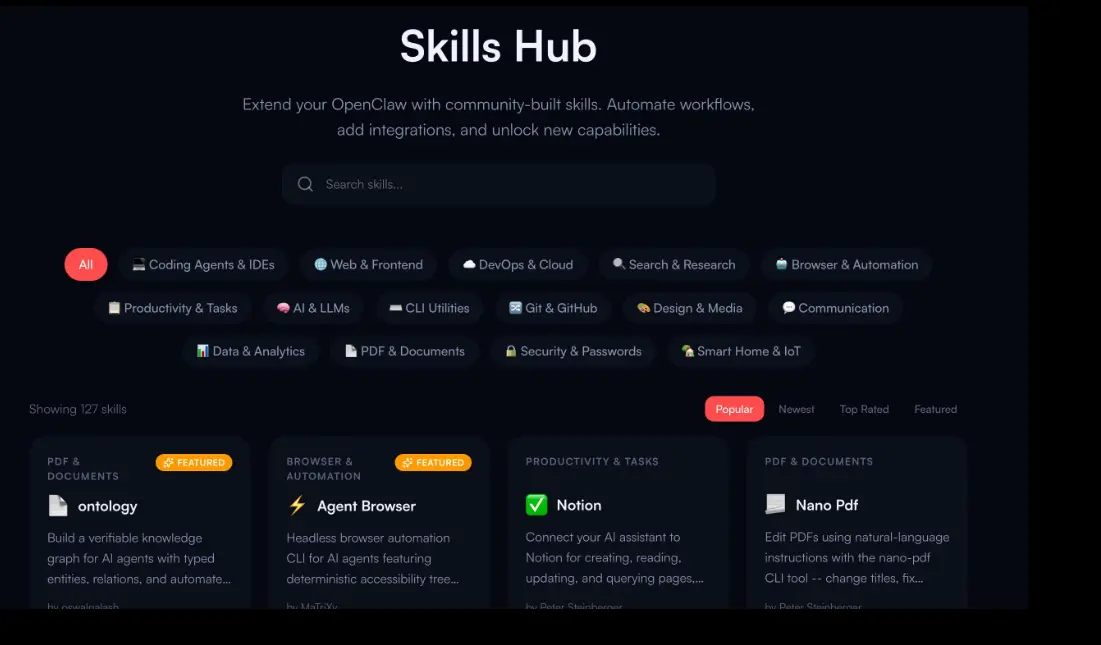
| Skill | What It Does | Best For | Install |
| GOG | Google Workspace access | Email & docs | openclaw skills install gog |
| GitHub | Repositories, PRs, and issues | Developers | openclaw skills install github |
| Self-Improving Agent | Learns from past sessions | Personalization | openclaw skills install self-improving-agent |
| Summarize | Condenses long content | Research & reading | Usually bundled |
| Agent Browser | Browser automation | Web scraping & research | openclaw skills install agent-browser |
| Notion | Manages pages and databases | Project documentation | openclaw skills install notion |
| Obsidian | Organizes vault notes | Personal knowledge base | openclaw skills install obsidian |
| Cron | Schedules recurring tasks | Automation | Search ClawHub for cron |
| Proactive Agent | Runs tasks with minimal input | Advanced autonomy | Search ClawHub for proactive-agent |
| Humanizer | Rewrites AI text naturally | Writers & marketers | openclaw skills install humanizer |
1) GOG
GOG is a Google Workspace CLI skill that gives OpenClaw a single integration point for Gmail, Calendar, Drive, Contacts, Sheets, and Docs.
It’s consistently one of the most-downloaded skills on ClawHub, which tracks with how often “check my email and calendar” is the first thing people want an agent to do.
Benefits:
- Read and send email
- Manage calendar events
- Access and edit Drive files
- Create and edit Docs and Sheets
- Organize contacts
Why install it: It replaces five separate integrations with one, and it’s the fastest path to a working personal-assistant setup.
Installation: openclaw skills install gog
2) GitHub
This skill wraps the official gh CLI, giving OpenClaw direct access to repositories, pull requests, issues, commits, and CI runs: gh issue, gh pr, gh run, and gh api for anything not covered by the higher-level commands.
Benefits:
- Review and comment on pull requests
- Create and triage issues
- Monitor repository activity
- Check CI/workflow status without leaving the chat
Why install it: For anyone doing development work through OpenClaw, this is the skill that turns it from a code editor into something that participates in the actual GitHub workflow, PR reviews, issue triage, CI checks instead of just producing diffs.
Installation: openclaw skills install github
3) Self-Improving Agent
This skill gives OpenClaw a way to log mistakes, corrections, and successful patterns from past sessions, then draw on that record in future ones. It’s part of a broader family of “proactive partner” skills built around persistent memory rather than a single conversation window.
Benefits:
- Retains lessons from prior corrections instead of repeating them
- Adapts responses to a user’s stated preferences over time
- Builds a session history an agent can consult, not just a static prompt
Why install it: Daily users get the most out of it; the payoff compounds the longer the agent has been running against your actual workflow rather than a fresh context each time.
Installation: openclaw skills install self-improving-agent
4) Summarize

Summarize condenses long inputs, articles, PDFs, documents, YouTube videos, podcasts, or a sprawling chat thread, down to their key points. Some variants pull the URL or file directly and extract the substance without a manual copy-paste.
Benefits:
- Cuts review time on long-form content
- Surfaces the most load-bearing points instead of the whole text
- Works across formats: text, audio, video
Why install it: It’s frequently bundled with OpenClaw by default, but where it isn’t, it’s worth enabling deliberately; few skills see as much routine, everyday use. Some implementations need a companion binary (a local summarize CLI) installed separately, so check that the bundled version actually covers video and audio if that counts to you.
Installation: Usually bundled with OpenClaw; check your configuration; enable it if it isn’t already active.
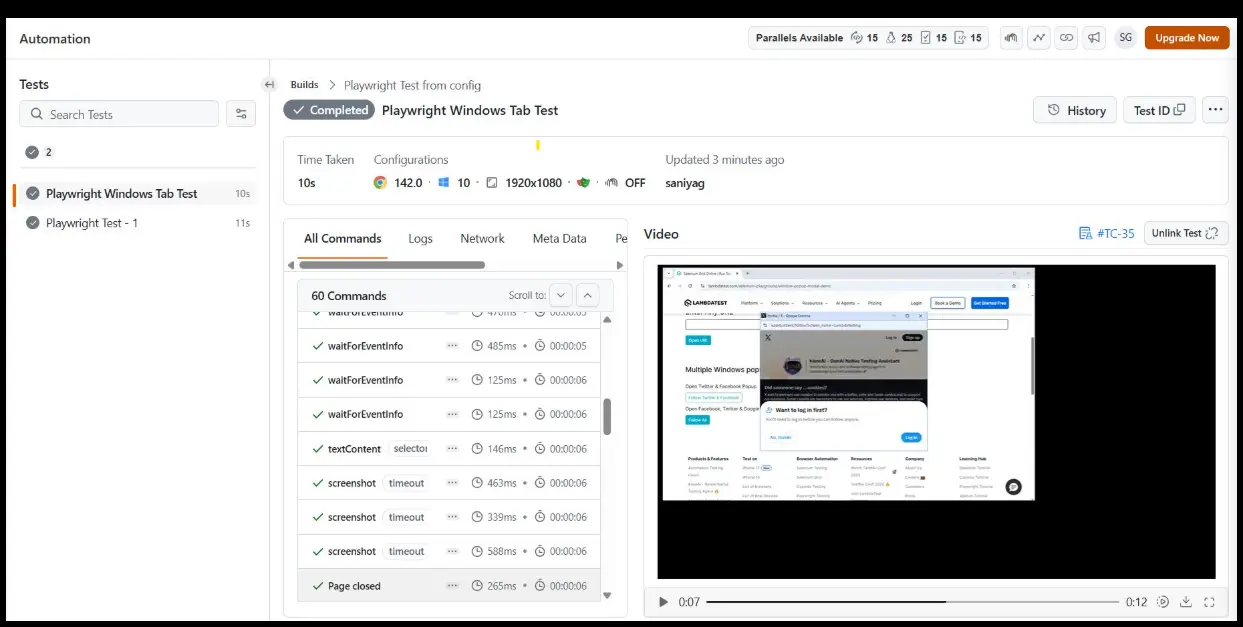
5) Agent Browser
Agent Browser gives OpenClaw a full headless browser, allowing it to browse websites, click through interfaces, fill out forms, take screenshots, and extract data from pages that don’t provide a public API.
Several implementations exist across the OpenClaw ecosystem, including Rust-based versions with a Node.js fallback and Playwright-based options, but they all solve the same problem: without browser access, an agent can’t interact with websites that require a real browser instead of an API.
Benefits:
- Automates repetitive web tasks (form submission, data entry)
- Scrapes structured data from dynamic pages
- Interacts with sites the way a person would, including ones with no API
- Supports research workflows that need live, current information
Why install it: If any part of your workflow involves pulling information from the live web or operating a web app on your behalf, this closes the biggest capability gap in a text-only agent.
For cloud-hosted browsing with anti-detection and CAPTCHA handling, some users pair it with a separate managed-browser skill rather than relying on the local headless version alone.
Installation: openclaw skills install agent-browser (or search ClawHub for Playwright-based alternatives)
If you’re setting up model access alongside browser tools, see our OpenAI integration and configuration guide
6) Notion
The Notion skill connects OpenClaw to the Notion API, letting it create and edit pages, manage databases, and search workspace content through natural-language commands rather than the Notion UI.
Benefits:
- Creates and edits pages directly
- Manages databases (adding, updating, querying records)
- Organizes and tracks projects
- Searches across existing workspace content
Why install it: Teams already standardized on Notion for documentation and project tracking; get a direct conversational interface to it, instead of switching context to the app for every small update.
Installation: openclaw skills install notion
7) Obsidian
This skill works against a local Obsidian vault of plain Markdown notes, using the obsidian-cli to search, edit, organize, and create entries.
Benefits:
- Searches an existing knowledge base
- Creates and updates notes in place
- Manages links between documents
- Keeps a personal knowledge system organized without manual upkeep
Why install it: For anyone using Obsidian as a primary knowledge store, this is the difference between asking OpenClaw questions about your notes and asking it to actually maintain them.
As noted above, this one is a clean example of the tools-vs-skills split: the skill teaches organization, but nothing gets written unless the write tool is separately enabled.
Installation: openclaw skills install obsidian
8) Cron
The Cron skill adds real scheduling to OpenClaw: recurring tasks, timed reminders, and background jobs that run without a user prompting them in the moment.
Benefits:
- Schedules recurring workflows (daily digests, weekly reports)
- Sends reminders at set times
- Generates reports on a fixed cadence
- Underpins other automation and “proactive” skills, which typically depend on a working scheduler
Why install it: It’s the mechanism that turns OpenClaw from something that only acts when spoken to into something that runs work on its own timeline.
Several of the more advanced autonomy-focused skills explicitly list autonomous cron support as a dependency, so this is worth installing before those.
Installation: Search ClawHub for cron or other scheduling skills.
9) Proactive Agent
This skill (and its variants, sometimes bundled under names like “Hal Stack”) gives OpenClaw the ability to initiate tasks on its own, reflect on prior output, and manage ongoing workflows with minimal fresh input each time. Implementations reference persistent memory patterns, working buffers, and write-ahead logging to keep state across sessions.
Benefits:
- Starts tasks without an explicit new prompt
- Reflects on and revises previous work
- Manages long-running, multi-step workflows
- Pairs naturally with scheduling and memory skills rather than working in isolation
Why install it: This is squarely for advanced setups. It shifts OpenClaw from a request-response tool toward something closer to an autonomous assistant, which raises the stakes on the permissions and tools it has access to, worth pairing with a security-vetting skill rather than installing on its own.
Installation: Search ClawHub for proactive-agent or similar autonomy-focused skills.
10) Humanizer
Humanizer rewrites AI-generated text to remove the patterns that read as machine-written, inflated phrasing, overused em dashes, vague attributions, the “rule of three,” and similar tics, so the output reads like something a person actually wrote.
Benefits:
- Improves the natural readability of drafted content
- Targets specific, well-documented markers of AI-generated writing rather than a vague “tone” pass
- Useful across blog posts, marketing copy, and reports
- Cuts down on manual editing after a first AI draft
Why install it: Anyone producing regular written content with AI assistance- writers, marketers, comms teams- gets a cleanup pass that’s otherwise done by hand, one paragraph at a time.
Installation: openclaw skills install humanizer
How to Choose the Right OpenClaw Skill
With thousands of Skills available, it’s better to install a few good ones than everything you find. Before installing a Skill:
- Check the security scan. Review the ClawHub security scan to make sure no known issues have been flagged.
- Choose actively maintained Skills. Recent updates usually mean better compatibility, bug fixes, and security.
- Review the permissions. Only install Skills that request the access they actually need.
- Read community feedback. Downloads, GitHub activity, and user reviews can help you judge reliability.
- Verify the Skill. Run openclaw skills verify to check its authenticity before installing.
- Install only what you’ll use. Pick Skills that match your daily workflow instead of trying to collect as many as possible.
- Keep your setup simple. A smaller set of trusted Skills is easier to manage, update, and secure than a large collection.
Build a Smarter OpenClaw Agent with the Right Skills
None of this requires installing everything on ClawHub. Pick the one or two skills that map to a workflow you already run every day: GOG for inbox and calendar, GitHub for repos and PRs, Agent Browser for anything on the live web, and get that working well before adding more. Cron earns its place once you actually want tasks running on a schedule instead of on request. Proactive Agent and Self-Improving Agent go last: they expand what OpenClaw can do without being asked, which only pays off once the tools and permissions underneath are already locked down.
Ready to run OpenClaw somewhere built for it? Get started with Truehost.
Best OpenClaw Skills to Install in 2026: FAQs
Are OpenClaw Skills safe to install?
They can be, but you should only install Skills from trusted sources. Since Skills are instruction files, a poorly written or malicious Skill could misuse the tools and permissions available to OpenClaw. Review the Skill’s source, publisher, and required permissions before installing.
Are OpenClaw Skills free?
Most Skills on ClawHub are free and open source. However, some connect to paid services, so you may need your own API key or subscription for the underlying service.
How do I install OpenClaw Skills?
Most Skills can be installed with the OpenClaw CLI. Some also require additional software, such as a CLI tool or external application. Always check the Skill’s installation instructions.
How do I update OpenClaw Skills?
Update Skills through the OpenClaw CLI or by following the update instructions on the Skill’s ClawHub page. Check periodically for new versions, especially for Skills you use frequently.
How many OpenClaw Skills should I install?
Install only the Skills you regularly use. Fewer, well-maintained Skills are easier to manage, update, and review than a large collection you rarely use.
What happens if I install a malicious Skill?
A malicious Skill can only use the tools and permissions available to OpenClaw. If sensitive tools such as file access or command execution are enabled, it could misuse them. Installing trusted Skills and limiting tool permissions reduces this risk.
What’s the difference between an OpenClaw Skill and a plugin?
A Skill provides instructions that tell OpenClaw how to use existing tools to complete a task. A plugin adds new functionality or capabilities. Skills depend on tools that are already installed and enabled, while plugins extend what the software can do.