Domain RegistrationFind and register the perfect domain for your website.
 .COM DomainChoose a widely recognized domain to build global credibility.
 Domain TransferSeamless domain transfers with zero downtime and complete control.
 All TLDsFind and register your perfect domain. Choose from local and global extensions.
 SSL CertificatesKeep your website safe with reliable SSL Certificates that protect customer data and build trust.
 whoisCheck domain ownership details, expiration dates, and registrar information.
 US DomainRegister a .US domain and build trust in the USA.
 Web HostingEverything your website needs to run smoothly
 WordPress HostingWordPress hosting that just works
 Windows HostingReliable hosting for Windows environments
 Reseller HostingTurn hosting into your business
 Email HostingEmail that looks professional and works anywhere
 cPanel HostingFull control of your hosting with cPanel
 Affiliate ProgramJoin as a partner and earn commissions on every referral you send our way.
 Vps HostingScalable virtual servers that expand as you need.
 Dedicated ServersGet complete access and full control over your dedicated physical server.
 Managed vpsNot tech-savvy? We will take care of everything with our fully managed VPS hosting for you.
 AI Website BuilderCreate stunning websites in seconds with AI.
 Online ShopSet up a professional online store. No coding required.
 Web design serviceGet a tailored website designed to match your brand and support your goals.
 BlogFind helpful guides on web hosting, online selling, digital marketing, and more.
 Contact USYou can reach us anytime, day or night, through chat or email.
 SupportBrowse helpful guides and answers for all of our services.
Your emails were getting through just fine last week. Now customers say they never arrived. Your website traffic dropped for no clear reason. A visitor mentions a browser security warning when they try to open your site.
These are classic signs of a blacklisted domain. Knowing how to check if your domain is blacklisted is the first step toward fixing it. This article covers everything from spotting the warning signs to getting removed and staying off blacklists for good.
Using Truehost for your domain and hosting? Log into your account to review your settings and keep your domain in good standing.
What Does It Mean When a Domain Is Blacklisted?
A blacklisted domain has been flagged by security organizations, email providers, or search engines as a source of spam, malware, or suspicious activity.
What is a Domain Blacklist?
A domain blacklist is a database that tracks domains linked to harmful activity. When your domain appears on one, other servers, browsers, or email clients use that information to block or filter your content.
How Blacklisting Affects Websites and Email
A blacklisted domain causes emails to land in spam or get blocked entirely. It can also trigger browser security warnings that stop visitors from reaching your site.
Signs Your Domain May Be Blacklisted
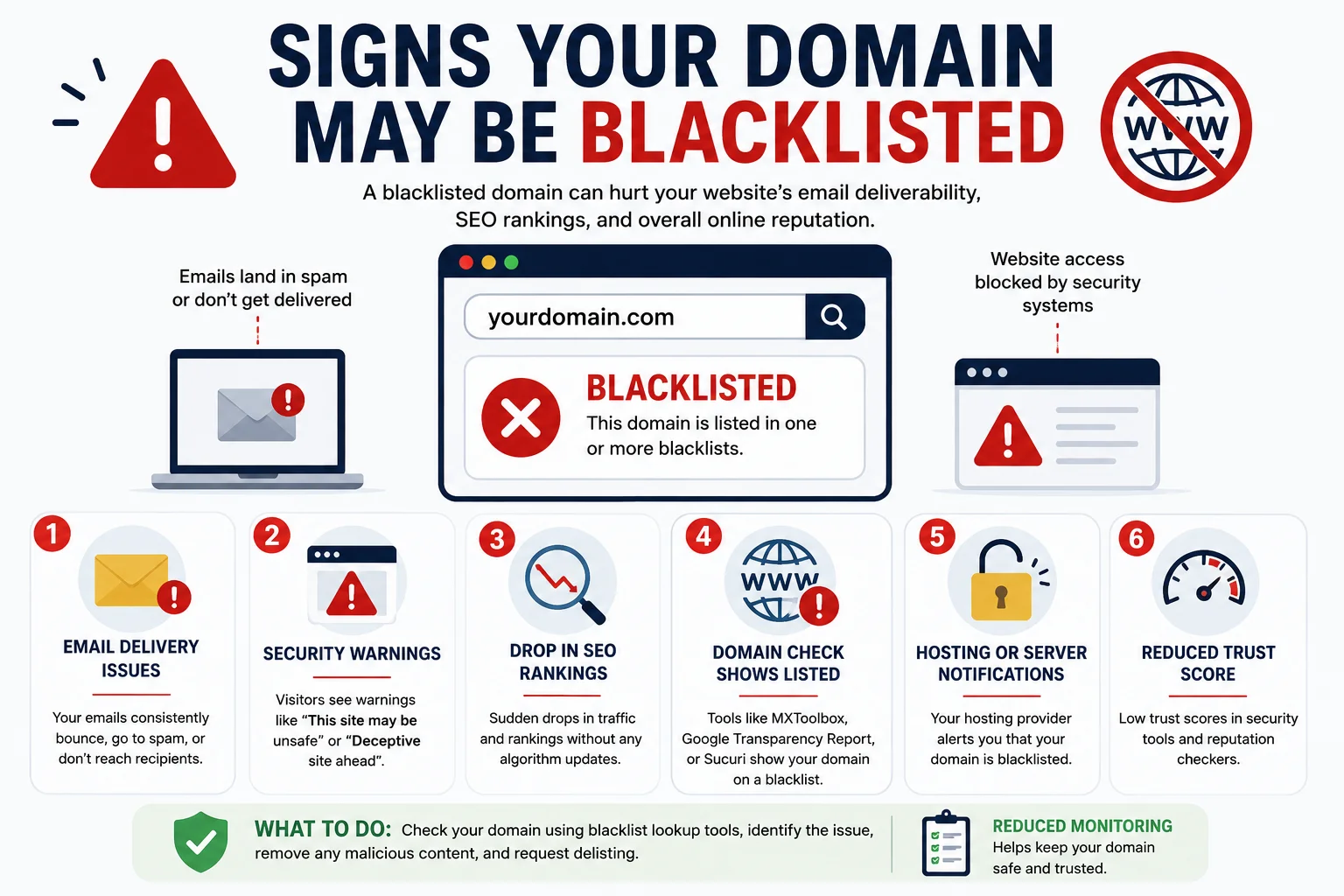
1) Emails Going to Spam
If contacts consistently find your messages in junk folders, your email deliverability may already be affected. This is usually the first symptom people notice.
2) Browser Security Warnings
When Chrome or Firefox displays a warning like “This site may harm your computer,” your domain has likely been flagged by a website blacklist like Google Safe Browsing.
3) Sudden Drop in Website Traffic
A sharp drop in organic traffic without any content changes can point to a blacklisting event or a search engine penalty.
4) Reports from Customers or Visitors
Sometimes the first sign comes from a customer saying they never received your email. Take these reports seriously and investigate right away.
How to Check If Your Domain Is Blacklisted
Using Online Blacklist Checkers
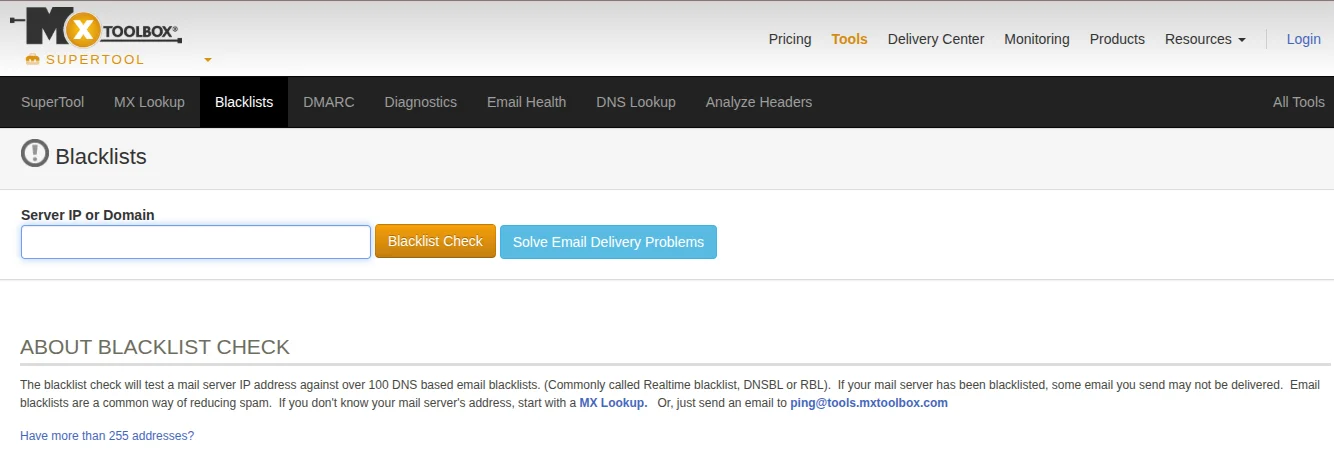
The fastest method is a free blacklist checker tool. MXToolbox checks your domain against dozens of blacklists at once and shows exactly which ones have flagged you.
Using Google Transparency Report
For browser-related issues, check the Google Transparency Report to see whether Google Safe Browsing has flagged your domain for malware or phishing. This is the same tool Chrome uses to generate security warnings.
Reviewing Server and Email Logs
If you have access to your hosting or email logs, look for unusual sending activity or unauthorized access. Logs can point directly to the problem source.
Common Domain Blacklists You Should Know
Spamhaus
Spamhaus is one of the most respected blacklist providers globally. A listing here can block your emails at major providers like Gmail and Outlook.
SURBL
SURBL flags domains found inside spam message bodies. If your domain appears in spam links, SURBL will catch it.
SpamCop
SpamCop builds its list from user-submitted spam reports. Even a small number of recipients marking your emails as spam can trigger a listing.
Barracuda Reputation Block List
Used by email security systems worldwide. Organizations using Barracuda products will block emails from any listed domain.
Google Safe Browsing
Flags websites distributing malware or running phishing pages. A listing here directly affects how browsers display your site to visitors.
Why Domains Get Blacklisted
1) Sending Spam Emails
Sending bulk emails to outdated or non-consenting lists generates spam complaints quickly. High complaint rates are one of the fastest routes to a blacklist.
2) Malware and Phishing Activity
If your website is hacked and used to host malware or fake login pages, security organizations will flag your domain automatically. This often happens without the owner knowing.
3) Poor Email Authentication
Missing SPF, DKIM, or DMARC records make it easy for spammers to send emails pretending to be from your domain. Blacklists see that abuse as coming from you.
4) Shared Hosting Issues
On shared hosting, your domain shares an IP address with other sites. If a neighboring site gets blacklisted for spam or malicious activity, your domain can sometimes be caught in the same listing.
How to Remove Your Domain from a Blacklist
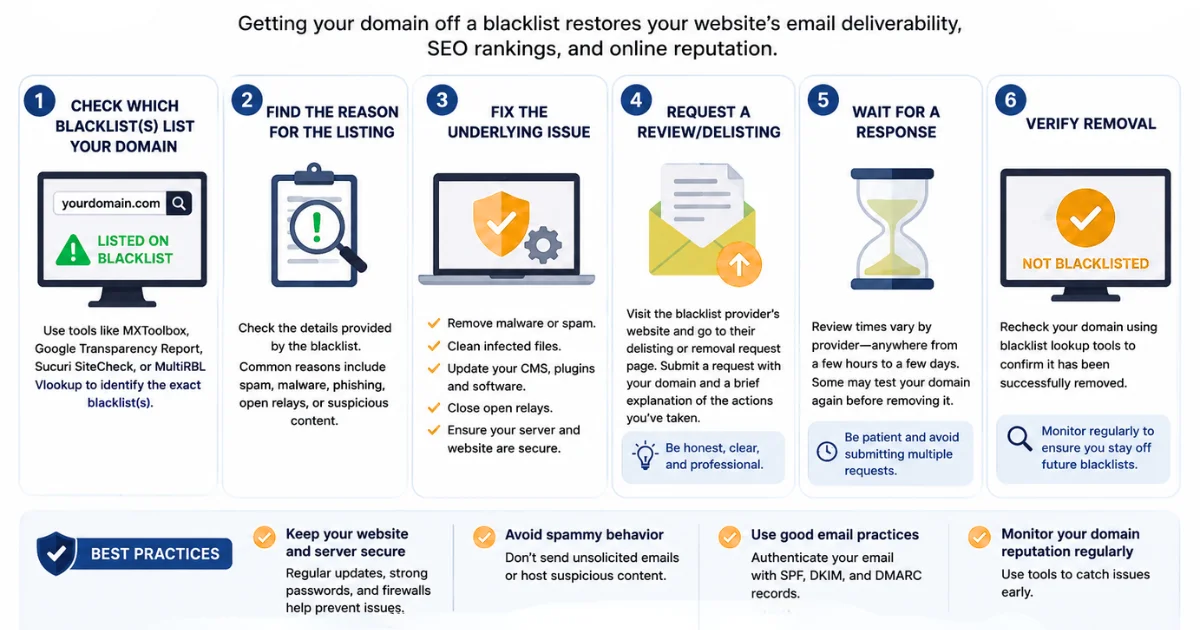
1) Identify and Fix the Cause
Use your blacklist checker results to understand which lists you’re on and why. Fix the root issue first. Submitting a removal request before resolving the problem almost always results in getting listed again.
2) Secure Your Website and Email
Change all passwords, update your CMS and plugins, remove any malicious code, and configure SPF, DKIM, and DMARC correctly. This shows blacklist operators the problem has been resolved.
3) Request Delisting
Each blacklist has its own removal process. Spamhaus, SpamCop, and Barracuda all have online request forms. Be clear about what happened and the steps you’ve taken to fix it.
4) Monitor Afterwards
Check your domain reputation weekly for the first month after delisting. It’s common to get relisted if the underlying issue wasn’t fully resolved the first time.
How to Prevent Your Domain from Being Blacklisted
1) Enable SPF, DKIM, and DMARC
These email authentication records confirm to receiving servers that your emails are legitimate. Set them up through your DNS settings, most hosting providers make this straightforward.
2) Keep Your Website Updated
Outdated themes, plugins, and CMS versions are the most common entry points for attackers. Update everything regularly and remove anything you no longer use.
3) Scan for Malware Regularly
Schedule regular website security scans to catch infections early. Early detection means less time on a blacklist and less damage to your domain reputation.
4) Choose a Reliable Hosting Provider
A hosting provider that monitors for abuse and maintains clean server IP addresses reduces your risk significantly. Truehost offers secure hosting with the monitoring and support to help keep your domain off blacklists.
Common Mistakes to Avoid
- Ignoring security updates. Outdated software is the leading cause of website compromises.
- Sending bulk emails without permission. Unsolicited emails generate spam complaints that land you on blacklists fast.
- Skipping email authentication. SPF, DKIM, and DMARC are not optional if you care about email deliverability.
- Waiting too long to investigate. The longer a blacklisting issue sits unaddressed, the more damage it does to your domain reputation.
- Assuming it will resolve itself. Blacklists require active removal requests and won’t clear automatically.
FAQs
What does it mean if my domain is blacklisted?
It means security organizations have flagged your domain as a source of spam, malware, or suspicious activity. This affects both your email deliverability and website accessibility.
How do I know if my domain is blacklisted?
Use a free blacklist checker like MXToolbox to scan your domain across multiple databases. Also check Google Safe Browsing for any browser-level flags.
Can a blacklisted domain be removed?
Yes. Fix the underlying problem first, then submit a delisting request through the relevant blacklist provider’s website.
Why are my emails going to spam?
Common causes include a domain blacklist listing, missing email authentication records, or a high volume of spam complaints from recipients.
How long does blacklist removal take?
It varies by provider. Some process requests within 24 hours. Others take several days. Google Safe Browsing and Spamhaus tend to respond relatively quickly once the issue is resolved.
Can shared hosting cause domain blacklisting?
Yes. Shared hosting means shared IP addresses. If another site on the same server engages in abuse, your domain can get caught in the same blacklist listing.
Ready to Protect Your Domain Reputation?
Knowing how to check if your domain is blacklisted is the first step, but staying off blacklists is an ongoing habit. Blacklisting can seriously damage your email deliverability, your search visibility, and the trust visitors have in your brand.
Most blacklisting issues are fixable when caught early. Regular monitoring, strong security habits, and a reliable hosting provider make all the difference.
Take action today: Register or manage your domain with Truehost and explore hosting built with security and reliability in mind. Find more tips on the Truehost blog.