Domain RegistrationFind and register the perfect domain for your website.
 .COM DomainChoose a widely recognized domain to build global credibility.
 Domain TransferSeamless domain transfers with zero downtime and complete control.
 All TLDsFind and register your perfect domain. Choose from local and global extensions.
 SSL CertificatesKeep your website safe with reliable SSL Certificates that protect customer data and build trust.
 whoisCheck domain ownership details, expiration dates, and registrar information.
 US DomainRegister a .US domain and build trust in the USA.
 Web HostingEverything your website needs to run smoothly
 WordPress HostingWordPress hosting that just works
 Windows HostingReliable hosting for Windows environments
 Reseller HostingTurn hosting into your business
 Email HostingEmail that looks professional and works anywhere
 cPanel HostingFull control of your hosting with cPanel
 Affiliate ProgramJoin as a partner and earn commissions on every referral you send our way.
 Vps HostingScalable virtual servers that expand as you need.
 Dedicated ServersGet complete access and full control over your dedicated physical server.
 Managed vpsNot tech-savvy? We will take care of everything with our fully managed VPS hosting for you.
 AI Website BuilderCreate stunning websites in seconds with AI.
 Online ShopSet up a professional online store. No coding required.
 Web design serviceGet a tailored website designed to match your brand and support your goals.
 BlogFind helpful guides on web hosting, online selling, digital marketing, and more.
 Contact USYou can reach us anytime, day or night, through chat or email.
 SupportBrowse helpful guides and answers for all of our services.
Starting a business used to mean a storefront, a lease, and a pile of upfront cash. Ecommerce changed that.
Today, you can launch a real online business from your laptop, with startup costs a fraction of what a physical shop would need. This article walks you through how to start an ecommerce business, step by step, from your first idea to your first sale (and everything after).

Why Start an Ecommerce Business?
Ecommerce is still one of the easiest ways to build a real business in the US, and once you see the numbers, it’s not hard to understand why.
- Lower startup costs. No lease, no storefront buildout, no in-person staff required to get moving.
- Reach customers everywhere. Sell across the US, or globally, without opening a second location.
- Sell around the clock. Your store stays open at 2am while you sleep.
- Scale through digital marketing. Growth doesn’t require more square footage, just smarter marketing spend.
- Multiple business models. From dropshipping to handmade goods, there’s a path that fits your budget and skills.
What You Need Before Starting an Ecommerce Business
Before you jump into the steps, here’s what you’ll want to have on hand:
- A profitable business idea
- A clearly defined target audience
- A memorable business name
- A domain name
- Reliable ecommerce hosting
- An ecommerce platform
- A payment gateway
- Products or services to sell
- A marketing strategy
Step-by-Step Guide to Starting an Ecommerce Business
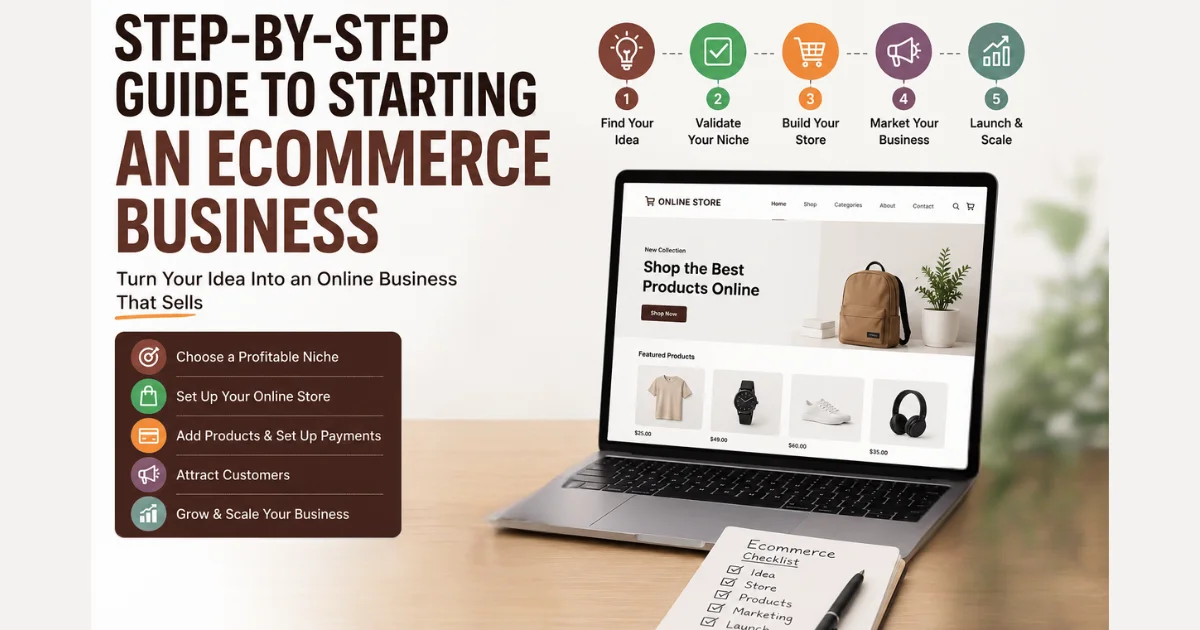
Step 1: Choose an Ecommerce Business Model
Your model shapes almost every decision that follows.
- B2C (Business-to-Consumer): You sell directly to individual shoppers. Most new ecommerce businesses start here.
- B2B (Business-to-Business): You sell to other companies, often with larger order sizes and longer sales cycles.
- C2C (Consumer-to-Consumer): You build a marketplace where individuals sell to each other.
- C2B (Consumer-to-Business): Individuals offer products or services that businesses purchase, like freelance work or user-generated content licensing.
Most beginners start with B2C since it has the most straightforward path to a first sale.
Step 2: Decide What to Sell
Choose your product type:
- Physical products
- Digital products
- Handmade products
- Services
- Subscription products
Choose your fulfillment model:
- D2C (Direct-to-Consumer): You manufacture or source products and sell them directly.
- Dropshipping: A supplier ships products directly to customers, so you never hold inventory.
- Wholesale: You buy in bulk at a discount and resell at a markup.
- White label: You sell a generic product under your own brand.
- Private label: You have a manufacturer produce a custom product exclusively for your brand.
- Print-on-demand: Products are printed and shipped only after a customer orders.
Step 3: Research Your Market and Find a Profitable Niche
Skipping this step is one of the fastest ways to waste money later.
- Identify real customer pain points, not just assumptions.
- Analyze competitors to see what’s working and what’s missing.
- Validate demand with tools like Google Trends or keyword search volume.
- Research pricing to understand what customers already pay.
- Define your target audience clearly, including their needs and buying habits.
Step 4: Create an Ecommerce Business Plan

Your plan doesn’t need to be long, but it should cover:
- Clear business goals
- Your revenue model
- A realistic startup budget
- A basic marketing strategy
- A rough growth plan for your first year
Step 5: Choose a Business Name and Build Your Brand
Brainstorm names that are short, easy to spell, and easy to say out loud.
Check domain availability before you fall in love with a name. Once you’ve settled on one, design a simple logo, build a basic brand identity, and secure matching social media usernames.
Step 6: Register Your Business
Handle the legal groundwork early so it doesn’t hold up your launch later.
- Choose a business structure, like an LLC or sole proprietorship.
- Apply for an EIN through the IRS.
- Register your business with your state.
- Obtain any required licenses or permits.
- Check state-specific requirements, since they vary widely.
Step 7: Register Your Domain Name
Your domain is your permanent online address, so it’s worth getting right.
- Choose the right domain extension for your business, usually
.comfor broad trust. - Search domain availability before committing to a name.
- Register your domain name with Truehost.
- Enable domain privacy to keep your personal details out of public WHOIS records.
- Consider registering additional extensions to protect your brand from competitors and squatters.
Step 8: Choose Reliable Ecommerce Hosting
Your hosting choice directly affects site speed, uptime, and how well your store handles traffic spikes.
- Shared hosting: The cheapest option, fine for very early-stage stores with low traffic.
- VPS hosting: More power and control, better suited to growing stores.
- Cloud hosting: Scales automatically as your traffic grows, ideal for stores expecting rapid growth.
Look for strong performance, high uptime, solid security, automatic backups, and room to scale. Truehost Ecommerce Hosting hits every one of those marks, with infrastructure built specifically for online stores instead of generic websites.
Step 9: Build Your Ecommerce Website
Choose your platform, then focus on making the store easy to use.
- Customize your theme to match your brand.
- Build intuitive navigation so customers find products quickly.
- Optimize every page for mobile, since most shopping traffic comes from phones.
- Streamline the shopping experience from browsing to checkout.
Popular Ecommerce Platforms
| Platform | Best For | Ease of Use | Pricing |
|---|---|---|---|
| WooCommerce | WordPress users wanting flexibility | Moderate | Free plugin, hosting costs apply |
| Shopify | Beginners wanting an all-in-one solution | Easy | Monthly subscription |
| Magento | Large stores needing deep customization | Advanced | Free (Open Source) or paid Enterprise |
| OpenCart | Budget-conscious store owners | Moderate | Free, hosting costs apply |
| PrestaShop | European and mid-sized stores | Moderate | Free, hosting costs apply |
Step 10: Add Your Products
Product pages do a lot of the selling for you, so treat them carefully.
- Write SEO-friendly product descriptions that answer real customer questions.
- Upload high-quality images from multiple angles.
- Set competitive prices based on your earlier market research.
- Organize products into clear, logical categories.
- Keep inventory counts accurate to avoid overselling.
Step 11: Set Up Payment Methods
Offer the payment options your customers already trust and use.
- Credit and debit cards
- PayPal
- Apple Pay
- Google Pay
- Buy Now, Pay Later options
Whichever gateway you choose, confirm it meets PCI DSS security standards for handling cardholder data.
Step 12: Set Up Shipping and Order Fulfillment
Shipping decisions affect both your margins and customer satisfaction.
- Decide on shipping options and delivery pricing upfront.
- Choose an inventory management approach that fits your order volume.
- Consider warehousing needs as you scale.
- Write a clear, fair return policy.
- Offer order tracking so customers aren’t left guessing.
Step 13: Secure Your Ecommerce Website
Security isn’t optional once you’re handling customer data and payments.
- Install an SSL certificate and enable HTTPS across your entire site.
- Protect customer information with proper data handling practices.
- Schedule automatic backups so you can recover quickly if something goes wrong.
- Enable two-factor authentication on your admin accounts.
Step 14: Test Your Store Before Launching
Put yourself in your customer’s shoes and walk through the whole process yourself before anyone else does.
- Complete a full checkout process from start to finish.
- Test payment processing with a real (small) transaction.
- Confirm shipping calculations are accurate.
- Check mobile responsiveness on multiple devices.
- Click through every link to catch anything broken.
Step 15: Launch Your Ecommerce Business
This is it, the moment you make it official.
- Connect your domain to your live hosting environment.
- Publish your website.
- Submit your sitemap to Google Search Console.
- Install Google Analytics to start tracking visitors.
- Announce your launch across email and social channels.
- Monitor performance closely in the first few weeks.
How to Market Your Ecommerce Business
Getting your store live is only half the battle. Now you actually need people to show up.
- Search Engine Optimization (SEO): Optimize product pages and content to rank for terms your customers are already searching.
- Content Marketing: Blog posts, guides, and videos build trust and drive organic traffic over time.
- Email Marketing: Build a list early and nurture it with welcome offers, product updates, and abandoned cart reminders.
- Social Media Marketing: Meet your audience where they already spend time, and post consistently.
- Google Ads: Capture high-intent shoppers actively searching for what you sell.
- Facebook and Instagram Ads: Reach new audiences with visual products, especially effective for physical goods.
- Influencer Marketing: Partner with creators whose audience matches your ideal customer.
- Affiliate Marketing: Let others promote your products in exchange for a commission on sales.
- Sell on Online Marketplaces: Expand reach by listing on Amazon, Etsy, eBay, and Walmart Marketplace alongside your own store.
- Build Customer Loyalty:
- Launch a simple loyalty or rewards program.
- Actively collect and showcase customer reviews.
- Set up a referral program to turn customers into promoters.
- Keep running email campaigns to bring past customers back.
How Much Does It Cost to Start an Ecommerce Business?
Costs vary a lot depending on what you’re selling, but here’s a realistic range to plan around.
| Expense | Estimated Cost |
|---|---|
| Business registration | $50–$500 |
| Domain name | $10–$20/year |
| Ecommerce hosting | $10–$50/month |
| Ecommerce platform | $0–$79/month |
| SSL certificate | Often included with hosting |
| Initial inventory | $500–$5,000+ |
| Packaging | $100–$500 |
| Shipping supplies | $100–$300 |
| Marketing | $200–$1,000+/month |
| Payment processing fees | 2.5–3% per transaction |
Your total will depend heavily on your product type and fulfillment model. Dropshipping and digital products keep upfront costs especially low.
Common Mistakes to Avoid
- Choosing the wrong niche without validating real demand first.
- Skipping market research and guessing what customers want.
- Ignoring SEO and relying entirely on paid ads.
- Overstocking inventory before you know what actually sells.
- Choosing unreliable hosting that slows down or crashes under traffic.
- Neglecting website security, which puts customer data at risk.
- Not testing the checkout process, losing sales to broken links or errors.
- Relying on a single marketing channel, which leaves you exposed if it stops working.
Best Tools for Running an Ecommerce Business
- Ecommerce platforms: Shopify, WooCommerce, Magento
- Payment gateways: Stripe, PayPal, Square
- Email marketing software: Klaviyo, Mailchimp, Omnisend
- Inventory management tools: Zoho Inventory, TradeGecko, Cin7
- Analytics platforms: Google Analytics, Hotjar
- Customer support software: Zendesk, Gorgias, Freshdesk
FAQs
How long does it take to start an ecommerce business?
A basic store can launch in a few weeks. A fully polished store with tested processes and a marketing plan usually takes one to three months.
Can I start an ecommerce business from home?
Yes. Most ecommerce businesses, especially dropshipping and digital product stores, run entirely from home with no physical inventory space needed.
Is an LLC required to start an ecommerce business?
No, but it’s often recommended. An LLC offers liability protection that a sole proprietorship doesn’t.
Can I run an ecommerce business by mysel
Yes. Many successful stores start as solo operations, with tasks outsourced or automated as the business grows.
What products are most profitable to sell online
Products with strong demand, healthy margins, and manageable shipping costs tend to perform best. Digital products often carry the highest margins since there’s no physical fulfillment cost.
How can I get customers for a new ecommerce business?
Combine SEO, social media, email marketing, and paid ads early on. Selling on established marketplaces alongside your own store can also generate initial traction faster.
Ready to Start Your Ecommerce Business Today?
Starting an ecommerce business really does come down to a simple sequence: validate your idea, pick your model, build your store, then launch with an actual plan to get people through the door. Each step here builds on the last, so working through them in order sets you up for a much smoother ride.
Truehost handles the technical side for you, domain registration, ecommerce hosting, SSL certificates, and professional business email, all in one place. That’s less time fighting with infrastructure and more time actually building your business.
Ready to launch? Get started with Truehost and give your online store the solid foundation it deserves from day one.