Domain RegistrationFind and register the perfect domain for your website.
 .COM DomainChoose a widely recognized domain to build global credibility.
 Domain TransferSeamless domain transfers with zero downtime and complete control.
 All TLDsFind and register your perfect domain. Choose from local and global extensions.
 SSL CertificatesKeep your website safe with reliable SSL Certificates that protect customer data and build trust.
 whoisCheck domain ownership details, expiration dates, and registrar information.
 US DomainRegister a .US domain and build trust in the USA.
 Web HostingEverything your website needs to run smoothly
 WordPress HostingWordPress hosting that just works
 Windows HostingReliable hosting for Windows environments
 Reseller HostingTurn hosting into your business
 Email HostingEmail that looks professional and works anywhere
 cPanel HostingFull control of your hosting with cPanel
 Affiliate ProgramJoin as a partner and earn commissions on every referral you send our way.
 Vps HostingScalable virtual servers that expand as you need.
 Dedicated ServersGet complete access and full control over your dedicated physical server.
 Managed vpsNot tech-savvy? We will take care of everything with our fully managed VPS hosting for you.
 AI Website BuilderCreate stunning websites in seconds with AI.
 Online ShopSet up a professional online store. No coding required.
 Web design serviceGet a tailored website designed to match your brand and support your goals.
 BlogFind helpful guides on web hosting, online selling, digital marketing, and more.
 Contact USYou can reach us anytime, day or night, through chat or email.
 SupportBrowse helpful guides and answers for all of our services.
You signed up for a domain name. You built a website. Then everything fell apart.
Maybe your site loaded in six seconds. Maybe your host went dark at 2 AM on a Friday. Or maybe you paid for a plan that sounded great on paper but came with hidden renewal fees that tripled your bill after the first year.
Getting online should not feel this complicated, but for most people, it does. That is because the web hosting industry is packed with technical jargon, misleading pricing, and plans that look identical until something goes wrong.
This article cuts through all of that. By the time you finish reading, you will know exactly what web hosting is, how it works, which type fits your needs, and what to look for in a provider you can actually trust. We will also walk through the mistakes that cost beginners the most, and how to avoid them from day one.
What Is Web Hosting?
Web hosting is a service that stores your website’s files on a server and makes them accessible to anyone with an internet connection.
Your domain name is your street address, and web hosting is the actual building at that address. Without hosting, your domain points to nothing.
Every website you visit, whether it is a blog, an online store, or a government portal, lives on a server somewhere. Web hosting providers own and maintain those servers, and you pay for space on them.
Who Needs Web Hosting?
The short answer is: anyone who wants a presence on the internet that they actually own and control.
1) Small Business Owners
If you run a local business, a professional website builds credibility before a customer ever walks through your door. Web hosting gives you a platform to showcase your services, collect leads, and make it easy for people to find and contact you.
A Facebook page or Google Business profile is useful, but it is rented space. You do not control what happens to it if the platform changes its rules overnight.
2) Bloggers and Content Creators
Whether you write about travel, personal finance, food, or fitness, self-hosted web hosting lets you monetize your content on your own terms. You can run ads, sell digital products, and build an email list without any platform taking a cut or shutting you down.
Free blogging platforms put restrictions on what you can publish and how you can earn. Your own hosted site removes those limits entirely.
3) eCommerce Sellers
Online stores need reliable, fast, and secure hosting. Customers expect pages to load quickly and checkout to feel safe. A slow or insecure host directly reduces sales.
Web hosting built for eCommerce also gives you control over your product pages, payment integrations, and customer data in a way that marketplace platforms like Etsy or Amazon simply do not.
4) Freelancers and Professionals
A hosted portfolio website is one of the most effective tools a freelancer can have. It shows your work, communicates your rates, and acts as a permanent professional address that follows you regardless of where you work or what platforms you use.
This applies to designers, developers, photographers, consultants, lawyers, accountants, and anyone else who sells their expertise.
5) Nonprofits and Community Organisations
Nonprofits need web hosting to share their mission, accept donations, and communicate with supporters. A hosted website gives an organisation legitimacy and reach that social media alone cannot provide.
Many hosting providers, including Truehost, offer affordable plans that fit the budget of smaller organisations without sacrificing reliability.
6) Schools, Clubs, and Personal Projects
Even a small project deserves a proper home online. Whether it is a school club, a community group, or a personal passion project, web hosting gives your content a stable and accessible place to live.
Why Should You Have Web Hosting?
Having a website is no longer optional if you want to be taken seriously online. Here is why web hosting specifically matters.
1) You Own Your Space on the Internet
Social media profiles, free website builders, and marketplace listings can disappear or change without warning. When you pay for web hosting, you control your content, your data, and your online presence.
Your hosted website is an asset. It grows in value over time through traffic, backlinks, and brand recognition in a way that borrowed platforms do not.
2) It Builds Trust With Your Audience
Studies show that consumers trust businesses with professional websites more than those without. A site with a custom domain, fast loading speed, and an SSL certificate signals that you are legitimate and serious about what you do.
First impressions online happen in milliseconds. Your hosting quality directly affects whether that impression is a good one.
3) It Supports Business Growth
A well-hosted website is the foundation of every effective digital marketing strategy. It is where your social media ads lead, where your Google search results point, and where your email campaigns send people.
Without reliable web hosting, every other marketing effort is built on unstable ground.
4) It Gives You Access to Powerful Tools
Self-hosted websites give you access to platforms like WordPress, WooCommerce, and hundreds of plugins that would be restricted or unavailable on free hosting services.
WordPress alone powers more than 43% of all websites on the internet, a figure that reflects just how capable and flexible self-hosted platforms have become.
These tools let you build exactly what your audience needs, from booking systems to membership areas to full online stores, without paying for third-party platforms.
5) It Is More Affordable Than Most People Think
Quality web hosting does not have to cost a lot. At Truehost, shared hosting plans start at a price that is accessible for individuals and small businesses, with everything included to get a professional site live from day one.
The return on investment from a properly hosted website almost always outpaces the cost within the first few months.
How Web Hosting Works
When someone types your domain name into a browser, here is what happens behind the scenes:
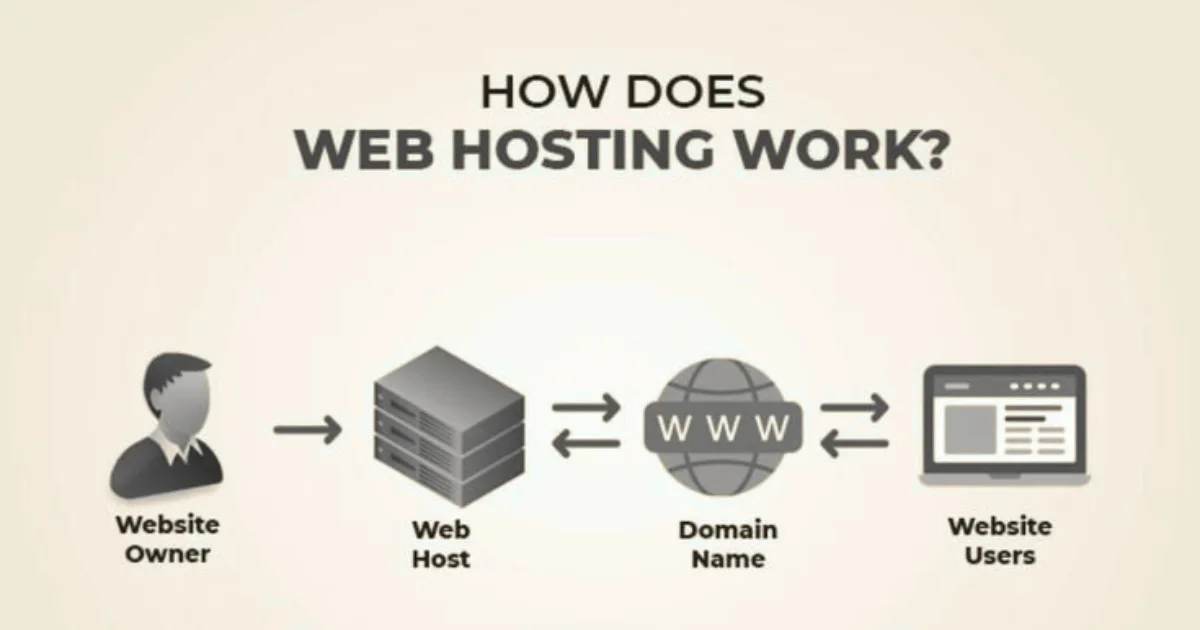
- The browser sends a request to a Domain Name System (DNS) server
- The DNS server translates your domain into an IP address
- That IP address points to your hosting server
- The server sends your website’s files back to the visitor’s browser
- The browser renders those files as the page they see
This entire process takes less than a second on a good host. On a slow or overloaded server, it can take several seconds, and studies consistently show that visitors abandon pages that take more than three seconds to load.
Types of Web Hosting
Not all web hosting plans are the same. The type you choose directly affects your site’s speed, security, and cost.
i) Shared Hosting
Shared hosting places your website on a server alongside hundreds or thousands of other websites. It is the most affordable option and works well for small sites, blogs, and beginners.
The trade-off is that you share resources like CPU and RAM with your neighbours. If one site on the server gets a traffic spike, yours may slow down.
Best for: Blogs, personal websites, small business sites with low traffic
ii) VPS Hosting (Virtual Private Server)
A VPS gives you a dedicated slice of a physical server. You still share the hardware with others, but your resources are isolated and guaranteed.
VPS hosting costs more than shared hosting but delivers significantly better performance and control. Most growing businesses make the switch to VPS when they start hitting traffic limits or need to install custom software.
Best for: Growing websites, eCommerce stores, developers who need root access
iii) Cloud Hosting
Cloud hosting spreads your website across a network of servers. If one server fails, another picks up instantly, making it one of the most reliable options available.
It also scales automatically. If your site goes viral overnight, cloud hosting adjusts resources in real time without manual intervention.
Best for: High-traffic sites, SaaS platforms, businesses that cannot afford downtime
iv) Dedicated Hosting
With dedicated hosting, you rent an entire physical server for your site alone. No sharing, no neighbours, no resource competition.
It is the most powerful and the most expensive option. Most small to mid-sized businesses do not need dedicated hosting unless they are running complex applications or handling thousands of simultaneous transactions.
Best for: Large enterprises, high-security platforms, resource-intensive applications
How Domain Names Connect to Hosting
Your domain name and your web hosting are two separate products, but they need to talk to each other.
When you register a domain, you point it to your host using something called nameservers. Nameservers are addresses (usually two of them) provided by your hosting company. Once you update your domain’s nameserver records, DNS changes typically propagate across the internet within 24 to 48 hours.
Truehost makes this easy. When you register a domain and hosting together, the connection is handled automatically with no manual DNS configuration needed.
If you already have a domain elsewhere, we provide nameserver details you can copy directly into your domain registrar’s control panel.
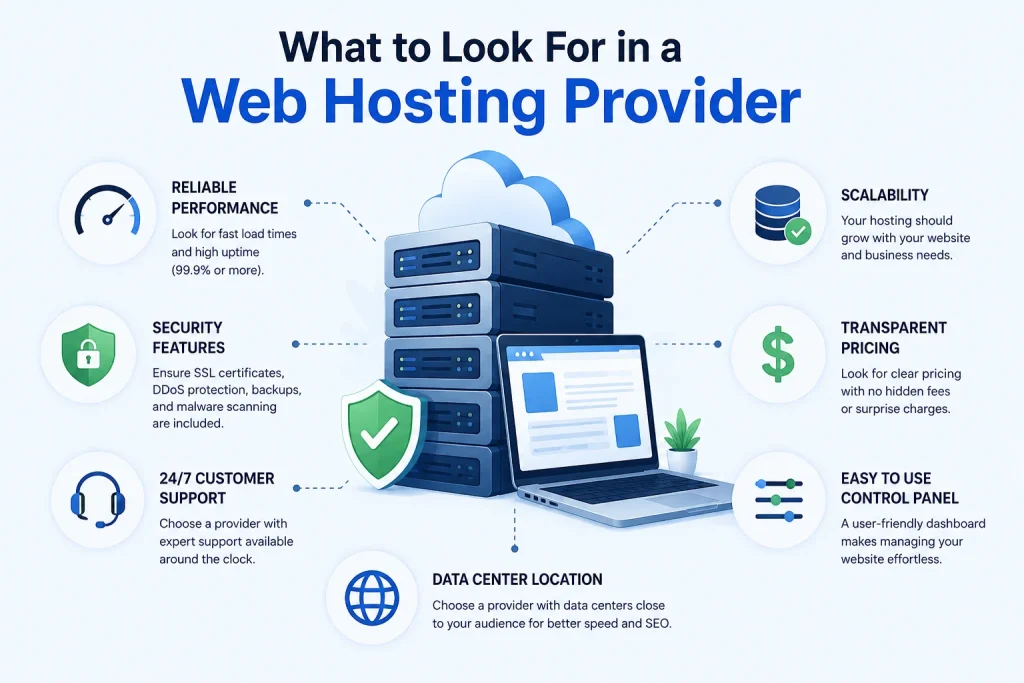
What to Look For in a Web Hosting Provider
Choosing a host is one of the most important technical decisions you will make for your website. Here is what actually matters:
1) Uptime Guarantee
Uptime is the percentage of time your website is online and accessible. A 99.9% uptime guarantee means your site could be down for roughly 8.7 hours per year. A 99.99% guarantee reduces that to less than an hour.
Look for providers that publish uptime data publicly and back their promises with service level agreements (SLAs).
2) Page Load Speed
Speed affects user experience, conversion rates, and search engine rankings. Your hosting environment plays a major role in how fast your pages load.
Key factors that influence speed include:
- Server location (closer to your visitors = faster)
- SSD storage (faster than traditional hard drives)
- Content Delivery Network (CDN) support
- PHP version and server-side caching
3) Security Features
A good web host should protect your site by default, not charge extra for basic security. At minimum, look for:
- Free SSL certificate: encrypts data between your site and visitors
- Automatic backups: daily or weekly snapshots in case something breaks
- Malware scanning: proactive detection of malicious code
- DDoS protection: shields your server from traffic-flood attacks
- Firewall rules: filters suspicious requests before they reach your files
4) Customer Support
Support quality is where budget hosts often fall short. A host might offer 24/7 live chat on paper but take 45 minutes to respond during peak hours.
Test a host’s support before you commit. Send a pre-sale question and note how long the response takes and how helpful the answer is.
5) Control Panel
The control panel is the dashboard you use to manage your hosting. The two most common options are cPanel and Plesk, both of which are widely supported and beginner-friendly.
A good control panel lets you manage email accounts, install WordPress with one click, view error logs, and configure your domain settings without touching a command line.
Web Hosting Pricing: What You Are Actually Paying For
Hosting prices can look deceptively low. A plan advertised at $1.99 per month might renew at $9.99, a 400% jump that catches many first-time buyers off guard.
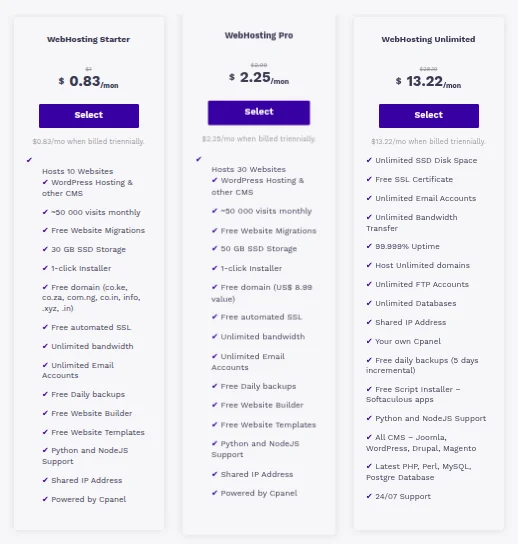
Here is how to read hosting pricing honestly:
- Introductory rate: the price you pay for the first term (often 1–3 years)
- Renewal rate: the price after your first term ends (often 2–4x higher)
- Included features: SSL, backups, email accounts, and bandwidth limits
- Hidden fees: domain privacy, site migration, and setup fees
At Truehost, our pricing is transparent. What you see is what you pay, including at renewal. We include free SSL, daily backups, and unlimited email accounts across our standard plans.
Common Mistakes Beginners Make (and How to Avoid Them)
1) Choosing a Host Based on Price Alone
The cheapest plan is not always the best value. A $1/month plan that goes down twice a week will cost you more in lost visitors and lost revenue than a $10/month plan with solid uptime.
Evaluate total cost of ownership, not just the sign-up price.
2) Skipping Backups
Many beginners assume their host backs up their data automatically. Some do, some do not, and some charge extra for it.
Always confirm backup frequency, retention period, and restore process before signing up. At Truehost, daily backups are included, and restoring a site takes minutes from your dashboard.
3) Using a Free Hosting Service for a Business Site
Free hosting sounds appealing until you see the trade-offs: forced ads on your pages, no custom domain, unreliable uptime, and zero support.
Free hosting is fine for testing or learning. It is not suitable for any website you want people to take seriously.
4) Not Checking the Cancellation Policy
Some hosts lock you into annual contracts with no prorated refunds. Others offer a 30-day money-back guarantee.
Read the terms before you pay. Look specifically for the refund window, cancellation process, and any fees attached to early termination.
5) Ignoring Resource Limits
Shared hosting plans often advertise unlimited storage and bandwidth, but the fine print includes fair use policies that throttle your site if you exceed certain thresholds.
Ask your host specifically: what are the actual CPU, RAM, and inode limits on this plan? A host that answers this clearly is a host worth trusting.
Web Hosting and SEO: The Connection Most People Miss
Your hosting provider affects your search engine rankings more than most people realise.
Google uses page speed as a ranking factor through its Core Web Vitals framework, which measures loading speed, interactivity, and visual stability. A slow server means a slower site, which means lower rankings and fewer visitors. Server location also matters. Hosting your site on a server in the same region as your target audience reduces latency and improves load times.
At Truehost, we operate data centres in the US, Europe, and beyond, giving you the option to host closer to your audience for faster delivery.
SSL is also a ranking signal. Google flags sites without HTTPS as insecure, which can reduce click-through rates in search results. We provide free SSL on every hosting plan.
Managed vs. Unmanaged Hosting
This is a distinction that trips up a lot of growing businesses.
Managed hosting means your provider handles server maintenance, security updates, backups, and performance monitoring. You focus on your business; they handle the infrastructure.
Unmanaged hosting gives you full control but requires technical knowledge. You are responsible for everything: software updates, security patches, server configuration, and troubleshooting.
Most small to mid-sized businesses benefit from managed hosting. It costs slightly more, but it eliminates a category of problems entirely.
How to Choose the Right Hosting Plan
Here is a straightforward framework for making the decision:
Step 1: Assess your traffic
- Under 5,000 visits/month → Shared hosting
- 5,000–50,000 visits/month → VPS or Cloud hosting
- 50,000+ visits/month → Cloud or Dedicated hosting
Step 2: Identify your technical needs
- Do you need root access? → VPS or Dedicated
- Do you need automatic scaling? → Cloud hosting
- Do you just need WordPress? → Managed shared hosting
Step 3: Set a realistic budget
- Include the renewal price, not just the sign-up price
- Factor in the cost of any add-ons you actually need
Step 4: Test support before committing
Ask a pre-sale question and evaluate the response quality and speed
Step 5: Check the refund policy
A host that offers a 30-day money-back guarantee is confident in its product
Why We Recommend Truehost
We built Truehost around one idea: web hosting should be reliable, affordable, and genuinely supported.
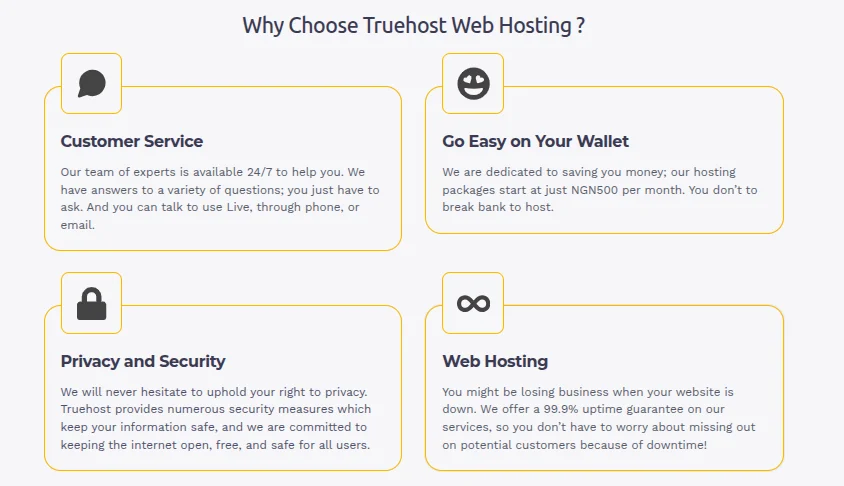
Here is what you get with every Truehost plan:
- 99.9% uptime guarantee backed by a real SLA
- Free SSL certificate on all plans
- Daily backups with one-click restore
- 24/7 live support with under-10-minute response times
- Data centres in Africa and beyond for fast local loading
- cPanel control panel with one-click WordPress installation
- Transparent renewal pricing — no surprise rate jumps
Whether you are launching your first blog or migrating a growing eCommerce store, we have a plan built for where you are right now and room to scale as you grow.
Ready to Get Started?
You now have everything you need to make a confident decision about web hosting.
Do not let choice paralysis keep your website offline. Pick a plan that matches your current needs, choose a provider that offers genuine support, and get your site online.
Start with Truehost today and get your website up and running with a host that has your back from day one.