Last week, a contractor called me panicking. His calls dried up overnight.
Same business, same location, nothing changed.
Or so he thought.
When I pulled up his Google Business Profile, the problem smacked me in the face.
His primary category said “Contractor.”
That’s it.
Meanwhile, his competitor down the street had “Roofing Contractor” as the primary category and was dominating every “roof repair” search in town.
That one category mistake cost him thousands in revenue every single month.
Here’s the thing most business owners don’t understand: your Google Business categories aren’t just labels. They’re the single most powerful ranking signal telling Google exactly when to show your business to people searching for what you sell.
Get them right, and you show up when it matters. Get them wrong, and you might as well be invisible.
TL;DR: Right Google Business Categories
Your Google Business Profile category is the number one local ranking factor, according to local SEO experts.
You get 1 primary category (your most important choice) and up to 9 secondary categories. Here’s what actually works:
Choose your primary category based on your most profitable service, not what sounds impressive.
Be as specific as possible.
“Italian Restaurant” beats “Restaurant” every time.
For secondary categories, add 2 to 5 that directly support your core business, but don’t stuff categories just to rank for more searches.
That backfires.
The mistake most businesses make: treating categories like a buffet where more is better. Wrong. Focused beats scattered.
A plumber ranking for “emergency plumber” gets more calls than a “general contractor” trying to rank for everything.
Time to optimize: 15 minutes to choose the right categories, massive ongoing impact on your visibility.
Why Getting This Right Matters for Your Business (And Your Bank Account)

Look at the numbers.
Primary Google Business Profile category is the number one ranking factor for local pack results, beating reviews, website content, and everything else. When local SEO experts ranked 149 potential ranking factors, GBP categories came out on top.
Translation: nail your categories, and you’ll outrank competitors who ignore them, even if they have more reviews or a fancier website.
But here’s where most business owners lose money.
They either pick categories that are too broad (trying to be everything to everyone) or stuff their profile with irrelevant categories hoping to rank for more searches. Both strategies tank your rankings.
Think about it this way.
When someone searches “emergency plumber near me” at 2 AM with water flooding their basement, Google needs to know you’re the right fit.
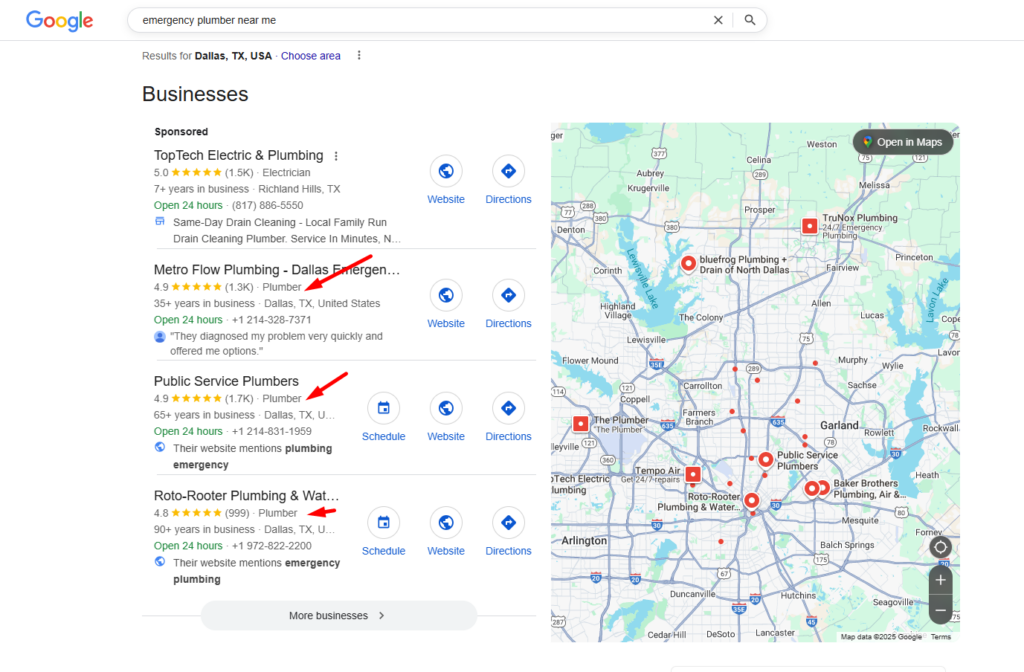
Your category is the first signal.
If your primary category is “General Contractor,” you’re not even in the conversation. The plumber with “Emergency Plumber Service” as their primary category gets the call.
That’s not theory. That’s money in the bank versus watching your phone stay silent while competitors clean up.
This is exactly why we built our local SEO services to focus on category optimization as a foundation. Because without the right categories, everything else you do is fighting uphill.
What Are Google Business Categories? What They Actually Do
As of February 2025, there are 4,102 Google Business Profile categories.
That’s not a typo.
Over 4,000 options, and Google updates this list monthly, adding new categories and removing outdated ones.
Categories aren’t just descriptive tags.
They’re algorithmic triggers.
When you select “Vegan Restaurant” as your primary category instead of just “Restaurant,” you’re telling Google to show your business when someone searches for vegan food, plant-based dining, or cruelty-free restaurants.
You won’t rank as well for generic “restaurant” searches, but you’ll dominate the niche searches that actually convert into customers who want exactly what you offer.
Here’s the framework:
Select categories that complete the statement “This business IS a” rather than “this business HAS a”.
A grocery store with a bakery inside IS a “Grocery Store.”
It HAS a bakery, so you can add “Bakery” as a secondary category.
But the primary category defines what you fundamentally are.
Your primary category determines which searches trigger your business to appear in Google Maps and the local 3-pack (those three businesses that show at the top of local search results).
Secondary categories help you appear in more specific, long-tail searches while supporting your primary category.
And here’s what nobody tells you: choosing the wrong primary category in Google Business Profile is the most impactful negative ranking factor for local SEO.
It’s not just neutral. It actively hurts you.
The Real Strategy: How to Choose Categories That Make Your Phone Ring
Forget everything you’ve heard about “just pick what describes your business.” That’s incomplete advice that costs you customers. Here’s what actually works.
Start With Money, Not Description
Which service makes you the most profit? That’s your primary category. Period.
A landscaping company that makes 70% of their profit from landscape design should use “Landscape Designer” as the primary category, not “Landscaper.” Even if they do general landscaping too.
Because you optimize for profit, not for being technically accurate.
Ask yourself: if I could only rank for one service, which one pays my bills? That’s your primary category.
Be Ridiculously Specific
Google has created thousands of categories for a reason. Use them.
Bad: “Salon.”
Good: “Nail Salon.”
Bad: “Restaurant.”
Good: “Authentic Japanese Restaurant.”
Bad: “Lawyer.”
Good: “Divorce Attorney.”
The more specific your category, the more qualified the traffic. A “Pediatric Dentist” attracts parents looking for a kids’ dentist.
A generic “Dentist” attracts everyone, including people who need services you don’t offer. Specificity isn’t limiting. It’s targeting.
Spy on Your Top Competitors (The Smart Way)
Here’s a move most businesses miss: research competitor business categories to see what’s working in your market.
Look at the three businesses ranking at the top of local search for your main keywords.
What categories are they using?
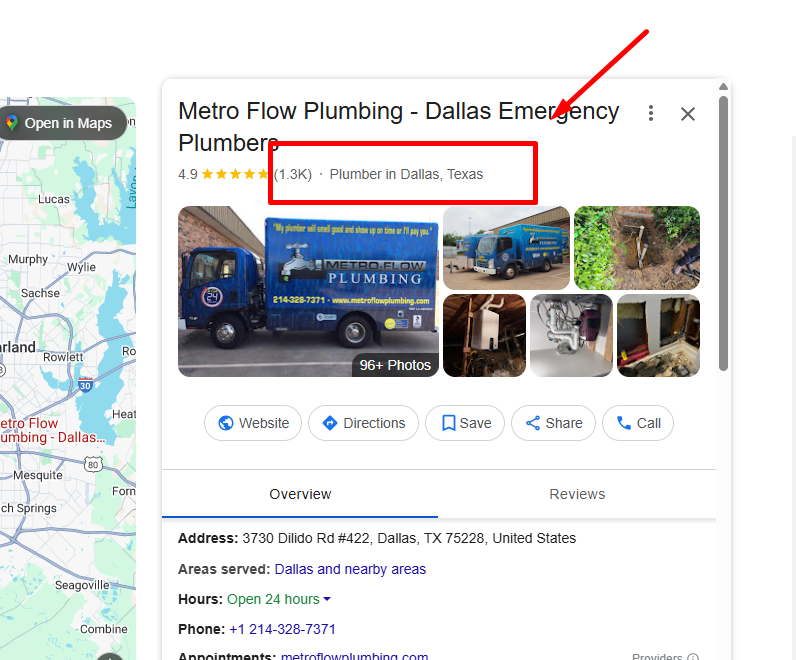
You can see their primary category easily (it shows on their Google listing).
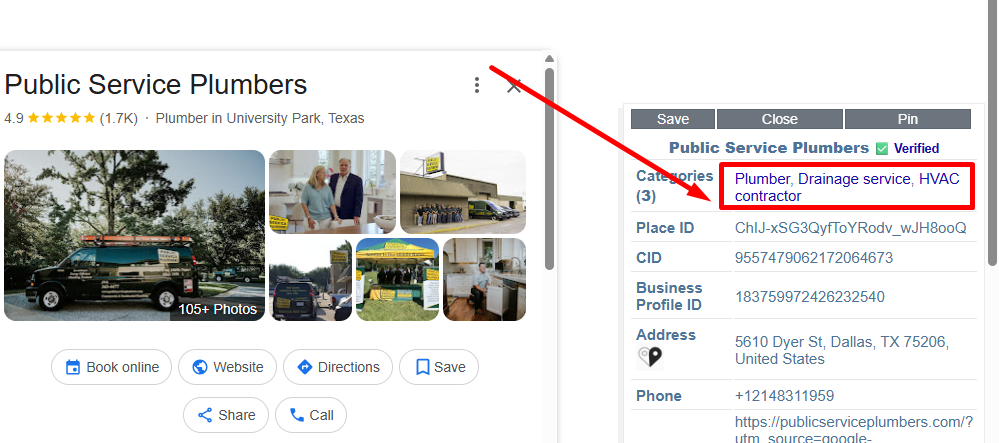
To see secondary categories, use free Chrome extensions like Phantom or GMB Everywhere.
If the top-ranking businesses in your niche all use similar category combinations, that’s your blueprint.
Don’t copy them exactly. But if five successful competitors all include “Emergency Plumber Service” as a category and you don’t, you’re probably missing something.
The Secondary Category Question: How Many Should You Add?
This is where opinions split.
Google’s official advice is to choose the fewest number of categories it takes to describe your overall core business.
They say less is more.
Local SEO experts disagree.
Hard.
More categories can help you rank better, as long as they’re genuinely relevant to your business.
Here’s the balanced approach that works: add 2 to 5 secondary categories that directly support your primary category and represent real services you offer regularly.
Don’t add 9 categories just because you can. But don’t artificially limit yourself to 1 or 2 if you legitimately offer multiple relevant services.
Example: A family dentistry practice might structure categories like this:
- Primary: “Family Dentist”
- Secondary: “Cosmetic Dentist,” “Teeth Whitening Service,” “Pediatric Dentist,” “Emergency Dental Service”
Each secondary category represents a real service they offer and helps them show up for specific searches while supporting the family dentistry focus.
What About Seasonal Businesses?
An HVAC contractor might do most of their work on AC units in summer and on furnaces in winter. Should you change your primary category seasonally?
Yes. If someone searches “furnace repair” in January and your primary category says “Air Conditioning Repair,” you’re losing that customer.
Change your primary category to match your seasonal focus.
This works for any business with seasonal services: landscapers who do snow removal in winter, pool companies that offer winterization services, or tax accountants during tax season.
Set a quarterly reminder to review and update your categories based on what you’re actually selling right now.
The Categories vs Services Confusion (And Why It Costs You Customers)
Here’s where most businesses screw up completely. They confuse categories with services.
Categories tell Google what type of business you ARE. They’re algorithmic signals that determine which searches you show up for.
Services (in the Services section of your GBP) describe what you DO. They’re for customers to understand your specific offerings once they land on your profile.
When you try to use categories like a services menu, you dilute your algorithmic relevance. Google sees you as unfocused and generic. Your rankings drop.
The Right Approach:
A commercial painting company should structure it like this:
Categories:
- Primary: “Commercial Painter”
- Secondary: “Painting,” “Industrial Equipment Supplier” (if applicable)
Services Section:
- Interior Commercial Painting
- Exterior Commercial Painting
- Industrial Coating
- Warehouse Floor Painting
- Retail Space Painting
- Office Painting
See the difference? Categories are tight and focused on what you ARE. Services are comprehensive and show everything you DO.
This approach gives you strong ranking signals for your core business while still showing customers your full range of capabilities. Best of both worlds.
Common Category Mistakes That Kill Your Rankings
Let’s talk about what not to do, because these mistakes are costing businesses thousands.
Mistake 1: Being Too Generic
Choosing “Contractor” when “Roofing Contractor” exists. Choosing “Store” when “Home Goods Store” exists. You’re trying to cast a wide net, but you’re actually just making yourself invisible for specific searches that convert.
Nobody searches for “contractor near me.” They search for “roofing contractor,” “bathroom remodeling contractor,” or “kitchen renovation contractor.” If your category doesn’t match the search, you don’t show up.
Mistake 2: Category Stuffing
Adding every remotely related category hoping to rank for more searches. Adding too many unrelated categories dilutes your algorithmic relevance and makes you appear less specialized to Google.
A restaurant that adds “Caterer,” “Event Planner,” “Cooking School,” “Food Delivery,” and “Bar” looks scattered. Unless you legitimately offer all those services as core business functions, you’re weakening your primary category’s power.
Mistake 3: Mixing Up Primary and Secondary
Your primary category matters exponentially more than secondary categories. Primary GBP category received a score of 193, putting it in first place as the number one ranking factor for the local pack.
Choosing the wrong primary category, even if your secondary categories are perfect, tanks your rankings. Get the primary category right first. Everything else is secondary (literally).
Mistake 4: Adding Categories for Businesses Within Your Business
If you have a Starbucks inside your Target, Target shouldn’t add “Coffee Shop” as a category. If your business is a health club that has an independently-operated cafe, do not add the category “Cafe”. That separate business needs its own Google Business Profile.
This applies to any independently operated business within your location, whether it’s a pharmacy inside a grocery store, a hair salon inside a department store, or a restaurant inside a hotel.
Quick Action Plan: Fix Your Categories in the Next 15 Minutes
Stop reading. Do this right now.
Step 1: Log into your Google Business Profile at business.google.com
Step 2: Click “Edit Profile” then find “Business Category”
Step 3: Evaluate your current primary category. Ask: “Does this describe my most profitable service using the most specific category available?”
If not, search for a better option. Type keywords related to your business and see what category options appear. Remember: specific beats generic.
Step 4: Review your secondary categories. Keep 2 to 5 that genuinely describe core services you offer regularly. Remove anything that’s not central to your business.
Step 5: Save changes.
Warning: changing your primary category may trigger re-verification of your Google Business Profile. You might need to verify again via postcard or phone. It’s worth it. Don’t let the verification process stop you from fixing a category that’s costing you customers.
Step 6: Document what you changed and set a calendar reminder to review your categories again in 3 months.
Still not sure which categories to choose? Use our free GBP audit tool to see exactly how your current categories compare to top competitors in your area and get specific recommendations for optimization.
Read also: Local SEO for Doctors: #9 Proven Strategies to Rank Higher.
The Complete Local SEO Picture (Beyond Categories)

Categories are the foundation, but they’re just the start.
Think of your GBP like a house. Categories are the foundation. If the foundation is cracked, nothing else you build matters.
But once the foundation is solid, you need walls, a roof, plumbing, and electrical.
GBP signals now account for over 32% of how well a business ranks in Google’s local pack. That includes not just categories, but also:
- Complete and accurate business information (NAP: Name, Address, Phone Number)
- High-quality photos showing your business, products, and services
- Regular posts keeping your profile active
- Verified service areas and business hours
- Attributes that describe your business features
- Customer reviews and your responses to them
Categories are the most important GBP element, but they work best as part of a complete optimization strategy.
This is exactly why businesses work with specialists for comprehensive local SEO optimization rather than trying to piece together every element themselves.
Because while categories take 15 minutes to fix, maintaining everything else that makes local SEO work takes consistent expertise.
Your Next Move
Here’s what matters: your categories right now are either making you money or costing you money. There’s no neutral.
If you haven’t looked at your Google Business categories in months (or ever), you’re almost certainly leaving money on the table.
Competitors who understand this are outranking you for searches you should own.
The fix takes 15 minutes. The impact compounds every single day.
Do it now, or watch competitors who read this article steal your customers.
And if you want to know exactly where your local SEO stands and what else is holding you back from dominating your local market, grab our free Google Business Profile audit. It’ll show you the category mistakes you’re making, plus everything else that’s keeping local customers from finding you.
Your competitors aren’t waiting. Neither should you.
Read also:
- How to Analyze Your Local SEO Competition (7 Easy Steps)
- Local SEO for restaurants: #9 Proven Strategies to Increase Foot Traffic
