Domain RegistrationFind and register the perfect domain for your website.
 .COM DomainChoose a widely recognized domain to build global credibility.
 Domain TransferSeamless domain transfers with zero downtime and complete control.
 All TLDsFind and register your perfect domain. Choose from local and global extensions.
 SSL CertificatesKeep your website safe with reliable SSL Certificates that protect customer data and build trust.
 whoisCheck domain ownership details, expiration dates, and registrar information.
 US DomainRegister a .US domain and build trust in the USA.
 Web HostingEverything your website needs to run smoothly
 WordPress HostingWordPress hosting that just works
 Windows HostingReliable hosting for Windows environments
 Reseller HostingTurn hosting into your business
 Email HostingEmail that looks professional and works anywhere
 cPanel HostingFull control of your hosting with cPanel
 Affiliate ProgramJoin as a partner and earn commissions on every referral you send our way.
 Vps HostingScalable virtual servers that expand as you need.
 Dedicated ServersGet complete access and full control over your dedicated physical server.
 Managed vpsNot tech-savvy? We will take care of everything with our fully managed VPS hosting for you.
 AI Website BuilderCreate stunning websites in seconds with AI.
 Online ShopSet up a professional online store. No coding required.
 Web design serviceGet a tailored website designed to match your brand and support your goals.
 BlogFind helpful guides on web hosting, online selling, digital marketing, and more.
 Contact USYou can reach us anytime, day or night, through chat or email.
 SupportBrowse helpful guides and answers for all of our services.
You just updated your DNS settings. You refreshed your browser. Nothing changed. You are refreshed again. Still nothing.
This is one of the most frustrating experiences in web hosting. You did everything right, but your website, email, or domain changes are simply not showing up yet. The reason comes down to a process called DNS propagation.
This guide explains exactly what DNS propagation is, why it happens, how long it takes, and what you can do to reduce delays. At Truehost, we work with thousands of website owners and businesses navigating DNS changes every day. This article pulls from that real-world experience to give you clear, practical answers.
What Is DNS Propagation?
DNS propagation is the time it takes for DNS record changes to spread across all the servers on the internet. When you update a DNS record, such as pointing your domain to a new hosting server, that change does not apply everywhere at once.
Instead, it ripples outward through a global network of DNS servers over a period of time. Until that process is complete, different users in different locations may see different versions of your website or be unable to reach your email.
Quick Facts About DNS Propagation
- DNS propagation typically takes between 24 and 72 hours to complete globally
- Some changes can propagate in as little as a few minutes, depending on TTL settings
- Not all users see the updated version at the same time during propagation
- DNS changes affect websites, email, subdomains, and other connected services
- You cannot force global propagation to complete, but you can reduce how long it takes
- Propagation speed depends on your TTL value, your DNS provider, and ISP caching behavior
What Affects DNS Propagation Time?
Several factors influence how quickly DNS changes spread.
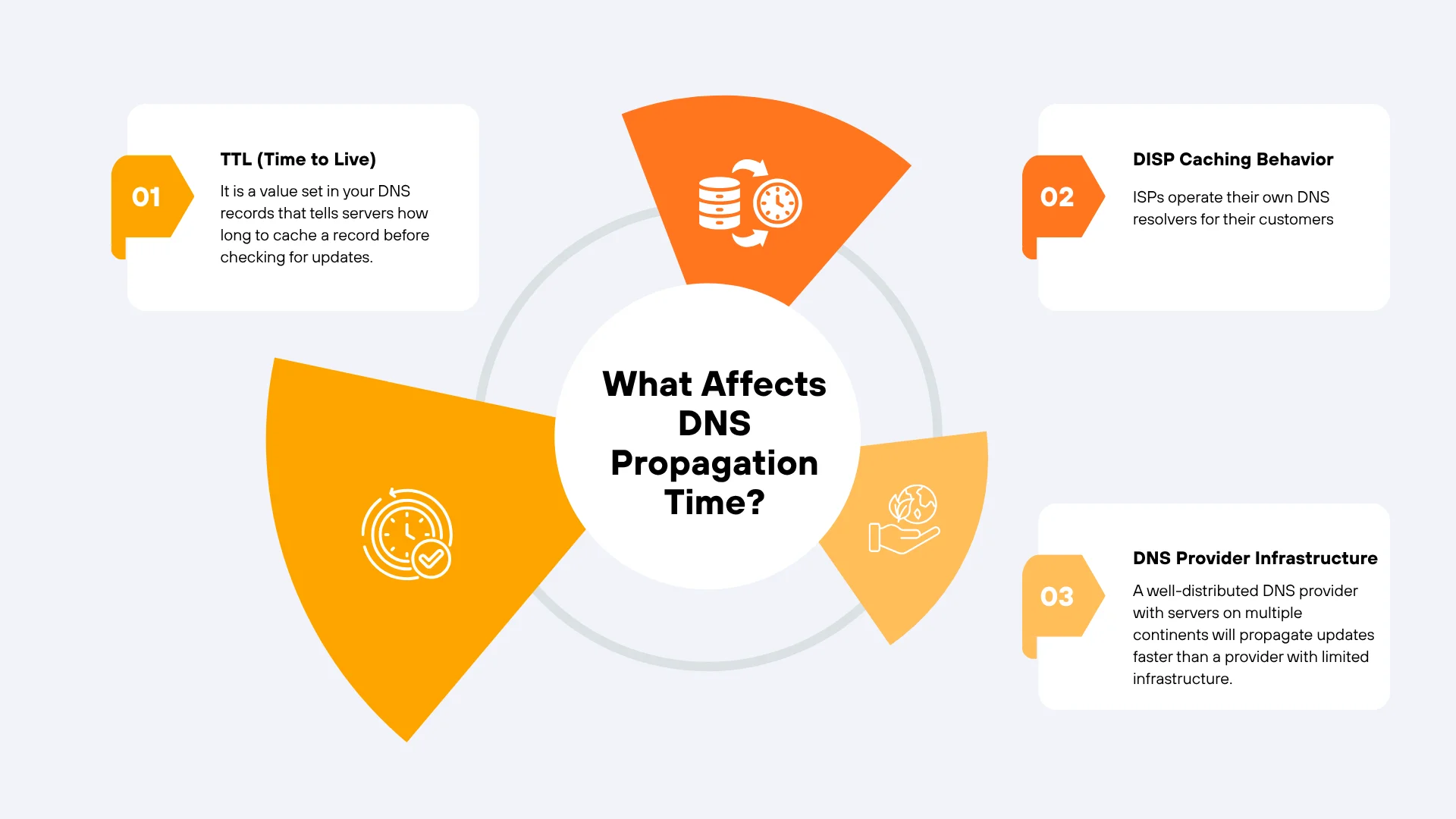
1) TTL (Time to Live)
TTL is the most controllable factor. It is a value set in your DNS records that tells servers how long to cache a record before checking for updates. A TTL of 3600 means servers cache the record for one hour. A TTL of 300 means they refresh every five minutes.
Lowering your TTL before making a DNS change is one of the most effective ways to speed up propagation. We recommend setting TTL to 300 at least 24 hours before a planned DNS update.
2) DISP Caching Behavior
ISPs operate their own DNS resolvers for their customers. Some ISPs respect the TTL value precisely. Others cache records longer than the TTL specifies, which can extend propagation time beyond what you would expect.
This behavior is outside your control, but it is the main reason propagation sometimes takes longer than the TTL would suggest.
3) DNS Provider Infrastructure
Not all DNS providers are equal in speed or global coverage. A well-distributed DNS provider with servers on multiple continents will propagate updates faster than a provider with limited infrastructure.
At Truehost, our DNS infrastructure is designed for reliability and speed. When you register a domain with Truehost, your DNS changes propagate through a robust and globally distributed system.
4) Number of DNS Servers in the Chain
Every DNS query passes through multiple servers before reaching its destination. The more servers involved in the resolution chain, the more points where a cached record can slow things down.
How DNS Propagation Works
Here is a step-by-step breakdown of what happens when you update a DNS record.
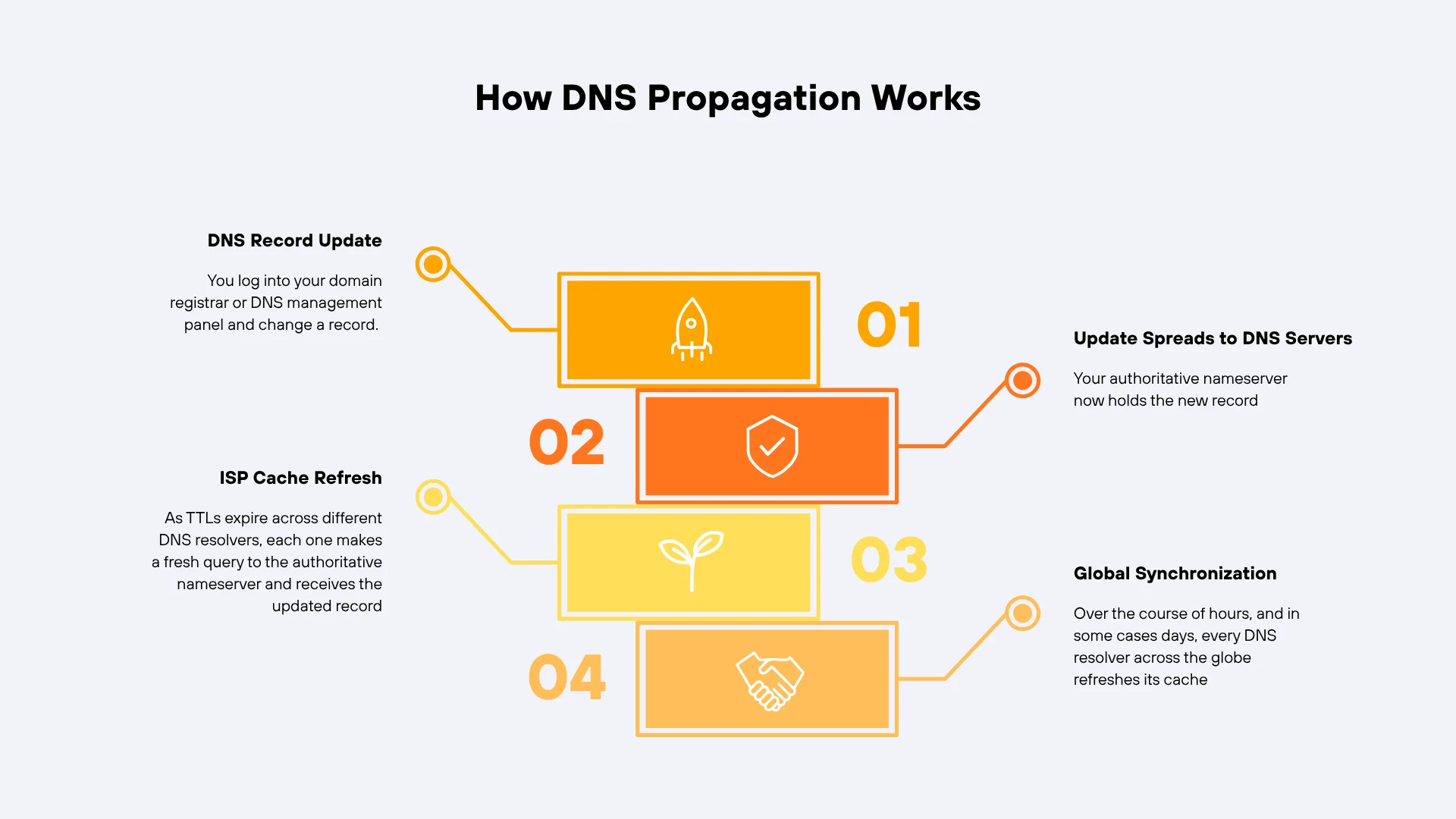
Step 1: DNS Record Update
You log into your domain registrar or DNS management panel and change a record. For example, you update the A record to point to a new server IP address. The change is saved on the authoritative nameserver for your domain.
Step 2: Update Spreads to DNS Servers
Your authoritative nameserver now holds the new record. When other DNS servers query it for your domain, they will receive the updated information. However, they only query it when their cached version expires, based on the TTL.
Step 3: ISP Cache Refresh
As TTLs expire across different DNS resolvers, each one makes a fresh query to the authoritative nameserver and receives the updated record. From that point forward, users connecting through that resolver will see the new version.
Step 4: Global Synchronization
Over the course of hours, and in some cases days, every DNS resolver across the globe refreshes its cache. Once all resolvers have the updated record, propagation is complete and all users reach the same destination.
Common DNS Records Affected by Propagation
Not all DNS records behave the same way during propagation. Here are the most common ones and what they control.
1) A Record
The A record maps your domain name to an IPv4 address. It is the most fundamental DNS record and is what determines which server your domain points to. Changing the A record is the most common reason users experience propagation delays.
2) CNAME Record
A CNAME record points one domain name to another domain name rather than an IP address. It is commonly used for subdomains like www or for third-party service integrations. CNAME changes are also subject to propagation delays.
3) MX Record
The MX record controls where email for your domain is delivered. If you change your email hosting provider, you must update your MX records. Until propagation completes, incoming emails may still be routed to the old mail server.
4) TXT Record
TXT records store text-based information for your domain. They are used for domain verification, SPF records, DKIM keys, and DMARC policies. Changes to TXT records are also subject to propagation and can affect email deliverability during the transition.
Why DNS Propagation Has Real Business Impact
DNS propagation is not just a technical delay. It has real consequences for businesses and website owners.
i) Website Accessibility
During propagation, your website may be unreachable for some users. Others may see your old site hosted on a previous server. This inconsistency can confuse visitors and damage trust if it happens during a high-traffic period or product launch.
ii) Email Delivery
If you change your MX records as part of switching email providers, emails sent during propagation may not reach your new inbox. Some messages could be delivered to the old server, and others may fail entirely. Planning migrations carefully reduces this risk significantly.
iii) Domain Switching
When migrating a domain from one registrar to another or pointing it to a new hosting provider, propagation affects every connected service. Your website, email, and any subdomains all go through the same update process.
iv) Website Downtime Risks
If the old server is decommissioned before propagation completes, users who still have the old DNS record cached will experience downtime. Always keep your old server running until you are confident propagation is complete.
How to Check DNS Propagation
Waiting is frustrating when you do not know how far along propagation is. These tools give you visibility into what different servers around the world are currently seeing.
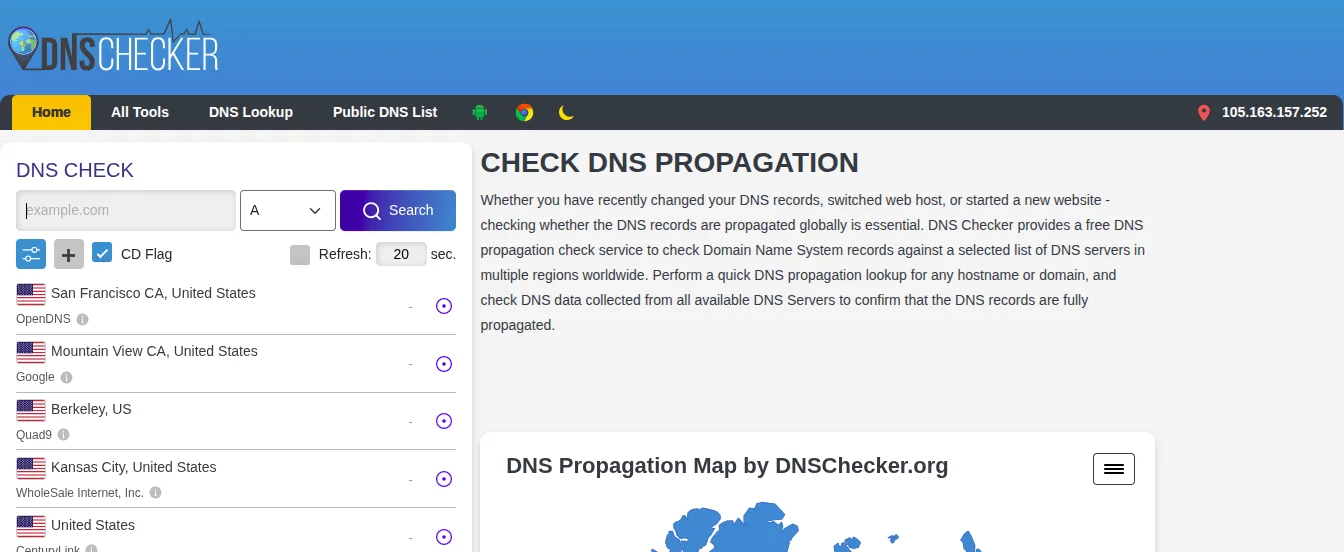
1) Using DNS Checker Tools
DNSChecker.org is one of the most widely used tools for checking propagation globally. Enter your domain name and choose the record type you updated. The tool queries DNS servers in dozens of countries and shows you which ones have the new record and which ones still show the old version.
2) Using Command Line Tools
If you prefer working in a terminal, two commands are available for DNS lookups.
nslookup is available on Windows, macOS, and Linux. Run the following to check the A record for your domain:
nslookup yourdomain.com
dig is available on macOS and Linux and provides more detailed output:
dig yourdomain.com A
Both commands show you what the DNS resolver on your machine is currently returning. To check what a specific DNS server sees, you can specify it directly in the command.
3) Using Online Propagation Checkers
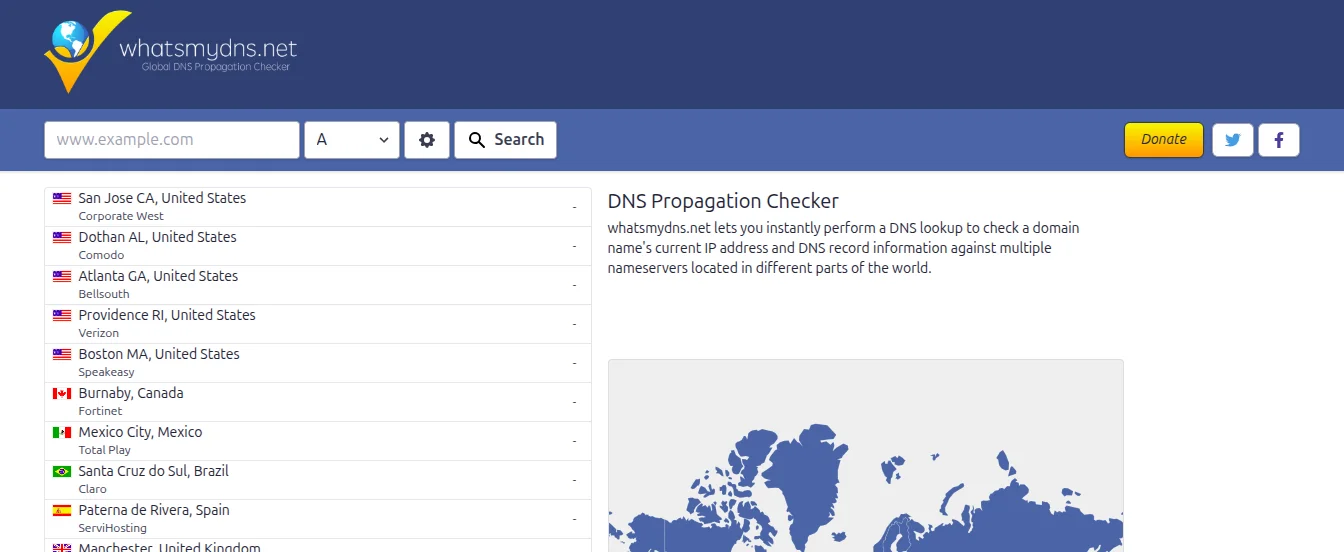
WhatsMyDNS.net is another reliable tool that shows DNS record values from servers in multiple global locations simultaneously. It is particularly useful for seeing regional differences in real time during active propagation.
MXToolbox is especially useful for checking MX records and diagnosing email-related DNS issues. It also provides a full DNS health check that surfaces any misconfigurations alongside your propagation status.
Common DNS Propagation Issues
These are the problems users most commonly run into during propagation.
i) Website Not Loading After an Update
If your website is not loading after a DNS change, you are likely experiencing normal propagation delay. Check using a tool like DNSChecker.org to see if the new record is visible globally. If it is, the issue is likely local caching on your device.
ii) Email Not Working After MX Changes
Email disruptions during MX record propagation are common. If your old mail server is still running, incoming emails will continue to arrive there until propagation completes. After propagation, check your new inbox and your old one for any messages that arrived during the transition.
iii) Old Version of Site Still Showing
If you see the old version of your site, your ISP’s resolver has not yet refreshed its cache. Try flushing your local DNS cache first. If the issue persists, check the propagation status using a global DNS checker tool to confirm whether it is local or regional.
iv) Regional Differences in Access
During propagation, users in one city may see your updated site while users in another city still see the old version. This is completely normal and is a result of different ISPs refreshing their caches at different times. It resolves on its own as propagation spreads.
DNS Propagation vs DNS Caching
These two concepts are related but they are not the same thing.
What Is DNS Caching?
DNS caching is the process of storing a DNS record locally so that future lookups are faster. Your browser, operating system, router, and ISP resolver all cache DNS records. The duration of the cache is controlled by the TTL value in the record.
Key Differences Between Caching and Propagation
Propagation refers to the global spread of a DNS update across all nameservers and resolvers. Caching refers to the temporary storage of a DNS record at any point in the resolution chain.
Propagation happens once after a DNS change is made. Caching is an ongoing process that happens every time a DNS record is looked up.
A long cache lifetime extends the apparent propagation time because each server has to wait for its cache to expire before it can fetch the updated record. Reducing your TTL shortens the cache lifetime and speeds up the spread of your changes.
Who Should Care About DNS Propagation
- Website owners migrating to a new hosting provider need to plan for propagation delays to avoid unexpected downtime.
- Developers launching new projects or redirecting subdomains will encounter propagation regularly as part of deployment workflows.
- Digital marketers setting up new domains for campaigns or configuring tracking pixels and email authentication records need to account for propagation in their timelines.
- Businesses migrating hosting or domains have the most at stake. A poorly planned DNS migration can result in email loss, website downtime, and damaged client relationships. At Truehost, we provide step-by-step migration support to make the transition as smooth as possible.
Get Your DNS and Hosting Set Up Right From the Start
DNS propagation is a normal part of managing a domain, but it becomes much less stressful when you have a reliable hosting and DNS provider behind you.
Planning ahead, lowering your TTL before changes, and choosing a provider with strong global DNS infrastructure reduces both the duration and the impact of propagation delays.
At Truehost, we make domain registration, DNS management, and hosting straightforward. Whether you are launching a new site, migrating an existing one, or setting up business email, we provide the infrastructure and support to make it work without unnecessary delays.
DNS Propagation FAQs
Why DNS Propagation Happens?
The internet does not run on a single DNS server. It runs on thousands of them, scattered across every country and managed by different organizations.
When you make a DNS change, your update starts at your domain registrar or DNS hosting provider. From there, it needs to reach nameservers, root servers, and the DNS resolvers used by internet service providers (ISPs) around the world. Each of those servers has its own schedule for refreshing its records, which is what creates the delay.
Caching plays a major role in this. DNS servers store records locally to speed up lookups. When a cached version exists, the server will serve that old record rather than fetching the new one, until the cache expires. That expiry is controlled by a setting called Time to Live, or TTL.
How Long Does DNS Propagation Take?
DNS propagation typically completes within 24 to 72 hours. However, the actual time varies based on several factors covered in detail below.
Here are realistic time ranges based on common scenarios:
- If a low TTL is set in advance (300 seconds), propagation can take 30 minutes to 2 hours.
- With a standard TTL (3600 seconds / 1 hour), it usually takes 2 to 12 hours.
- For a high TTL (86400 seconds / 24 hours), expect 24 to 48 hours.
- Full global propagation across all regions can take up to 72 hours.
These are estimates, not guarantees. Regional differences, ISP behavior, and DNS provider infrastructure all play a role in the final timeline.
Is DNS Propagation Instant?
No. DNS propagation is never instant, and it is important to set that expectation before making any DNS change.
The reason is simple: there is no central authority that pushes updates to every DNS server simultaneously. Each server checks for updates on its own schedule, based on TTL values and its own caching rules. Some servers update within minutes, while others may hold a cached record for hours.
This is why two people in different cities can visit the same domain and see completely different content during propagation. One ISP may have already refreshed its cache while another has not.
Why is my website not updating after a DNS change?
The most likely cause is propagation delay. Your DNS change has been made at the authoritative nameserver, but other DNS resolvers around the world have not yet refreshed their cached records. Use a global DNS checker to see the current propagation status.
How do I know if DNS propagation is complete?
Use a tool like WhatsMyDNS.net to query DNS servers in multiple countries. When all or most servers return the new record, propagation is effectively complete.
Why do some people see my site while others do not?
Different ISPs cache DNS records for different lengths of time. Some resolvers have already been refreshed to the new record while others still hold the old cached version. This is normal during propagation and resolves over time.
Can I speed up DNS propagation?
You cannot force all DNS servers to update simultaneously. However, you can reduce propagation time significantly by lowering your TTL to 300 seconds at least 24 hours before making the DNS change. You can also flush your local DNS cache to see the updated version on your own device sooner.
How to Troubleshoot DNS Propagation Issues
If your DNS changes are not behaving as expected, follow these steps in order.
Step 1: Clear your browser cache. Your browser stores cached versions of web pages. A hard refresh (Ctrl + Shift + R on Windows or Cmd + Shift + R on macOS) forces it to reload the page from the server rather than from cache.
Step 2: Flush your local DNS cache. Use the appropriate command for your operating system as listed in the section above. This removes any cached DNS records from your device and forces a fresh lookup.
Step 3: Check your DNS record configuration. Log into your DNS management panel and confirm the record you changed is correctly saved. Double-check the IP address, hostname, and TTL value. A typo in a DNS record is a common and easily missed cause of problems.
Step 4: Verify your hosting settings. Confirm that your hosting server is configured to accept traffic for the domain in question. A correctly propagated DNS record still will not work if the hosting server does not have the domain set up properly.
Step 5: Test from a different network. Use a mobile data connection or a VPN to test your domain from a different DNS resolver. If your site loads from a different network but not from your home connection, the issue is with your ISP’s cached record, and it will resolve itself as the TTL expires.
Step 6: Contact your DNS or hosting provider. If the issue persists beyond 72 hours or you suspect a misconfiguration, reach out for support. At Truehost, our support team is available 24/7 to help you diagnose and resolve DNS-related issues quickly.